
Products compared
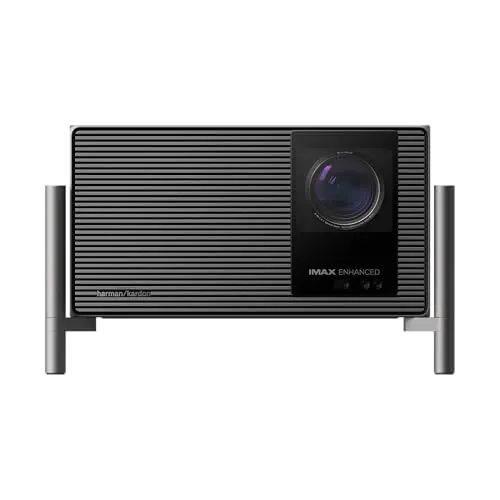
XGIMI
XGIMI TITAN Noir
U.S. TITAN Noir model; product page lists 16:9 projection, 0.98–2.0:1 throw ratio and optical zoom.
Model TITAN Noir
Amazon ASIN B0GY7H3LV7
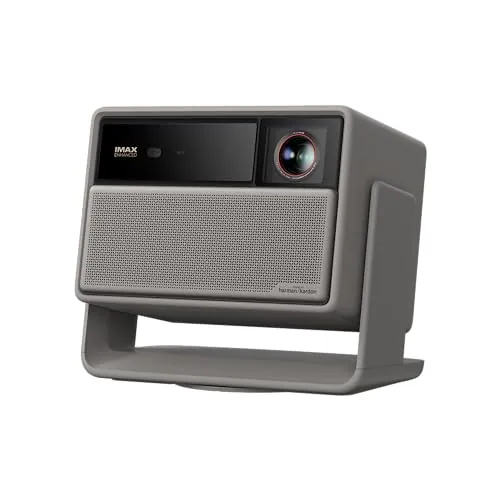
XGIMI
XGIMI HORIZON 20 Pro
U.S. HORIZON 20 Pro, model XR14A; product page lists 16:9 projection, 1.2–1.5:1 throw ratio and optical zoom.
Model HORIZON 20 Pro (XR14A)
Amazon ASIN B0FN7TPNSG
Differences that matter
What matters most to you?
Choose a priority to see what it changes.
Sources for Throw ratio and 100-inch 16:9 placement estimate
Sources for Lens-shift axes and setup constraints
Sources for Resolution and published image/game figures
Sources for Built-in system and HDMI planning
Start with the screen width and lens-to-screen distance
For a 100-inch diagonal, 16:9 image, the screen is about 87.2 inches wide. Multiply the desired width by a projector's throw ratio: XGIMI lists 0.98–2.0:1 for TITAN Noir and 1.2–1.5:1 for HORIZON 20 Pro. That gives approximate lens-to-screen ranges of 7.1–14.5 feet and 8.7–10.9 feet, respectively. Their ranges overlap, but TITAN Noir extends closer and farther on the published figures.
Measure from where the projector lens would sit to the screen plane, not from the rear of the chassis. Treat the calculation as a first filter: mount location, screen borders, room obstructions and actual optical setup still matter. If your required distance is outside both listed ranges, keep looking rather than assuming digital keystone or a larger image will solve it.
Check lens-shift axes before choosing a shelf or ceiling mount
Both models list optical zoom and horizontal and vertical lens shift, but the maximum percentages are not a promise that every combination works. TITAN Noir lists vertical ±130% and horizontal ±50%; its page says reaching a maximum in one direction requires the other axis centered. It also warns that above 2× zoom the usable shift may be reduced under standard optical conditions.
HORIZON 20 Pro (XR14A) lists vertical ±120% and horizontal ±45%. XGIMI says the horizontal maximum is available only with vertical shift at zero; when lens shift is active, keystone and other intelligent image adjustments are disabled. Draw the desired lens-to-screen position and check each needed axis independently against the exact instructions.
Read the display figures with their labels and conditions
Both U.S. product pages call 3840 × 2160 pixels the standard resolution and list the same Game Mode, AK-off latency figures: 1 ms at 1080p/240 Hz, 2.2 ms at 1080p/120 Hz and 3 ms at 4K/60 Hz. These specifications do not establish a real-world gaming or image-quality winner.
XGIMI lists TITAN Noir at 4800 ISO lumens and HORIZON 20 Pro at 4100 ISO lumens. The pages describe white-light output under ISO 21118, tested in Performance Mode for TITAN Noir and Performance/High Power Mode for HORIZON 20 Pro. Those are published manufacturer figures under stated mode conditions, not a matched independent brightness test. Contrast terminology also differs: TITAN Noir lists native and dynamic figures, while HORIZON 20 Pro lists a viewing-contrast figure with DBLE on; do not compare those labels as if they were the same test.
Check the source plan and the physical mount as separate decisions
TITAN Noir's U.S. page lists three HDMI inputs, one with eARC, and no built-in operating system. HORIZON 20 Pro lists two HDMI inputs, one with eARC, and Google TV. Count the TV audio link, consoles and external streamers you expect to connect; verify the apps you use if choosing the built-in system.
Finally, measure the shelf or ceiling location for the complete projector arrangement, including its stand if used, mount, power lead and HDMI cable bends. Compare those measurements with the exact product dimensions and mounting instructions. The room-distance formula checks projection geometry; it does not certify that the chassis or mount fits the space.
Product details
XGIMI TITAN Noir
- Standard resolution and aspect ratio
- 3840 × 2160 pixels; 16:9 Source
- Throw ratio and lens shift
- 0.98–2.0:1; vertical ±130% and horizontal ±50%, subject to the manufacturer's axis and zoom limits Source
- Published gaming latency condition
- Game Mode, AK off: 1 ms at 1080p/240 Hz, 2.2 ms at 1080p/120 Hz, and 3 ms at 4K/60 Hz Source
XGIMI HORIZON 20 Pro
- Standard resolution and aspect ratio
- 3840 × 2160 pixels; 16:9 Source
- Throw ratio and lens shift
- 1.2–1.5:1; vertical ±120% and horizontal ±45%, with horizontal maximum specified when vertical shift is zero Source
- Published gaming latency condition
- Game Mode, AK off: 1 ms at 1080p/240 Hz, 2.2 ms at 1080p/120 Hz, and 3 ms at 4K/60 Hz Source
Before you buy
Community discussions
Checking mount dimensions before ordering
XGIMI TITAN Noir
A TITAN Noir shopper asked for the minimum and maximum adjustment range of the ceiling mount.
What to check
Compare the mount’s documented adjustment range with the space you have. Verify it is listed for the exact projector before ordering.
Allowing for a slanted ceiling
XGIMI HORIZON 20 Pro
A HORIZON 20 Pro owner with a slanted ceiling asked about a shallow mount that could tilt.
What to check
Measure the space near your ceiling and check which mounts are documented for this projector and surface.
Common questions
What distance should I plan for a 100-inch 16:9 screen?
Its width is approximately 87.2 inches. Applying XGIMI's listed ratios gives about 7.1–14.5 feet for TITAN Noir and 8.7–10.9 feet for HORIZON 20 Pro. These are arithmetic estimates from lens to screen; verify the exact lens position and installation constraints before mounting.TITAN Noir 4K Bright Projector for Home — U.S. specificationsHORIZON 20 Pro 4K Projector — U.S. product page and specifications (model XR14A)
Can I use the maximum vertical and horizontal lens shift together?
Do not plan around both maxima at once. XGIMI says TITAN Noir's maximum shift on one axis requires the other axis centered. HORIZON 20 Pro specifies its horizontal maximum only when vertical shift is zero and states that using lens shift disables keystone and other listed intelligent adjustments. Check the exact geometry and setup instructions before fixing a mount.TITAN Noir 4K Bright Projector for Home — U.S. specificationsHORIZON 20 Pro 4K Projector — U.S. product page and specifications (model XR14A)
Do the published specifications show a resolution or gaming-latency winner?
No. Both U.S. pages list 3840 × 2160 as standard resolution and the same Game Mode, AK-off latency figures at 1080p/240 Hz, 1080p/120 Hz and 4K/60 Hz. They are manufacturer specifications, not a controlled comparison. The brightness figures are also published ISO-lumen values with manufacturer mode conditions, not an independent matched brightness test.TITAN Noir 4K Bright Projector for Home — U.S. specificationsHORIZON 20 Pro 4K Projector — U.S. product page and specifications (model XR14A)
Which one needs an external streaming device?
The TITAN Noir U.S. page lists no built-in operating system. The HORIZON 20 Pro page lists Google TV. Check current app support and count any external streamer, console and eARC audio connection against the HDMI inputs you plan to use.TITAN Noir 4K Bright Projector for Home — U.S. specificationsHORIZON 20 Pro 4K Projector — U.S. product page and specifications (model XR14A)
Sources and scope
The throw-distance examples are arithmetic from XGIMI's published 16:9 throw ratios and do not account for every mount, screen border, lens offset or room obstruction. XGIMI reports maximum lens-shift axes with constraints; confirm the exact combination in the setup guide before mounting. Published brightness and latency are manufacturer specifications, not a matched independent test. The two contrast figures use different labels and should not be ranked directly.