
Pickagu

Anker A2154 vs UGREEN X765: Choose by USB-C and USB-A Port Needs

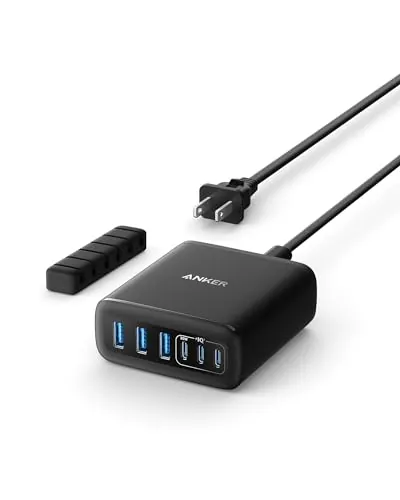
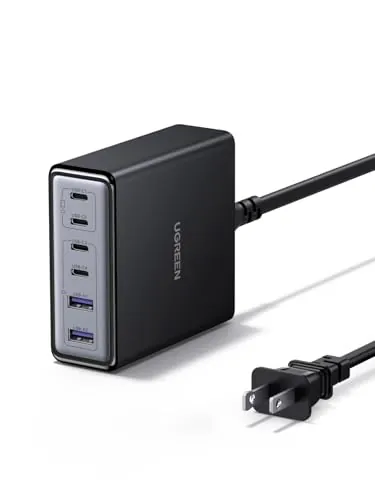
Anker Charger (112W, 6 Ports, GaN)Model A2154UGREEN 100W 6-Port ChargerModel X765 / SKU 65189

Both are six-port desktop chargers, but their connector mix and per-port ratings differ. The Anker A2154 has three USB-C and three USB-A outputs, with a 30W maximum on C1. UGREEN's US SKU 65189 (X765) has four USB-C and two USB-A outputs, and its C1/C2 ports are each rated up to 65W when used alone. Match the charger to the plugs on your actual cables and the input requirements of your most demanding device; total wattage does not tell you how power is divided across several connected devices.

Choose by what matters to you

Choose Anker Charger (112W, 6 Ports, GaN) A2154

Your six-device desk depends on three USB-A plugs, or if its listed port ratings cover your devices. Put a USB-C device needing the charger's highest listed USB-C rating on C1, then check the published total limit for the number of active ports. The guide does not disclose every simultaneous port split.

Check price on Amazon

Choose UGREEN 100W 6-Port Charger X765 / SKU 65189

You need four USB-C sockets, or if one compatible device needs a USB-C source rated above Anker's 30W C1 maximum and no more than UGREEN's 65W single-port rating. Its 65W figure applies to one USB-C port used alone; it is not a promise that the port retains 65W when other devices are connected.

Check price on Amazon

Look for another charger if you need more than six simultaneous connections, a single USB-C output rated above 65W, or a particular power split across several ports that the maker does not document here. Before choosing either model, confirm your device's required input, charging protocol and cable rating. If your setup needs a specific multi-device output allocation, obtain that exact configuration from the manufacturer rather than adding the solo-port maxima together.

As an Amazon Associate I earn from qualifying purchases.Affiliate disclosure

Products compared

Anker Charger (112W, 6 Ports, GaN) · A2154

Anker

Anker Charger (112W, 6 Ports, GaN)

Six-output desktop charger with three USB-C and three USB-A sockets. Its USB-C ports have different published one-port maximums, so check the port label as well as the cable plug.

Model A2154
Amazon ASIN B0CM6V5GL2
Check current price on Amazon
UGREEN 100W 6-Port Charger · X765 / SKU 65189

UGREEN

UGREEN 100W 6-Port Charger

The reviewed U.S. product page identifies SKU 65189. Its six outputs are four USB-C and two USB-A; the official port graphic lists single-port maxima by socket.

Model X765 / SKU 65189
Amazon ASIN B0DNSRXRFT

Check current price on Amazon

Differences that matter

Difference
Anker Charger (112W, 6 Ports, GaN)
UGREEN 100W 6-Port Charger
Why it matters
Charger-side plug mix
Anker Charger (112W, 6 Ports, GaN)3 USB-C and 3 USB-A sockets.
UGREEN 100W 6-Port Charger4 USB-C and 2 USB-A sockets.
Count the plugs at the charger end of the cables you plan to leave connected. Three USB-A leads point to Anker; four USB-C leads point to UGREEN. If you need three USB-A connections, UGREEN's two USB-A sockets are not enough; if you need four USB-C connections, Anker's three are not enough.
Sources for Charger-side plug mix
One device on USB-C
Anker Charger (112W, 6 Ports, GaN)C1 is rated up to 30W; C2 and C3 are rated up to 20W each.
UGREEN 100W 6-Port ChargerC1 and C2 are rated up to 65W each when used alone; C3 and C4 up to 35W each when used alone.
If one device has a documented input requirement above 30W and at or below 65W, UGREEN has the higher listed single-port USB-C ceiling. Check that the device and cable support the charger's charging profile. These ratings do not establish how quickly a device will charge.
Sources for One device on USB-C
Several devices connected at once
Anker Charger (112W, 6 Ports, GaN)The A2154 guide lists total maxima of 50W with 2 ports, 70W with 3, 88W with 4, 100W with 5 and 112W with 6 ports in use. It does not provide each port's output for every combination.
UGREEN 100W 6-Port ChargerUGREEN advertises 100W total, up to six devices and smart power distribution. The accessible US product page does not specify an exact simultaneous split for every port combination.
Do not add each socket's solo maximum and treat the sum as available at once. For a setup where a laptop and several other devices must each receive a specified output, verify the exact connection pattern with the manufacturer. The published totals alone do not settle that allocation.
Sources for Several devices connected at once
USB-A output selection
Anker Charger (112W, 6 Ports, GaN)A1/A2 are each rated up to 12W; A3 is rated up to 18W.
UGREEN 100W 6-Port ChargerA1/A2 are each rated up to 22.5W when used alone, according to the official port map.
If an older cable forces a USB-A connection, compare that device's documented input with the specific port rating. The maximum printed for a port is not a measured device result and may not describe its output while other ports are occupied.
Sources for USB-A output selection

Count cable plugs before comparing headline wattage

Start with the devices and cables already on your desk. Anker provides three USB-C and three USB-A sockets; UGREEN SKU 65189 provides four USB-C and two USB-A. The difference is practical: choose based on the charger-end plugs you want connected without swapping cables.

If you need three USB-A leads, UGREEN's two USB-A ports do not meet that port-count requirement. If you need four USB-C leads, Anker's three USB-C ports do not meet it. Neither mix is automatically better for every desk.

Match the highest-demand device to one port

The most useful wattage comparison is often the rating of the port serving your most demanding device. Anker rates USB-C1 at 30W and C2/C3 at 20W each. UGREEN's official port map gives C1/C2 a 65W maximum each when used alone and C3/C4 35W each when used alone.

That makes UGREEN the fit to examine first if a compatible device requires a source above Anker's 30W C1 rating and at or below 65W. The device must also support the charger's protocol and the cable must be suitable. The ratings do not promise a charge time, and UGREEN's solo-port figure should not be assumed while other devices draw power.

Treat multi-device output as its own compatibility check

Anker's guide lists a total maximum for each number of active ports, rising from up to 30W for one port to up to 112W for six. It does not show how every specific port combination shares that total. UGREEN advertises a 100W total, up to six connected devices and smart power distribution, but the accessible US product page does not give a complete port-by-port split for each combination.

So a headline total cannot answer whether a laptop gets a required input while a phone, tablet and other devices are connected. If that simultaneous allocation is decisive, ask the maker about the exact ports and devices you plan to use. Do not calculate it by summing solo-port ratings.

Product details

Anker Charger (112W, 6 Ports, GaN)

Port mix
3 USB-C and 3 USB-A outputs Source
USB-C single-port maximums
C1: 30W; C2/C3: 20W each Source
USB-A single-port maximums
A1/A2: 12W each; A3: 18W Source
Published total by occupied-port count
Up to 30W with 1 port, 50W with 2, 70W with 3, 88W with 4, 100W with 5 and 112W with 6 Source

UGREEN 100W 6-Port Charger

Port mix
4 USB-C and 2 USB-A outputs Source
USB-C single-port maximums
C1/C2: up to 65W each when used alone; C3/C4: up to 35W each when used alone Source
USB-A single-port maximum
A1/A2: up to 22.5W each when used alone Source
Advertised total and multi-device use
100W total; manufacturer says up to six devices can be charged at once and power is intelligently distributed Source

Before you buy

  • Write down the connector at the charger end of each cable you need attached at once. Match that count against three USB-C/three USB-A on Anker or four USB-C/two USB-A on UGREEN.
  • Identify the single device with the highest input requirement. Match its required wattage and supported protocol to the charger's exact port rating; for UGREEN, the official 65W rating is for C1 or C2 used alone.
  • If several devices will charge together, use the manufacturer's simultaneous-output guidance for your exact port combination. Anker's guide gives total caps by number of ports but not every per-port split; UGREEN's accessible US page does not publish a complete split table.
  • Check the cable rating as well as the charger. A connector that fits does not establish that the full device, cable and charger combination supports the expected charging mode.
  • Confirm the exact product model in the listing: Anker A2154 versus UGREEN X765, SKU 65189. Other UGREEN charger versions or packages are outside this comparison.

Community discussions

Choosing between a desk charger and a travel charger

Anker Charger (112W, 6 Ports, GaN)

A shopper who moves between locations asked about desktop chargers with removable cords. A reply identified the A2154 and said they found it heavy for travel.

What to check

Check what the exact package includes, how much of it you would carry, and whether your priority is desk use or portability.

Original Reddit discussion

Giving several device cables one place on a desk

UGREEN 100W 6-Port Charger

An X765 reviewer described keeping cables for a laptop, phone and accessories at one charging spot on their desk.

What to check

Count which devices you want to connect at once and map where their cables need to reach. Check port types and placement on the exact model.

Original Reddit discussion

Common questions

Which charger has more USB-C ports?

UGREEN X765 SKU 65189 has four USB-C outputs. Anker A2154 has three. Both have six total outputs, but Anker has one more USB-A socket.UGREEN 100W 6-Port Charger, UGREEN US page, SKU 65189Anker A2154 Quick Start Guide

Which one can supply more power to one USB-C device?

UGREEN lists up to 65W on C1 or C2 when used alone. Anker lists 30W maximum on C1 and 20W on C2/C3. Check your device's supported input and cable; these source ratings do not predict charge time or simultaneous output.A2154 Anker Charger (112W, 6 Ports, GaN) product support and 1-port outputUGREEN official US product gallery output map

Does Anker's 112W total mean every port can provide its listed maximum at once?

No such per-port combination is established by the cited guide. It lists total output caps based on whether one through six ports are in use, but does not specify each port's share for every combination. Do not add solo-port maximums together.Anker A2154 Quick Start Guide

Does UGREEN keep 65W available on C1 or C2 while all six devices are connected?

The US product page advertises 100W total, charging up to six devices and smart power distribution. The accessible specification does not establish a 65W allocation for C1 or C2 in every multi-port setup. Ask UGREEN for the exact port combination you need.UGREEN 100W 6-Port Charger, UGREEN US page, SKU 65189UGREEN official US product gallery output map

Sources and scope

This comparison uses manufacturer specifications and the exact Anker A2154 guide; it is not a charging-speed, efficiency, thermal, safety or reliability test. Individual port maxima are not simultaneous power guarantees. Anker publishes total maximum output by the number of ports in use, but the cited guide does not identify each port's allocation for every combination. UGREEN advertises smart power distribution and a 100W total but its accessible US product page does not provide a complete simultaneous port-by-port allocation table. Verify the device's own input requirements, supported charging protocol and cable, and consult the maker for the allocation needed by your full setup.
  1. A2154 Anker Charger (112W, 6 Ports, GaN) product support and 1-port output
  2. Anker A2154 Quick Start Guide
  3. UGREEN 100W 6-Port Charger, UGREEN US page, SKU 65189
  4. UGREEN official US product gallery output map