
Products compared
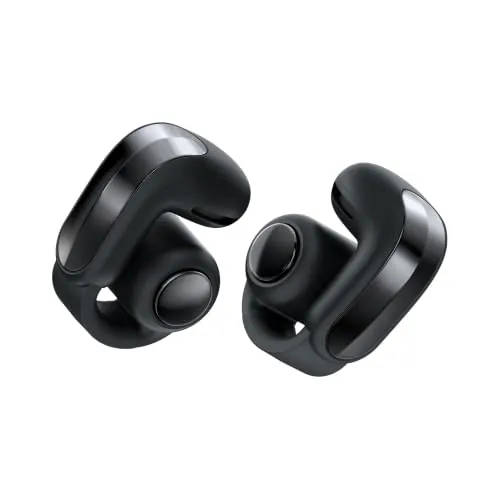
Bose
Bose Ultra Open Earbuds (2nd Gen)
Black, open-ear cuff design; exact assigned 2nd-generation model.
Model 897806-0010
Amazon ASIN B0HF8PYLWS
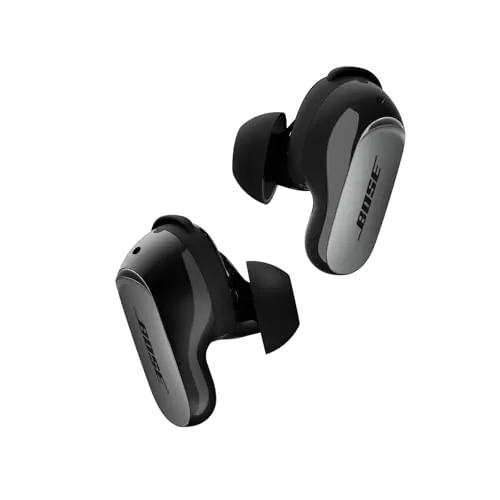
Bose
Bose QuietComfort Ultra Earbuds (2nd Gen)
Black, in-ear fit with the 2nd-generation Fit Kit and wireless charging case.
Model 896637-0010
Amazon ASIN B0F7M3HPBD
Differences that matter
What matters most to you?
Choose a priority to see what it changes.
Sources for Noise-control modes
Sources for Fit parts and package check
Sources for Case charging workflow
Start with the physical fit
Ultra Open 2nd Gen is the open-ear cuff in this pair: Bose describes the speaker as sitting outside the ear canal and lists no noise cancelling. QuietComfort Ultra 2nd Gen is in-ear and uses silicone eartips and stability bands. Its Aware mode does not alter that physical fit. Decide which construction suits your intended listening setup before comparing app modes.
QuietComfort Ultra's box includes three eartip sizes and three stability-band sizes. Those are fitting options to try, not a guarantee that a particular person will get a comfortable fit or seal.
Pick the controls and modes you will use
Ultra Open uses physical earbud buttons for documented media, call and shortcut actions. QuietComfort Ultra uses touch surfaces for taps, swipes and press-and-hold actions; Bose lists Quiet, Aware and Immersion modes and describes shortcut settings in its app. This is a control and feature distinction, not evidence that one model sounds better or blocks more noise.
If an uncovered ear canal is the requirement, QuietComfort Ultra's Aware mode is not a substitute for Ultra Open's open-ear construction. If selectable noise-control modes are the requirement, the Ultra Open page lists no ANC.
Check the charging items in the exact offer
Bose documents USB-C and wireless case charging for both models, so those case options are not a reason to pick one over the other. The QuietComfort Ultra 2nd Gen package list names a 12-inch USB-C A-to-C cable and says a power adapter is not included. Ultra Open's package list names earbuds and a charging case but does not list a cable; confirm the actual seller package if a cable matters.
The published quick-charge descriptions use different stated conditions, so they are not a controlled side-by-side battery comparison. This guide makes no runtime or charging-speed recommendation.
Product details
Bose Ultra Open Earbuds (2nd Gen)
This is the open-ear option in the assigned pair. Its cuff sits outside the ear canal and it has physical earbud buttons; it does not have ANC.
- Fit and noise-control feature
- Bose describes an open-ear cuff design and lists noise cancelling as No. Source
- Earbud controls
- Physical buttons on the earbuds handle documented media, call and shortcut actions; shortcut behavior is configurable in the Bose app. Source
- Case charging
- Bose documents USB-C and wireless charging for the case. Source
Bose QuietComfort Ultra Earbuds (2nd Gen)
Choose this model when you want the documented in-ear Fit Kit and selectable Quiet, Aware or Immersion mode. The product remains in-ear; Aware mode is not an open-ear fit.
- Fit parts in the box
- Bose lists three eartip sizes (S/M/L) and three stability-band sizes (1/2/3) in the Fit Kit. Source
- Documented listening modes
- Bose lists Quiet, Aware and Immersion modes; this remains an in-ear product in every mode. Source
- Included charging accessories
- The package list names a wireless charging case and a 12-inch USB-C A-to-C cable; Bose says the power adapter is not included. Source
Before you buy
Community discussions
Checking the switch between everyday listening setups
Bose Ultra Open Earbuds (2nd Gen)
An owner who had used Bose QuietComfort Ultra Earbuds Gen 2 and later tried the Ultra Open Gen 2 reported using multipoint with the open-ear pair.
What to check
Pair the phone and second device you normally use. Try an incoming call or starting playback on the other device and check how switching works with your settings.
Common questions
Does Aware mode make QuietComfort Ultra an open-ear earbud?
No. QuietComfort Ultra remains an in-ear model with silicone tips. Aware is a listening mode. Bose identifies Ultra Open as the open-ear design and lists no ANC for it.Bose Ultra Open Earbuds (2nd Gen)Bose QuietComfort Ultra Earbuds (2nd Gen)
Do both assigned cases support wireless charging?
Bose documents wireless charging for both cases as well as USB-C. The QuietComfort Ultra 2nd Gen package list also names a 12-inch USB-C A-to-C cable; its power adapter is not included.Bose Ultra Open Earbuds (2nd Gen)Bose QuietComfort Ultra Earbuds (2nd Gen)QuietComfort Ultra Earbuds (2nd Gen) Owner's Guide
Which has better noise cancellation or sound?
This guide does not rank either outcome. It summarizes Bose's documented open-ear versus in-ear designs and listed modes; no matched listening or noise-reduction test was used.Bose Ultra Open Earbuds (2nd Gen)Bose QuietComfort Ultra Earbuds (2nd Gen)
Sources and scope
This guide compares Bose's documented features and package lists for the exact second-generation models. It is not a fit, listening, ANC, call-quality, battery or safety test; personal fit and seal vary.
Related comparisons
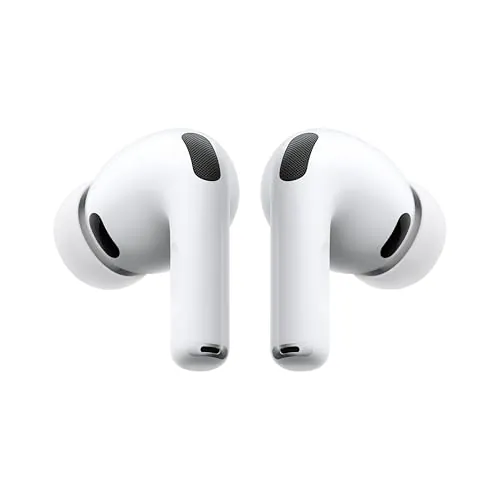
AirPods Pro 3 vs Bose QuietComfort Ultra Earbuds (2nd Gen): Fit and Device Switching
This is white Apple AirPods Pro 3 (MFHP4LL/A) versus black Bose QuietComfort Ultra Earbuds (2nd Gen, 896637-0010), not Bose's first-generation Ultra earbuds or either brand's headphones. RTINGS' direct comparison says AirPods Pro 3 has slightly better ANC and isolation plus longer continuous battery life, while Bose's microphone does a bit better with Android and PCs. The everyday difference is device workflow: Apple says AirPods can be used as Bluetooth headphones with non-Apple devices but functionality may be limited; Bose offers an iOS/Android app and multipoint for two source devices. Fit may override either result: Apple includes five tip sizes, and Bose offers nine tip-and-stability-band combinations plus an in-app seal test. Try the seal and switching routine with your actual phone and laptop before deciding.
Read comparison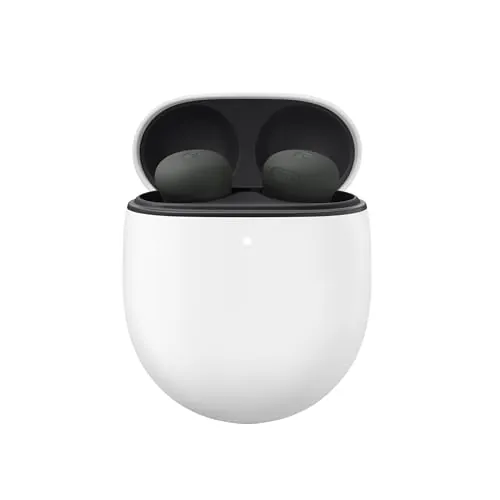
Bose QuietComfort Ultra Earbuds (2nd Gen) vs Pixel Buds Pro 2: Device Switching, Fit and Case
Bose QuietComfort Ultra Earbuds (2nd Gen), Black (896637-0010), and Google Pixel Buds Pro 2, Hazel (GA05762-US), both support multipoint and wireless charging. Pixel Buds Pro 2 pair with Bluetooth 4.0+ devices across Android, iOS, tablets and laptops, but Google says full feature access needs a Google Account, an Android 6.0+ companion phone and internet; its Audio switch has additional Android and same-account requirements. Bose lists app-managed listening modes and Bluetooth multipoint, plus a charging case, three eartip sizes, three stability-band sizes and a short USB-C-to-USB-A cable. Google lists four eartip sizes, a USB-C/Qi case and no cable in its box list. Neither model has a direct matched test against the other in the evidence used here, so this guide does not rank sound, ANC, comfort or battery performance.
Read comparison