
Products compared
Bose
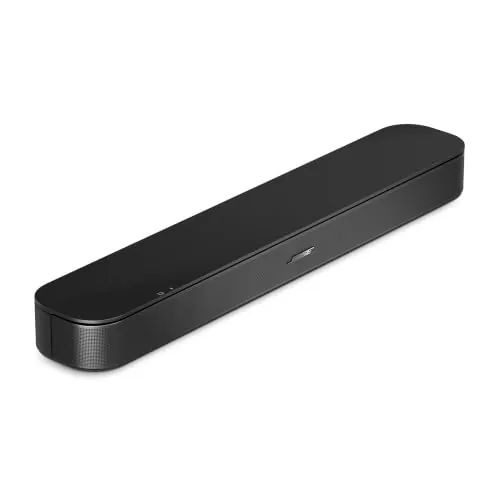
Bose TV Speaker (2nd Gen)
Exact black U.S. 2nd-generation model. Bose lists an HDMI cable in the box; the optional optical cable is not included.
Model 901067-1100
Amazon ASIN B0H8D3QLLJ
Bose
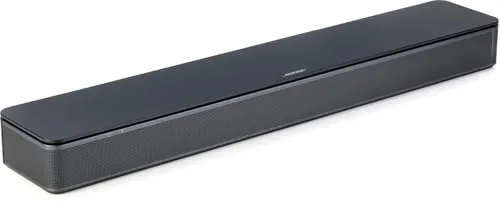
Bose TV Speaker
Exact black original-generation model sold from 2020. Bose lists an optical cable in the box; HDMI cable is sold separately.
Model 838309-1100
Amazon ASIN B088KRPCQJ
Differences that matter
What matters most to you?
Choose a priority to see what it changes.
Sources for Included cable and alternate TV connection
Sources for TV remote control and port setup
Sources for Bose bass-module expansion
Sources for Shelf width and screen clearance
Start with the cable your TV actually needs
This generation comparison is primarily a box-and-connection choice. Bose puts an HDMI cable in the 2nd Gen box and an optical cable in the original box. Both bars support HDMI ARC and optical audio, so either can work with either output when you supply the missing cable. Match the model to the port and cable you will use rather than assuming the new generation adds a connection the original lacks.
For HDMI audio return, use the TV port specifically labeled HDMI ARC/eARC; a standard HDMI input is not the documented connection. If using the TV remote for bar volume or power matters, check that the TV supports and has enabled HDMI-CEC. Bose describes remote control over the HDMI route, but the TV and its settings remain part of the setup.
Check the TV remote and audio route
The 2nd Gen owner guide explicitly says that connecting the included HDMI cable to the TV’s eARC/ARC port allows TV-remote control of power, volume and mute. Bose also documents HDMI-CEC for the original model’s HDMI ARC connection. If using optical, plan to use the included Bose remote or confirm another supported control route for your TV; the optical link is documented as audio, not HDMI-CEC.
Both are simple TV-connected soundbars. Bose recommends that the original connect to the TV’s audio output so sound and picture stay in sync; do not assume the bar serves as an HDMI switch or video pass-through hub.
Treat bass-module support and Atmos as separate checks
Bose names Bass Module 500 and 700 as wired options for both generations. The 2nd Gen owner guide also names the Lifestyle Ultra Subwoofer and says a 3.5 mm audio cable is not included. Bose’s original page reviewed does not mention Lifestyle Ultra, so an owner of that module should confirm its use with the older speaker directly rather than reading silence as a no.
Bose’s specifications list Dolby Digital for the 2nd Gen. Use Bose’s published audio format and your TV’s output settings when comparing it with a soundbar explicitly designed for Dolby Atmos.
Measure below the TV before selecting a generation
Bose’s product page lists the 2nd Gen at 23.465 inches wide and 4.154 inches deep; Bose Support lists 23.38 and 4.02 inches. Bose lists 23.38 inches wide and 4.02 inches deep for the original. Use the larger listed size as a starting point, with extra space for plugs and any clearance needed by the TV’s screen or remote sensor.
Bose’s 2nd Gen guidance recommends a centered position under the TV on a flat, stable, level surface and toward the front of the table or mantle; the original can also use the separately sold Bose wall bracket. Allow room for the rear cable connection and check that the installation does not block the TV’s ventilation.
Product details
Bose TV Speaker (2nd Gen)
- Included TV cable and connection
- HDMI cable included; HDMI ARC/eARC and optical audio supported, optical cable not included Source
- Soundbar dimensions
- 23.465 in W × 4.154 in D × 2.244 in H Source
- Optional bass modules named in owner guide
- Lifestyle Ultra Subwoofer, Bass Module 500, or Bass Module 700; 3.5 mm cable not included Source
Bose TV Speaker
- Included TV cable and connection
- Optical cable included; HDMI ARC and optical audio supported, HDMI cable sold separately Source
- Soundbar dimensions
- 23.38 in W × 4.02 in D × 2.21 in H Source
- Optional bass-module support documented on Bose page
- Bass Module 500 or Bass Module 700; connection cable sold separately Source
Before you buy
Community discussions
Choosing the TV connection and remote setup
Bose TV Speaker
A Bose TV Speaker owner reported that their optical connection played sound when their first HDMI attempt did not. Their replacement remote also did not map all its buttons as expected.
What to check
Check the connection and cable for the exact generation, then try power, volume and mute with your remote during setup.
Common questions
What cable comes with each Bose TV Speaker?
Bose lists an HDMI cable with the 2nd Gen and an optical cable with the original. Bose supports the alternate cable type on each, but it is not included in the respective box list.Bose TV Speaker (2nd Gen) | Bose U.S.Bose TV Speaker (original, sold from 2020) | Bose U.S.
Can I use my TV remote with either soundbar?
Bose documents HDMI-CEC control for both when connected to a compatible TV by HDMI ARC. Check the TV’s port labeling and CEC setting; control behavior can depend on the TV. Optical is an alternate audio connection, while the Bose remote is included with both models.Bose TV Speaker (2nd Gen) | Bose U.S.Bose TV Speaker (original, sold from 2020) | Bose U.S.Bose TV Speaker (2nd Gen) Owner's Guide | Bose
Does the Bose TV Speaker (2nd Gen) support Dolby Atmos?
Bose’s technical specifications list Dolby Digital for the TV Speaker (2nd Gen). For Atmos playback, choose a soundbar that Bose explicitly lists as compatible and check that the TV and source support the required format and connection.Bose TV Speaker (2nd Gen) | Bose U.S.Bose TV Speaker (2nd Gen) Owner's Guide | BoseBose TV Speaker (2nd Gen) Product Specifications and Audio Format
Can I add my existing Bose subwoofer?
Bose lists Bass Module 500 and 700 with both bars, connected by a separately sourced cable. The 2nd Gen guide also names Lifestyle Ultra. The original page reviewed does not confirm that accessory, so check with Bose rather than assuming either compatibility or incompatibility.Bose TV Speaker (2nd Gen) Owner's Guide | BoseBose TV Speaker (original, sold from 2020) | Bose U.S.
Sources and scope
Bose lists slightly different dimensions for the 2nd Gen on its product and support pages. Measure your actual unit for a tight installation. Bose’s 2nd Gen specifications list Dolby Digital. Bass module support comes from the corresponding product page or owner guide.
Related comparisons

Bose TV Speaker 838309-1100 vs Sony HT-S100F: Match TV Ports, Cables, and Shelf Space
For a simple TV connection, either soundbar can use optical audio and both official box lists include an optical cable. Both also support HDMI ARC, but plan for a separate HDMI cable and verify that your TV has an ARC-labeled port; actual control and audio behavior depends on the TV and its settings. Bose’s TV Speaker (838309-1100) includes a remote with Dialogue and Bass controls and supports optional wired Bose Bass Module 500 or 700 expansion using a separately sold cable. Sony HT-S100F includes a remote and supports Voice mode plus USB playback for compatible file types. Bose is 23.38 inches wide; Sony is 35.5 inches wide, so check the shelf and cable path.
Read comparison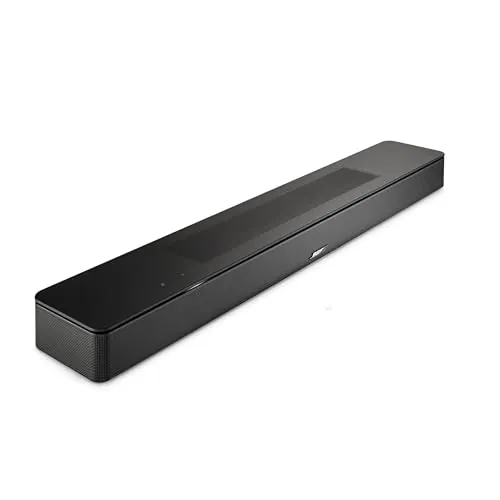
Bose TV Speaker vs Bose Smart Soundbar: Connections, App and Expansion
These Bose soundbars serve different system plans. The TV Speaker focuses on one TV connection, Bluetooth music and remote control; it includes an optical cable, while its HDMI cable is sold separately. Smart Soundbar adds the Bose app, Wi-Fi streaming and optional wireless bass and surround equipment, and its box lists both optical and HDMI cables. Before choosing, check your TV ports, whether you need Dolby Atmos, the cables already included, the space under your TV and any accessories you expect to add.
Read comparison