
Products compared
Bose
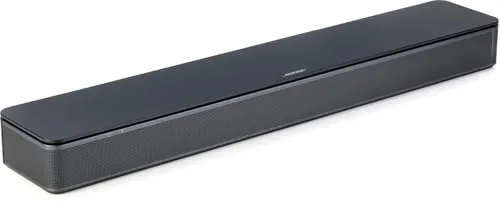
Bose TV Speaker
The black Bose TV Speaker is model/part 838309-1100. Bose documents optical, HDMI ARC and analog inputs. The package list includes an optical cable and remote; the HDMI cable and optional bass-module connection cable are separate purchases. Bose says this model cannot connect satellite surround speakers.
Model 838309-1100
Amazon ASIN B088KRPCQJ
Bose
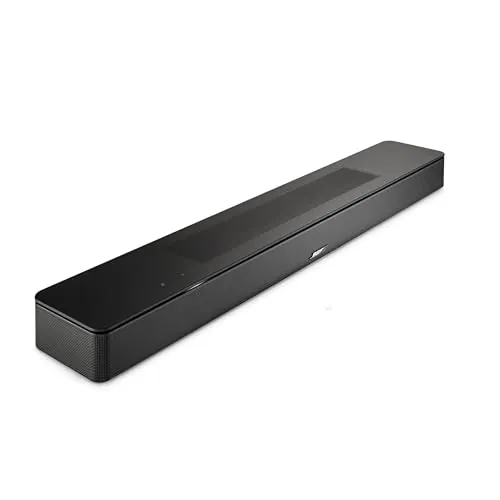
Bose Smart Soundbar
The black Bose Smart Soundbar is model/part 892079-1100; it is distinct from the Smart Soundbar 600, 900 and Ultra, and from bundles. Bose documents HDMI eARC/ARC and optical TV connections, app and Wi-Fi streaming, plus optional wireless bass and surround equipment. The package list includes optical and HDMI cables, but check the seller's exact offer before relying on bundle contents.
Model 892079-1100
Amazon ASIN B0D6W8XQ6J
Differences that matter
What matters most to you?
Choose a priority to see what it changes.
Sources for TV connection, remote control and Atmos path
Sources for Everyday control and music sources
Sources for Optional bass and surround expansion
Sources for Width and under-TV placement
Start with the ports on your TV
Both models can use optical, but Bose gives the Smart Soundbar an additional format-dependent connection check: its guide says HDMI eARC or ARC is preferred and required to deliver Dolby Atmos. Optical remains an alternative if your TV has no ARC/eARC, but it does not provide that Atmos path. The TV Speaker also supports HDMI ARC and optical, with Bose recommending the speaker be connected to the TV output; its cited product page says an HDMI cable is sold separately.
Before ordering, photograph or write down your TV's labeled audio outputs. If using HDMI, check the TV manual for ARC/CEC settings and confirm which remote you want to use. A port label and a speaker feature list do not establish that every TV setting or audio format is configured automatically.
Pick the controls and music routine you will actually use
The TV Speaker is the simpler remote-and-Bluetooth workflow: Bose says it has no app on the speaker, includes a remote, and can stream from a Bluetooth device. With HDMI-CEC on a compatible TV, the TV's existing remote can control volume; over optical, use the Bose remote or program another remote.
Smart Soundbar adds guided setup and preferences through the Bose app, Wi-Fi music services, Bluetooth, AirPlay 2, Chromecast built-in and Spotify Connect. Its additional choices are useful if they match the phone, network and streaming apps you use. Check regional service support and the current app requirements before treating a service name as guaranteed for every account.
Decide whether you plan to add bass or surround hardware
TV Speaker supports optional Bose Bass Module 500 or 700 over a wired connection, with the connection cable sold separately; Bose explicitly says satellite surround speakers cannot connect. Smart Soundbar's official page lists optional wireless Bose bass modules and wireless surround speakers. It also supports Personal Surround using Ultra Open Earbuds for one listener; Bose describes that as supplementary audio rather than a shared room-wide setup.
Make an accessory list before comparing offers: exact compatible module, required cable or power, and whether you want separate room speakers or personal listening. This guide does not assume every Bose bass or surround accessory generation works with either selected bar; confirm the precise model in Bose's compatibility documentation.
Measure the shelf and verify the package
Bose lists the TV Speaker at 23.38 inches wide and Smart Soundbar at 27.34 inches wide, with both listed at 2.21 inches high. Measure usable shelf width and depth, including the TV feet, any lip and room for cables. The measurement is a placement check, not a sound-quality or fit guarantee.
The Bose product pages list optical cable in the TV Speaker box and both optical and HDMI cables in the Smart Soundbar box. Amazon offers may be seller bundles or change over time, so compare the exact ASIN, seller and included items shown at checkout. Add the cost of any missing cable, wall bracket or optional expansion accessory before deciding which system better fits the setup.
Product details
Bose TV Speaker
- TV connection
- Optical or HDMI ARC; Bose recommends connecting the speaker to the TV output. Optical cable included; HDMI cable sold separately. Source
- Music and controls
- Bluetooth music streaming, included remote and no app on the TV Speaker; a compatible HDMI-CEC TV can control volume using its existing remote. Source
- Expansion
- Optional Bose Bass Module 500 or 700 via wired connection; cable sold separately. Bose says satellite surround speakers cannot connect. Source
Bose Smart Soundbar
- TV connection and Atmos condition
- HDMI eARC or ARC is the preferred connection; optical is an alternative. Bose says Dolby Atmos requires the eARC/ARC connection. Source
- Included cables
- Bose's box list includes optical and HDMI cables, power cord and remote; verify the exact seller's package. Source
- App, streaming and expansion
- Bose app; Wi-Fi, Bluetooth, Apple AirPlay 2, Chromecast built-in and Spotify Connect; optional wireless Bose bass modules and surround speakers. Personal Surround uses Ultra Open Earbuds for one listener. Source
Before you buy
Community discussions
Testing one-remote startup with the TV
Bose Smart Soundbar
An owner connected the 2024 Bose Smart Soundbar through an LG OLED’s ARC port and used an Apple TV remote. They reported that the TV and streamer sometimes powered on without the bar.
What to check
Test what happens when the TV and streamer wake from standby. Check the latest settings for ARC and compatible power or volume controls on your actual TV.
A TV Speaker (2020) buyer asked whether ARC setup needed a different cable
Bose TV Speaker
A buyer said their Bose TV Speaker (2020) produced no sound over the TV's HDMI-ARC connection with the cable they tried, while optical audio worked for them. They also described inconsistent third-party remote learning; the post does not identify a confirmed cable cause or general fix.
What to check
For the original TV Speaker, confirm that the TV port is labeled ARC and review its audio-output settings. If choosing optical instead, check the included optical cable and plan for the separately sold HDMI cable only if you intend to use ARC; one user's experiment does not diagnose another setup.
A TV Speaker owner asked what bass controls work with Bass Module 500
Bose TV Speaker
A user with the Bose TV Speaker and Bass Module 500 asked whether there was adjustment beyond the bass control on the soundbar remote, noting they had seen app controls on some smarter Bose models. The post is a question and does not establish the module's control options.
What to check
If app-based or separate bass adjustment matters, verify the controls documented for the exact soundbar and module before buying. Do not infer that the Smart Soundbar's app features or another Bose model's controls carry over to the TV Speaker.
Common questions
Can both soundbars connect to a TV by optical cable?
Yes. Bose documents an optical connection for the TV Speaker and Smart Soundbar. For Smart Soundbar, Bose specifies HDMI eARC/ARC for Dolby Atmos; use optical only if the TV lacks ARC/eARC or Atmos is not part of your intended connection path.Bose TV Speaker — U.S. product page, box contents, connections and FAQsBose Smart Soundbar — Owner's Guide
Which cables are listed in the Bose boxes?
Bose lists an optical cable with the TV Speaker, and says an HDMI cable is sold separately. The Smart Soundbar box list includes both optical and HDMI cables. Check the exact Amazon seller and bundle before purchase because offers can differ.Bose TV Speaker — U.S. product page, box contents, connections and FAQsBose Smart Soundbar — U.S. product page, specifications and FAQs
Can I add surround speakers to the Bose TV Speaker?
No. Bose's TV Speaker FAQ says satellite surround speakers cannot connect. It documents an optional wired connection to Bass Module 500 or 700; the connection cable is sold separately.Bose TV Speaker — U.S. product page, box contents, connections and FAQs
Does Smart Soundbar Personal Surround work for everyone in the room?
No. Bose says Personal Surround is limited to one listener and uses separately sold Ultra Open Earbuds as supplementary audio. For room speakers, Bose separately documents optional wireless surround speakers.Bose Smart Soundbar — U.S. product page, specifications and FAQs
Which one sounds better?
The cited Bose materials list different hardware, processing and expansion features, but they are not a controlled comparison of these two models' sound quality. Choose by your TV connection, cable needs, control and streaming routine, space and planned accessories; audition both if sound is the deciding factor.Bose TV Speaker — U.S. product page, box contents, connections and FAQsBose Smart Soundbar — U.S. product page, specifications and FAQs
Sources and scope
This guide compares documented connections, controls, included contents and expansion paths. It does not conduct a controlled listening test or rank dialogue clarity, bass, Atmos effect or overall sound quality. TV and source compatibility depends on their available outputs, settings and supported formats. Check the exact Amazon product and bundle before purchase; accessory compatibility and the package contents of a marketplace offer should be confirmed for the selected seller/variant.
Related comparisons

Bose TV Speaker 838309-1100 vs Sony HT-S100F: Match TV Ports, Cables, and Shelf Space
For a simple TV connection, either soundbar can use optical audio and both official box lists include an optical cable. Both also support HDMI ARC, but plan for a separate HDMI cable and verify that your TV has an ARC-labeled port; actual control and audio behavior depends on the TV and its settings. Bose’s TV Speaker (838309-1100) includes a remote with Dialogue and Bass controls and supports optional wired Bose Bass Module 500 or 700 expansion using a separately sold cable. Sony HT-S100F includes a remote and supports Voice mode plus USB playback for compatible file types. Bose is 23.38 inches wide; Sony is 35.5 inches wide, so check the shelf and cable path.
Read comparison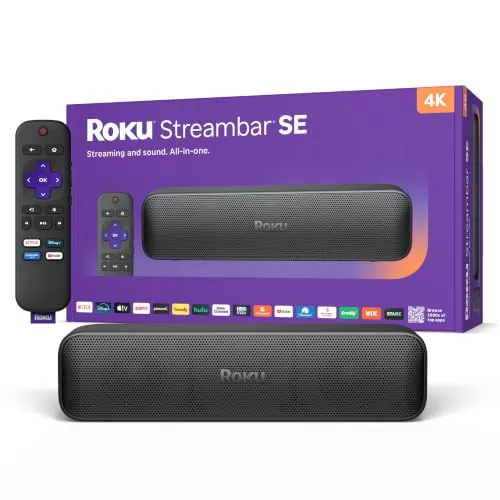
Roku Streambar SE vs Bose TV Speaker: Streaming and TV Connection Fit
Roku Streambar SE combines a Roku streaming player with TV audio. Bose TV Speaker is documented as a TV-audio speaker with HDMI ARC or optical input and Bluetooth from a mobile device. Roku’s exact setup requires internet/account activation and PCM Stereo for TV audio; Bose Support identifies Dolby Digital and PCM 2.0 support for model 838309-1100. Check your television’s actual ports and source-output settings before choosing.
Read comparison