
Products compared
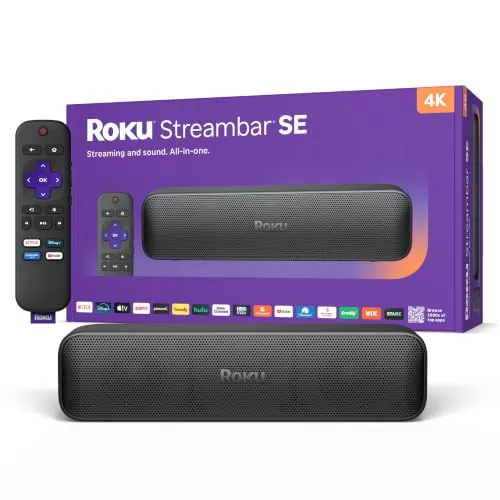
Roku
Roku Streambar SE 4K Streaming Soundbar — Black
Black U.S. model; built-in Roku streaming player and TV-audio soundbar
Model 9104R
Amazon ASIN B0CTBF4MKS
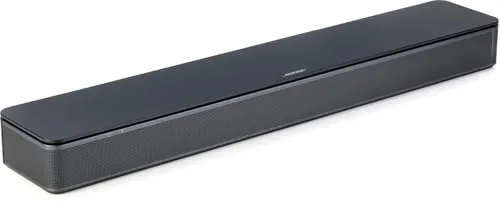
Bose
Bose TV Speaker — Black, first generation
First-generation U.S. Bose TV Speaker; TV-audio soundbar with Bluetooth input
Model 838309-1100
Amazon ASIN B088KRPCQJ
Differences that matter
Sources for TV ports and cables
Sources for TV audio format and menu settings
Sources for What to confirm before mounting or plugging in
Decide whether you want streaming inside the soundbar
Roku documents Streambar SE as a two-in-one TV-audio and 4K streaming product. On a non-Roku TV, setup includes internet connection and on-screen activation/account steps. If your TV or a separate player already supplies the video apps you want, the Bose TV Speaker materials instead focus on TV audio through HDMI ARC or optical, plus Bluetooth audio from a paired mobile device.
Before choosing Roku, confirm the home network reaches the installation location and you are comfortable with Roku’s account activation. Before choosing Bose, make sure your existing TV or external streaming device will continue to provide the apps and video interface you use.
Match the TV ports and included cables
Roku recommends HDMI ARC as the simplest connection. If the TV has no ARC port, Roku says to connect both HDMI and optical; it notes an ARC port may already be in use by another device. Roku’s U.S. quick-start guide lists the HDMI cable and optical cable as included.
Bose’s quick-start guide also describes HDMI ARC or optical TV hookup, but says the HDMI cable is not provided. Check the television’s actual labels and the contents of the selected Bose offer before buying any additional cable. Do not substitute a standard HDMI input for an ARC port where the guide calls for ARC.
Check TV audio settings before choosing by format
Roku’s Streambar SE support instructions say to enable ARC and CEC as needed and set the TV audio output to PCM-Stereo (or Stereo), because Streambar SE cannot play Dolby Audio or DTS from TV audio input. Roku separately lists USB media formats; that is a different path and is not covered by this TV setup guidance.
For Bose model 838309-1100, Bose Support’s answer on the exact-model listing states Dolby Digital and PCM 2.0 support. Treat that as a format capability, not a guarantee that every television or external box will pass the format through. Review the TV and source-device audio output menus and use the appropriate HDMI ARC or optical path. No format statement here is a sound-quality comparison.
A quick setup worksheet
Write down four facts before checkout: the TV model, whether an HDMI ARC port is available and free, whether optical output is available, and whether you want the streaming apps built into the soundbar. For Roku, add Wi-Fi/internet availability and account activation; for a no-ARC TV, check the HDMI-plus-optical cabling plan.
For Bose, decide between ARC and optical, account for the guide’s statement that HDMI cable is not provided, and check the TV/source format if you intend to use Dolby Digital. If any one item is unclear, confirm it in the TV manual or with the source-device maker rather than assuming a feature carries through automatically.
Product details
Roku Streambar SE 4K Streaming Soundbar — Black
- Streaming setup
- Built-in Roku streaming; Roku setup requires connecting to the internet and activating the device/account. Source
- TV connection
- HDMI ARC is the recommended one-cable TV path; without ARC, use HDMI plus optical. Roku lists HDMI cable and optical cable in the box. Source
- TV audio output setting
- For TV audio input, Roku says Streambar SE cannot play Dolby Audio or DTS and directs users to set the TV output to PCM-Stereo (or Stereo). Source
Bose TV Speaker — Black, first generation
- TV connection
- Bose’s quick-start guide documents HDMI ARC (HDMI cable not provided) or optical connection to the TV. Source
- Mobile audio
- Bose’s quick-start guide documents pairing a mobile device over Bluetooth. Source
- Documented TV audio formats
- Bose Support identifies Dolby Digital and PCM 2.0 support for model 838309-1100. TV/source pass-through settings still matter. Source
Before you buy
Community discussions
Choosing the TV connection and remote setup
Bose TV Speaker — Black, first generation
A Bose TV Speaker owner reported that their optical connection played sound when their first HDMI attempt did not. Their replacement remote also did not map all its buttons as expected.
What to check
Check how you will switch the TV input and adjust volume from where you watch. Test that the connection you choose sends sound after standby.
Common questions
Does Roku Streambar SE need internet?
Yes for its built-in streaming setup: Roku directs users to connect to the internet and complete on-screen activation/account setup on a non-Roku TV. This requirement is separate from the Bose TV Speaker’s documented TV-audio and Bluetooth input workflow.Roku Streambar SE U.S. product pageRoku Streambar SE setup with a non-Roku TV system
What if my TV does not have HDMI ARC?
Roku instructs Streambar SE owners to connect HDMI and optical to the TV when ARC is unavailable. Bose’s quick-start guide separately documents an optical TV connection as an alternative to HDMI ARC. Check that your TV has optical output and that the required cables are available.How to set up your Roku Streambar SERoku Streambar SE Quick Start Guide (U.S.)Bose TV Speaker Quick Start Guide
Why does Roku ask me to change the TV audio setting to PCM?
Roku says Streambar SE cannot play Dolby Audio or DTS formats from TV audio input and directs users to choose PCM-Stereo (or Stereo). Roku lists formats for USB media separately; this guide does not cover USB playback.How to set up your Roku Streambar SERoku Streambar SE setup with a non-Roku TV system
Can the Bose TV Speaker accept Dolby Digital?
Bose Support answered for the exact 838309-1100 model that it supports Dolby Digital and PCM 2.0. Check your TV and source-device pass-through menus because the actual format arriving at the speaker depends on that setup.Bose Support answer for TV Speaker model 838309-1100Bose TV Speaker Quick Start Guide
Sources and scope
This is a feature and setup comparison, not a sound-quality or listening test. The Roku PCM requirement is specific to TV audio input; Roku lists some other formats separately for USB media, which this guide does not assess. Bose Support’s Dolby Digital and PCM 2.0 statement comes from a manufacturer-authored answer on an exact-model listing; TV/source pass-through varies. Bose’s current specifications page loaded without readable text in this check, so Bose connection details are grounded in its quick-start guide and the exact-model support answer. No universal TV compatibility or sound winner is claimed.
Related comparisons

Bose TV Speaker 838309-1100 vs Sony HT-S100F: Match TV Ports, Cables, and Shelf Space
For a simple TV connection, either soundbar can use optical audio and both official box lists include an optical cable. Both also support HDMI ARC, but plan for a separate HDMI cable and verify that your TV has an ARC-labeled port; actual control and audio behavior depends on the TV and its settings. Bose’s TV Speaker (838309-1100) includes a remote with Dialogue and Bass controls and supports optional wired Bose Bass Module 500 or 700 expansion using a separately sold cable. Sony HT-S100F includes a remote and supports Voice mode plus USB playback for compatible file types. Bose is 23.38 inches wide; Sony is 35.5 inches wide, so check the shelf and cable path.
Read comparison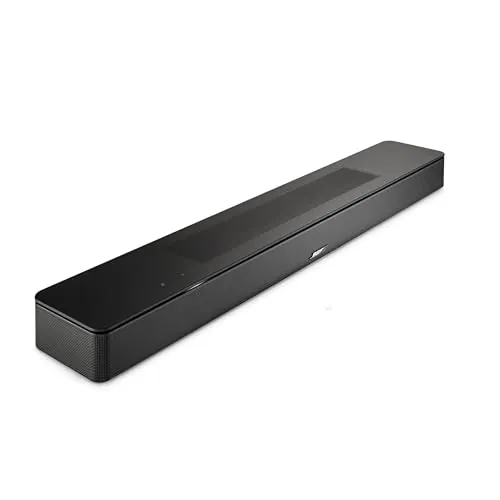
Bose TV Speaker vs Bose Smart Soundbar: Connections, App and Expansion
These Bose soundbars serve different system plans. The TV Speaker focuses on one TV connection, Bluetooth music and remote control; it includes an optical cable, while its HDMI cable is sold separately. Smart Soundbar adds the Bose app, Wi-Fi streaming and optional wireless bass and surround equipment, and its box lists both optical and HDMI cables. Before choosing, check your TV ports, whether you need Dolby Atmos, the cables already included, the space under your TV and any accessories you expect to add.
Read comparison