
Products compared
Brother
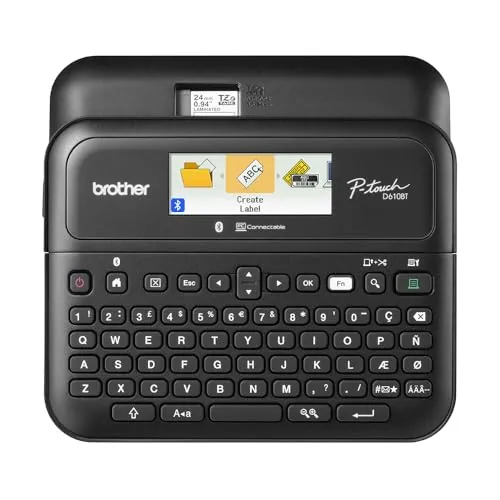
Brother P-touch PT-D610BT Business Professional Connected Label Maker
Black US model with built-in QWERTY keyboard and 20-character, two-line color display. Brother's standard US carton list includes an AC adapter, USB cable, and one 24 mm × 4 m black-on-white laminated TZe sample tape.
Model PT-D610BT
Amazon ASIN B0B1KZJXPG
Brother
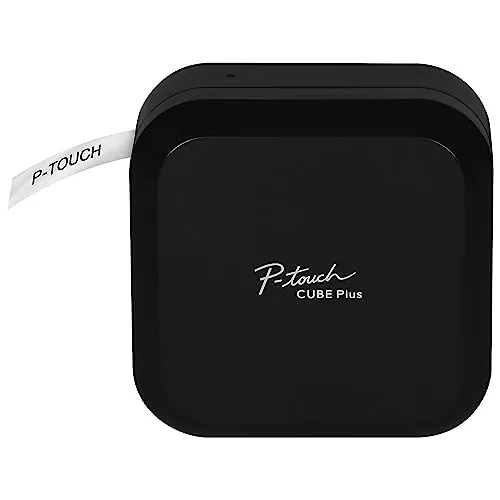
Brother P-touch CUBE Plus PT-P710BT Bluetooth Connected Label Maker
Black US model without a screen or keyboard. Brother's standard US carton list names a built-in rechargeable Li-ion battery, USB cable, a 24 mm × 4 m black-on-white starter tape, and a 24 mm × 2 m black-on-premium-glitter-gold starter tape; it does not list an AC adapter.
Model PT-P710BT
Amazon ASIN B07HB8LNSY
Differences that matter
What matters most to you?
Choose a priority to see what it changes.
Sources for Where labels are composed
Sources for Computer connection
Sources for Tape width and cutting
Sources for Published body dimensions
Choose the input surface you want to use
PT-D610BT's QWERTY keyboard and two-line color display let you enter and preview text at the printer. Brother also lists P-touch Editor and iPrint&Label routes when you want to create from a computer or mobile device. PT-P710BT removes the keyboard and display: its US product page names Brother's mobile apps, and its manual covers computer label creation in P-touch Editor.
That makes the choice concrete: favor D610BT for quick edits where the printer itself should be the typing station; favor P710BT when you already prefer designing on a phone or computer. These are documented input routes, not a comparison of print quality or speed.
Plan the computer cable and power separately
The PT-P710BT guide's computer workflow uses P-touch Editor and the included USB cable; it explicitly says computer Bluetooth is not supported. Brother's US sales page also describes laptop Bluetooth, so the product page and manual conflict. This guide uses the model-specific manual's USB path; if wireless printing from a laptop is a requirement, confirm it with Brother before choosing.
For Brother's standard US box, PT-D610BT includes an AC adapter and USB cable, with six AA batteries listed as an alternative but not included. PT-P710BT's standard list instead names a built-in rechargeable battery and USB cable; its guide says a USB AC adapter is not included. Check the assigned seller offer's actual included items rather than treating either manufacturer list as a guarantee of a reseller bundle.
Both stop at 24 mm TZe tape
The exact PT-D610BT page lists TZe widths up to 24 mm. PT-P710BT's manual lists six cassette widths from 3.5 through 24 mm, and its exact-model specification table also caps at 24 mm. A separate generic CUBE XP paragraph on the P710BT sales page says 36 mm; that text conflicts with the model-specific table and manual and is not applied to this PT-P710BT comparison.
Brother lists one 24 mm black-on-white sample tape in the D610BT standard carton. The P710BT standard carton list includes a 24 mm black-on-white sample plus a shorter 24 mm black-on-premium-glitter-gold sample. Both support an automatic-cut workflow, though the P710BT manual makes Auto Cut a selectable setting and calls for hand cutting some special tapes. Check the required width and finish before buying replacement cassettes.
Product details
Brother P-touch PT-D610BT Business Professional Connected Label Maker
- On-device controls
- QWERTY keyboard; 20-character × 2-line color LCD Source
- Computer and mobile creation
- Brother lists P-touch Editor/iPrint&Label creation and USB or Bluetooth computer connection; check current software support for your OS. Source
- Power in Brother's standard carton
- AC adapter included; six AA batteries are an alternative power option but are not included. Source
- Tape and cutter
- Brother lists TZe tape up to 24 mm and a built-in automatic cutter. Source
- Listed unit dimensions
- 8.0 × 7.7 × 3.4 in; Brother's table does not label these axes. Source
Brother P-touch CUBE Plus PT-P710BT Bluetooth Connected Label Maker
- Controls and mobile creation
- No LCD or keyboard; Brother lists iPrint&Label and Design&Print 2 mobile apps with Bluetooth pairing. Source
- Computer workflow
- The exact-model user guide documents P-touch Editor printing from a computer over the included USB cable and states that computer Bluetooth is not supported; do not assume a wireless laptop route. Source
- Power in Brother's standard carton
- Built-in rechargeable Li-ion battery and USB cable; the guide says a USB AC adapter is not included. Source
- Tape and cutter
- The model-specific guide lists TZe cassette widths of 3.5, 6, 9, 12, 18, and 24 mm; Auto Cut is a selectable print setting. Source
- Listed unit dimensions
- 5 × 2.6 × 5 in; Brother's table does not label these axes. Source
Before you buy
Community discussions
Getting the connected label workflow running on Windows 11
Brother P-touch PT-D610BT Business Professional Connected Label Maker
A PT-D610BT owner reported that Windows 11 showed a driver-unavailable message even after they installed the official Brother driver. They got their printer working after adding it manually with the correct port in their setup.
What to check
Check your planned authoring paths before choosing. If both machines would depend on a shared Windows PC in your setup, confirm the documented driver, port, and label application for each.
Common questions
Can the PT-P710BT print from a computer without a USB cable?
Brother's exact PT-P710BT user guide says computer printing uses the included USB cable and that computer Bluetooth is unsupported. The US sales page mentions laptop Bluetooth, so treat that as a source conflict and confirm with Brother if wireless computer printing is essential.P-touch CUBE Plus PTP710BT Bluetooth Connected Label MakerPT-P710BT User's Guide (English), US support download
Do both models take 36 mm Brother TZe tape?
No. The exact PT-D610BT product page lists a 24 mm maximum, and the PT-P710BT user guide lists TZe cassette widths up to 24 mm. Ignore the generic CUBE XP 36 mm copy on the P710BT page for this exact model.P-touch PT-D610BT Business Professional Connected Label MakerP-touch CUBE Plus PTP710BT Bluetooth Connected Label MakerPT-P710BT User's Guide (English), US support download
Does the PT-P710BT include a wall adapter?
Brother's standard US box list names its built-in battery and USB cable, not an AC adapter; the user guide says the USB AC adapter is not included. Check the exact retailer bundle if you need one in the box.P-touch CUBE Plus PTP710BT Bluetooth Connected Label MakerPT-P710BT User's Guide (English), US support download
Sources and scope
This is a feature and package-list comparison, not a print-quality, speed, battery-runtime, or reliability test. Brother's standard US carton lists may not match a seller-specific bundle for the selected ASIN. The PTP710BT sales page contains a generic CUBE XP paragraph mentioning 36 mm tape, but its exact-model specification table and PT-P710BT user guide support a 24 mm maximum; this guide uses the exact-model limit. The same page describes laptop Bluetooth, while the PT-P710BT user guide says computer Bluetooth is unsupported; this guide uses the manual's USB computer path and flags the conflict.
Related comparisons
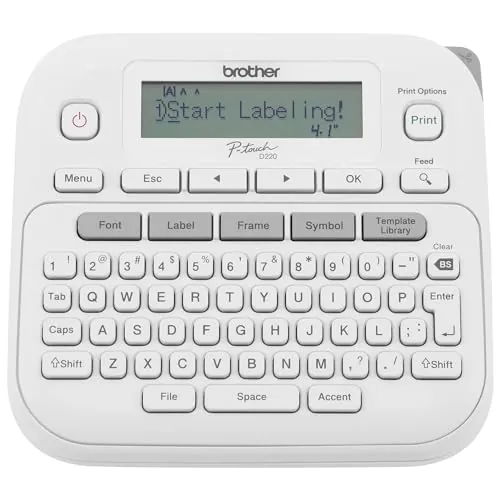
Brother PT-D220 vs PT-D610BT: Tape Width, Typing and Power Setup
Brother lists the PT-D220 for TZe tape up to 12 mm, with a QWERTY keyboard and up to nine copies. The PT-D610BT supports TZe tapes up to 24 mm, PC or phone label design, an automatic cutter and up to 99 copies. Brother's PT-D610BT product page conflicts about its keyboard: the description says built-in QWERTY, while its spec table says keyboard layout none. If typing directly on the machine matters, verify the exact unit before buying. Power differs too: D220 batteries and AC adapter are sold separately; the D610BT's standard box lists its AC adapter and USB cable.
Read comparison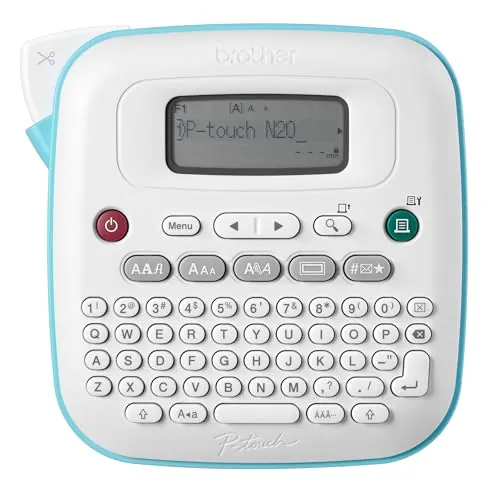
Brother PT-N20 vs PT-D610BT: Btag vs TZe, Apps and Box Contents
The key choice is the tape ecosystem and where you create labels. Brother specifies the PT-N20 exclusively for 12 mm Btag cassettes; its US page describes a keyboard, preview and saved-label workflow and lists no mobile-device printing app. The PT-D610BT's US support specification lists standard TZe cassettes from 3.5 to 24 mm, USB 2.0 Micro-B and Bluetooth, while Brother documents P-touch Editor and iPrint&Label workflows for computer and mobile use. Box contents and power differ too: the PT-N20 uses six AAA batteries and has an optional adapter; the PT-D610BT uses six AA batteries or its included adapter and USB cable. Match existing tape stock and the device you want to design from before deciding.
Read comparison