
Products compared
Creative
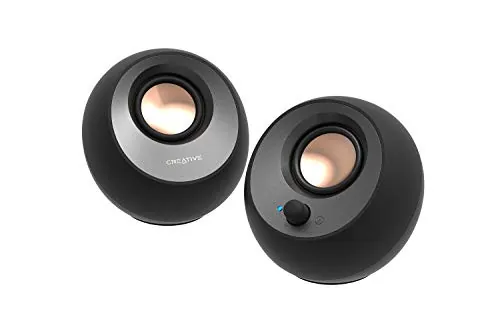
Creative Pebble V3 USB-C Desktop Speakers
Black US listing; exact model MF1700. USB audio, Bluetooth 5.0 and 3.5 mm analog input are documented by Creative.
Model MF1700
Amazon ASIN B08F57GSJ7
Edifier
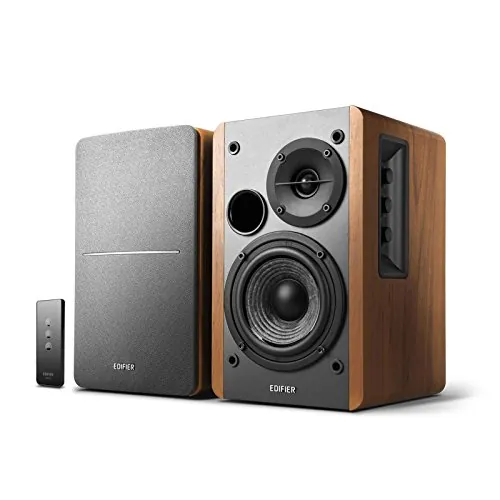
Edifier R1280T Powered Bookshelf Speakers
selected listing names the R1280T model. The exact Amazon color/box selection could not be freshly confirmed; verify the selected R1280T listing before ordering.
Model R1280T
Amazon ASIN B016P9HJIA
Differences that matter
What matters most to you?
Choose a priority to see what it changes.
Sources for Computer and phone connection options
Sources for Power path and output condition
Sources for Cables and setup at the desk
Sources for Space and day-to-day control
Sources for Two connected sources
A desk setup checklist that catches the easy-to-miss differences
1. List each source you use: computer, phone, turntable or another analog device. For Pebble V3, mark USB Audio, Bluetooth 5.0 or 3.5 mm AUX. For R1280T, mark which sources can provide stereo RCA or use the included 3.5 mm-to-dual-RCA cable.
2. Mark the power point separately from the audio path. Pebble takes 5V/2A USB power and its guide specifies the source needed for the up-to-8W RMS High Gain condition. R1280T plugs into AC mains. A matching audio cable does not replace either product's power requirement.
3. Sketch cable routes and controls. Pebble has a small USB-C-to-A converter if required, but not an AUX lead. R1280T has active and passive speakers joined by a cable, a power cord, side dials and a remote. Leave enough space to reach the controls and route the inter-speaker lead.
4. If leaving two sources connected to R1280T, decide which device you will mute or turn down: the manual says both signals play at once. Do not buy this model expecting automatic source selection or Bluetooth.
Why the answer changes with your devices, not a sound score
The Pebble V3 answers a computer-first need: USB audio and power share the USB setup, with Bluetooth and AUX as other documented input modes. It avoids requiring an AC mains outlet for the speaker power path, but the High Gain output condition still depends on the specified USB power source.
The R1280T solves a different desk or shelf workflow: two wired RCA inputs, a separate AC connection, control from the speaker side or remote, and included analog cables. Its cabinets and inter-speaker cable take a different placement plan than the compact V3. The model has no Bluetooth.
Rated watts, driver descriptions and separate product reviews cannot establish that one sounds better in a matched comparison. Pick the setup that your actual sources and desk can support; treat sound preference as something to audition or verify through a controlled, exact-model comparison.
Product details
Creative Pebble V3 USB-C Desktop Speakers
A direct fit when a computer USB port can handle both the chosen audio path and speaker power, or when Bluetooth is useful. If connecting by AUX, source your own 3.5 mm cable; if laptop USB output is low, Creative recommends a 10W USB port for optimum volume.
- Audio connections
- USB Audio, Bluetooth 5.0 and 3.5 mm analog stereo-in. Source
- Power and rated output condition
- 5V/2A input; up to 8W RMS in High Gain only with a 10W USB-C port/adapter or 5V/2A USB-A adapter. Adapter not included. Source
- Included connection accessory
- USB-C-to-USB-A converter is shown if required; 3.5 mm AUX cable is not included. Source
Edifier R1280T Powered Bookshelf Speakers
A fit for a wired desk or shelf where two RCA sources, a separate AC outlet and room for the speaker pair are acceptable. The manual says both connected sources play simultaneously; lower or turn off the source you are not using rather than expecting automatic input selection.
- Audio connections
- Dual stereo RCA inputs; no Bluetooth on the exact R1280T model. Source
- Power and placement
- AC mains power; manufacturer manual lists dimensions 146 × 234 × 196 mm and approximate net weight 4.9 kg. Source
- Included cables and controls
- Manual lists a 3.5 mm-to-dual-RCA cable, dual-RCA cable and speaker connecting cable; also remote, active and passive speakers. Side dials adjust master volume, bass and treble. Source
Before you buy
Community discussions
Checking the audio cable for a desktop interface
Edifier R1280T Powered Bookshelf Speakers
An R1280T owner wanted to connect separate left and right outputs from a Scarlett 2i2 to the stereo speaker pair.
What to check
List the inputs and outputs for the computer or audio interface you use. Check what you will need beyond the cables in each box.
Common questions
Does the Edifier R1280T have Bluetooth?
No. Edifier's exact-model support FAQ says R1280T is not Bluetooth. Its dual RCA inputs are for wired audio; the Bluetooth R1280DB/DBs are different models.Support for R1280T – Edifier USAR1280T – Edifier Official US product page
Does the Pebble V3 include an AUX cable or power adapter?
Creative's MF1700 quick-start guide says the AUX cable is not included. It also says the power adapter used for the up-to-8W RMS High Gain condition is not included; the USB-C-to-A converter is shown for use if required.Pebble V3 Quick Start Guide (Model MF1700)
Will the R1280T automatically switch between two connected sources?
No automatic switching is documented. The R1280T manual says both connected audio signals play simultaneously; lower or switch off the source you do not want to hear.R1280T User Manual
Which one sounds better?
This guide cannot establish a sound-quality winner: the available evidence is not a matched, controlled listening comparison of these exact models. Choose by your source connections, power and placement needs, then audition or check a directly comparable test if sound is decisive.Pebble V3 Quick Start Guide (Model MF1700)R1280T User Manual
Sources and scope
For Creative’s rated 8W RMS, use High Gain with a compatible 10W USB supply. Have a USB power adapter and AUX cable available if your setup requires them. On the Edifier listing, check the R1280T model and finish, then confirm cabinet dimensions with the seller if your desk has tight clearance.
Related comparisons
Logitech Z207 vs Creative Pebble V3: Choose by Desk Connections
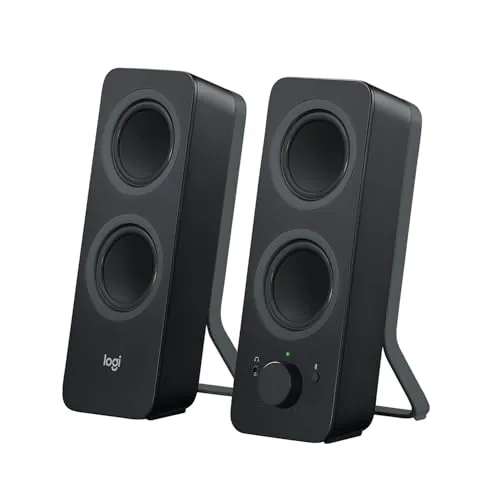
For a desktop speaker setup, the black Logitech Z207 (980-001294) and Creative Pebble V3 (MF1700) solve different connection problems. Logitech documents two paired Bluetooth devices plus one 3.5 mm input and an Easy-Switch routine. Creative documents USB-C audio and power, Bluetooth 5.0 and AUX; its package material lists a USB-C-to-USB-A converter but no USB power adapter or AUX cable. Check which ports your computer actually has and whether you need separate USB power when using analog audio.
Read comparisonLogitech Z207 vs Edifier R1280T: Bluetooth, Inputs and Desk Setup
Logitech Z207 model 980-001294 accepts Bluetooth and one 3.5 mm analog input, with power and volume at the right speaker. Edifier R1280T has no Bluetooth, but offers two RCA inputs, a remote for volume and mute, and side-panel tone controls. A 3.5 mm source can still connect to the R1280T using its documented 3.5 mm-to-RCA cable; its two connected sources play together rather than auto-selecting.
Read comparison