Products compared
Dell
Dell Pro Dock WD25
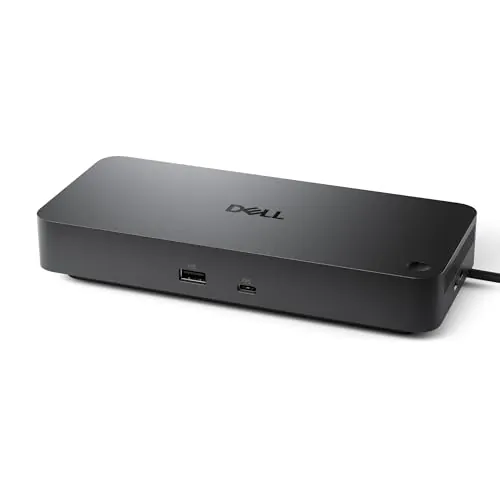
The WD25 is the higher-host-power option on paper: Dell lists up to 100 W to Dell systems or 96 W to non-Dell systems with a 130 W adapter. It has four USB-A ports, a multi-function USB-C display port, two DisplayPort outputs, HDMI, and 2.5GbE. Confirm that the exact laptop and desk use those connections.
Model WD25 (PTC1N)
Amazon ASIN B0FCSHJGGK
Anker
Anker 575 USB-C Docking Station (13-in-1)
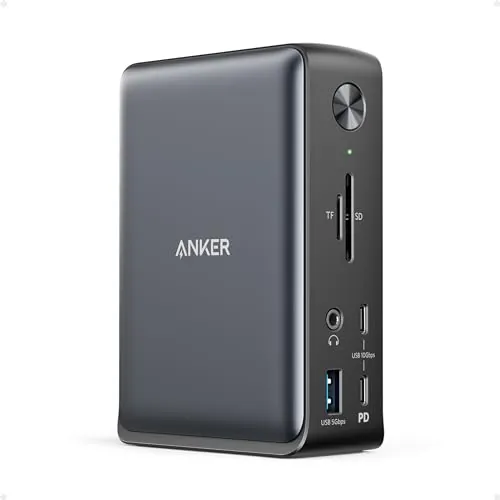
The Anker 575 has a lower listed laptop-output ceiling of 85 W, while its box guide lists a 135 W adapter, a power cord, and a 1 m USB-C host cable. Its desk layout includes two HDMI outputs, one DisplayPort, SD and microSD readers, and a combined 3.5 mm audio port.
Model A8392 / A83921A1
Amazon ASIN B088F7SY6S
Differences that matter
What matters most to you?
Choose a priority to see what it changes.
Sources for Laptop charging ceiling vs adapter rating
Sources for Ports for the equipment already on your desk
Sources for Monitor connectors and host display behavior
Sources for Power accessories and one-cable setup
Start with the laptop, not the adapter box
These docks are not a simple 130 W versus 135 W choice. Dell rates WD25’s included adapter at 130 W and documents up to 100 W to Dell computers or 96 W to non-Dell computers. Anker lists a 135 W adapter but caps its 575 laptop upstream port at 85 W. Check the laptop’s required USB-C input and whether that exact port supports Power Delivery before choosing either model.
If your laptop needs more than 85 W but no more than the WD25 limit that applies to it, the Dell is the candidate to verify. If the laptop fits inside 85 W, the Anker may still fit better when its card readers, headset connection, or HDMI layout match your desk. Neither maximum guarantees power negotiation or charging under every workload.
Map the dock to your actual peripherals
WD25 has four 10 Gbps USB-A ports, a separate 10 Gbps USB-C data port, two DisplayPort 1.4 outputs, one HDMI 2.1 output, a multi-function USB-C DisplayPort output, and 2.5GbE-rated Ethernet. Anker 575 instead has two HDMI outputs plus one DisplayPort, SD and microSD readers, a combined headset jack, and Gigabit Ethernet. It lists three USB-A and three USB-C ports with different roles, including a host connection rated to 85 W and an 18 W PD charging port.
Use a quick desk inventory: count HDMI and DP plugs, USB-A peripherals, USB-C data devices, cards, audio, and network cabling. WD25 is the closer match if the fourth USB-A socket or its Ethernet link rating matters; Anker is more direct when cards, analog audio, or two HDMI leads are regular connections. Port link ratings do not predict the speeds your own devices will reach.
Check screen behavior and package before checkout
Both manufacturers require a compatible USB-C video path for display use. Anker’s exact-model support says Windows can use MST/SST for different monitor content, while macOS makes the connected external monitors mirror one another. That note is specific to Anker’s guidance; for a WD25 setup, confirm supported modes for the exact laptop and operating system. Dell lists up to four external displays, but the dock’s spec does not establish what your host can drive.
Dell lists the WD25 PTC1N package with dock, adapter, power cord, and documentation; the manual specifies its 130 W adapter and 0.9 m docking cable. Anker lists a 135 W adapter, 1.2 m power cord, and 1 m USB-C host cable in the A8392 box. Measure desk reach and recheck the exact seller package, particularly if buying a bundle or regional listing.
Product details
Dell Pro Dock WD25
- Laptop power and adapter
- Dell lists up to 100 W to Dell computers or 96 W to non-Dell computers with the 130 W AC adapter; adapter rating and host output are separate values. Source
- Wired desk connections
- Four USB-A 10 Gbps ports, one USB-C 10 Gbps port, one USB-C multi-function DisplayPort 1.4 port, two DisplayPort 1.4 ports, one HDMI 2.1 port, and RJ45 rated at 10/100/1000/2500 Mbps. Source
Anker 575 USB-C Docking Station (13-in-1)
- Laptop power and adapter
- The host USB-C upstream port is rated up to 85 W; the separately listed 135 W adapter is the dock's power supply, not the laptop-output rating. Source
- Wired desk connections
- Two HDMI 2.0, one DisplayPort, three USB-A, three USB-C including an 18 W PD port, Gigabit Ethernet, UHS-I SD and microSD slots, and a combined 3.5 mm audio port. Source
Before you buy
Community discussions
Checking laptop charging separately from dock connections
Anker 575 USB-C Docking Station (13-in-1)
A Legion 7 owner says their Anker 575 with two monitors did not power the laptop, so they kept using the Lenovo charger. The same dock had powered an older Yoga; the post also describes an unusual USB-C connection sequence but does not establish why it behaved that way.
What to check
Check the exact laptop's USB-C or Thunderbolt capabilities and charging requirement against the dock's published host-power details. Test charging, displays and peripherals separately with your own laptop, and plan to keep its charger available if needed.
Common questions
Does the 135 W Anker adapter charge a laptop at 135 W?
No such laptop-output claim is documented here. Anker lists the adapter as 135 W but rates the 575’s laptop upstream port up to 85 W. Compare that host-port limit with your laptop’s requirement.Anker 575 USB-C Docking Station (13-in-1): exact model support and port specificationHow to connect Anker 575 USB-C Docking Station to the laptop: box contents
Is the Dell WD25's 130 W adapter the power delivered to every laptop?
No. Dell documents up to 100 W to Dell computers and 96 W to non-Dell computers when using the 130 W adapter. These are model-specific maximums, not a promise that any laptop negotiates that output.Dell Pro Dock WD25 User’s Guide: Product specifications
Will either dock make every laptop drive all its listed display connections independently?
That is not established by socket count. Check the laptop’s USB-C DisplayPort support, graphics limits, operating system, and the dock’s display guidance. Anker specifically says its connected external monitors mirror on macOS; confirm the exact setup with Dell for WD25 as well.Dell Pro Dock WD25 User’s Guide: Product specificationsWhat display modes can Anker 575 USB-C Docking Station support?
Sources and scope
This is a manufacturer-documentation comparison, not a charging, throughput, display, or reliability test. The host-power figures are ceilings under the stated adapter and system conditions, not a promise of negotiated power in every laptop setup. Verify the exact laptop’s USB-C Power Delivery and DisplayPort Alt Mode support, operating system, graphics display limit, monitor inputs, and seller package before buying.
- Dell Pro Dock WD25 User’s Guide: Product specifications
- Dell Pro Dock - WD25 (manufacturer part PTC1N)
- Anker 575 USB-C Docking Station (13-in-1): exact model support and port specification
- How to connect Anker 575 USB-C Docking Station to the laptop: box contents
- What display modes can Anker 575 USB-C Docking Station support?