
Products compared
Garmin
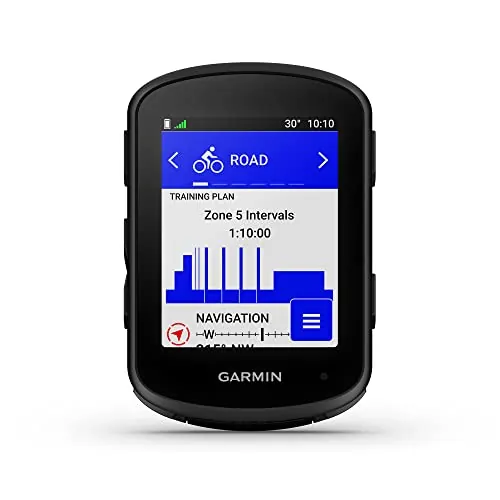
Garmin Edge 840 GPS Cycling Computer
Standard non-solar Edge 840; touchscreen plus physical-button operation.
Model 010-02695-00
Amazon ASIN B0BT36CRCQ
Hammerhead
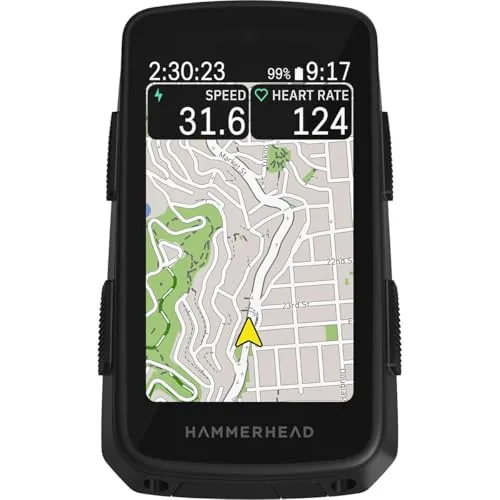
Hammerhead Karoo GPS Cycling Computer
Current Hammerhead Karoo model 00.3018.396.001; distinct from Karoo 2.
Model 00.3018.396.001
Amazon ASIN B0D5TC6BLS
Differences that matter
What matters most to you?
Choose a priority to see what it changes.
Sources for Screen size and published body size
Sources for On-device route creation
Sources for Route creation prerequisites
Sources for Screen and physical controls
Start with how you build routes
The Edge 840 manual describes a round-trip builder on the device: set a distance, choose a start point and choose a direction. You can select a current, mapped, saved or recent location, or use listed search tools. Karoo’s support page instead walks through a location search or map pins and waypoints. These are different documented processes, not a test of which route is better.
Karoo’s route instructions also require a downloaded offline map section and active internet through Wi-Fi or the Companion App for the route-creation flow. The page recommends Dashboard as a better route-creation experience, which can also be accessed from a smartphone. Decide where you will create routes and whether those steps work for your rides.
Treat screen size as a preference, then check the cockpit
Garmin lists a 2.6-inch diagonal screen for Edge 840 and body dimensions of 57.8 × 85.1 × 19.6 mm. Hammerhead lists 3.2 inches and a 102.8 × 61.7 × 19.9 mm body for Karoo. These figures let you compare the published device envelopes; they do not establish which display is easier to read while riding or whether either mount fits your handlebar.
Garmin’s setup instructions refer to its standard and out-front mounts. The exact Karoo product page lists a 31.8 mm Hammerhead mounting system and quarter-turn adapter in the box. Measure the bar and check the exact seller package and mount interface before purchase.
Match sensor and drivetrain support to your equipment
The Edge 840 manual says it pairs with ANT+ or Bluetooth wireless sensors and lists sensor categories such as heart rate, power, e-bike, speed/cadence and electronic shifting. Garmin’s 840-series announcement says certain training insights require compatible sensors. Check the exact accessory and function you plan to use.
SRAM lists Karoo integration with SRAM AXS equipment, including shifting and power-related connections, plus e-bike data fields. That is a positive fit if you use the supported SRAM equipment; it does not prove the Edge is incompatible. Verify the exact component, data field and any required account or setup before relying on it.
Do not use battery claims as a head-to-head result
Both companies describe power-saving options, but the available material does not test both computers with matched navigation, screen and sensor settings. The Garmin series announcement and SRAM product copy use their own stated duration conditions; those claims should not be compared as if they came from the same ride or test. Choose by route workflow, screen preference and verified equipment setup instead.
Product details
Garmin Edge 840 GPS Cycling Computer
Before you buy
Community discussions
Choosing controls for frequent map use
Garmin Edge 840 GPS Cycling Computer
An Edge 540 owner who used navigation was thinking about switching to the touchscreen Edge 840.
What to check
List the map actions you use on a normal ride and check how each exact computer handles them.
Following a Komoot route from phone to computer
Hammerhead Karoo GPS Cycling Computer
A Karoo 3 owner coming from a Garmin 1030 described saving a Komoot route, syncing it and opening it on the Karoo.
What to check
If you plan routes in Komoot, check the current steps for sending and opening a route on each computer.
Common questions
What does Karoo require to create a route on the device?
Hammerhead’s route-creation instructions say to download the specific offline map section and keep an active internet connection through Wi-Fi or the Companion App. They describe searching for a location or adding map pins/waypoints and recommend using Dashboard for a better experience.Karoo OS — Creating a Route
Can the Edge 840 create a round-trip route without starting from an existing course?
Its manual documents creating one on the device by entering a distance, selecting a start location and choosing a direction. It lists several ways to set the start location, including current location, map, saved/recent locations and search tools. The guide does not compare resulting route quality.Edge 840 Owner’s Manual — Creating and Riding a Round-Trip Course
Which one is easier to read or will fit my bike better?
The published diagonals differ (2.6 inches for Edge 840 and 3.2 inches for Karoo), but screen size alone does not prove readability outdoors. Manufacturer dimensions also do not certify fit with your handlebar or mount; measure your setup and verify the exact mounting package.Garmin Product Comparison — Edge 840 published size valuesKaroo — Hardware SpecificationsEdge 840 Owner’s Manual — Getting Started and Mount ChoicesHammerhead Karoo GPS Cycling Computer — SRAM exact SKU 00.3018.396.001
Does either computer last longer on a charge?
That is unresolved here. Garmin’s listed duration and SRAM/Hammerhead’s battery claims are not a matched test under the same settings and conditions. Both describe battery-saving settings; compare the conditions that match your ride rather than treating the published figures as a head-to-head result.Garmin Edge 540 and 840 Series GPS Cycling Computers — announcement and controlsHammerhead Karoo GPS Cycling Computer — SRAM exact SKU 00.3018.396.001Karoo OS — Battery Save Mode
Sources and scope
No comparative ride test was performed. The sources do not establish GPS accuracy, rerouting quality, display readability outdoors, physical mount compatibility, sensor behavior in a particular setup or matched-condition battery runtime. Product bundle contents must be confirmed for the exact seller offer.
- Garmin Edge 840 GPS Cycling Computer — exact part number 010-02695-00
- Edge 840 Owner’s Manual — Creating and Riding a Round-Trip Course
- Edge 840 Owner’s Manual — Wireless Sensors
- Edge 840 Owner’s Manual — Getting Started and Mount Choices
- Garmin Edge 540 and 840 Series GPS Cycling Computers — announcement and controls
- Garmin Product Comparison — Edge 840 published size values
- Hammerhead Karoo GPS Cycling Computer — SRAM exact SKU 00.3018.396.001
- Karoo OS — Creating a Route
- Karoo — Hardware Specifications
- Karoo OS — Battery Save Mode
Related comparisons
Garmin Edge 540 vs Edge 840: Controls, Map Workflow, and Package Checks
The Edge 540 is button-only and Garmin says its map updates go through Garmin Express on a computer. The Edge 840 keeps buttons and adds a touchscreen, plus Wi-Fi Map Manager for updating or adding maps on the device. These listing information identify the non-Solar standard editions; check the exact Amazon option before assuming which mounts, cables, tether, or sensors are in its box.
Read comparison
Garmin Edge 1050 vs Hammerhead Karoo: AXS Setup, Routes and Mounts
Both assigned computers document SRAM AXS support and on-device route work. Edge 1050 uses a sensor-menu pairing flow and Garmin course tools; current Karoo links an AXS account, syncs selected bikes and offers route search, pins and waypoints. Check network prerequisites, controller support and the exact mount in the box before choosing.
Read comparison