Products compared
Elgato
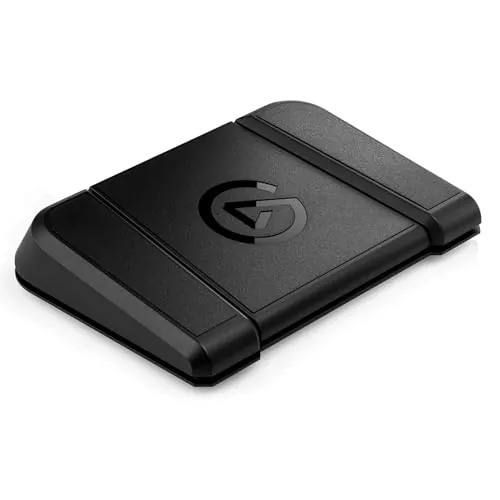
Elgato Stream Deck Pedal
U.S. Stream Deck Pedal model 10GBF9901, black; three customizable foot pedals with interchangeable spring-tension sets and a USB-C-to-USB-C cable listed in the box.
Model 10GBF9901
Amazon ASIN B09PRMCTGB
Elgato
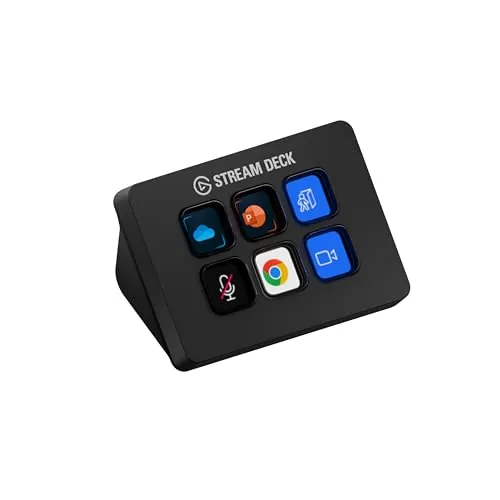
Elgato Stream Deck Mini
U.S. Stream Deck Mini model 10GAI9901, black; six customizable LCD keys with an integrated, non-detachable cable. Elgato's current U.S. product page and its device comparison table disagree on the required USB host connector, so verify the exact offer and computer.
Model 10GAI9901
Amazon ASIN B07DYRS1WH
Differences that matter
What matters most to you?
Choose a priority to see what it changes.
Sources for How you activate a command
Sources for Physical count and visible labels
Sources for Placement and desk/floor fit
Sources for How layouts expand beyond the physical controls
Sources for Computer and cable check
Decide whether you need a foot press or a visible hand control
Pedal's three switches are operated by foot. That changes the setup when your hands are already occupied: a command can be assigned to a pedal rather than a key you must reach for. Mini presents six customizable LCD keys that you press by hand; the key labels let you identify those controls on the device. Choose based on the task you will perform and where your hands need to be, not on an assumed productivity or accessibility advantage.
The two surfaces do not combine these properties. If you require the same action to be foot-triggered and displayed on a labeled LCD key, neither one by itself supplies both. A simple command inventory is more useful than picking by the Stream Deck name: write each action, then mark hands-free, labeled, or either.
Count physical controls separately from software actions
Mini gives you six physical keys; Pedal gives you three pedals. Elgato's device guide lists Smart Profiles and Multi Actions for both. Profiles can provide a different layout for a different app, and Multi Actions can group commands; neither feature increases the number of controls you can touch or step on at once.
Mini adds folders in Elgato's device comparison table. Its setup guide shows placing actions inside a folder and using a back key to return. That makes deeper layouts available, but you make an extra navigation press. If your important commands need to stay visible without navigating, count only the keys on Mini's main layout or the pedals you will use directly.
Plan placement, cable reach, and spring setup
Elgato lists Pedal at 175 × 244 × 49 mm and 960 g, and Mini at 84 × 60 × 58 mm and 160 g. Measure the actual spot rather than inferring fit from product names. Pedal is intended for foot placement and includes adjustable spring sets and stoppers; Mini is a desktop pad with six keys and an integrated, non-detachable 150 cm cable. Check the cable reach from the computer to the position where you plan to press.
The exact Pedal U.S. page specifies a 250 cm USB-C-to-USB-C cable in the box and lists USB-C as its host requirement. For Mini, Elgato's U.S. product page lists USB-C, but the official device-comparison table says USB-A. That connector difference is unresolved in the manufacturer's current documentation; confirm the exact 10GAI9901 listing and computer port before ordering.
Check the computer and the exact action you plan to assign
The current U.S. pages for both exact products list Windows 11 or newer or macOS 13 or newer, plus the Stream Deck app. Elgato's comparison guide says both use the same Stream Deck desktop application. These pages do not guarantee every third-party plugin or specific app command will work the same way on every OS. If a particular meeting, editing, music, or streaming action is the reason you are buying, confirm that action against the current plugin and your software version.
No measured speed, error rate, reliability, comfort, or work-quality comparison is available here. The supported decision is the control layout and setup path: foot-operated pedals, or a hand-operated LCD keypad with folders.
Product details
Elgato Stream Deck Pedal
Pedal is a floor control: its three switches can trigger actions while your hands stay on another task. Elgato supplies spring choices and stoppers, so plan where it will sit and whether the foot-operated positions match your routine. The hardware offers three pedals; Smart Profiles and Multi Actions can change software layouts or group actions, but do not add physical pedals.
- Physical controls
- Three customizable foot pedals; listed size 175 × 244 × 49 mm and weight 960 g. Source
- Pedal adjustment and in-box pieces
- Elgato lists four soft, four medium and four hard spring sets plus two stoppers; its product page lists a 250 cm USB-C-to-USB-C cable and SKU 10GBF9901. Source
- Current host requirements
- Elgato lists Windows 11 or newer, macOS 13 or newer, a USB-C port and the Stream Deck app. Source
Elgato Stream Deck Mini
Mini is a small desktop keypad: you press one of six customizable LCD keys by hand, and the displayed icons can label the commands. Mini supports folders, so additional software actions can sit behind a key; returning from a folder takes another press. This is useful when you want on-device labels, but the six physical keys still need a hand to reach.
- Physical controls and cable
- Six customizable LCD keys; listed size 84 × 60 × 58 mm and weight 160 g. Elgato lists an integrated, non-detachable 150 cm USB 2.0 cable. Source
- Folders and software setup
- The Mini supports folders; its official quick-start guide shows creating a folder on a key and returning with the back key. Source
- Current host requirements
- Elgato's U.S. product page lists Windows 11 or newer, macOS 13 or newer, a USB-C port and the Stream Deck app. Its device comparison guide lists USB-A for Mini instead; confirm the requirement for the exact 10GAI9901 offer before purchase. Source
Before you buy
Community discussions
A Stream Deck Mini owner starts with meeting shortcuts
Elgato Stream Deck Mini
In a discussion about everyday controls, a Stream Deck Mini owner described using its keys for meeting actions and then keeping separate profiles for other applications.
What to check
Decide which actions need a visible button and which you would prefer to trigger while your hands are occupied.
Common questions
Does Stream Deck Pedal give you only three software actions?
It has three physical pedals. Elgato lists Smart Profiles and Multi Actions for Pedal, so those three controls can support different software layouts or grouped actions. The comparison guide does not list folders for Pedal; this does not establish that only three actions can ever be configured.Stream Deck Device Comparison Guide - Elgato
Can Stream Deck Mini use more than six configured actions?
Mini has six physical LCD keys. Elgato lists Smart Profiles, Multi Actions, and folders; its quick-start guide shows putting actions inside a folder and backing out to the main configuration. Those software options do not add physical keys, and a folder takes an extra press to navigate.Stream Deck Device Comparison Guide - ElgatoElgato Stream Deck Mini - Quick Start Guide
What USB port does the exact Stream Deck Mini need?
Elgato's current U.S. Mini product page lists a USB-C host requirement, while Elgato's device comparison table lists USB-A for Mini. Since the exact connector is inconsistent in official documents, verify the port/cable for SKU 10GAI9901 and your computer before buying.Stream Deck Mini - Elgato U.S. product pageStream Deck Device Comparison Guide - Elgato
What operating system does each exact product page currently list?
Elgato's current U.S. product pages for Pedal SKU 10GBF9901 and Mini SKU 10GAI9901 list Windows 11 or newer or macOS 13 or newer, with the Stream Deck app. Recheck the current requirements if your computer uses another version.Stream Deck Pedal - Elgato U.S. product pageStream Deck Mini - Elgato U.S. product page
Sources and scope
This guide compares documented hardware layout and current Elgato setup information for Pedal SKU 10GBF9901 and Mini SKU 10GAI9901. Elgato’s current U.S. Mini product page lists a USB-C host requirement, while its official device-comparison table lists USB-A for Mini; the connector for the exact Mini offer remains unresolved between these official pages. Verify the requirement for the offer and your computer before buying. Elgato lists an integrated, non-detachable 150 cm Mini cable. Both pages list Windows 11 or newer and macOS 13 or newer with Stream Deck software. No accessibility, speed, comfort, reliability, latency or productivity outcome was tested; confirm each intended command/plugin in your app and software setup.