Products compared
Elgato
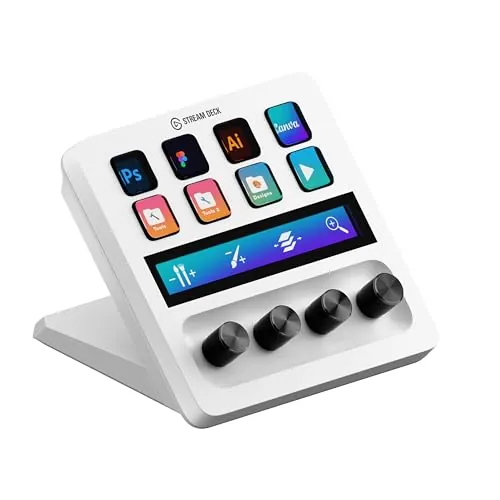
Elgato Stream Deck+ White
Elgato lists the Stream Deck+ White (10GBD9911) with eight customizable LCD keys, four multifunction dials and an LCD touch strip.
Model 10GBD9911
Amazon ASIN B0BXHL5DMD
Elgato
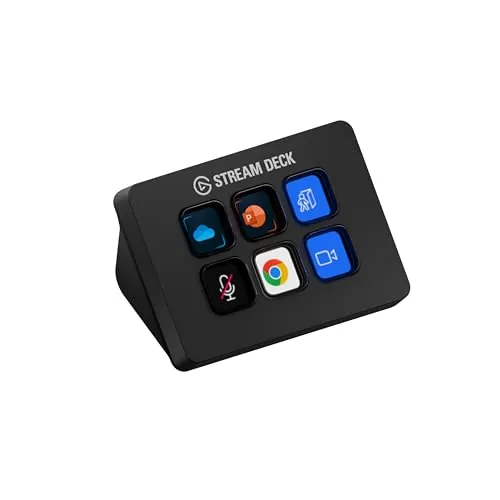
Elgato Stream Deck Mini Black
Elgato lists the black Stream Deck Mini (10GAI9901) with six customizable LCD keys; software pages and nested folders can hold additional actions behind those six physical keys.
Model 10GAI9901
Amazon ASIN B07DYRS1WH
Differences that matter
Sources for How many actions stay visible
Sources for Dial and touch workflow versus key presses
Sources for Desk space and placement
Sources for Desktop app and operating-system gate
Start with the action layout you actually use
The main difference is physical layout: eight visible LCD keys plus four dials and a touch panel on the Stream Deck+ White, compared with six LCD keys on the Mini. Both support software-organized actions such as pages, folders and Multi Actions, so the Mini is not limited to only six stored commands; its six-key surface means you navigate to additional actions rather than seeing more physical keys at once.
A dial is useful only when the desired app action supports it. Elgato's setup guide says unavailable plugins or actions will not appear in the dial assignment list. Treat the dial as a compatibility check against your actual plugin, not as a universal control for every app.
Make the cable and app checks before buying
The + product page lists a separate 150 cm USB-C-to-USB-C cable. The Mini uses an integrated 150 cm cable, but Elgato's references disagree about the Mini connector: its technical-specification page says the cable changed from Type-A to Type-C in 2026, while the device matrix still lists Type-A. Since the cable is not detachable, inspect the exact offer or verify the delivered revision before relying on a particular connector.
The current software requirements apply to both: 64-bit Windows 11 on Intel or AMD, or macOS Ventura 13.0 or later. Confirm the computer that will run the app and the specific plugins/actions you expect to use.
Product details
Elgato Stream Deck+ White
Elgato Stream Deck Mini Black
- Control surface
- 6 customizable LCD keys; Elgato documents pages and nested folders for actions beyond the six-key surface. Source
- Listed dimensions
- 84 × 60 × 58 mm (3.3 × 2.4 × 2.3 in). Source
- Integrated cable
- The product page lists a non-detachable 150 cm USB 2.0 cable. A separate 2026 support update says the Mini cable changed from Type-A to Type-C; see the pre-buy note because an older comparison matrix still says USB-A. Source
Before you buy
Community discussions
A Stream Deck+ owner asks what the dials can do beyond volume
Elgato Stream Deck+ White
The OP recently got a Stream Deck+ and says they have used its dials for weather and Chrome tabs, but have struggled to find compatible plugins and want ideas beyond volume controls. This is one owner’s early experience, not a test of the device or a guarantee that a particular plugin works.
What to check
Before paying for the + dials, list the dial actions you would actually use and verify that the current plugin supports them. If your main needs are button-triggered actions, compare those against Mini’s six physical keys and software pages.
A Stream Deck Mini owner starts with meeting shortcuts
Elgato Stream Deck Mini Black
In a discussion about everyday controls, a Stream Deck Mini owner described using its keys for meeting actions and then keeping separate profiles for other applications.
What to check
List the meeting and app actions you use often. Decide which you would press and whether you need separate dials.
Common questions
Can Stream Deck Mini store more than six actions?
Elgato says pages and nested folders can expand the available controls beyond six. The Mini still has six physical LCD keys, so additional actions are reached through the configured layout rather than shown on extra keys at once.Stream Deck Mini — U.S. product pageStream Deck Device Comparison Guide
Will every Stream Deck plugin work with the + dials?
No. Elgato's dial guide says only available plugins/actions appear for assignment and that not all plugins support dials. Verify the particular action you want before choosing the + for that workflow.Elgato Stream Deck+ — Dials Introduction
Does the Mini in this comparison definitely have a USB-A cable?
The exact cable revision cannot be confirmed for the selected Amazon ASIN from the inspected official references. Elgato's Mini technical-specification page says the integrated cable changed from Type-A to Type-C in 2026, while the device comparison matrix still lists USB-A. Confirm the connector in the exact offer or supplied unit.Elgato Stream Deck Mini — Technical SpecificationsStream Deck Device Comparison Guide
What computer does the current Stream Deck app require?
Elgato currently lists 64-bit Windows 11 on Intel or AMD, or macOS Ventura 13.0 or later. The shared app does not establish that every third-party plugin or action works on every configuration.Elgato Stream Deck Software — System RequirementsStream Deck Device Comparison Guide
Sources and scope
This guide compares documented hardware layout, software requirements and setup details for Stream Deck+ White SKU 10GBD9911 and Stream Deck Mini Black SKU 10GAI9901. It does not rank productivity or ease of use, and it does not report a hands-on or matched workflow test. Elgato’s current Mini technical-specification page says the integrated cable changed from Type-A to Type-C in 2026, while its device-comparison matrix still lists USB-A; the connector on the exact Mini offer remains unresolved. Check the listing or included cable against your host before ordering.
- Stream Deck+ White — U.S. product page
- Stream Deck Mini — U.S. product page
- Stream Deck Device Comparison Guide
- Elgato Stream Deck+ — Technical Specifications
- Elgato Stream Deck Mini — Technical Specifications
- Elgato Stream Deck+ — Dials Introduction
- Elgato Stream Deck+ — Touch Strip
- Elgato Stream Deck Software — System Requirements