Products compared
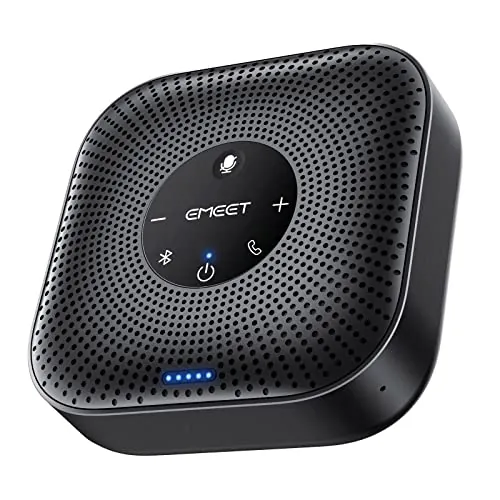
EMEET
EMEET OfficeCore M0 Plus Conference Speakerphone
EMEET offers a single M0 Plus and a separate two-unit expansion bundle. Check the exact ASIN B0BVZLS5GZ offer if you need a daisy-chain cable; the manufacturer's single-unit box list and two-unit bundle differ.
Model M0 Plus
Amazon ASIN B0BVZLS5GZ
Anker
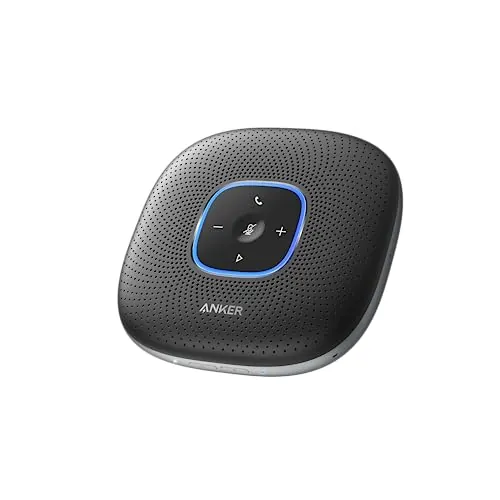
Anker PowerConf Bluetooth Speakerphone
Anker's manufacturer materials identify PowerConf as model A3301. The offer identified by ASIN B07ZNT7PRL is associated with part A3301011, while the Anker page lists A3301012; confirm the exact model code and accessories in the offer before checkout.
Model A3301
Amazon ASIN B07ZNT7PRL
Differences that matter
What matters most to you?
Choose a priority to see what it changes.
Sources for Two host connections and the active audio mode
Sources for Adding a second speakerphone
Sources for Charging another device from the speakerphone
Sources for Microphone hardware and buttons
Sources for Battery ratings and exact box contents
Start with the host-switching behavior you want
The connection labels are similar, but the documented user action is not. EMEET lists one corded device and one Bluetooth device on M0 Plus. Its product page and FAQ do not say whether audio from the two connections is mixed or how the active source is selected. Treat that detail as unknown until EMEET confirms the behavior you need.
Anker is more explicit for PowerConf A3301: it says the speakerphone can be connected to a computer through USB and to a second device over Bluetooth at the same time. If there is no sound from the intended source, its FAQ says to select PowerConf as the output and hold Play for two seconds to switch between USB and Bluetooth modes. This is an active-source switch, not evidence that two separate calls are mixed together.
If you alternate between a laptop meeting and a phone call, keep that button action in mind. If seamless dual-call mixing is essential, neither set of cited instructions establishes that behavior; confirm it before purchase.
Choose expansion by the second speakerphone you own
EMEET describes a cable-based daisy chain for compatible EMEET units, naming M0 Plus, M3, and Meeting Capsule. The FAQ says to connect the units' OUT ports with an EMEET daisy-chain cable and clarifies that this extends a mono speaker-and-microphone arrangement rather than creating stereo. The feature is useful only if your second unit is in the supported family and the right cable is available.
Anker's A3301 FAQ says PowerConf cannot daisy-chain two speakerphones to one host at a time. Do not transfer linking features from PowerConf S500 or other Anker models to A3301. If expansion is a deciding requirement, verify exact model names on both units and check the cable contents of the selected M0 Plus Amazon offer.
Treat charge-out and call-time figures as separate jobs
PowerConf A3301 documents a USB-A PowerIQ charge-out for another device. Its manual says the unit must be on and not charging; below 30% battery the output is limited to 5 V/1 A, and below 10% it stops. This can fit a desk or travel kit where a small backup output is useful, provided the speakerphone's own power state and remaining charge meet those limits.
EMEET's M0 Plus pages list USB-C and Bluetooth connections plus a 2600 mAh built-in battery. EMEET says a fully charged unit typically supports a 10-hour continuous call. The Anker A3301 product page lists 6700 mAh and 24 hours of talk time, but the published pages do not establish matching runtime test conditions. Read those as individual maker ratings, not proof one will last a known amount longer in your meetings.
Verify the exact package before relying on an included cable
The EMEET product page lists an individual M0 Plus option separately from its two-unit expansion bundle, which explicitly includes one daisy-chain cable. The standard single-unit page lists the speakerphone, USB-C cable, user manual, and carrying case. That model page does not verify the contents of Amazon ASIN B0BVZLS5GZ, so confirm the selected offer if you need a chain cable or a specific accessory.
Anker's official A3301 page lists SKU A3301012 and a travel case, USB-C cable and user guide. The offer identified by ASIN B07ZNT7PRL is associated with A3301011. Both labels identify the A3301 family, but Anker's materials do not confirm that the two SKU suffixes share a package. Check the model code and box list on the offer before checkout.
Product details
EMEET OfficeCore M0 Plus Conference Speakerphone
- Listed connection count
- EMEET lists one corded device and one device via Bluetooth; it does not describe source-selection or audio-mixing behavior for those connections. Source
- Expansion
- EMEET says a separate daisy-chain cable links compatible units including M0 Plus, M3, and Meeting Capsule; the FAQ says this extends a mono speaker-and-microphone setup, not stereo. Source
- Microphone array
- Four omnidirectional microphones, as listed by EMEET; this is a hardware description, not a pickup-quality comparison. Source
- USB and Bluetooth
- USB-C cable and Bluetooth 5.0 are listed connection methods. EMEET's FAQ describes USB-C computer setup and Bluetooth pairing with a mobile device. Source
- Maker-stated battery
- EMEET says its 2600 mAh battery typically supports a 10-hour continuous call when fully charged; treat this as a manufacturer statement, not a comparable runtime test. Source
Anker PowerConf Bluetooth Speakerphone
- Connection switching
- Anker says USB and Bluetooth devices can be connected at the same time; hold Play for two seconds to switch between USB and Bluetooth modes. Source
- Daisy-chain support
- Anker's A3301 FAQ says it does not support daisy-chaining two speakerphones to one host at a time. Source
- Microphone array
- Anker's A3301 product page describes six microphones arranged in a 360-degree array; this does not establish comparative pickup performance. Source
- USB-A charge-out
- The A3301 manual lists USB-A charge-out. Output is unavailable while the speakerphone is off or charging, drops to 5 V/1 A below 30% remaining battery, and stops below 10%. Source
- Maker-stated battery
- The A3301 page lists a 6700 mAh battery and 24-hour talk time. Anker does not specify comparable test conditions on that page; do not treat the rating as a head-to-head result. Source
Before you buy
Community discussions
Checking microphone pairing on a meeting-room computer
EMEET OfficeCore M0 Plus Conference Speakerphone
A team trying an M0 Plus on an Ubuntu meeting cart ran into Bluetooth pairing trouble. They were looking for a wireless speakerphone for hybrid Zoom calls.
What to check
If your room uses Linux, check that your intended connection shows both microphone and speaker in the meeting app.
Common questions
Can PowerConf A3301 connect to USB and Bluetooth at once?
Anker's A3301 FAQ says it may be connected to two devices through USB and Bluetooth at the same time. To switch the active mode, it says to hold Play for two seconds. That documents switching, not mixing two call streams.PowerConf A3301 FAQ
Can the M0 Plus be daisy-chained with another EMEET speakerphone?
EMEET says its daisy-chain cable connects compatible models including M0 Plus, M3, and Meeting Capsule. Its FAQ calls this an extension of a mono speaker-and-microphone setup, not stereo. Verify the exact second model and whether your selected offer includes the cable.EMEET OfficeCore M0 Plus product pageEMEET M0 Plus FAQ
Can the PowerConf A3301 charge a phone while it is switched off?
No. The A3301 manual says USB-A charge-out is unavailable while PowerConf is off or charging, reduced to 5 V/1 A below 30% battery, and unavailable below 10%.Anker PowerConf User Manual A3301
Which exact accessories arrive with these Amazon listings?
The manufacturer pages describe standard M0 Plus and A3301 model packages, but they do not establish the selected Amazon ASIN offers. This is especially important for an M0 Plus daisy-chain cable and because the assigned A3301 listing data part A3301011 differs from the inspected official page's SKU A3301012. Check the selected Amazon offer's model code and box contents before purchase.EMEET OfficeCore M0 Plus product pagePowerConf Bluetooth Speakerphone with 6 Microphones A3301
Sources and scope
EMEET documents a compatible link cable, and Anker’s A3301 materials describe the active-source switch. Check the retailer’s exact package for cables and any kit-specific accessories.