
Pickagu

Jabra Speak 510 vs EMEET M0 Plus: Cable, Charging and Meeting Setup

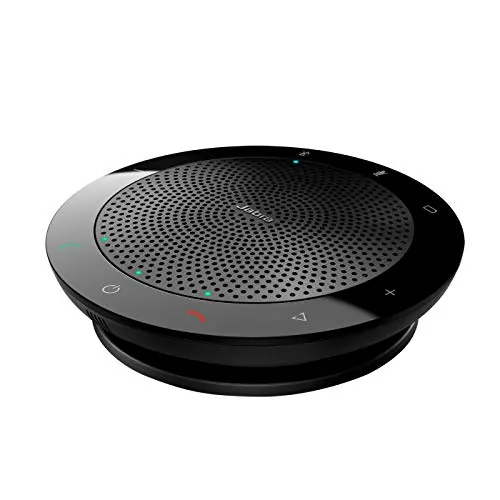
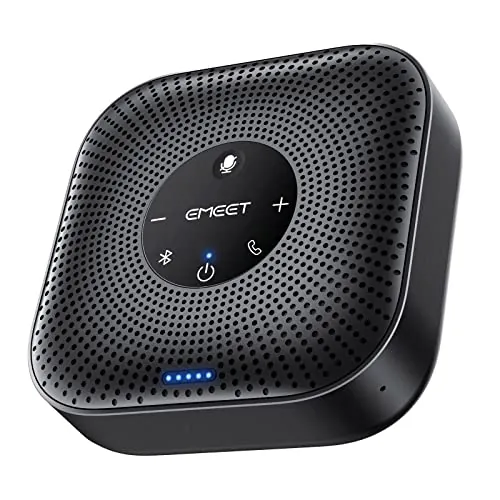
Jabra Speak 510 (2025 Edition)Model 7510-209-01EMEET OfficeCore M0 PlusModel M0 PLUS

Both models offer wired USB and Bluetooth, but their cable arrangements differ. Jabra documents up to four participants; EMEET documents one-unit guidance for up to eight and a two-unit daisy-chain setup for up to sixteen. Match those manufacturer guidelines to your meeting plan, then verify the exact retail package and app behavior before you buy.

Choose by what matters to you

Choose Jabra Speak 510 (2025 Edition) 7510-209-01

A specific adapter or UC package matters.

Check price on Amazon

Choose EMEET OfficeCore M0 Plus M0 PLUS

You need the stated two-unit path for up to sixteen, verify that the selected package contains two units and the daisy-chain cable; the single-unit product page lists those as a separate configuration.

Check price on Amazon

Keep comparing if your decision depends on measured microphone pickup, audio quality, or coverage in a particular room. These sources provide manufacturer guidance only, and no controlled head-to-head room test was found in the assigned evidence.

As an Amazon Associate I earn from qualifying purchases.Affiliate disclosure

Products compared

Jabra Speak 510 (2025 Edition) · 7510-209-01

Jabra

Jabra Speak 510 (2025 Edition)

Black, single speakerphone as identified in the current product record. Jabra’s 2025 technical sheet lists the related 7510-209 Speak 510 UC family item, not the complete -01 retail suffix.

Model 7510-209-01
Amazon ASIN B0FC3XV5DK
Check current price on Amazon
EMEET OfficeCore M0 Plus · M0 PLUS

EMEET

EMEET OfficeCore M0 Plus

Single M0 Plus model in the current listing data. EMEET’s official page also offers a separate two-unit bundle with a daisy-chain cable; do not assume that bundle is the selected Amazon package.

Model M0 PLUS
Amazon ASIN B0BVZLS5GZ

Check current price on Amazon

Differences that matter

What matters most to you?

Choose a priority to see what it changes.

Difference
Jabra Speak 510 (2025 Edition)
EMEET OfficeCore M0 Plus
Why it matters
Wired host connection and cable reach
Jabra Speak 510 (2025 Edition)Jabra’s 2025 family sheet specifies an integrated 0.9 m USB-A lead and a USB-C adapter.
EMEET OfficeCore M0 PlusEMEET lists a 1 m USB-C-to-USB-C cable and USB-C-to-USB-A adapter in its connection specifications. Its single-unit box list includes the cable but does not list the adapter.
Measure the distance from the device to the host and check whether your computer has USB-A or USB-C. Jabra’s cable is built in; EMEET lists a separate USB-C cable. If you need USB-A for EMEET, confirm that the exact seller box includes the adapter. Both makers also list Bluetooth, so these cable differences alone do not establish host incompatibility.
Sources for Wired host connection and cable reach
Charging routine
Jabra Speak 510 (2025 Edition)Jabra’s Speak 510 family sheet says the rechargeable battery is charged through the USB connection; it does not document charging while using a separate wall adapter for the selected -01 suffix.
EMEET OfficeCore M0 PlusEMEET’s M0 Plus FAQ instructs charging through a USB cable while the device is off. It describes a built-in rechargeable battery; the page’s stated charge time varies with remaining charge and battery condition.
Both have a battery and a USB-based charging path in the cited family/model documentation, but the sources do not establish identical charging conditions or whether either selected retail box includes a separate power adapter. Plan to have a suitable USB power source and use the exact manual for the unit received; do not compare the manufacturers’ charge-time estimates as a head-to-head result.
Sources for Charging routine
Published participant guidance and daisy-chain setup
Jabra Speak 510 (2025 Edition)Jabra’s 2025 Speak 510 family sheet states in-room guidance for up to four people. It does not establish an expansion setup in that document.
EMEET OfficeCore M0 PlusEMEET states up to eight people for one M0 Plus and up to sixteen for two units connected with its daisy-chain cable. Its product page shows a two-unit option containing two M0 Plus devices and one daisy-chain cable, separate from the single-unit option.
Use the participant counts only as the manufacturers’ planning guidance, not as proof of sound pickup or room coverage. For a group beyond Jabra’s published guidance, EMEET documents a larger configuration, but it requires another unit and the chain cable. Confirm the exact ASIN bundle instead of assuming those parts are included.
Sources for Published participant guidance and daisy-chain setup
Meeting-app mute and certification check
Jabra Speak 510 (2025 Edition)Jabra’s 2022 family specification identifies 7510-209 as Speak 510 UC and lists Skype for Business certification; it does not confirm the full 7510-209-01 retail suffix or a current Teams mute-status behavior.
EMEET OfficeCore M0 PlusEMEET lists use with Teams and Zoom, but says its M0 Plus is not certified to synchronize the hardware mute state with those apps; the physical mute button still mutes the microphone while the app icon may not update.
If your work requires a certified exact SKU or a hardware mute indicator that mirrors the meeting app, verify that requirement for the exact product and app version before buying. Do not infer current Teams certification for the Jabra suffix from its older Skype for Business family sheet, or treat EMEET’s lack of mute-icon synchronization as inability to join those meetings.
Sources for Meeting-app mute and certification check

Start with the ports at your meeting table

The Jabra’s documented cable is integrated into the speakerphone: 0.9 m ending in USB-A, with a USB-C adapter. EMEET lists a separate 1 m USB-C cable. If your host has only USB-A, EMEET’s connection specifications mention an adapter but the single-unit box list does not; verify the selected package. Both manufacturers also document Bluetooth, so choose the cable arrangement you prefer rather than assuming one model cannot connect to your computer.

Before ordering, measure from the unit’s intended table position to the host port. Jabra’s fixed lead gives less freedom to replace the cable; EMEET’s listed cable is separate. This is a desk setup check, not a claim that one connection sounds or performs better.

Use participant guidance to plan the configuration

Jabra’s 2025 sheet gives up-to-four-person in-room guidance. EMEET states up to eight people with one M0 Plus and up to sixteen when two devices are connected with the required daisy-chain cable. Treat both sets of figures as manufacturer guidance; they do not predict how well a particular table, distance or noisy room will work.

For the EMEET sixteen-person setup, count the hardware before you compare packages: the official two-unit bundle shows two M0 Plus devices and one chain cable. Its single-unit option is listed separately. If the exact Amazon listing does not clearly show the second device and cable, do not plan on the expanded configuration being included.

Check charge and app controls as separate requirements

The Jabra family specification describes USB charging. EMEET’s M0 Plus FAQ says to charge through a USB cable while the unit is off. The sources do not establish matched battery endurance or charge-time conditions, so neither is presented as a better battery choice.

If your meetings rely on an app’s mute icon matching a hardware button, check that behavior explicitly. EMEET says its physical mute works but the mute state may not synchronize in Teams or Zoom. Jabra’s older family sheet lists Skype for Business certification for the Speak 510 family, but it does not verify that the listing data’s full 7510-209-01 suffix has current Teams mute synchronization.

Product details

Jabra Speak 510 (2025 Edition)

Wired layout
Manufacturer sheet lists a 0.9 m integrated USB-A cable and USB-C adapter. Source
Manufacturer participant guidance
Up to four people in-room, per the 2025 family technical sheet; this is guidance, not a coverage test. Source

EMEET OfficeCore M0 Plus

Wired layout
EMEET lists a 1 m USB-C-to-USB-C cable and a USB-C-to-USB-A adapter in connection specifications; its single-unit box list names the cable but not the adapter. Source
Manufacturer participant guidance
Up to eight people with one unit and up to sixteen in a two-unit daisy-chain configuration; these are maker recommendations, not measured room coverage. Source

Before you buy

  • Before ordering, match your host port to the cable you will use and measure the cable path from the meeting table to the computer. Jabra documents a fixed 0.9 m USB-A lead with a USB-C adapter; EMEET documents a 1 m USB-C lead.
  • Check the exact EMEET seller package if you need the USB-C-to-A adapter: the manufacturer connection specifications list one, while its single-unit box list names the USB-C cable but not that adapter.
  • If planning for more than one M0 Plus, confirm that the selected bundle contains two units and an EMEET daisy-chain cable. The single-unit and two-unit options are listed separately by EMEET.
  • Treat the participant counts as maker guidance, not a guarantee for your room. Room layout, distance and background noise are not tested in this comparison.
  • If Teams/Zoom mute-state synchronization or a formal certification is required, verify the exact SKU and current app certification. EMEET says hardware mute works but its software mute icon may not synchronize; Jabra’s older family sheet does not confirm that behavior for listing data suffix 7510-209-01.

Community discussions

Planning where a speakerphone will sit at a desk

EMEET OfficeCore M0 Plus

A meeting participant wanted a low-profile audio setup. An M0 Plus owner in the discussion said they usually place it beside or behind the keyboard.

What to check

Pick a spot near where people talk and check that the speakerphone and its controls can stay within reach.

Original Reddit discussion

Common questions

Does the EMEET M0 Plus single-unit listing include the daisy-chain cable?

EMEET lists a single-unit option separately from its two-unit option. The official two-unit configuration contains two M0 Plus devices and one daisy-chain cable. Check the exact retailer package before assuming those extra items are included.EMEET OfficeCore M0 Plus

Will the M0 Plus mute button update the Teams or Zoom mute icon?

EMEET says the physical mute button mutes the microphone, but its M0 Plus is not certified for synchronized mute-state display in Teams or Zoom, so the software icon may not change. If that indicator is a requirement, confirm current app behavior before buying.M0 Plus FAQ

Are the participant counts a room-coverage test?

No. They are manufacturer recommendations. This comparison does not include a controlled microphone-pickup or room-coverage test.Jabra Speak 510 Technical Specifications (2025-07-08)EMEET OfficeCore M0 Plus

Sources and scope

This is a feature-fit guide based on manufacturer documentation, not a hands-on audio, microphone or room-coverage comparison. Jabra’s sources identify the 7510-209 Speak 510 UC family but do not verify the listing data’s full 7510-209-01 suffix or its exact US retail box. EMEET’s official page describes several package variants; its single-unit box list and connection specifications differ on whether a USB-A adapter is included, so check the exact seller package.
  1. Jabra Speak 510 Technical Specifications (2025-07-08)
  2. Jabra Speak 510 Technical Specifications (02/2022)
  3. EMEET OfficeCore M0 Plus
  4. M0 Plus FAQ