
Products compared
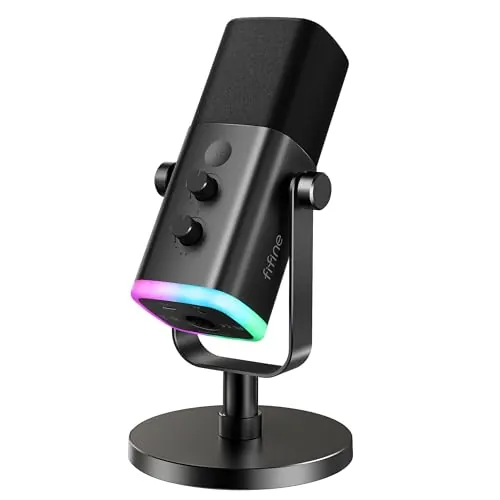
FIFINE
FIFINE AmpliGame AM8 USB/XLR Dynamic Microphone
The black AM8 standard package is listed with a base stand and USB cable. Check the exact seller option; AM8T, AM8PLUS and other bundles may have different stands or cables.
Model AM8
Amazon ASIN B0BMFQP2ZZ
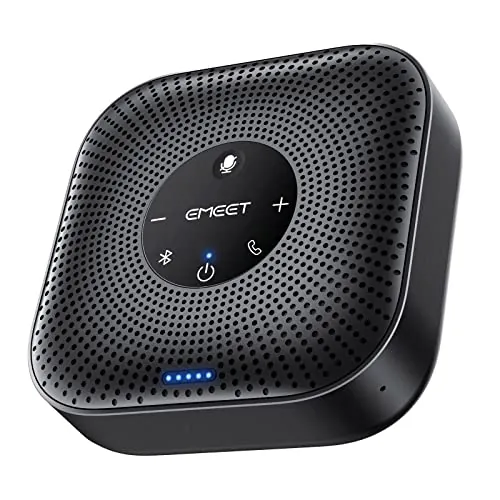
EMEET
EMEET OfficeCore M0 Plus Conference Speakerphone
This guide covers one black M0 Plus. EMEET offers other bundles; check the exact single-unit offer and its included cables or accessories before ordering.
Model M0 Plus
Amazon ASIN B0BVZLS5GZ
Differences that matter
What matters most to you?
Choose a priority to see what it changes.
Sources for Where incoming computer audio plays
Sources for Additional connection you need
Sources for Mute and monitoring controls
Sources for Power and package check
Decide whether you want headphones or speaker playback
The AM8 is the more direct fit for one person's voice-input desk when you already use headphones. In USB mode, its manual shows the computer using the microphone for input while output is routed through headphones connected to the mic. It also shows using the computer's own speaker or headphone output, so you do not have to listen through the AM8 jack.
The M0 Plus is a speakerphone: EMEET documents selecting it as both computer microphone and speaker so incoming audio plays from the desk unit. If other people sit around the table, that all-in-one layout may better match the use case than a personal microphone with separate headphones. This is a routing distinction, not a claim about call clarity, pickup range, or room performance.
Choose the extra connection and understand what changes
If an XLR interface is already part of your setup, the AM8 can connect to it with a separate XLR cable. FIFINE says to manage functions such as volume, mute, or monitoring on the interface or mixer; the microphone's USB controls are inactive in XLR mode. The exact listing is the base-stand and USB-cable configuration, so check the seller's included-items list before assuming an XLR cable is supplied.
For phone pairing, EMEET documents Bluetooth on the M0 Plus alongside the computer USB route. Its product page lists one wired and one Bluetooth-connected device, but it does not establish that two call streams are mixed. Choose this path for the pairing capability you need, then verify the behavior for your host and conferencing application.
Set up the controls you expect to rely on
AM8's USB-mode controls include hardware mute and headphone/gain functions according to FIFINE. EMEET documents M0 Plus hardware mic mute and volume controls, but also says mute-state synchronization with Zoom and Teams is not certified. Before a meeting, check both the device indicator and the conferencing app instead of assuming they always show identical state.
A useful pre-buy check is to write down the app's input device, output device, and mute method. If that routing is hard to explain for the system you use, confirm it with the manufacturer or app documentation before selecting a device.
Check the exact stand, cable, and speakerphone package
FIFINE's product page distinguishes the base stand plus USB cable from the AM8T boom-arm and AM8PLUS XLR-cable bundle. The listing data ASIN in this comparison is the base-stand version, so use the exact offer title and included-items section to confirm it before checkout.
EMEET's product page shows a single M0 Plus and separate multi-device bundles with different accessory contents. Its general box list and FAQ are not identical, so check the seller's single-unit contents rather than assuming a case, adapter, or daisy-chain cable. The M0 Plus also has a rechargeable battery; include its charging routine if you plan to move it away from USB power.
Product details
FIFINE AmpliGame AM8 USB/XLR Dynamic Microphone
A fit for a personal voice-input setup where you already have or plan to add headphones, or where an XLR interface is part of the desk. Choose by routing and connection needs, not an untested sound-quality ranking.
- Computer listening path
- In USB mode, a computer can use the AM8 as input and route playback to wired headphones connected to the mic; the manual also shows separate computer headphone or speaker output Source
- XLR setup
- Requires a separate XLR cable and audio interface or mixer; the interface or mixer handles controls and monitoring Source
- USB-only controls
- FIFINE lists real-time headphone monitoring, headphone-volume and gain controls, and hardware mute for USB mode; mute, RGB, and function keys are inactive in XLR mode Source
EMEET OfficeCore M0 Plus Conference Speakerphone
A fit when incoming computer audio should play through the same desk device that supplies microphone input, or when you need Bluetooth phone pairing. EMEET documents physical mute, but its FAQ says the software mute indicator may not track that button.
- Computer input and output
- Connect by USB-C and select M0 Plus as both microphone and speaker in the computer or meeting app Source
- Additional device connection
- Bluetooth pairing is documented for phones, tablets, and computers; EMEET lists one wired and one Bluetooth-connected device, which does not by itself promise mixed or simultaneous call audio Source
- On-device controls
- The speakerphone has a hardware microphone-mute button and volume controls; Zoom or Teams mute-icon synchronization is not certified according to EMEET's FAQ Source
Before you buy
Community discussions
Keeping PC audio and mic monitoring in one headphone setup
FIFINE AmpliGame AM8 USB/XLR Dynamic Microphone
A Windows user considering the FIFINE AM8 wanted to know whether one headphone connection could carry both computer audio and microphone monitoring.
What to check
Work out where you want to plug in your headphones. Check how the AM8 and EMEET each handle playback in the setup you plan to use.
Common questions
Does plugging headphones into AM8 automatically route computer audio to them?
No. In the documented USB setup, select the AM8 for computer input and choose the intended output device. FIFINE's manual shows playback through headphones on the mic and also separate computer speakers or headphone output.AM8 user guide, SS Version 25-V2
Does the FIFINE AM8 include everything for XLR?
The selected base-stand plus USB-cable AM8 version does not promise XLR equipment. FIFINE says XLR requires a separate cable and interface or mixer; select and verify an XLR bundle only if that is the offer you want.FIFINE AmpliGame AM8 USB/XLR Dynamic Microphone with RGB
Can the EMEET M0 Plus be both the computer microphone and speaker?
Yes, EMEET's setup FAQ shows selecting M0 Plus as both input and output. Confirm the sound selections in the meeting app as well as the computer settings.EMEET OfficeCore M0 Plus setup FAQ
Will pressing M0 Plus mute update the Zoom or Teams mute icon?
EMEET says its mute function is not certified for synchronized status display in Zoom or Teams. The physical mute can be active even when the software icon does not show the same state.EMEET OfficeCore M0 Plus setup FAQ
Does Bluetooth mean M0 Plus mixes a phone call with a computer meeting?
The manufacturer lists one wired and one Bluetooth-connected device, but that does not establish simultaneous mixing or call merging. Verify the exact multi-device behavior you need before purchase.EMEET OfficeCore M0 Plus product information
Sources and scope
This guide compares documented computer routing, connections, and controls rather than call or microphone quality. The AM8 USB headphone-return steps come from its linked manufacturer manual; an exact XLR path needs separate cable and interface/mixer equipment. EMEET warns that its physical mute status may not synchronize with Zoom or Teams, and the cited sources do not establish simultaneous mixing for its wired plus Bluetooth connections. EMEET's general product and FAQ package lists differ, so verify the exact single-unit offer. No matched tests establish pickup range, echo/noise handling, call clarity, latency, or reliability for this pair.
Related comparisons
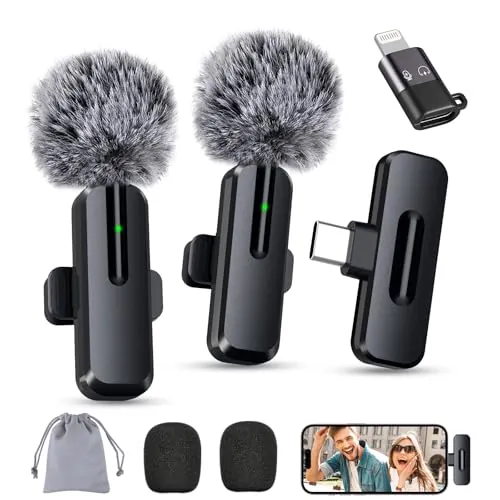
Wedaniya WM189 vs FIFINE AM8: Clip-On Phone Mic or Desk USB/XLR Setup?
The wedaniya WM189 page documents a clothing/gear clip, USB-C and Lightning receiver adapters, headphone monitoring, and Standard, Reverb, and Mute modes. FIFINE documents the black AM8 as a desk/base or stand-mounted USB/XLR mic: USB provides gain, headphone-volume and mute controls; XLR needs an interface or mixer and a separate cable, and disables the mic controls. Neither source establishes a recording-quality winner or proves every phone/ASIN bundle will work as listed.
Read comparison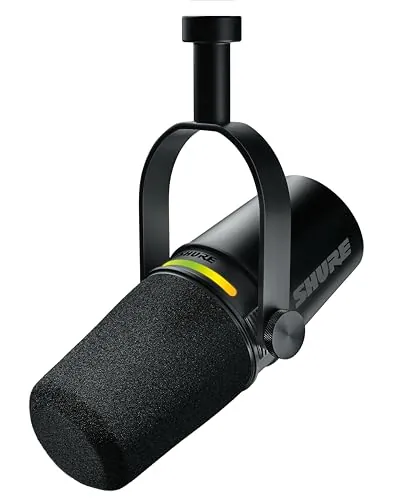
Shure MV7+ vs FIFINE AmpliGame AM8: USB workflow or included desktop stand?
Both exact black microphones offer USB and XLR connections, so the useful distinction is what happens around those connections. Shure's MV7+-K pairs USB-C with MOTIV software features and has an XLR output that is not affected by software settings; its guide lists a windscreen and USB cable, while a desktop base is an optional accessory. FIFINE's standard AM8 package is the Base Stand + USB Cable option, with physical gain, monitoring and level controls available over USB. Those controls and RGB lighting are inactive over XLR, and an XLR cable and interface or mixer are needed for that route. Neither manual establishes a sound-quality winner.
Read comparison