Pickagu

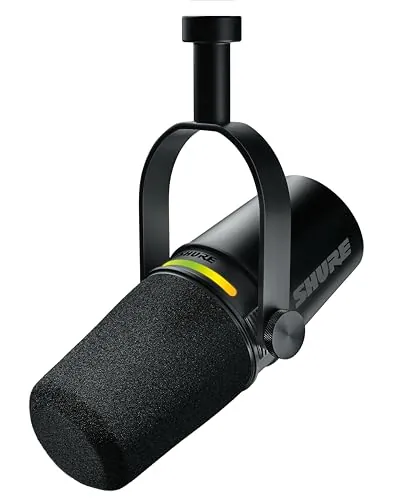
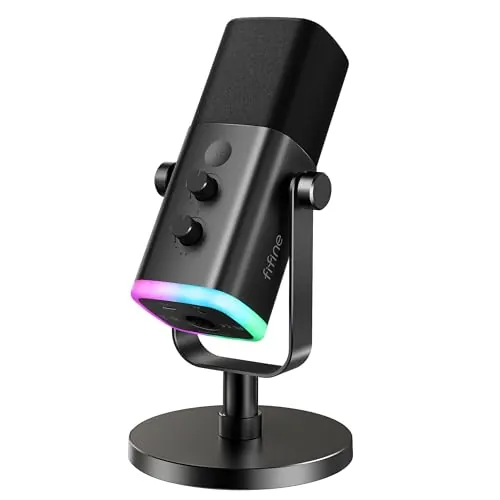
Shure MV7+ vs FIFINE AmpliGame AM8: USB workflow or included desktop stand?

Shure MV7+ Podcast Microphone — BlackModel MV7+-KFIFINE AmpliGame AM8 USB/XLR Dynamic Microphone — Black, Standard PackageModel AM8 (standard Base Stand + USB Cable option)

Both exact black microphones offer USB and XLR connections, so the useful distinction is what happens around those connections. Shure's MV7+-K pairs USB-C with MOTIV software features and has an XLR output that is not affected by software settings; its guide lists a windscreen and USB cable, while a desktop base is an optional accessory. FIFINE's standard AM8 package is the Base Stand + USB Cable option, with physical gain, monitoring and level controls available over USB. Those controls and RGB lighting are inactive over XLR, and an XLR cable and interface or mixer are needed for that route. Neither manual establishes a sound-quality winner.

Choose by what matters to you

Choose Shure MV7+ Podcast Microphone — Black MV7+-K

Your intended workflow uses Shure's USB-C connection and you want its documented MOTIV controls and processing options, while keeping XLR available as a separate analog output path. Plan your mount before checkout: the guide lists the windscreen and USB cable, but Shure lists the desktop base as optional. The guide says software settings do not affect the XLR output.

Check price on Amazon

Choose FIFINE AmpliGame AM8 USB/XLR Dynamic Microphone — Black, Standard Package AM8 (standard Base Stand + USB Cable option)

You want the listed base stand and USB cable in the package and prefer on-mic gain, headphone monitoring and level controls in USB mode. For XLR, budget for a separate XLR cable and an interface or mixer, and do not expect the AM8's on-mic controls or RGB lighting to work in that mode. This is the standard AM8 package, not AM8T with its boom arm.

Check price on Amazon

Keep comparing if you need a measured sound, noise rejection, voice clarity, latency or durability result; the cited manufacturer materials describe features and setup, not matched tests. If you will record only through XLR, compare the controls and software you actually need on the interface or mixer, since the Shure software does not affect its XLR output and the AM8's on-mic controls are inactive in XLR mode. Verify the exact SKU and package contents on the seller page before ordering.

As an Amazon Associate I earn from qualifying purchases.Affiliate disclosure

Products compared

Shure MV7+ Podcast Microphone — Black · MV7+-K

Shure

Shure MV7+ Podcast Microphone — Black

Black U.S. MV7+ SKU. USB-C and XLR outputs, with a 3.5 mm headphone monitoring output. The reviewed standard package documentation lists a windscreen and USB-C cable; Shure lists the desktop base separately as an optional accessory.

Model MV7+-K
Amazon ASIN B0CTJ7PVN1
Check current price on Amazon
FIFINE AmpliGame AM8 USB/XLR Dynamic Microphone — Black, Standard Package · AM8 (standard Base Stand + USB Cable option)

FIFINE

FIFINE AmpliGame AM8 USB/XLR Dynamic Microphone — Black, Standard Package

Standard black AM8 package, not the AM8T boom-arm kit. FIFINE's selected standard option is Base Stand + USB Cable. The manufacturer page says the XLR cable is not included in this package; XLR use also requires an interface or mixer.

Model AM8 (standard Base Stand + USB Cable option)
Amazon ASIN B0BMFQP2ZZ

Check current price on Amazon

Differences that matter

What matters most to you?

Choose a priority to see what it changes.

Difference
Shure MV7+ Podcast Microphone — Black
FIFINE AmpliGame AM8 USB/XLR Dynamic Microphone — Black, Standard Package
Why it matters
USB recording and control workflow
Shure MV7+ Podcast Microphone — BlackUSB-C connects to MOTIV software, where Shure lists Auto Level, real-time denoiser, Digital Popper Stopper, reverb choices and other settings.
FIFINE AmpliGame AM8 USB/XLR Dynamic Microphone — Black, Standard PackageFIFINE lists physical gain, headphone-monitoring and level controls in USB mode; RGB lighting and the listed controls are inactive in XLR mode.
If your routine depends on software processing and setup controls over USB, compare the specific Shure MOTIV options with the AM8's physical USB controls. These are feature descriptions, not evidence that either microphone sounds clearer or rejects more noise.
Sources for USB recording and control workflow
XLR use and controls
Shure MV7+ Podcast Microphone — BlackThe MV7+ guide identifies an XLR output and states that software settings do not affect this analog output.
FIFINE AmpliGame AM8 USB/XLR Dynamic Microphone — Black, Standard PackageAM8 can connect by XLR to an interface or mixer, but FIFINE says its on-mic controls and RGB lighting are inactive in XLR mode; the standard package does not include an XLR cable.
For an XLR setup, plan for the interface or mixer and cable first. The presence of XLR on both models does not make their USB software or on-mic controls equivalent in analog mode.
Sources for XLR use and controls
Stand and package contents
Shure MV7+ Podcast Microphone — BlackShure's MV7+ guide lists a USB-C cable and black foam windscreen in the box; it lists the desktop base among optional accessories.
FIFINE AmpliGame AM8 USB/XLR Dynamic Microphone — Black, Standard PackageFIFINE lists the standard black AM8 with a base stand and USB cable; AM8T is a separate boom-arm package. Check the seller's selected option.
If you want a desktop setup on day one, check the standard AM8 package selection. For the MV7+, plan a separate mount and verify the stand thread; keep a boom-arm bundle separate from a standard microphone box.
Sources for Stand and package contents
Headphone monitoring and mute
Shure MV7+ Podcast Microphone — BlackShure documents a 3.5 mm headphone output and touch-panel mute control.
FIFINE AmpliGame AM8 USB/XLR Dynamic Microphone — Black, Standard PackageFIFINE documents a headphone jack and physical controls for monitoring in USB mode, plus tap-to-mute.
Both offer a documented monitoring route and mute control. Choose based on whether you prefer Shure's touch-panel operation or the AM8's physical USB control layout; the sources do not compare how easy or reliable these controls feel in use.
Sources for Headphone monitoring and mute

Before buying: choose the signal path and verify the stand

Start by deciding whether the microphone will connect by USB or XLR. For the Shure, USB-C is the route associated with its MOTIV controls and processing options. Its XLR output is a separate analog path and is not affected by software settings. For FIFINE, USB mode provides the listed physical controls and RGB, while XLR mode disables those features and requires an interface or mixer plus a separately supplied XLR cable.

Then check what will hold the microphone. The MV7+ guide lists its USB-C cable and black foam windscreen, while Shure treats the desktop base as optional. FIFINE's standard black AM8 selection is Base Stand + USB Cable; the AM8T boom-arm selection is a different package. If your seller offers a bundle, verify the exact model and contents rather than relying on a family title.

Both microphones document USB and XLR, but that shared connector list does not mean their controls work the same way in both modes. Use the comparison above to match your planned host, interface, monitoring and mount. The documentation does not compare recording quality, noise rejection, latency or durability.

Product details

Shure MV7+ Podcast Microphone — Black

Connections and monitoring
USB-C, XLR and 3.5 mm headphone output Source
Included items in the guide
USB-C-to-USB-C cable and black foam windscreen; desktop base is listed among optional accessories Source

FIFINE AmpliGame AM8 USB/XLR Dynamic Microphone — Black, Standard Package

Included package option
Base stand and USB cable; excludes the separately selected AM8T boom-arm bundle Source
USB-only physical controls
Gain, headphone monitoring and level controls are available in USB mode; the manufacturer says controls and RGB lighting are inactive in XLR mode Source

Before you buy

  • Match the exact product pages: black Shure MV7+-K (ASIN B0CTJ7PVN1) and standard black FIFINE AM8 (ASIN B0BMFQP2ZZ). Do not substitute AM8T if you want the base-stand package described here.
  • Sketch your recording chain: USB-C to computer/device for the documented USB features, or XLR cable to an audio interface or mixer. On Shure, software settings do not change the XLR output; on AM8, its on-mic controls and RGB lighting are inactive over XLR.
  • Check the mount in the box. The Shure guide lists its cable and windscreen and treats the desktop base as optional; FIFINE's standard AM8 option is explicitly Base Stand + USB Cable.
  • If you monitor from the microphone, confirm that your headphones use the documented 3.5 mm monitor output and decide whether you prefer the Shure touch mute or FIFINE tap-to-mute control. Documentation does not establish which is easier to use.

Community discussions

Keeping a USB mic for a mobile setup

FIFINE AmpliGame AM8 USB/XLR Dynamic Microphone — Black, Standard Package

A FIFINE AM8 user kept their AM8 for occasions when they wanted to plug a microphone in over USB, while using another mic for their usual setup.

What to check

If the mic will move between desks, check which cable and input you’ll need at each one. Decide whether you want the option to connect directly over USB.

Original Reddit discussion

Common questions

Does the standard black FIFINE AM8 include a boom arm?

FIFINE lists the standard AM8 with a base stand and USB cable. AM8T is a separate boom-arm bundle, so check the selected option before ordering.FIFINE AmpliGame AM8 product page and package options

Can I use all the USB controls while the AM8 is connected by XLR?

No. FIFINE says its controls and RGB lighting are inactive in XLR mode. It also says the XLR cable is not included with the standard package and that XLR use requires an interface or mixer.FIFINE AmpliGame AM8 product page and package options

Is the Shure desktop stand included with MV7+-K?

Shure's MV7+ guide lists the USB-C cable and black foam windscreen as furnished items, and shows the desktop base as an optional accessory. Verify any seller bundle separately.Shure MV7+ User GuideShure MV7+ Podcast Microphone — U.S. product page, black MV7+-K

Does the MV7+ apply its USB software settings to its XLR output?

No. Shure's guide says the XLR output is not affected by software settings. Choose that path based on your analog interface or mixer workflow rather than assuming USB processing carries over.Shure MV7+ User Guide

Sources and scope

This is a model-and-workflow comparison based on manufacturer documentation, not a listening or recording test. Shure's included-items list is separate from its optional desktop stand. FIFINE lists the standard black AM8 Base Stand + USB Cable package; AM8T is a different boom-arm bundle. USB host, software and interface requirements depend on your equipment. No prices or current offer claims are included. No matched tests establish pickup range, echo/noise handling, call clarity, latency or reliability for this pair.

  1. Shure MV7+ Podcast Microphone — U.S. product page, black MV7+-K
  2. Shure MV7+ User Guide
  3. FIFINE AmpliGame AM8 product page and package options