Products compared
Focusrite
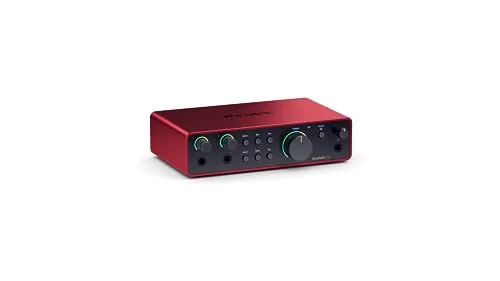
Focusrite Scarlett 2i2 4th Gen
The assigned U.S. offer is the red Scarlett 2i2 4th Gen, listed model AMS-SCARLETT-2I2-4G. Focusrite documents two mic preamps, two rear XLR sockets and two front jacks; using a front jack disables that channel’s XLR mic input.
Model AMS-SCARLETT-2I2-4G
Amazon ASIN B0C5JRTS3Y
Audient
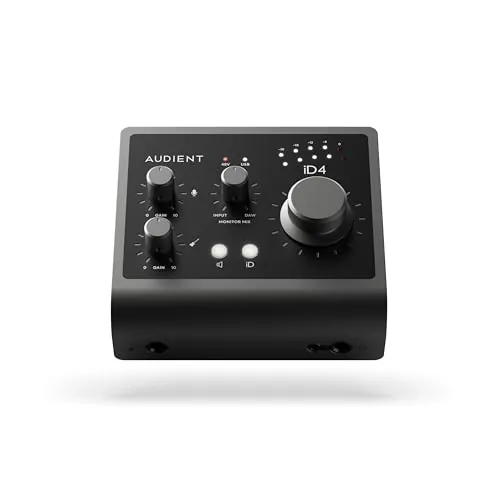
Audient iD4 MkII
The assigned black offer is Audient iD4 MkII, model iD4MKII. Its two analog inputs are one mic/line preamp and one dedicated JFET instrument input; its two headphone sockets carry the same feed.
Model iD4MKII
Amazon ASIN B08SBSN88X
Differences that matter
What matters most to you?
Choose a priority to see what it changes.
Sources for Two-source input plan
Sources for Headphone listening at the desk
Sources for Computer-audio loopback
Sources for Host data protocol and bus power
Start with your input list
For a two-mic interview, the Scarlett’s two mic preamps and rear XLR sockets make the source plan straightforward; leave both front jacks unused so neither XLR mic input is disabled. If you are recording a mic and guitar or bass, both models have a two-source path. Choose whether the iD4’s dedicated JFET input or Scarlett’s front-jack arrangement better suits the desk you will keep wired.
Decide how many people monitor
The iD4 MkII has two headphone sockets and Audient specifies that they carry the same feed. Its physical Monitor Mix blends live inputs and computer playback; Monitor Pan changes the stereo position of its two live inputs. Scarlett lists one headphone output, with software monitoring controls in Focusrite Control 2. If each listener needs a different cue mix, compare a larger interface with explicit independent outputs instead.
Plan loopback before a call or stream
Both include software loopback, so loopback availability alone does not decide the purchase. Focusrite Control 2 documents Audio Capture, Video Call and Stream routes; the iD4 loopback mixer selects mic, DI and playback sources and the recording app chooses the matching input pair. Audient notes that its current DAW playback feed is taken before Monitor Mix. Map your computer playback and app input channels first, especially if you need system audio and a microphone together.
Check the host, not just the cable end
Both use USB-C connectors, but the manufacturer requirements differ. Focusrite specifies USB 2.0 and 900 mA bus power for this Scarlett, plus a separate 5 V DC input. Audient specifies USB 3.0 or newer and at least 0.9 A at 5 V. Before buying, check the computer’s port data capability and power specification, then confirm any required app or driver for your operating system.
Product details
Focusrite Scarlett 2i2 4th Gen
- Analog inputs
- Two mic preamps; two rear XLR inputs and two front 1/4-inch jacks. A front jack disables the mic input on its channel. Source
- Host connection
- USB 2.0 Type-C data/power; Focusrite lists 900 mA bus power and a separate USB-C 5 V DC power input. Source
- Monitoring and loopback
- One headphone output; software control and selectable loopback modes through Focusrite Control 2. Source
Audient iD4 MkII
- Analog inputs
- One mic/line preamp and one dedicated JFET instrument input. Source
- Headphone and monitor controls
- Two headphone sockets share the same signal; hardware controls include Monitor Mix and Monitor Pan. Source
- Host connection
- USB-C connector; Audient specifies USB 3.0 or greater and at least 0.9 A at 5 V bus power. Source
Before you buy
Community discussions
A home singer weighing the Solo against the 2i2
Focusrite Scarlett 2i2 4th Gen
One buyer was choosing a first recording setup for someone who sings at home and may add acoustic guitar later, and asked whether the 2i2’s extra input matters. The post compares the Solo and 2i2, not the Audient iD4 MkII.
What to check
Decide whether voice and guitar need to be recorded at the same time, then compare each interface’s input count and instrument connection for that plan.
Common questions
Can both interfaces record a microphone and guitar at once?
Yes, the documented two-channel layouts allow a mic plus an instrument. The iD4 MkII provides one dedicated JFET instrument input. Scarlett also accepts an instrument on a front jack, but using that channel’s jack disables its XLR mic input. Choose by your full two-source plan.Scarlett 2i2 4th Gen SpecificationsiD4 MKII Manual
Do the iD4 MkII headphone sockets give listeners separate mixes?
No. Audient’s manual says the two headphone connections carry the same signal simultaneously. Treat them as two sockets for one shared feed, not as separate cue mixes.iD4 MKII Manual
Will either unit capture computer audio for a stream or call?
Both document loopback. Scarlett’s Focusrite Control 2 guide describes different loopback modes and channel routes; Audient’s iD4 mixer can blend mic, DI and playback sources, then your app selects its loopback input. Confirm the channel labels and routing supported by your operating system and app.Using Focusrite Control 2 with your Scarlett 2i2 4th GeniD4 MKII Audio Loopback
Is a USB-C socket enough to know the interface will work with my computer?
No. Check both the USB data protocol and power. Focusrite lists USB 2.0 and 900 mA bus power, with a separate 5 V DC input; Audient specifies USB 3.0 or greater and at least 0.9 A at 5 V. Confirm your host against the current manufacturer setup guidance.Scarlett 2i2 4th Gen SpecificationsScarlett 2i2 4th Gen hardware featuresiD4 MKII Technical Specifications
Sources and scope
Feature-fit guidance from current manufacturer documentation for the exact 4th Gen Scarlett and iD4 MkII. No controlled pair test was used; this guide does not rank audio quality, noise, latency or recording results. Confirm host ports, power and application input routing for your own setup.