Products compared
Focusrite
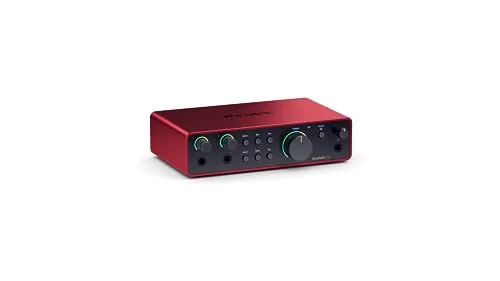
Focusrite Scarlett 2i2 4th Gen
The assigned Scarlett is the 4th Gen two-input model. Each channel has a physical gain control and Gain Halo; Auto Gain samples a live source for 10 seconds to set a starting level, while Clip Safe can adjust preamp gain when clipping risk is detected. Its inputs are rear XLR mic sockets plus front 1/4-inch line/instrument jacks; plugging a jack disables that channel's XLR. Focusrite also documents an optional mobile app that controls Focusrite Control 2 while it is running on a computer on the same Wi-Fi network.
Model AMS-SCARLETT-2I2-4G
Amazon ASIN B0C5JRTS3Y
MOTU
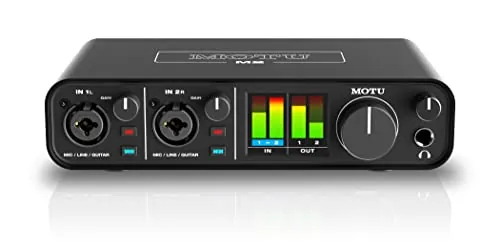
MOTU M2 USB-C Audio Interface
The assigned MOTU offer is the two-input M2, not the four-input M4. Its M2 quick reference shows two XLR/TRS combo inputs, separate gain knobs, a full-color LCD with input and output meters, direct-monitor buttons, USB-C and standard MIDI IN/OUT ports. The manual says it is powered through its host USB connection. MOTU's driver-provided loopback is a software route; its manual says Windows use requires the M Series driver and macOS loopback requires the optional driver.
Model M2 (part 3120)
Amazon ASIN B0812B26TN
Differences that matter
What matters most to you?
Choose a priority to see what it changes.
Sources for Setting input gain and reading levels
Sources for Input layout and external MIDI
Sources for Loopback and control software
Sources for Direct monitoring and USB power
A guided starting level or meters you can read on the unit?
The Scarlett 2i2 4th Gen keeps manual gain knobs and Gain Halos on its face, and adds Auto Gain: send a live signal for a ten-second pass and the interface sets a starting preamp level. Clip Safe can adjust gain when the input approaches clipping, but Focusrite limits it to sample rates up to 96 kHz; it is unavailable at 176.4 and 192 kHz. You can still set gain yourself.
The MOTU M2 also uses physical gain knobs, with a full-color display showing input and output meters and a red overload indication. That makes the distinction a control/display preference: an assisted starting-level feature on Scarlett versus a screen for reading levels while you adjust the M2. No comparative audio or recording result is implied.
Check your source plugs and any external MIDI
The Scarlett's two channels pair rear XLR mic sockets with front 1/4-inch inputs; inserting a 1/4-inch plug disables that channel's XLR. The M2 instead gives each of its two channels an XLR/TRS combo input. Check how you want to connect and leave microphones or instruments in place before choosing.
For external gear that uses standard 5-pin MIDI, the M2 guide labels MIDI IN and OUT ports on the unit. Focusrite's Scarlett 2i2 hardware list does not show physical DIN MIDI. If your MIDI path goes through the computer or a different interface, that port difference may not matter.
Loopback is shared; check the software path
Both manufacturers document loopback, so neither is the only option for capturing computer playback. Scarlett's 2i2 4th Gen loopback appears as stereo virtual inputs and can include the direct-monitor mix when configured in Focusrite Control 2. Its mobile app can control Focusrite Control 2 on a computer on the same Wi-Fi, but the desktop software must be running and the app does not control the Scarlett directly.
MOTU describes M2 Loopback 1-2 as channels supplied by its M Series driver. The manual calls for the driver on Windows and says Mac users need the optional driver for loopback. Verify current software support for your system, and set up the host recording channels before a stream or session.
Plan the monitoring and power path
Both units document direct monitoring and run from USB host power. Focusrite describes Off, Mono and Stereo direct-monitor settings on the 2i2; it also provides an optional 5V DC input if a computer cannot supply enough USB power. MOTU describes per-channel MON buttons and stereo monitoring on hold, with the M2 powered over its host USB connection.
Before ordering, check your computer/tablet port, cable or adapter, DAW driver path, and whether the host supplies the required power. This is especially relevant if using a mobile host or routing many apps; neither set of specs guarantees every device-and-cable combination.
Product details
Focusrite Scarlett 2i2 4th Gen
- Input-level controls
- Two physical gain knobs with Gain Halos; Auto Gain and Clip Safe are also documented. Clip Safe is unavailable at 176.4 and 192 kHz. Source
- Inputs and monitoring
- Two rear XLR mic inputs and two front 1/4-inch line/instrument jacks; a connected jack disables its corresponding XLR. Front-panel direct monitoring and loopback are documented. Source
- Host and power
- USB-C data/power; Focusrite lists bus power at 900 mA and an optional 5V DC power input for cases where host USB power is insufficient. Source
MOTU M2 USB-C Audio Interface
- Input-level controls and meters
- Two gain knobs; the M2 quick reference describes a 160×120 color LCD with full-length input and output meters and red overload indication. Source
- Physical connections
- Two XLR/TRS combo inputs, 5-pin MIDI IN and OUT, USB-C host connection, balanced 1/4-inch monitor outputs and mirrored RCA outputs. Source
- Host and loopback
- Host USB powers the M2. The manual describes loopback as driver-provided channels; Windows requires the M Series driver and Mac loopback requires its optional driver. Source
Before you buy
Community discussions
Checking which cable comes with the microphone
Focusrite Scarlett 2i2 4th Gen
A shopper with a Shure SM7B was considering the Scarlett 2i2 4th Gen and asked which cable they would need for their setup.
What to check
Check the connector on the microphone and where the matching input is on each interface. Check the box contents for the cable.
Planning which inputs you want to leave connected
Focusrite Scarlett 2i2 4th Gen
A shopper considering the Scarlett 2i2 4th Gen wanted to keep a vocal mic connected and switch between an instrument and a second mic.
What to check
List the sources you want connected at the same time and check the available input combinations in each manual.
Common questions
Do both interfaces have two inputs?
Yes. The Scarlett 2i2 4th Gen has two channels; each has a rear XLR mic socket and a front 1/4-inch line/instrument jack, with the jack disabling that channel's XLR. MOTU's M2 quick reference shows two XLR/TRS combo inputs. Check the way your sources need to remain connected.Scarlett 2i2 4th Gen hardware featuresM Series User Guide (M2/M4/M6), M2 Quick Reference
Can either capture sound coming from the computer?
Both manufacturers document loopback. Focusrite's Scarlett 2i2 4th Gen has stereo loopback channels. MOTU describes driver-provided Loopback 1-2; it requires the M Series driver on Windows and the optional driver on Mac. Set up the loopback channels in your recording software and avoid monitoring them back into themselves.Scarlett 4th Gen using LoopbackM Series User Guide (M2/M4/M6), M2 Quick Reference
Does the Scarlett's Clip Safe work at every sample rate?
No. Focusrite says Clip Safe is available up to 96 kHz and is unavailable at 176.4 and 192 kHz. Auto Gain and manual gain controls are separate features; check the current 2i2 4th Gen guide for operating details.Scarlett 2i2 4th Gen hardware featuresScarlett 2i2 4th Gen Specifications
Which has physical MIDI DIN?
MOTU's M2 manual identifies standard MIDI IN and OUT on the unit. Focusrite's listed 2i2 4th Gen hardware connections do not include 5-pin DIN. If DIN is not part of your hardware path, this may not change the choice.M Series User Guide (M2/M4/M6), M2 Quick ReferenceScarlett 2i2 4th Gen hardware featuresScarlett 2i2 4th Gen Specifications
Sources and scope
This is a documentation-based fit guide, not a test of sound quality, noise, latency or recording results. Both interfaces have two inputs, direct monitoring, loopback, USB host connection and USB power. Scarlett's Clip Safe feature is documented only through 96 kHz and is unavailable at 176.4 and 192 kHz; both makers' loopback workflows involve software. MOTU's M Series manual covers M2, M4 and M6, so only the M2-specific quick reference and M2-labeled instructions are applied. Check current host/driver compatibility and the exact seller package before buying.