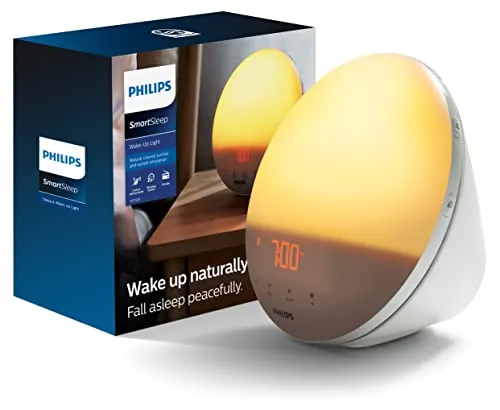
Products compared
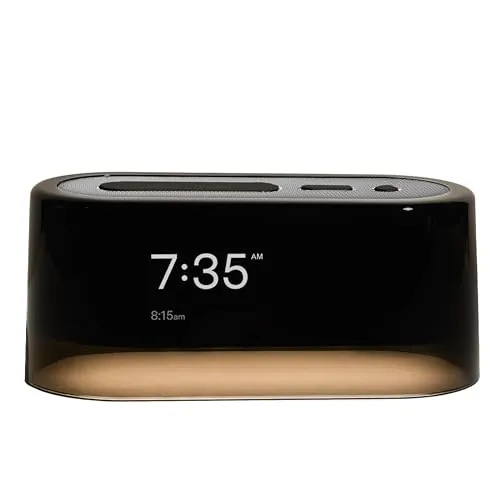
Loftie
Loftie Clock, Chrome
This Chrome listing is for the Loftie Clock; the manufacturer describes on-device features for the Clock model.
Model Loftie Alarm Clock
Amazon ASIN B0DWPYL7QS
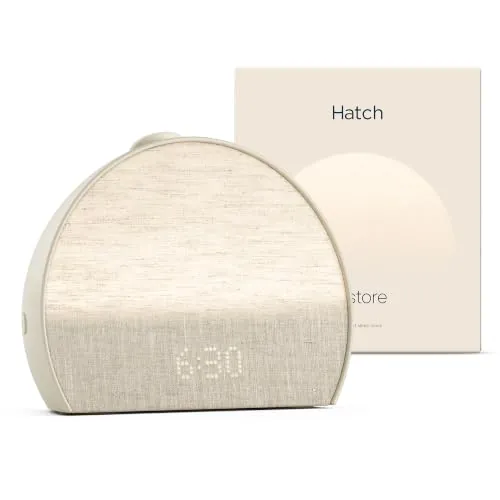
Hatch
Hatch Restore 3, Putty
Putty finish exact listing; manufacturer Restore 3 support covers setup, controls, sunrise alarms and the Hatch+ split.
Model Restore03
Amazon ASIN B0DLLSCVZW
Differences that matter
What matters most to you?
Choose a priority to see what it changes.
Sources for Wi-Fi and offline use
Sources for On-device controls
Sources for Trial and included content
Sources for Updates and setup path
Choose the alarm style first
Restore 3 is the sunrise-light choice: Hatch describes sunrise alarms with light and sound and lists sunrise cues as included with the device. Loftie explicitly says its Clock is not a sunrise alarm; its nightlight can turn on with alarms. Loftie instead uses a two-phase audio alarm: the first sound fades, then a second sounds after the chosen interval. This describes the hardware workflow, not a claim about sleep or waking results.
For a phone-down routine, Restore 3 has device buttons for the unwind sequence and alarm actions. Loftie can also be operated from the clock after setup, and its manufacturer documents an Offline Mode.
Check the setup and outage requirement
Loftie needs its app and 2.4 GHz Wi-Fi for setup. After the correct time is synced, its support page says Offline Mode retains core functions; Wi-Fi is still needed for updates and new content.
Hatch’s Restore 3 setup instructions require the Hatch Sleep app and Wi-Fi. Its overview and controls guides explain phone-down use after customization, but the exact Restore 3 pages reviewed do not say which alarms or saved routines continue during a Wi-Fi outage. If you need an offline clock, ask Hatch to confirm the exact outage behavior before choosing it.
Separate the free setup trial from ongoing content
Loftie lists its alarm and more than 100 sounds without a subscription. Hatch requires starting a free Hatch+ trial during Restore 3 setup; its support page says cancellation leaves basic features available, and its current content guide separates device-included sounds/sunrise cues from Hatch+ additions. Check the exact sound or routine you want in Hatch’s current included-content list and cancel before renewal if you do not want the membership.
Confirm the exact finish and device generation
This comparison is between the Chrome Loftie Clock and the Putty Hatch Restore 3. Use Restore 3-specific setup and control guidance; instructions for earlier Restore generations may differ.
Product details
Loftie Clock, Chrome
Hatch Restore 3, Putty
- Alarm/light
- Restore 3 includes a sunrise alarm with light and sound; sunrise cues are listed as included with the device. Source
- Phone-down controls
- Four device buttons support phone-down use after setup/customization in the Hatch Sleep app. Source
- Setup and membership
- Wi-Fi and the Hatch Sleep app are required for setup; Hatch says starting a free Hatch+ trial is part of setup, but basic features remain if cancelled. Source
Before you buy
Community discussions
Setting alarms without a phone in the bedroom
Hatch Restore 3, Putty
A prospective Hatch Restore 3 buyer wanted to keep their phone out of the bedroom and asked whether alarms can be set or changed on the clock.
What to check
If you want a phone-free bedtime, compare the setup needs with the controls each clock supports after setup; the guide describes Restore 3 alarm creation in its app and selected on-device actions.
Checking which audio is included before choosing Hatch+
Hatch Restore 3, Putty
A Restore 3 user asks whether Hatch+ is worth it for the sounds they play before bed and the music they want at sunrise.
What to check
Check Hatch’s current included-content list for the sounds you actually want before deciding whether to subscribe.
Common questions
Can the Loftie Clock run without Wi-Fi?
Loftie says Wi-Fi is needed for setup, updates and new content. Once setup is complete and the clock has the correct time, it can be switched to Offline Mode and used with its core functions.Loftie Clock Support — Offline Mode and on-device useLoftie Clock — product, alarm, included sounds and Chrome finish
Can Hatch Restore 3 run through a Wi-Fi outage?
Hatch requires Wi-Fi during setup and describes phone-down buttons after the Hatch Sleep app has customized the device. The Restore 3 materials reviewed here do not specify which scheduled alarms or routines continue during a Wi-Fi outage; verify that with Hatch if it is essential.Restore 3 Setup and InstallationRestore 3 OverviewRestore 3 Controls Guide
Does the Hatch Restore 3 need a paid Hatch+ subscription?
Hatch says a free Hatch+ trial must be started during setup, but it can be cancelled and basic Restore 3 features remain. Hatch’s current feature guide separates content included with the device from Hatch+ additions.Is Hatch+ Required?What do I get with Hatch+? What do I get for free?
Does Loftie have a sunrise alarm?
No. Loftie says the Clock is not a sunrise alarm, though its nightlight can be set to turn on with an alarm. Hatch lists a sunrise alarm with light and sound for Restore 3.Loftie Clock — product, alarm, included sounds and Chrome finishRestore 3 Overview
Can I use the Hatch without my phone every night?
After app setup/customization, Restore 3’s four on-device buttons can start and step through routines, adjust volume, control the bedside light, and snooze or turn off alarms. Use the app to customize the device; this phone-down workflow is not an offline-Wi-Fi guarantee.Restore 3 OverviewRestore 3 Controls GuideRestore 3 Setup and Installation
Sources and scope
This is a feature and setup comparison, not a sleep-outcome test. Loftie’s manufacturer says its Clock has no sunrise alarm; its nightlight can turn on with an alarm. Hatch documents phone-down controls after app customization and requires Wi-Fi for setup, but the Restore 3 materials reviewed do not specify which functions continue during a Wi-Fi outage. No offline operation claim is made for Hatch.
- Loftie Clock — product, alarm, included sounds and Chrome finish
- Loftie Clock Support — Offline Mode and on-device use
- Loftie Clock 101 — button controls
- Restore 3 Overview
- Restore 3 Setup and Installation
- Restore 3 Controls Guide
- Is Hatch+ Required?
- What do I get with Hatch+? What do I get for free?
- Firmware Updates