Products compared
JBL
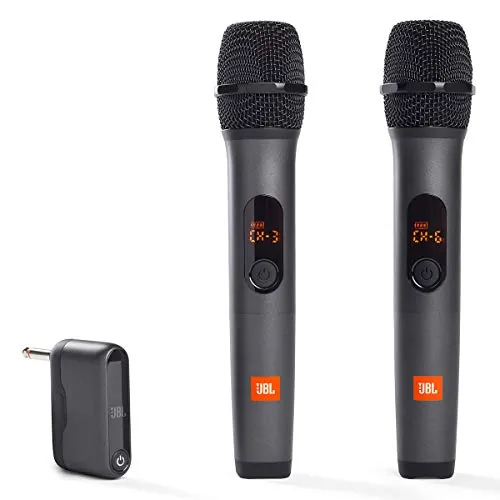
JBL Wireless Microphone Set
Two-microphone set with a separate rechargeable receiver and AA-powered microphones.
Model JBLWIRELESSMICAM
Amazon ASIN B08WHHWRST
JBL
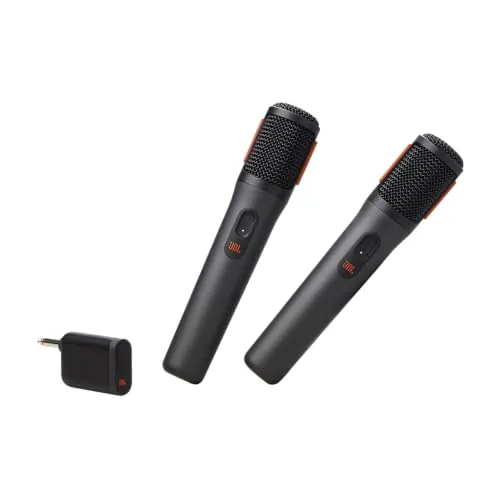
JBL PartyBox Wireless Mic
Rechargeable two-microphone kit with a wireless dongle, listed by JBL for PartyBox speakers.
Model JBLPBWIRELESSMICAM
Amazon ASIN B0CTDJ45M4
Differences that matter
What matters most to you?
Choose a priority to see what it changes.
Sources for Microphone power routine
Sources for Receiver / dongle path
Sources for What is in the package
Start with the speaker, not the microphone label
These are both JBL two-microphone kits, but their documented host paths differ. The Wireless Microphone Set has a separate 6.3 mm receiver plug and JBL describes it for speakers with a microphone input. JBL's U.S. help page shows that receiver plugged into a PartyBox microphone input. PartyBox Wireless Mic uses its included dongle, and JBL lists it as compatible with JBL PartyBox speakers. Before buying, check the exact speaker model, input and the kit's maker-documented connection path.
That distinction matters if you are shopping for a non-PartyBox speaker: the PartyBox Wireless Mic listing does not establish general compatibility just because the speaker has a socket of a similar size. If JBL does not name your host or connection, treat support as unconfirmed.
Choose the power routine you can keep up with
The Wireless Microphone Set puts four included AA alkaline cells in the microphone kit and uses a rechargeable receiver. JBL's setup guidance says not to charge that receiver while it is in use because it may cause interference. PartyBox Wireless Mic instead has rechargeable microphones and a separate rechargeable dongle; JBL says the microphones charge from a PartyBox charging port. The difference is a practical event-prep choice, not a measured runtime verdict.
If you choose the rechargeable PartyBox kit, plan to charge the dongle as well as the microphones and check whether your particular PartyBox provides the documented mic charging port. If you choose the AA-powered kit, account for spare cells and the receiver's charge before an event.
Check the exact kit contents before checkout
JBL lists two microphones in each set. The Wireless Microphone Set box includes its receiver, USB-C cable, four AA cells and printed setup/safety/warranty materials. PartyBox Wireless Mic includes its dongle, USB-C cable and setup/safety/warranty materials. These lists help you plan the first setup; the exact seller listing remains the place to confirm the shipped bundle or any regional/package revision.
JBL’s specification sheet and quick-start guide differ on the capacity details for the PartyBox microphones and dongle. Treat them as separate rechargeable components and check JBL’s current instructions; the listed capacities do not establish runtime.
Product details
JBL Wireless Microphone Set
JBL PartyBox Wireless Mic
- Host compatibility stated by JBL
- Compatible with all JBL PartyBox speakers Source
- Charging arrangement
- Microphones charge from a PartyBox charging port; the dongle charges separately by USB-C Source
- In-box items
- Two microphones, one dongle, USB-C cable, quick-start guide, safety sheet and warranty card Source
Before you buy
Community discussions
Checking the microphone receiver against your speaker input
JBL Wireless Microphone Set
A JBL Wireless Microphone Set buyer tried to use its receiver with an existing speaker setup and asked about the connection.
What to check
Identify the exact speaker’s supported microphone input and compare it with the receiver plug. Check the intended setup in the manufacturer’s instructions before buying.
Deciding where the receiver will sit in your karaoke setup
JBL PartyBox Wireless Mic
A home karaoke shopper considered the JBL PartyBox Wireless Mic and other two-mic sets, and compared a plug-in receiver with setups using a separate receiver box.
What to check
Check the room around the speaker’s input and how the exact receiver gets power. Decide where any receiver box and cables would go.
Common questions
Will both kits work with any speaker that has a 1/4-inch input?
The Wireless Microphone Set is described for use with a speaker that has a microphone input. JBL specifically lists PartyBox Wireless Mic for JBL PartyBox speakers; its documentation here does not establish universal compatibility with other brands or every 1/4-inch input.JBL Wireless Microphone Set — official specification sheetJBL PartyBox Wireless Mic — official U.S. product page
Do both kits include two microphones?
Yes. JBL's listed package contents for both models include two microphones. The Wireless Microphone Set also includes a separate receiver; PartyBox Wireless Mic includes a dongle.JBL Wireless Microphone Set — official specification sheetJBL PartyBox Wireless Mic — official U.S. product page
Which one uses replaceable AA batteries?
The JBL Wireless Microphone Set includes four AA alkaline batteries for its microphones. PartyBox Wireless Mic uses rechargeable microphones and a separately rechargeable dongle.JBL Wireless Microphone Set — official specification sheetJBL PartyBox Wireless Mic — official U.S. product page
Sources and scope
This is a feature and setup comparison based on JBL documentation, not a test of sound, range, interference resistance, or battery runtime. Confirm the exact speaker model and its input before purchase; the PartyBox Wireless Mic's compatibility statement is specific to JBL PartyBox speakers.