
Products compared
JBL
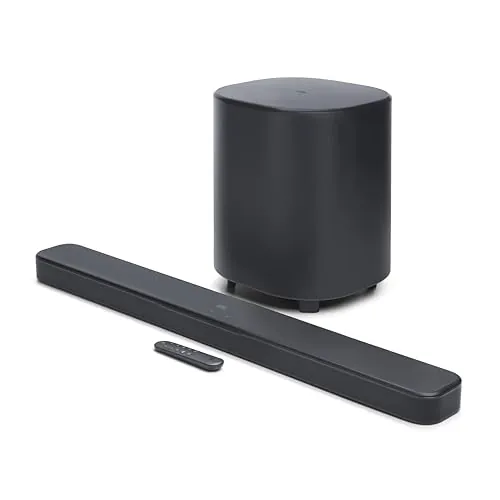
JBL Bar 500MK2 5.1-Channel Soundbar System — Black
This is JBL's black U.S. Bar 500MK2, model JBLBAR500M2BLKAM. JBL lists the soundbar and one wireless subwoofer, with no rear-speaker pair in the included equipment. The subwoofer links wirelessly to the bar but still needs its own power connection, so plan a floor or shelf location near an AC outlet.
Model JBLBAR500M2BLKAM
Amazon ASIN B0FHBVS6GC
LG
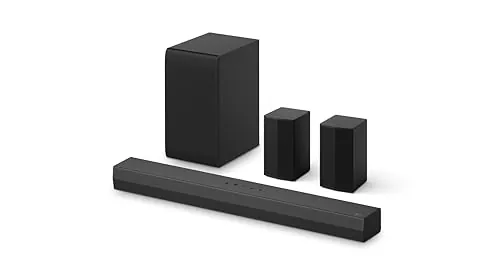
LG S40TR Home Theater Soundbar with Rear Speakers — Black
This is the black U.S. LG S40TR, model S40TR.DUSALLK. LG lists rear speakers with the system; its footnote says the two speakers connect to each other by wire and one needs AC power. Plan a route between the rear positions and an outlet near one speaker.
Model S40TR.DUSALLK
Amazon ASIN B0D1CPPL85
Differences that matter
Sources for What speaker hardware is listed in the system
Sources for Rear-room cable and outlet planning
Sources for Console or streaming-device routing
Start with where the rear speakers and subwoofer can go
The most concrete difference is the included hardware and what the room must provide for it. LG lists rear speakers in the S40TR system, then qualifies the setup: a wire connects the two rear speakers and one needs AC. JBL lists a separate wireless subwoofer with its Bar 500MK2, and the manual shows a power connector on that subwoofer. The JBL link may be wireless, but the subwoofer still needs its own powered location.
If you have clear rear positions and can route the connecting wire with an outlet nearby, LG's listed rear pair may better fit the room plan. If that route is awkward but a subwoofer can sit near AC power, JBL's listed arrangement may be easier to plan. These are installation tradeoffs, not evidence that one system sounds better.
Trace the TV and source connection before choosing
JBL documents HDMI IN for a streaming device, console or other digital source and HDMI OUT from the bar to the TV's HDMI ARC/eARC input. Its manual asks the owner to check TV HDMI-CEC and ARC/eARC settings, and notes that full HDMI-CEC compatibility is not guaranteed. If the TV lacks eARC, the manual says a digital source may need to connect through the soundbar for the documented Atmos path; check the manuals for your exact devices and settings.
LG's exact U.S. product page confirms the model and rear-speaker wiring requirement but does not give a complete TV and source wiring diagram in the cited content. Open the S40TR.DUSALLK manual and your TV manual to verify ports, control and source routing instead of inferring the connection from a 4.1 label or the speaker count.
A quick pre-purchase room check
1. Mark the bar location and the seating position. 2. For LG, mark both rear-speaker positions, the wire route between them and the AC outlet for one speaker. 3. For JBL, mark a separate subwoofer position and its outlet. 4. Write down the television's labeled HDMI ARC/eARC and optical ports, then trace the console or streaming device's connection using the relevant manuals. 5. Confirm the seller's exact included items before checkout.
This check resolves the main uncertainty supported by the official sources: which included hardware and documented connection path fit the actual room. It cannot predict sound quality or guarantee compatibility with an unverified television.
Product details
JBL Bar 500MK2 5.1-Channel Soundbar System — Black
- Listed included speaker hardware
- The official product page and manual list the soundbar and one wireless subwoofer. The manual shows a separate power connector on the subwoofer; wireless describes its link to the bar, not battery operation. Source
- Documented TV and source-device path
- The U.S. model has HDMI IN for a digital device and HDMI OUT for the TV's ARC/eARC input; the manual describes enabling the relevant TV HDMI-CEC and ARC/eARC settings. Full CEC compatibility is not guaranteed. Source
LG S40TR Home Theater Soundbar with Rear Speakers — Black
- Included rear speakers and their setup constraint
- LG lists rear speakers with the S40TR; its footnote says a wire is required between them and one rear speaker needs AC power. Plan both the connecting cable route and a nearby outlet. Source
- Exact U.S. support identity
- LG's U.S. support page identifies model S40TR.DUSALLK and provides its model-specific manuals. Check that manual for the TV connection and control method for your exact television. Source
Before you buy
Community discussions
One S40TR owner puts the rear speakers behind the couch
LG S40TR Home Theater Soundbar with Rear Speakers — Black
An S40TR owner put the rear speakers and subwoofer close behind the couch. They reported that the front still seemed quiet from their seat after they adjusted channel levels.
What to check
Decide whether there is space for rear speakers near the seating area and an outlet in reach. Check the included JBL pieces separately.
Common questions
Does the LG S40TR rear-speaker setup need any cables or outlets?
Yes. LG says the rear speakers require a wired connection between them, and one rear speaker requires AC power. Plan for both before placing the pair behind the seating area.LG S40TR U.S. product page
Does the JBL Bar 500MK2 wireless subwoofer need a power cord?
Yes. The JBL manual shows a separate power connector on the subwoofer. Its wireless description refers to its connection with the bar, not battery operation.JBL Bar 500MK2 Owner's Manual
Can a source device connect directly to the JBL soundbar?
The manual documents HDMI IN for a digital device and HDMI OUT from the soundbar to the TV's ARC/eARC input. Check the TV and source-device manuals for the needed ports and HDMI-CEC settings; JBL says full HDMI-CEC compatibility is not guaranteed.JBL Bar 500MK2 Owner's Manual
Sources and scope
Plan power and placement for the complete systems. The JBL Bar 500MK2 subwoofer needs its own AC connection; the LG S40TR rear speakers connect to each other by wire, and one rear speaker needs AC. Check your TV and soundbar manuals for the ports and settings required by your sources.
Related comparisons
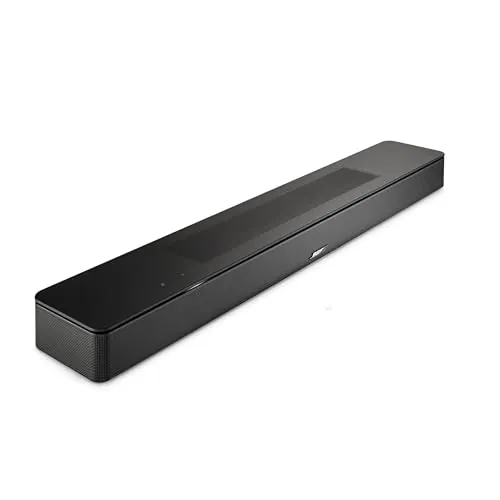
JBL Bar 500MK2 vs Bose Smart Soundbar: Included Subwoofer, TV Ports and Placement
This U.S. comparison focuses on four purchase checks: what arrives in the box, where a game console or player connects, the space each bar and bass setup needs, and which remote workflow is documented. JBL's Bar 500MK2 Black page lists a separate wireless subwoofer, one HDMI video input and one eARC output. Bose's Smart Soundbar package lists one bar with HDMI and optical cables; Bose describes bass modules as compatible optional add-ons and documents TV audio over eARC/ARC or optical. No matched listening test was performed, so choose by package, wiring and placement rather than an audio-quality ranking.
Read comparisonLG S40TR vs Bose Smart Soundbar: Included Rear Kit or Single Bar?
The U.S. LG S40TR page describes a set with rear speakers and a subwoofer; the rear speakers still need a wire between them, and one needs AC power. Bose's Smart Soundbar box list contains the bar, HDMI and optical cables, power cord and remote, while bass and surround modules are optional. Check your TV's ARC/eARC and optical ports before choosing: Bose requires ARC/eARC for Atmos, while optical is its stated fallback for spacious sound.
Read comparison