
Products compared
JBL
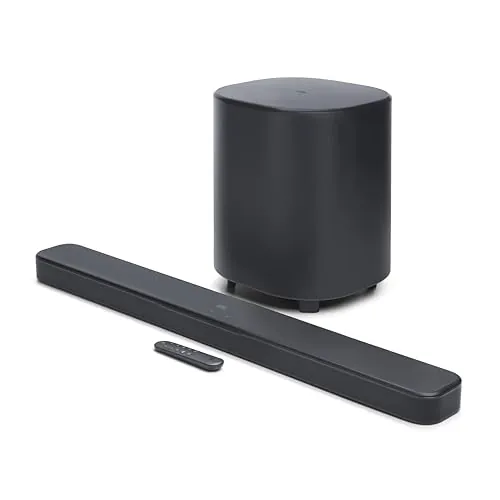
JBL Bar 500MK2 5.1-Channel Soundbar System — Black
Exact black U.S. item identified by JBL as JBLBAR500M2BLKAM. JBL lists one wireless subwoofer in this system and documents an HDMI video input plus an eARC output. The separate subwoofer has its own supplied power cord, so include a nearby outlet and floor or shelf location in the setup plan.
Model JBLBAR500M2BLKAM
Amazon ASIN B0FHBVS6GC
Bose
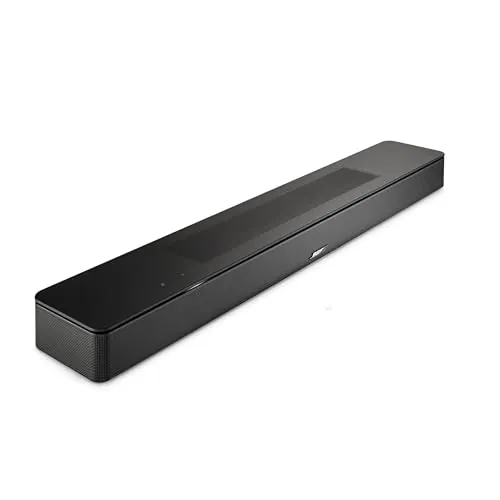
Bose Smart Soundbar — Black
selected listing entry for the black Bose Smart Soundbar (retail part-number bridge unresolved in Bose's cited official materials). Bose's U.S. product page lists a single soundbar package with HDMI and optical cables; its owner guide documents eARC/ARC or optical from TV and compatible Bass Module 500/700 add-ons.
Model 892079-1100
Amazon ASIN B0D6W8XQ6J
Differences that matter
Sources for What arrives in the base package
Sources for Where a console or media player connects
Sources for Bar footprint and separate placement needs
Sources for TV remote and repeated control routine
Trace your TV and source-device wiring before comparing features
Start at the TV's rear panel and write down which socket is labeled HDMI eARC/ARC and whether an optical audio output is present. Then trace the devices that matter: a console, streaming box or disc player. JBL documents one HDMI video input on the Bar 500MK2 plus an eARC output, and its setup manual shows the digital device connected to HDMI IN while the soundbar connects to the TV's ARC/eARC input. JBL lists HDR10+ and Dolby Vision passthrough for that HDMI path, but actual results still depend on the connected TV and source configuration.
Bose's owner guide documents the Smart Soundbar connecting to the TV through HDMI eARC/ARC, with optical as its alternative. The reviewed Bose documentation does not show a corresponding HDMI video source input on the soundbar. That makes the buyer check concrete: decide whether sources will plug into the TV and return audio to the soundbar, or whether you need a source to pass through the soundbar. This guide does not infer that every TV or device will support every format or control behavior.
Count components and check the actual footprint
The JBL product page lists one wireless subwoofer with the Bar 500MK2. The manual shows the subwoofer has a power connector, so it needs its own AC outlet and a separate place in the room; a wireless link does not remove those physical needs. JBL lists the soundbar at 37 inches wide and the subwoofer at 12.8 by 15.7 by 12.8 inches. Its U.S. box list also names the main bar's two wall brackets and template.
Bose's listed basic package is the Smart Soundbar plus remote, power cord, HDMI cable and optical cable. Bose lists the bar at 27.34 inches wide. If wall mounting, the Bose guide calls for at least 4 inches between the bar's top and the TV, and its guide describes the Bose wall bracket as an optional separately purchased accessory. Measure the shelf, screen clearance, cable path and outlet location instead of comparing only bar width. The dimensions guide placement; they do not establish a sound-quality difference.
Match the remote routine and exact bundle you will buy
Both products include a remote in their listed box contents. JBL documents HDMI-CEC for TV/device control and an IR-learning alternative; its manual cautions that full CEC compatibility is not guaranteed. Bose's guide ties TV-remote power, volume and mute control to an eARC/ARC connection. If optical is the available Bose TV connection, the manual does not promise that same TV-remote routine, so check whether using the soundbar remote or app is acceptable.
For JBL, count one bar, one subwoofer and the required powered locations. For Bose, inspect the exact offer to see whether it is the Smart Soundbar alone or a bundle with an optional compatible Bass Module 500 or 700. One identity caveat remains: Bose's official page and guide identify the Smart Soundbar but do not print listing data part number 892079-1100, which is the model field attached to the selected listing ASIN. Confirm that listing-to-model association before relying on a particular seller offer.
Product details
JBL Bar 500MK2 5.1-Channel Soundbar System — Black
- Included system and extra power point
- JBL's box list names the soundbar, one wireless subwoofer, remote with two batteries, HDMI cable and power cords. The subwoofer has a separate power connector; wireless describes its connection to the bar, not a battery-powered sub. Source
- TV and source-device connections
- One HDMI video input and one HDMI eARC output; JBL lists HDR10+ and Dolby Vision passthrough. The manual shows a player or console connected to HDMI IN and the TV connected to HDMI OUT (ARC/eARC). Source
- Soundbar and subwoofer dimensions
- Soundbar: 37 in W × 2.0 in H × 4.1 in D. Subwoofer: 12.8 × 15.7 × 12.8 in. Measure the bar location and a separate subwoofer location. Source
Bose Smart Soundbar — Black
- Standard listed box contents
- Bose lists the Smart Soundbar, remote with battery, power cord, HDMI cable and optical cable. The listed package does not name a bass module; Bose describes compatible modules as optional additions. Source
- TV connection and remote-control condition
- The owner guide documents the TV connection through HDMI eARC/ARC or optical. TV-remote power, volume and mute control requires the eARC/ARC connection in the cited guide. Source
- Soundbar dimensions and placement guidance
- Bose lists 27.34 in W × 2.21 in H × 4.09 in D. Its guide says to leave at least 4 in above the bar when wall-mounted and at least 0.4 in behind it; a wall bracket is purchased separately. Source
Before you buy
Community discussions
Testing one-remote startup with the TV
Bose Smart Soundbar — Black
An owner connected the 2024 Bose Smart Soundbar through an LG OLED’s ARC port and used an Apple TV remote. They reported that the TV and streamer sometimes powered on without the bar.
What to check
Draw the connection path from the media box to the TV and soundbar. Check which remote handles volume and whether the bar wakes with the equipment.
Common questions
Does the JBL Bar 500MK2 package include a subwoofer?
Yes. JBL's current U.S. Bar 500MK2 box list names one wireless subwoofer. Its exact manual shows a separate power connector for that subwoofer, so plan for an outlet and a physical spot as well as room for the soundbar.JBL Bar 500MK2 U.S. product page — Black item JBLBAR500M2BLKAMJBL Bar 500MK2 Owner's Manual
Can I plug a console into either soundbar and pass video to the TV?
JBL lists one HDMI video input, one eARC output and HDR10+/Dolby Vision passthrough, and its manual gives a console/player-to-HDMI-IN setup. Bose's guide documents connecting the TV's eARC/ARC port or optical output to the soundbar; it does not document the same soundbar-side HDMI video input and pass-through route. Confirm the exact TV and source settings for your desired setup.JBL Bar 500MK2 U.S. product page — Black item JBLBAR500M2BLKAMJBL Bar 500MK2 Owner's ManualBose Smart Soundbar Owner's Guide
Will my TV remote control the Bose Smart Soundbar?
Bose's guide says TV-remote power, volume and mute require the soundbar to be connected to the TV's HDMI eARC or ARC port. The guide documents optical as an alternative TV-audio path when ARC is unavailable, but does not promise those same TV-remote controls over optical.Bose Smart Soundbar Owner's Guide
Does the Bose Smart Soundbar box include a bass module?
Bose's listed Smart Soundbar box contents include the bar, remote, power cord, HDMI cable and optical cable; the list does not name a bass module. Bose's guide identifies Bass Module 500 and 700 as compatible accessories. Verify the actual seller bundle if a module is supposed to arrive with your order.Bose Smart Soundbar U.S. product pageBose Smart Soundbar Owner's Guide
Sources and scope
No hands-on or matched listening test was performed; this guide does not rank bass output, loudness, dialogue, immersion or sound quality. JBL's current U.S. page identifies its exact black item JBLBAR500M2BLKAM. Bose's U.S. product page and linked guide identify the Bose Smart Soundbar, but neither displays listing data retail part number 892079-1100; the selected listing mapping is therefore not independently bridged by those official sources. Confirm the exact Bose product/offer and any bundle contents before ordering. TV ports, audio output settings, HDMI-CEC behavior and source-device formats vary by equipment. Bose's cited owner guide documents a TV eARC/ARC or optical connection and does not document a matching HDMI source-input/pass-through path.
Related comparisons
Bose TV Speaker vs Bose Smart Soundbar: Connections, App and Expansion
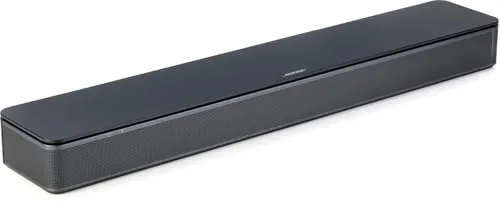
These Bose soundbars serve different system plans. The TV Speaker focuses on one TV connection, Bluetooth music and remote control; it includes an optical cable, while its HDMI cable is sold separately. Smart Soundbar adds the Bose app, Wi-Fi streaming and optional wireless bass and surround equipment, and its box lists both optical and HDMI cables. Before choosing, check your TV ports, whether you need Dolby Atmos, the cables already included, the space under your TV and any accessories you expect to add.
Read comparison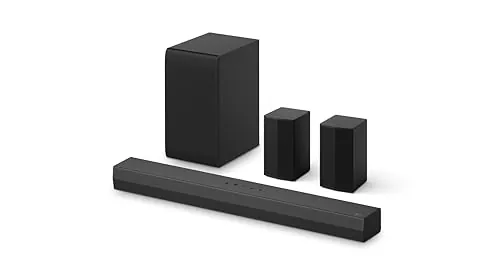
JBL Bar 500MK2 vs LG S40TR: Rear Speakers, Power and TV Wiring
This U.S. comparison answers a practical setup question, not which system sounds better. LG's S40TR product page lists rear speakers in the box; its footnote says the pair must connect to each other by wire and one speaker needs AC power. JBL's Bar 500MK2 box list names the main bar and a wireless subwoofer, while its manual shows that subwoofer has its own power connector. JBL also documents an HDMI IN for a player or console and HDMI OUT to the TV's eARC/ARC port. Before choosing, map the TV connection, outlet locations and rear-speaker cable path in your room.
Read comparison