
Products compared
LG
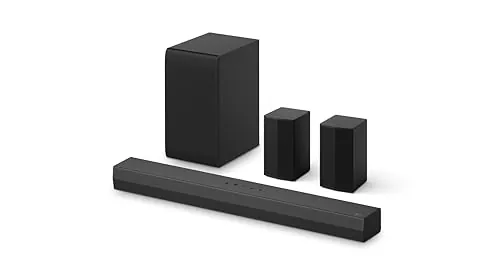
LG S40TR 4.1-Channel Home Theater Soundbar with Rear Surround Speakers and Wireless Subwoofer
For the U.S. LG S40TR, model S40TR.DUSALLK, LG says the rear units connect to each other by wire and one requires AC power. Plan the cable run between the two rear positions and an outlet at one unit.
Model S40TR
Amazon ASIN B0D1CPPL85
ULTIMEA
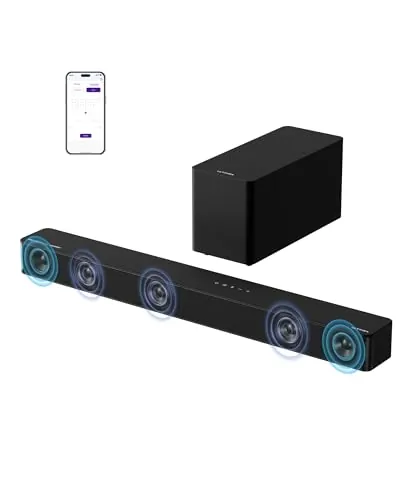
ULTIMEA Poseidon M60 5.1 Soundbar
The ULTIMEA Poseidon M60, model U3721, has left and right surround drivers built into the soundbar and a separate subwoofer, according to ULTIMEA's product description.
Model U3721
Amazon ASIN B0F62YBNSX
Differences that matter
What matters most to you?
Choose a priority to see what it changes.
Sources for Where the surround speakers go and how they get power
Sources for Subwoofer and bar footprint
Sources for Remote, phone app and TV-brand dependency
Start with the rear-speaker layout, not the channel label
The LG S40TR is the more explicit rear-speaker layout: LG lists a 4.1-channel system with rear surround speakers and a subwoofer. Its product-page footnote says the rear pair is connected by wire and one rear speaker needs AC power. That means a real setup includes two rear positions, a wire path between them and a power point at one rear unit. LG does not give the wire length in the source reviewed here, so ask or measure before relying on a long route.
ULTIMEA describes the Poseidon M60 as a 5.1 system, with left and right surround drivers built into the soundbar and a separate subwoofer. In the official M60 product page's driver description, those surround drivers are part of the bar; the reviewed documentation does not describe separate rear surround or height speakers. The 5.1/Dolby Atmos label therefore should not be read as proof that sound comes from physical rear or overhead units. Choose according to the layout you can make in your room, not a channel number alone.
Measure the console and reserve a separate subwoofer spot
ULTIMEA lists the M60 main bar at 800 × 90 × 70 mm and its subwoofer at 175 × 350 × 150 mm. Measure your console and the intended subwoofer spot before ordering, including the cable route and nearby power. These are published physical dimensions, not evidence of room coverage or audio quality.
LG identifies a subwoofer for the S40TR but does not list its dimensions on the U.S. product page. Check the exact U.S. S40TR.DUSALLK manual or measure the unit before choosing a shelf or cabinet. When planning space, count the bar, subwoofer and any rear units separately for either system.
Trace the TV signal path and settings you will actually use
ULTIMEA's exact M60 connection guide documents HDMI eARC/ARC, optical and Bluetooth. It recommends eARC and says the TV's ARC/eARC port must connect to the soundbar's eARC port; a regular HDMI input is not the same socket. For the maker's Atmos path, the TV must support eARC and use compatible audio output settings such as Auto or Pass Through. If using optical, ULTIMEA says the cable is not in the package and instructs the TV to output PCM. Its M60 troubleshooting material also calls for PCM output for DTS content in its HDMI troubleshooting steps. These are TV/source-specific setup checks, not a universal format guarantee.
LG's exact S40TR product page lists Dolby and DTS support, while its exact U.S. support page links the model manual. The manual's port and format details were not extracted for this guide, so check that document and your television's manual before deciding between connection paths. Do not transfer port details from a different LG soundbar. LG also limits WOW Orchestra / one-remote use to select LG TV and soundbar models; verify the exact pair if that control workflow is important.
Complete this before-you-buy room and TV worksheet
1. On paper, mark the TV, seating, bar shelf, subwoofer location, available outlets and cable route. For S40TR, add the two rear positions, the wire run between them and AC at one rear unit. For M60, check the listed bar and sub dimensions and leave room for its separate subwoofer.
2. Read the labels on the TV ports and record the exact TV model: HDMI ARC/eARC, optical out, and the audio options shown in its manual or settings. If you choose M60 for Atmos, verify the eARC route and TV/source passthrough settings in ULTIMEA's exact M60 guide. If you plan optical, include a cable because the maker says one is not included.
3. Decide how you want to control daily volume and inputs. For the LG, check whether the exact TV is among LG's select models for WOW Orchestra / one-remote. For M60, review the current product/app and remote guide and confirm the source-switching routine you prefer.
4. Match the retailer offer to the exact ASIN and model/bundle. The M60 maker product page's package illustration did not yield a clear full cable-count list in this review; confirm any needed HDMI, power or mounting item from the exact listing or seller. No price comparison is used here.
Product details
LG S40TR 4.1-Channel Home Theater Soundbar with Rear Surround Speakers and Wireless Subwoofer
- Documented speaker arrangement
- LG lists a 4.1-channel system with rear surround speakers and a subwoofer; a product-page footnote says the two rear units connect to each other by wire and one rear speaker requires AC power. Source
- TV integration caveat
- LG says WOW Orchestra / one-remote use applies only with select LG TVs and LG soundbar models; check the exact TV and soundbar pairing. Source
ULTIMEA Poseidon M60 5.1 Soundbar
- Documented surround arrangement
- ULTIMEA describes the M60 as a 5.1 system with left and right surround drivers built into the soundbar and a separate subwoofer. The reviewed sources do not describe separate rear surround speakers or height speakers. Source
- Main bar and subwoofer dimensions
- Maker-listed main bar: 800 × 90 × 70 mm; separate subwoofer: 175 × 350 × 150 mm. Measure the intended locations; these dimensions do not predict acoustic performance. Source
- TV connection options
- The M60 maker support page documents HDMI eARC/ARC, optical and Bluetooth connection methods. It says an optical cable is not included; the eARC connection is the recommended path in that guide. Source
Before you buy
Community discussions
One S40TR owner places the rear speakers immediately behind the couch
LG S40TR 4.1-Channel Home Theater Soundbar with Rear Surround Speakers and Wireless Subwoofer
An owner describing an LG S40TR setup with a 75-inch LG UA7100 says the rear speakers and subwoofer are immediately behind the couch. They also say they adjusted channel levels using the soundbar remote. The post does not give room dimensions or speaker distances.
What to check
Before choosing a system with separate rear units, sketch your listening position, candidate speaker spots, wire path and available outlet. Compare that layout with the owner's brief setup description, but do not assume the same placement will work or sound the same in another room.
Common questions
Does the ULTIMEA Poseidon M60 have separate rear speakers?
ULTIMEA describes the M60's left and right surround drivers as built into the soundbar and lists a separate subwoofer. The sources reviewed here do not describe separate rear surround units or height speakers. The LG S40TR, by contrast, is listed with separate rear units; LG says a wire connects those two units and one requires AC power.ULTIMEA Poseidon M60 5.1 Soundbar — product pageLG S40TR 4.1-Channel Home Theater Soundbar — U.S. product page
Will the M60 play Dolby Atmos through any HDMI port on my TV?
ULTIMEA's M60 guide calls for the TV's HDMI ARC/eARC-labeled port connected to the M60 eARC port; its Atmos instructions specify the eARC path and compatible TV output settings. Check your TV manual and exact source settings. An ordinary HDMI input is not the same as ARC/eARC.Multiple Connection Methods for Poseidon M60 SoundbarHow to Fix No Sound via HDMI Connection on Poseidon M60
Is an optical cable included with the Poseidon M60?
ULTIMEA's M60 connection guide says the optical cable is not included. If optical is your intended connection, add a suitable cable to the purchase checklist and verify the TV has an optical audio output.Multiple Connection Methods for Poseidon M60 Soundbar
Can I use the S40TR's one-remote feature with any TV?
LG limits WOW Orchestra / one-remote use to select LG TV and LG soundbar models. Check the exact TV model against LG's compatibility details rather than assuming it works with any television.LG S40TR 4.1-Channel Home Theater Soundbar — U.S. product page
Sources and scope
Plan power and wire routing for the LG rear speakers and verify the cable length in your exact kit. Check the TV’s port and output settings for either system. ULTIMEA says the M60 optical cable is sold separately.
- LG S40TR 4.1-Channel Home Theater Soundbar — U.S. product page
- LG S40TR U.S. product support and manual links
- ULTIMEA Poseidon M60 5.1 Soundbar — product page
- Multiple Connection Methods for Poseidon M60 Soundbar
- How to Fix No Sound via HDMI Connection on Poseidon M60
- Poseidon M60 remote control guide
Related comparisons
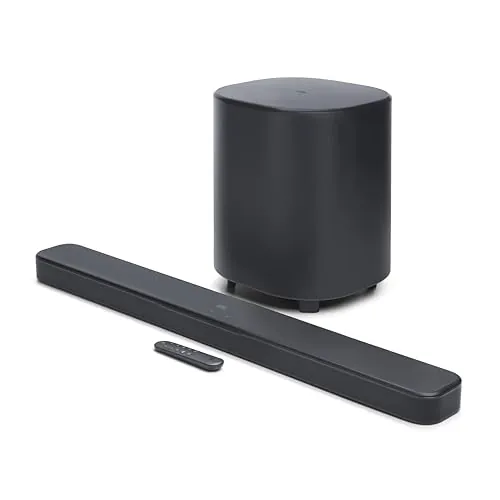
JBL Bar 500MK2 vs LG S40TR: Rear Speakers, Power and TV Wiring
This U.S. comparison answers a practical setup question, not which system sounds better. LG's S40TR product page lists rear speakers in the box; its footnote says the pair must connect to each other by wire and one speaker needs AC power. JBL's Bar 500MK2 box list names the main bar and a wireless subwoofer, while its manual shows that subwoofer has its own power connector. JBL also documents an HDMI IN for a player or console and HDMI OUT to the TV's eARC/ARC port. Before choosing, map the TV connection, outlet locations and rear-speaker cable path in your room.
Read comparison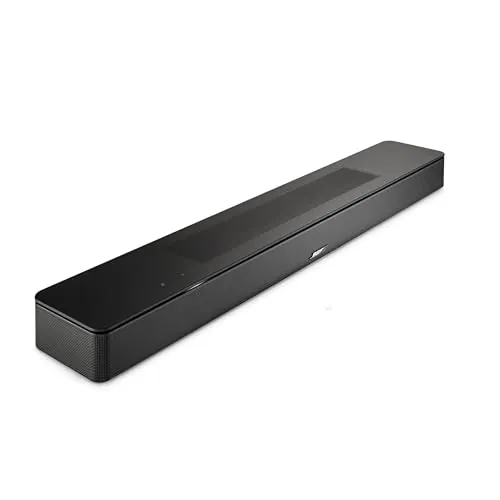
LG S40TR vs Bose Smart Soundbar: Included Rear Kit or Single Bar?
The U.S. LG S40TR page describes a set with rear speakers and a subwoofer; the rear speakers still need a wire between them, and one needs AC power. Bose's Smart Soundbar box list contains the bar, HDMI and optical cables, power cord and remote, while bass and surround modules are optional. Check your TV's ARC/eARC and optical ports before choosing: Bose requires ARC/eARC for Atmos, while optical is its stated fallback for spacious sound.
Read comparison