
Products compared
Logitech
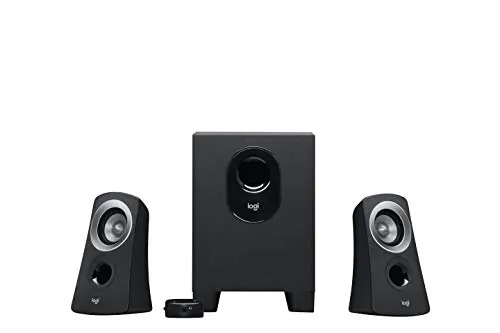
Logitech Z313 Speaker System with Subwoofer
US black version; 2.1 speaker system with a separate subwoofer, two satellite speakers and wired control pod.
Model Z313
Amazon ASIN B002HWRZ2K
Logitech
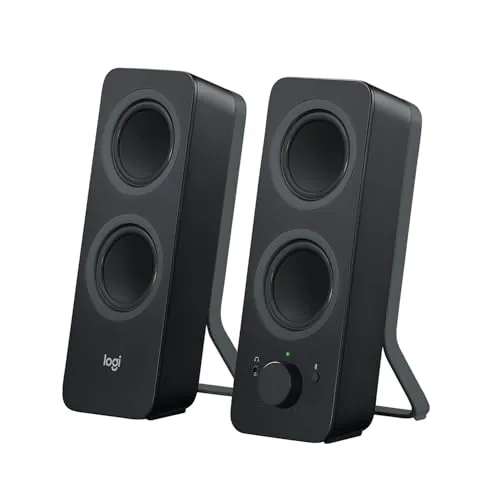
Logitech Z207 Bluetooth Computer Speakers
US black version; 2.0 stereo computer speakers with Bluetooth and a 3.5 mm input.
Model Z207
Amazon ASIN B074KJ6JQW
Differences that matter
What matters most to you?
Choose a priority to see what it changes.
Sources for Speaker layout and placement
Sources for Bluetooth and wired sources
Start with the desk layout, not the speaker wattage
The clearest physical distinction is the documented system layout. Z313 uses two satellite speakers connected to a separate subwoofer. Its setup guide also shows wall power and the wired control pod's 3.5 mm lead to the audio source. That arrangement can suit a desk where you want the subwoofer component and can route the cables, but it asks you to plan for another box and its connections.
Logitech presents Z207 as a 2.0 stereo computer-speaker pair and calls out a compact design intended to fit a deskspace. That gives it the simpler documented component plan if you want two speakers without a separately listed subwoofer. Logitech does not provide matched occupied-space measurements in these sources, so treat this as a layout difference, not a quantified size victory.
For Bluetooth handoff, Z207 has the documented path
Logitech says Z207 can pair with up to two Bluetooth devices. Its stated routine is to pause one source, switch with Easy-Switch, then play from the other. It also has one 3.5 mm input, so it can connect to a wired source as well. The pairing button, power/volume knob and wired jack are on the right speaker.
The Z313 product page and setup guide document a 3.5 mm connection from an audio device to the system. They do not establish Bluetooth support. If you prefer the Z313's subwoofer arrangement but require wireless input, verify that specific capability on an exact current manufacturer listing before deciding; this guide leaves it unknown rather than treating silence as proof of no Bluetooth.
Consider where you reach for volume and headphones
The Z313's wired pod puts system power, speaker volume and a headphone jack away from the speakers. One setup detail matters: its guide says the pod's volume wheel does not control headphone level, so set headphone volume on the connected audio source.
Z207 locates pairing, its power/volume knob and the 3.5 mm input on the right speaker. That may be convenient if the speaker itself is within reach; the reviewed Z207 page does not establish a headphone output. Before buying, check whether your normal routine is to switch wireless sources, reach for a desk-side wired pod, or connect headphones through the speaker system.
Product details
Logitech Z313 Speaker System with Subwoofer
The setup guide shows the satellite speakers connecting to the subwoofer, the system plugging into wall power, and the control pod's 3.5 mm lead connecting to the audio source. The pod's headphone jack is useful if you want a wired headset connection at the desk; when headphones are connected, Logitech says to set their volume from the audio source.
- System layout
- Two satellite speakers and a separate subwoofer Source
- Documented audio input
- One 3.5 mm input; Logitech says to connect a device with a headphone jack Source
- Control pod
- Wired power and speaker-volume controls, plus a headphone jack Source
Logitech Z207 Bluetooth Computer Speakers
Z207's maker describes two Bluetooth pairings with pause-and-switch playback, as well as one wired 3.5 mm source. Its product page calls out a compact desk design and locates pairing, power, volume and the wired jack on the right speaker.
Before you buy
Community discussions
First-time Z313 hookup question
Logitech Z313 Speaker System with Subwoofer
A first-time Z313 owner compared its satellite, subwoofer and control-pod wiring with a simpler two-speaker set they had used before, and was unsure where the plugs went.
What to check
Use the manufacturer's setup diagram to map where the subwoofer and control pod will fit and how the source cable reaches the desk; then compare that layout with the Z207's two-speaker arrangement.
A new desk changed how a Z313 owner routed audio
Logitech Z313 Speaker System with Subwoofer
After moving desks, one Z313 owner tried feeding audio from a monitor and reported that the sound was different from their previous setup.
What to check
List every device you want to connect and identify whether it provides Bluetooth or a usable analog output.
Common questions
Which one lets me switch between two Bluetooth sources?
The Z207. Logitech says it can pair with up to two Bluetooth devices and switch playback after pausing one source. The reviewed Z313 materials confirm a 3.5 mm wired input but do not establish whether it supports Bluetooth.Logitech Z207 Bluetooth Computer Speakers (US product page)Logitech Z313 Speaker System with Subwoofer (US product page)
Does the Z313 have a headphone jack?
Yes. Logitech places a headphone jack on the wired control pod. Its setup guide says the headphone volume is adjusted at the connected audio source; the pod's volume control changes speaker level.Logitech Z313 Speaker System with Subwoofer (US product page)Logitech Z313 Speaker System Setup Guide (English section, pages 3–4)
Can I use the Z207 with a wired source?
Logitech lists one 3.5 mm input in addition to its Bluetooth connections. The maker does not describe the Z207 product page as having a headphone output, so do not buy it on that assumption.Logitech Z207 Bluetooth Computer Speakers (US product page)
How much more desk space does the Z313 need?
The Z313 manual confirms a separate subwoofer and two satellites, while the Z207 page describes a compact 2.0 stereo design. The reviewed sources do not give a matched measurement of their occupied footprint or cable reach; measure your own placement before ordering.Logitech Z313 Speaker System Setup Guide (English section, pages 3–4)Logitech Z207 Bluetooth Computer Speakers (US product page)
Sources and scope
This is a feature and setup comparison, not an audio-quality or performance test. Logitech's reviewed Z313 materials document a 3.5 mm wired input but do not establish Bluetooth support; its presence or absence should be confirmed separately if decisive. The cited sources do not provide matched desk-footprint or cable-length measurements, and the Z207 page does not establish a headphone output. No live price, stock or offer is represented.
Related comparisons
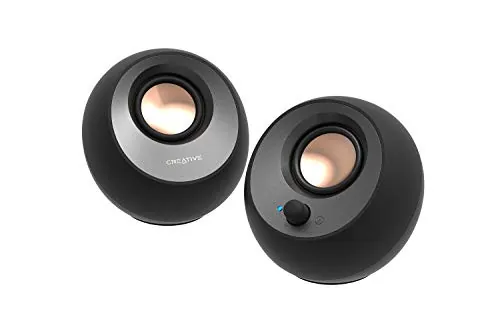
Logitech Z207 vs Creative Pebble V3: Choose by Desk Connections
For a desktop speaker setup, the black Logitech Z207 (980-001294) and Creative Pebble V3 (MF1700) solve different connection problems. Logitech documents two paired Bluetooth devices plus one 3.5 mm input and an Easy-Switch routine. Creative documents USB-C audio and power, Bluetooth 5.0 and AUX; its package material lists a USB-C-to-USB-A converter but no USB power adapter or AUX cable. Check which ports your computer actually has and whether you need separate USB power when using analog audio.
Read comparison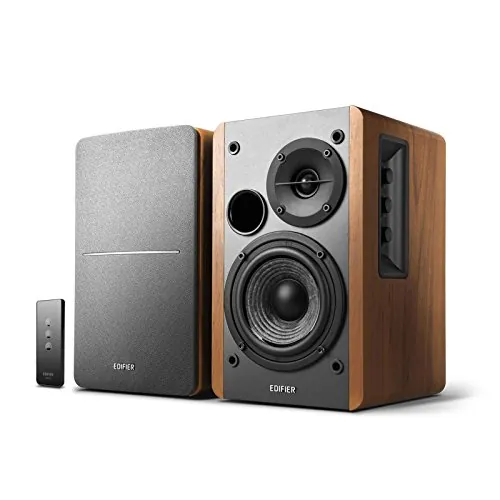
Logitech Z207 vs Edifier R1280T: Bluetooth, Inputs and Desk Setup
Logitech Z207 model 980-001294 accepts Bluetooth and one 3.5 mm analog input, with power and volume at the right speaker. Edifier R1280T has no Bluetooth, but offers two RCA inputs, a remote for volume and mute, and side-panel tone controls. A 3.5 mm source can still connect to the R1280T using its documented 3.5 mm-to-RCA cable; its two connected sources play together rather than auto-selecting.
Read comparison