
Products compared
Nelko
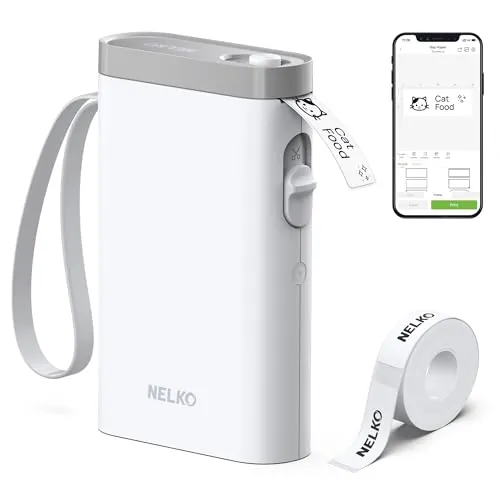
Nelko P21 Portable Bluetooth Label Printer (White)
A small thermal label printer designed around the NELKO app on a phone or tablet. NELKO says the P21 connects inside its app using Bluetooth; charging uses USB-C, while the cable is not the print connection. For repeated household labels, choose a P21-compatible roll and the matching media setting in the app. The selected listing listing says the printer has a built-in rechargeable battery and does not include a charging adapter, but the exact Amazon carton contents should be checked separately.
Model P21
Amazon ASIN B0C3L93F2Q
Brother
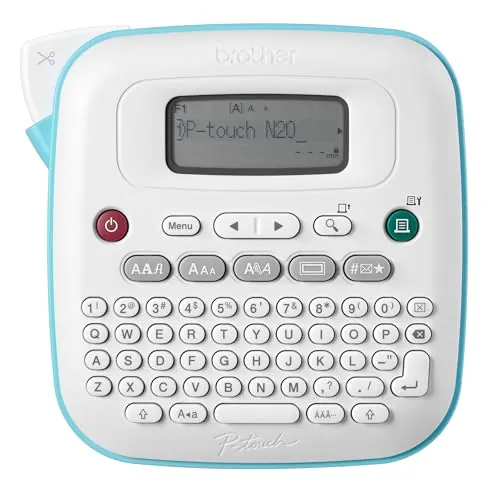
Brother P-touch PT-N20 Personal Desktop Label Maker (White)
A standalone handheld/desktop label maker: type on its QWERTY keyboard, preview on the 16-character display, and print from the unit. Brother lists up to two lines, 3 fonts, 7 font styles, 15 frames and 250 symbols, with storage for up to 10 labels. It uses Brother P-touch Btag tape only, at 12 mm; power requires six AAA batteries or an optional AC adapter, neither included according to Brother's specifications.
Model PT-N20
Amazon ASIN B0DFDRSHBJ
Differences that matter
What matters most to you?
Choose a priority to see what it changes.
Sources for Where you create and preview labels
Sources for Replacement tape to verify
Sources for Power and charging path
Sources for Starter supplies in the box
Start with the design workflow
These are two small label makers with different input paths. The P21 depends on a phone: open the NELKO app, connect the printer from inside that app over Bluetooth, choose a compatible media setting and send the label. The PT-N20 keeps the task on the unit: type on its QWERTY keyboard, review the content on its display, then print. It can retain up to 10 labels for repeat jobs.
That difference matters in a shared pantry or classroom. A person who already has the phone and app ready may prefer P21's mobile design workflow. Someone who wants to hand the device to another user without setting up a phone may prefer the PT-N20's self-contained keyboard and preview. The documented features support that workflow distinction; they do not establish a print-quality winner.
Choose the refill system before the printer
The P21 is an inkless thermal printer, so its recurring supply is compatible label rolls rather than ink or toner. NELKO directs P21 owners to rolls made for that series and to choose the matching label size in the app. Its support page and FAQ are not fully aligned on continuous-label use, so if you need an unusually long or specific label format, check that exact roll against the exact printer before buying.
PT-N20 has a more narrowly stated tape rule: Brother says it uses P-touch Btag tape, approximately 12 mm wide, exclusively. The maker lists 17 colorful varieties and a blue-on-white Btag-233 sample. Don't infer compatibility from the broader P-touch name; verify the tape's Btag marking.
Check power and carton contents
NELKO describes the P21 as rechargeable and says USB-C is for charging while Bluetooth through the app handles printing. Its current base-package description includes one 14 × 40 mm roll, a charging cable and a manual. That is a manufacturer package description, not proof that every third-party listing or the assigned Amazon carton has exactly the same bundle.
Brother's PT-N20 page lists one Btag-233 sample tape and quick-start and product-safety guides. It specifies six AAA batteries or an optional AC adapter, both not included. The page's sample-length fields conflict, so use the exact package label if tape length is important. Check the exact seller carton for both printers before counting on a starter supply or an adapter.
Product details
Nelko P21 Portable Bluetooth Label Printer (White)
- Design workflow
- NELKO app on iOS or Android; connect to P21 inside the app over Bluetooth. NELKO's P21 FAQ says USB-C is for charging, not printing. Source
- Media and printing
- Thermal, inkless output using P21-compatible NELKO label rolls; the maker's FAQ asks users to verify the roll size and feed compatibility. Source
- Official package listing
- NELKO's current base-package description lists a P21 printer, one 14 × 40 mm roll, USB-C charging cable and instruction manual; this is not independently tied to the assigned Amazon carton. Source
Brother P-touch PT-N20 Personal Desktop Label Maker (White)
- On-device workflow
- QWERTY keyboard, one-line 16-character preview display, up to two printed lines, and memory for up to 10 labels. Source
- Tape compatibility
- Exclusively Brother P-touch Btag tape, approximately 12 mm / 1/2 inch wide; not the broader P-touch tape family by default. Source
- Power and box
- Brother lists six AAA batteries or an AC adapter as power options, both not included; its carton contents list one Btag-233 blue-on-white sample tape plus guides. Source
Before you buy
Community discussions
A P21 owner uses its app to edit a photo label
Nelko P21 Portable Bluetooth Label Printer (White)
In a MiniDisc discussion, the owner identifies a Nelko P21 and says its phone app can print a photo and edit the label. The post describes the editing workflow but does not report label dimensions, fit on a particular surface, or a print-quality result.
What to check
If photo editing is important, preview and print a sample using the roll and surface you plan to label. This post does not establish the P21 stock size or how a photo fits on your media; the PT-N20 instead offers on-device typing and preview.
Common questions
Can I print from a computer with the P21?
NELKO describes P21 printing through its iOS/Android app and Bluetooth. It says the USB-C port is used for charging, not printing, and does not present the P21 as a computer-printing model.FAQ – NELKO (P21 questions)
Will regular Brother TZe tape work in the PT-N20?
Brother specifies P-touch Btag tape only for PT-N20, at about 12 mm wide. Confirm the consumable explicitly says Btag rather than assuming another P-touch tape family is compatible.PT-N20 Personal Desktop Label Maker
Does either model include everything needed to start printing?
Both manufacturer pages describe starter media, but the assigned Amazon cartons are not independently matched here. Brother lists one Btag-233 sample tape while requiring separate batteries or an adapter. NELKO's current base package lists one roll and a USB-C cable; verify the ASIN's exact bundle and whether you need a wall adapter.P21 Portable Bluetooth Label MakerPT-N20 Personal Desktop Label Maker
Sources and scope
This is a feature and workflow comparison based on manufacturer documentation and the selected listing records, not a print-quality or durability test. NELKO's pages differ on continuous-label support, so confirm a particular roll and size against the exact P21 before buying. The public manufacturer package descriptions do not establish the complete contents of each selected Amazon ASIN; verify the seller's exact carton listing when starter media or a charging adapter matters.
Related comparisons
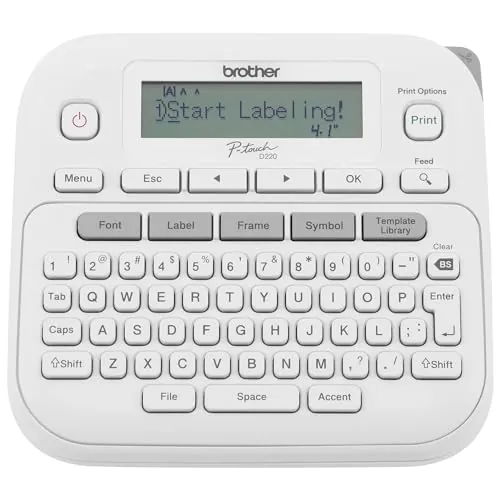
Brother PTD220 vs PT-N20: Tape Fit, Saved Labels and Power Setup
The shared 12 mm maximum does not mean these tape families interchange. Brother lists the PTD220 for TZe tape from 3.5 to 12 mm; PT-N20 is documented for Btag 12 mm tape exclusively. PTD220 also lists up to 30 saved labels and 25 preset templates; PT-N20 lists 10 saved labels, while its current page does not specify template availability. Both models use six AAA batteries or an optional AC adapter, neither included.
Read comparison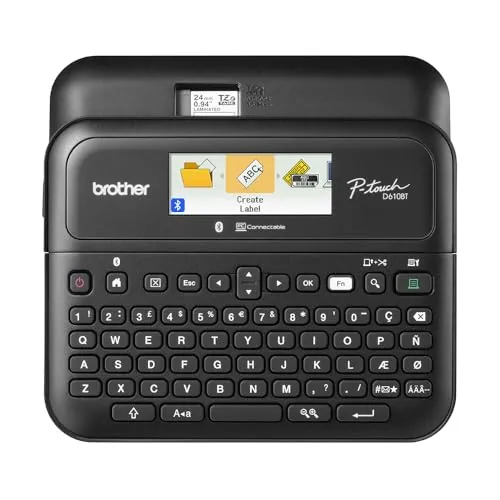
Brother PT-N20 vs PT-D610BT: Btag vs TZe, Apps and Box Contents
The key choice is the tape ecosystem and where you create labels. Brother specifies the PT-N20 exclusively for 12 mm Btag cassettes; its US page describes a keyboard, preview and saved-label workflow and lists no mobile-device printing app. The PT-D610BT's US support specification lists standard TZe cassettes from 3.5 to 24 mm, USB 2.0 Micro-B and Bluetooth, while Brother documents P-touch Editor and iPrint&Label workflows for computer and mobile use. Box contents and power differ too: the PT-N20 uses six AAA batteries and has an optional adapter; the PT-D610BT uses six AA batteries or its included adapter and USB cable. Match existing tape stock and the device you want to design from before deciding.
Read comparison