
Products compared
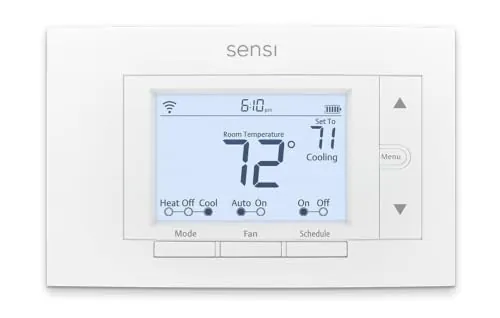
Sensi
Sensi Smart Thermostat ST55 (White)
The US white Sensi Smart Thermostat. Sensi says a C-wire is not required in most applications, with system-specific exceptions. Its operation manual documents physical controls on the wall unit.
Model ST55
Amazon ASIN B01NB1OB0I
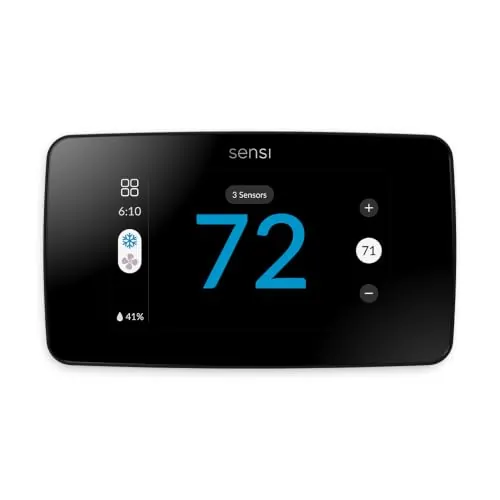
Sensi
Sensi Touch 2 ST76 (Black Beveled Edge)
The US black beveled-edge Sensi Touch 2 ST76. It requires a C-wire, uses a glass LCD touchscreen, and is in Sensi's supported Touch 2 family for separately sold wireless Room Sensors.
Model ST76
Amazon ASIN B0BKH83KF9
Differences that matter
What matters most to you?
Choose a priority to see what it changes.
Sources for Controls at the wall
Sources for Sensi Room Sensors
Check whether either thermostat fits your HVAC system
Start with the HVAC system, not the touchscreen question. Sensi says the ST55 does not need a common wire (C-wire) in most applications, while heat-only, cool-only, and heat-pump setups are exceptions. Touch 2/ST76 requires a C-wire. Sensi's compatibility chart also marks line-voltage, millivolt, communicating/proprietary, and RV/12VDC categories as incompatible.
Those are product-level rules, not a diagnosis of your home. Use Sensi's compatibility checker for the exact system before ordering. If you cannot identify it confidently or would need to handle wiring, ask Sensi support or a qualified HVAC professional.
Choose the wall interaction you want
The ST55 manual describes physical up/down, Menu, Schedule, Fan, Mode, and backlight buttons on the thermostat. Touch 2 is listed with a touchscreen LCD, and the ST76 belongs to that model family.
This is a preference choice. Sensi's descriptions do not establish which interface is easier, faster, or more reliable for a household.
Room sensors are an ST76 deciding factor
Sensi's support page says only Touch 2 model thermostats are compatible with Sensi Room Sensors, and names the ST76 series. If you want to add those sensors, ST76 is the supported choice between these two; the sensors are sold separately.
Keep the sensor question separate from HVAC compatibility: a supported sensor pairing does not confirm that the thermostat is compatible with your particular heating and cooling equipment.
A safe pre-buy check
1. Confirm the exact thermostat and HVAC system in Sensi's compatibility checker. 2. Verify whether the C-wire requirement is met for that system. 3. If the system is uncertain or you are not comfortable identifying its setup, contact Sensi or an HVAC professional before purchase. 4. Only after compatibility is clear, choose physical buttons (ST55) or touchscreen and Sensi Room Sensor support (ST76).
Sensi's Find a Pro page lets shoppers search its installer directory by ZIP code. Sensi notes that directory inclusion is for locating contractors and is not an endorsement of their work.
Product details
Sensi Smart Thermostat ST55 (White)
- Common wire requirement
- Not required in most applications; Sensi lists heat-only, cool-only, and heat-pump setups as C-wire exceptions Source
- Wall controls
- The ST55 operation guide documents physical up/down, Menu, Schedule, Fan, Mode, and backlight buttons Source
- Room sensor support
- Sensi says only Touch 2 model thermostats are compatible with Sensi Room Sensors; ST55 is not listed as a compatible model Source
Sensi Touch 2 ST76 (Black Beveled Edge)
- Common wire requirement
- Required for the Sensi Touch 2 Source
- Wall controls
- Touch 2 is listed with a touchscreen LCD; the ST76 product page is the exact model family page Source
- Room sensor support
- Sensi lists the ST76 series among the only thermostat models compatible with Sensi Room Sensors; sensors are a separate product Source
Before you buy
Community discussions
Checking HomeKit support on the ST55 box
Sensi Smart Thermostat ST55 (White)
A buyer chose an ST55 expecting to use Apple Home. They reported that their unit’s box did not list HomeKit and that they could use the thermostat through the Sensi app.
What to check
If Apple Home is part of your setup, confirm support on the listing and packaging for the exact version you will receive.
Common questions
Does the ST55 always work without a C-wire?
No. Sensi says the ST55 does not need a C-wire in most applications, but heat-only, cool-only, and heat-pump systems are listed exceptions. Check your exact HVAC system with Sensi before purchase.Will Sensi Thermostats Work with my HVAC System?ST55, Sensi Smart Thermostat
Can I use Sensi Room Sensors with the ST55 or ST76?
Sensi says only Touch 2 model thermostats are compatible with Room Sensors and lists the ST76 series. That makes ST76 the documented compatible model in this comparison; the sensors are separate.Room Sensor CompatibilitySensi Touch 2 Smart Thermostat
Which model has buttons and which has a touchscreen?
The ST55 operation guide documents physical controls on the wall unit. Sensi lists a touchscreen LCD for Touch 2/ST76. The sources do not establish that either is easier to use.Sensi Smart Thermostat Manual Operation Guide (R-5029-2)Sensi Thermostat product comparison
What should I do if I am not sure my HVAC system is compatible?
Use Sensi's compatibility checker for your exact system. If the result is uncertain or identifying the setup would involve handling wiring, contact Sensi or a qualified HVAC professional; Sensi provides a ZIP-code installer search.Check smart thermostat system compatibilityFind a Professional Installer
Sources and scope
This US feature-fit guide is based on Sensi/Copeland product, compatibility, sensor-support and manual documents. It cannot determine whether either thermostat fits a specific home, and it includes no wiring or installation instructions. Use Sensi's compatibility checker for the exact HVAC system and ask a qualified HVAC professional if the system or wiring is uncertain. No hands-on comparison, usability ranking, reliability conclusion, display-technology claim for ST55, price recommendation or performance claim is made.
- Will Sensi Thermostats Work with my HVAC System?
- Sensi Thermostat product comparison
- Check smart thermostat system compatibility
- ST55, Sensi Smart Thermostat
- Sensi Touch 2 Smart Thermostat
- Room Sensor Compatibility
- Sensi Smart Thermostat Manual Operation Guide (R-5029-2)
- Find a Professional Installer
Related comparisons
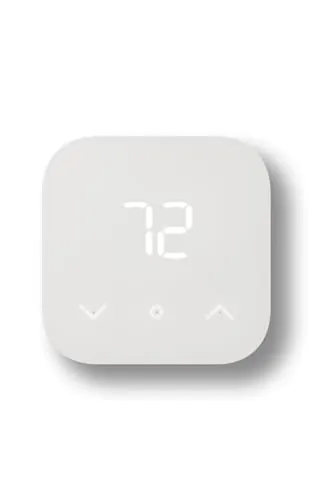
Amazon Smart Thermostat S6ED3R vs Sensi ST55: C-Wire and Schedule Fit
For these exact US thermostats, compatibility comes before app preference. Amazon requires C-wire power unless Amazon confirms its separately purchased adapter will work; ST55 can avoid a C-wire on conventional heat-and-cool systems, but other system types and HomeKit require one. If both qualify, Amazon puts schedule setup in Alexa, while ST55 supports a basic seven-day, four-setpoint wall schedule with Wi-Fi off.
Read comparison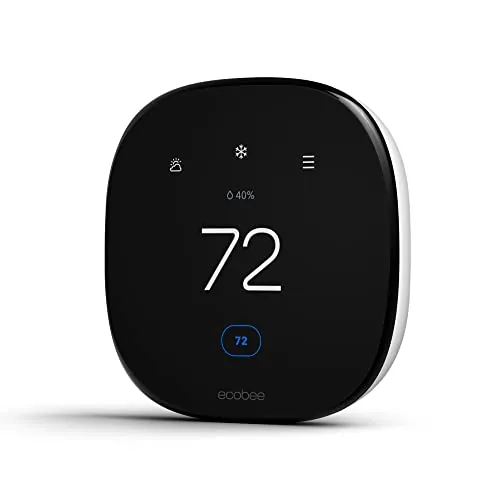
ecobee Enhanced vs Sensi Touch 2: C-Wire, Sensors and HomeKit
ecobee Enhanced includes a Power Extender Kit for compatible systems without a C wire. Sensi Touch 2 requires a C wire, and Sensi lists a separate kit for eligible setups. Both offer optional model-specific room sensors. Check system compatibility first, then compare the app and platform controls you use.
Read comparison