
Pickagu

Steam Deck OLED 512GB vs Legion Go S SteamOS: Controls and Desk Setup

Valve Steam Deck OLED 512GBModel OLED 512GBLenovo Legion Go S Powered by SteamOS, Ryzen Z1 Extreme, 32GB RAM, 1TB SSDModel 83N6000GUS

For these exact SteamOS handhelds, compare controls and the desk setup you plan to use. Valve lists two 32.5 mm trackpads and a 7.4-inch HDR OLED screen on Steam Deck OLED; Lenovo identifies model 83N6000GUS as a SteamOS, Ryzen Z1 Extreme configuration with 32GB memory and 1TB storage. Lenovo's 8APU1 family reference lists an 8-inch 1920×1200 touchscreen, one small right-side touchpad and two USB4 USB-C ports with DisplayPort; confirm the exact current configuration before buying.

Choose by what matters to you

Choose Valve Steam Deck OLED 512GB OLED 512GB

You specifically want two built-in trackpads and Valve's 7.4-inch HDR OLED specification, and one USB-C port with a hub or dock suits your external-display and charging plan. Check the games and accessories you rely on before committing.

Choose Lenovo Legion Go S Powered by SteamOS, Ryzen Z1 Extreme, 32GB RAM, 1TB SSD 83N6000GUS

You prefer its Lenovo-listed 8-inch 1920×1200 touch display and want two USB-C sockets for a planned direct connection arrangement. Its screen and port figures are from Lenovo's 8APU1 family reference, so verify the current exact SKU and your monitor/dock needs.

Before choosing, list the Steam games you expect to play, any cursor-heavy controls you need, and the exact external monitor, hub/dock, charger and cable you already own. Confirm the model-specific operating system, display mode, power requirements and compatibility with the manufacturer for that whole setup.

As an Amazon Associate I earn from qualifying purchases.Affiliate disclosure

Products compared

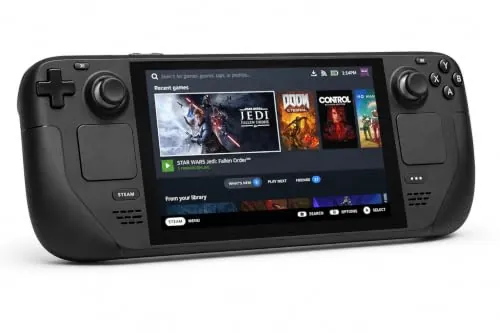
Valve Steam Deck OLED 512GB · OLED 512GB

Valve

Valve Steam Deck OLED 512GB

Steam Deck OLED 512GB. Valve lists a 512GB OLED model and its display, trackpads, USB-C functions and SteamOS.

Model OLED 512GB
Amazon ASIN B0CQ3RWQQZ
Amazon link unavailable for this model
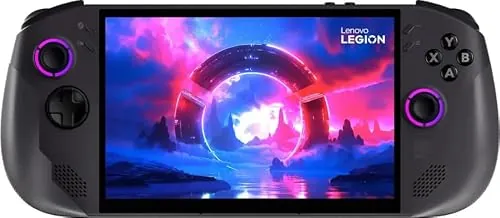
Lenovo Legion Go S Powered by SteamOS, Ryzen Z1 Extreme, 32GB RAM, 1TB SSD · 83N6000GUS

Lenovo

Lenovo Legion Go S Powered by SteamOS, Ryzen Z1 Extreme, 32GB RAM, 1TB SSD

U.S. Legion Go S model 83N6000GUS in Nebula Nocturne, listed with SteamOS, Ryzen Z1 Extreme, 32GB LPDDR5X and 1TB SSD. The detailed display and port notes below come from Lenovo's 8APU1 family PSREF.

Model 83N6000GUS
Amazon ASIN B0FTM1S785

Amazon link unavailable for this model

Differences that matter

What matters most to you?

Choose a priority to see what it changes.

Difference
Valve Steam Deck OLED 512GB
Lenovo Legion Go S Powered by SteamOS, Ryzen Z1 Extreme, 32GB RAM, 1TB SSD
Why it matters
Display specification and control layout
Valve Steam Deck OLED 512GBSteam Deck OLED 512GB: Valve lists a 7.4-inch 1280×800 HDR OLED touchscreen up to 90Hz and two 32.5mm square trackpads.
Lenovo Legion Go S Powered by SteamOS, Ryzen Z1 Extreme, 32GB RAM, 1TB SSDLegion Go S 8APU1 family PSREF: 8-inch 1920×1200 IPS multi-touch panel with 48–120Hz VRR and a 10×10mm buttonless touchpad on the right controller. Lenovo's U.S. page identifies the selected 83N6000GUS configuration; confirm the family details for the exact offer.
If you want two physical trackpads on the handheld, Valve's listed layout points to the Deck. If you prefer a larger, higher-resolution touchscreen and one small touchpad, Lenovo's family specification describes that Go S layout. These figures do not prove panel quality, comfort or game performance.
Sources for Display specification and control layout
Desk connection plan
Valve Steam Deck OLED 512GBSteam Deck OLED has one USB-C port supporting DisplayPort and USB 3 Gen 2. Valve's separately sold Dock lists DisplayPort, HDMI, USB-A, Ethernet and USB-C power passthrough; it lists up to 4K 60Hz or 1440p 120Hz and says specifications may change.
Lenovo Legion Go S Powered by SteamOS, Ryzen Z1 Extreme, 32GB RAM, 1TB SSDThe Legion Go S 8APU1 family PSREF lists two USB-C USB4 ports with DisplayPort 1.4 and USB Power Delivery and states USB-C docking solutions are supported.
Write down whether your monitor and accessories need to be connected while the handheld is charging. A one-port Deck setup may call for a compatible hub/dock; the Lenovo's two ports give two physical sockets but do not promise a specific display, dock or charging outcome. Check the exact products and cable/power requirements together.
Sources for Desk connection plan
Operating system and selected configuration
Valve Steam Deck OLED 512GBValve lists SteamOS 3 for Steam Deck OLED.
Lenovo Legion Go S Powered by SteamOS, Ryzen Z1 Extreme, 32GB RAM, 1TB SSDLenovo's U.S. listing identifies 83N6000GUS as a Legion Go S Powered by SteamOS with Ryzen Z1 Extreme, 32GB LPDDR5X memory and 1TB SSD; the 8APU1 PSREF includes SteamOS as a family operating-system option.
These are both SteamOS selections, not the Windows model. Confirm the exact games, storefront and accessory workflow you need; neither hardware specification alone establishes compatibility with every title or peripheral.
Sources for Operating system and selected configuration
Exact configurations
Valve Steam Deck OLED 512GBThe Steam Deck OLED 512GB is the selected configuration; Valve lists the OLED model with SteamOS.
Lenovo Legion Go S Powered by SteamOS, Ryzen Z1 Extreme, 32GB RAM, 1TB SSDLenovo's selected U.S. configuration is model 83N6000GUS in Nebula Nocturne, listed with SteamOS.
Match the exact model and ASIN, not a similarly named Steam Deck LCD, 1TB OLED, or Windows Legion Go S.
Sources for Exact configurations

Start with the controls and games you plan to use

Valve lists two built-in trackpads on Steam Deck OLED; Lenovo's 8APU1 family PSREF lists one small touchpad on the Go S's right controller. If your usual games benefit from touchpad input, compare those documented layouts before the display headline. These are hardware descriptions, not a comfort, accuracy or performance test.

Both selected devices are SteamOS systems. Make a short list of the games, storefronts and controller features you rely on and verify support for each title before buying; this guide does not test game compatibility. Valve's compatibility ratings give Steam Deck buyers a per-title starting point.

Map the desk setup before buying a dock

Steam Deck OLED has one USB-C port with DisplayPort video. If the same connection must provide charging and a monitor, plan around a compatible dock or hub. Valve lists its Dock separately and publishes its own display ports and modes; those specifications describe Valve's Dock, not every third-party dock.

Lenovo's Go S 8APU1 family reference lists two USB-C USB4 ports with DisplayPort 1.4 and power delivery, and says USB-C docking is supported. Two ports give you two connection points to plan around, but they do not guarantee a particular display, resolution, dock or power arrangement. Verify each accessory and the exact 83N6000GUS configuration.

Confirm the model and screen configuration

The Legion Go S compared here is U.S. model 83N6000GUS, which Lenovo lists as the SteamOS version with Ryzen Z1 Extreme, 32GB and 1TB. Lenovo's family PSREF supplies more detail on screen, touchpad and ports; check the exact offer because family specifications can vary by configuration.

Valve lists the Deck OLED at 7.4 inches, 1280×800 and up to 90Hz. The Lenovo 8APU1 family panel is listed at 8 inches, 1920×1200 and 48–120Hz VRR. These are published display specifications, not a ranking of image quality or game performance.

Product details

Valve Steam Deck OLED 512GB

Display and controls
Valve lists a 7.4-inch, 1280×800 HDR OLED touchscreen up to 90Hz and two 32.5mm square trackpads with haptic feedback. Source
USB-C and operating system
Steam Deck OLED has one USB-C port supporting DisplayPort and USB 3 Gen 2, and runs SteamOS 3. Source

Lenovo Legion Go S Powered by SteamOS, Ryzen Z1 Extreme, 32GB RAM, 1TB SSD

Exact U.S. configuration
Lenovo identifies model 83N6000GUS as Legion Go S Powered by SteamOS with Ryzen Z1 Extreme, 32GB LPDDR5X and 1TB SSD. Source
8APU1 family display and touchpad
Lenovo's 8APU1 family PSREF lists an 8-inch, 1920×1200 IPS multi-touch display with 48–120Hz VRR and a 10×10mm buttonless touchpad on the right controller. Confirm the exact offer and current configuration. Source
8APU1 family ports and docking
The 8APU1 family PSREF lists two USB-C USB4 ports with DisplayPort 1.4 and USB Power Delivery, and says USB-C docking solutions are supported; it does not guarantee every monitor/dock arrangement. Source

Before you buy

  • Check the Steam titles and input mappings you actually use. Both selected configurations run SteamOS; this comparison does not establish compatibility or performance for any specific game.
  • If you use a cursor-style control layout, compare the Deck's two trackpads with Lenovo's family-listed single 10×10mm right touchpad. Choose by control layout preference, not an assumed comfort or accuracy result.
  • For a desk setup, draw the connections: handheld, monitor, power and other peripherals. Valve lists one USB-C port on Steam Deck OLED and sells its Dock separately; Lenovo lists two USB-C ports for the 8APU1 family. Confirm dock, cable, display mode and power requirements for the exact products.
  • The Legion Go S 83N6000GUS is the SteamOS Z1 Extreme / 32GB / 1TB configuration. Confirm this part number on the offer; other Legion Go S models can have different operating systems or configurations.

Community discussions

A new Deck owner plans a hub setup

Valve Steam Deck OLED 512GB

A first-time handheld buyer names the Steam Deck OLED 512GB and lists a JSAUX Modcase with hub and a carry case among the accessories they are considering, describing the hub as their intended alternative to a dock. The post shares a planned setup rather than a confirmed compatibility result.

What to check

Before choosing a desk setup, list the display and peripherals you want connected and check the requirements of the exact hub or dock. Separately decide which carry case fits your travel needs.

Original Reddit discussion

Common questions

Which handheld has two trackpads?

Valve lists two 32.5mm square trackpads on Steam Deck OLED. Lenovo's Legion Go S 8APU1 family reference lists a 10×10mm buttonless touchpad on the right controller. The control layouts differ; this does not establish comfort or accuracy.Steam Deck OLED technical specificationsLenovo Legion Go S 8APU1 Product Specifications Reference (PSREF)

Can I connect an external display and charge at once?

Valve lists one USB-C port on Steam Deck OLED, so plan around a compatible hub or dock if one port must handle display and power. Lenovo lists two USB-C ports for the Go S 8APU1 family and says USB-C docking solutions are supported. Verify your exact monitor, dock, cable and power requirements; the port count alone does not guarantee a setup.Steam Deck OLED technical specificationsSteam Deck Dock technical specificationsLenovo Legion Go S 8APU1 Product Specifications Reference (PSREF)

Is B0FTM1S785 the SteamOS or Windows Legion Go S?

Lenovo's U.S. listing identifies model 83N6000GUS as Legion Go S Powered by SteamOS, with Ryzen Z1 Extreme, 32GB memory and 1TB SSD. Match the part number on the offer; the Legion Go S family includes other configurations.Lenovo Legion Go S Powered by SteamOS, model 83N6000GUS

How can I check whether a Steam game will work?

Check the compatibility status for each title on its Steam store page. Valve explains the Steam Deck ratings and why a Playable game can need manual setup. Use the rating as a Deck reference and confirm the specific game and controls on the Legion if that is your choice.Valve Steam Deck Verified

Sources and scope

This is a specification comparison, not a gaming benchmark or hands-on display assessment. Lenovo's detailed screen, touchpad and USB port specifications come from the Legion Go S 8APU1 family PSREF; its U.S. page identifies model 83N6000GUS as the selected SteamOS configuration. A USB4/DisplayPort label does not guarantee a particular monitor, dock, charging or multi-display setup. Check the games and accessories you use against the exact offer.
  1. Steam Deck OLED technical specifications
  2. Steam Deck Dock technical specifications
  3. Lenovo Legion Go S Powered by SteamOS, model 83N6000GUS
  4. Lenovo Legion Go S 8APU1 Product Specifications Reference (PSREF)
  5. Valve Steam Deck Verified