
Products compared
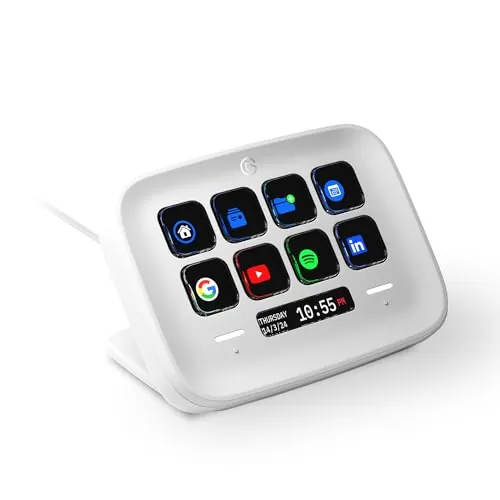
Elgato
Elgato Stream Deck Neo
White US listing; Stream Deck Neo, 8 customizable LCD keys
Model 10GBJ9901
Amazon ASIN B0CVY4566H
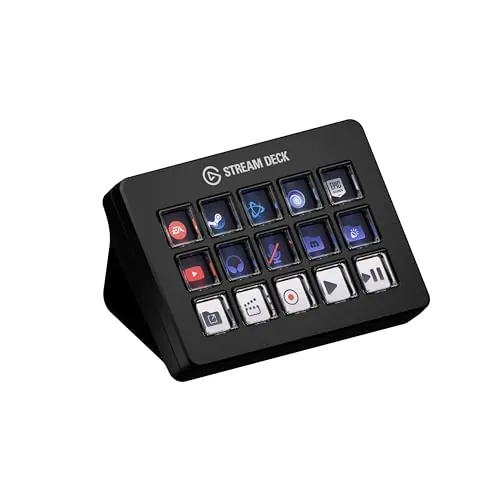
Elgato
Elgato Stream Deck Scissor Keys
Black US listing; 15-key Scissor Keys configuration
Model 10GBL9901
Amazon ASIN B0DVZCB7JD
Differences that matter
Sources for Controls visible on the pad
Sources for Stand and desk placement
The quick decision
These are two wired Stream Deck layouts, not a test of which controller makes a person faster. Neo has eight customizable LCD keys and two Touch Points for changing key layouts; Scissor Keys lists 15 customizable LCD keys. If you want more actions on the face at once, count whether those seven additional key slots would be used. If eight visible slots cover your recurring actions and page switching is acceptable, Neo may fit without paying attention to the larger key count.
Placement differs too: Neo has an integrated stand with three positions and a fixed 90 cm cable. Scissor Keys includes a detachable stand and a 150 cm USB-C-to-USB-C cable with a 90-degree connector. Measure the surface and cable route before using length as a deciding factor.
Measure the desk route before choosing
Measure from the planned controller position to the computer's available port along the actual route, including any detour around a display stand or cable channel. If the path is over 90 cm and no more than 150 cm, Scissor Keys' listed cable length covers more distance on paper; Neo's included cable is fixed at 90 cm. If your path is longer than 150 cm, neither listed in-box cable reaches that route by itself. These are simple comparisons against the manufacturer's cable lengths, not a guarantee about adapters, hubs or signal behavior.
Then verify the host port. Neo's current page specifies a Type-C host port. Scissor Keys' own product page says USB-C in system requirements, but recommends USB-A in its comparison table; the in-box cable/specifications say C-to-C. Ask Elgato to resolve that conflict for your computer rather than inferring a connection from the cable shape.
Check your OS and the exact listing
Both product pages name the Stream Deck app. Elgato's current Neo product page lists Windows 11 or later and macOS 13 or later, while its Neo technical-specifications article lists Windows 10 64-bit and macOS Monterey 12 or later. Use Elgato's live software download/support requirements for the computer you own; the older article is not a promise that today's app supports those earlier versions. The current Scissor Keys page lists Windows 11 or newer, macOS 13 or newer and the free Stream Deck download.
This comparison covers Neo White model/SKU 10GBJ9901 (ASIN B0CVY4566H) and the 15-key Black Scissor Keys model/SKU 10GBL9901 (ASIN B0DVZCB7JD). Match the model code and 15-key configuration on the retailer page before checkout, especially if variations or bundles are shown.
Product details
Elgato Stream Deck Neo
- Customizable LCD keys and navigation
- 8 customizable LCD keys; two Touch Points switch key layouts, with a customizable Infobar Source
- Stand and footprint
- Integrated three-position stand; 107 × 78 × 26 mm Source
- Included connection cable
- Fixed USB-C 2.0 cable, 90 cm (35 in); Elgato lists a USB 2.0-or-later Type-C host port Source
- Current product-page system requirements
- Windows 11 or later or macOS 13 or later; Stream Deck free download. An older Neo technical-specs article lists Windows 10 64-bit and macOS Monterey 12 or later, so check the current support/download requirements for your computer before ordering. Source
Elgato Stream Deck Scissor Keys
- Customizable LCD keys
- 15 customizable LCD keys Source
- Stand and footprint
- Detachable stand included; 118 × 84 × 30 mm listed in the technical specifications (160 g without stand) Source
- Included connection cable
- USB-C to USB-C cable with a 90-degree connector, 150 cm (59 in); the technical-specifications page lists USB 2.0 interface Source
- System requirements and port conflict
- The product page lists Windows 11 or newer, macOS 13 or newer, Stream Deck software and a USB-C host port. Elsewhere on that same page, its comparison table recommends USB 2.0-or-later Type-A, while the tech specs list a C-to-C cable. Confirm the exact host-port requirement with Elgato before purchase. Source
Before you buy
Community discussions
A Neo owner asks about changing pages
Elgato Stream Deck Neo
A Stream Deck Neo owner tried swiping across the bottom touch area to change pages and asked how other people navigated.
What to check
If you change action pages often, compare how you would navigate them and how many actions you want visible at once.
Common questions
How many more key slots does Scissor Keys have?
Elgato lists 15 customizable LCD keys on Stream Deck Scissor Keys and eight on Stream Deck Neo, a difference of seven. Neo also has two Touch Points for switching key layouts, so the useful question is how many actions you want visible at once.Stream Deck Neo — Elgato US product page (White SKU 10GBJ9901)Elgato Stream Deck Scissor Keys — Technical Specifications
Will Stream Deck Scissor Keys connect to a USB-A computer?
Elgato's current product page is inconsistent: its comparison table recommends a USB-A host port, while its system requirements say USB-C and its technical specifications list a 150 cm USB-C-to-USB-C cable. Confirm the requirement for your exact computer with Elgato before purchasing; the cited box list does not name a USB-A adapter.Stream Deck Scissor Keys — Elgato US product page (15-key SKU 10GBL9901)Elgato Stream Deck Scissor Keys — Technical Specifications
Which one is easier to place on a small desk?
The listed body is smaller for Neo at 107 × 78 × 26 mm, and its stand is integrated with three positions. Scissor Keys is listed at 118 × 84 × 30 mm with a detachable stand. Measure your own placement area and leave room for the cable; the product figures do not describe a tested ergonomic advantage.Stream Deck Neo — Elgato US product page (White SKU 10GBJ9901)Elgato Stream Deck Scissor Keys — Technical Specifications
Do both models use the Stream Deck desktop app?
Elgato's product pages list Stream Deck software for both. Check the live download requirements for your operating system: Neo's current product page and older support specification article show different minimum versions, while the Scissor Keys product page lists Windows 11 or newer and macOS 13 or newer.Stream Deck Neo — Elgato US product page (White SKU 10GBJ9901)Elgato Stream Deck Neo — Technical SpecificationsStream Deck Scissor Keys — Elgato US product page (15-key SKU 10GBL9901)
Sources and scope
Related comparisons
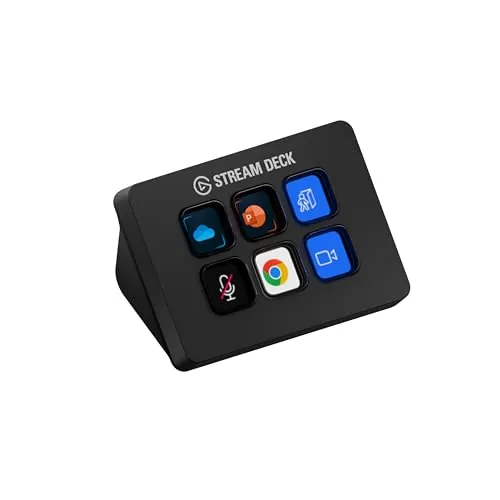
Elgato Stream Deck Neo vs Mini: Page Controls, Cable and Desk Space
Both use the Stream Deck software and support software Pages and folders. Neo adds two dedicated Touch Points for switching Pages and eight keys; Mini has six keys, a smaller listed device body, and a fixed 1.5 m cable versus Neo’s 0.9 m. Elgato’s Mini connector listings conflict, so verify the plug on the exact unit before ordering.
Read comparison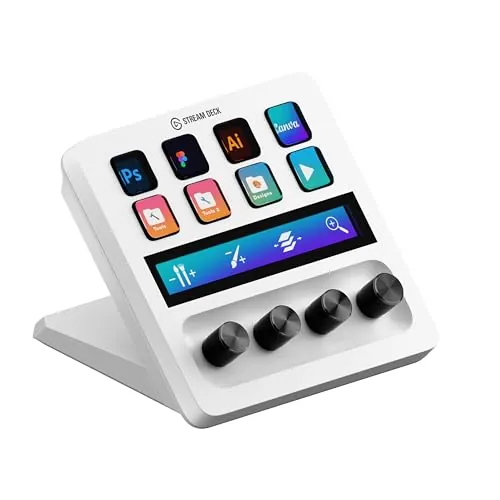
Elgato Stream Deck Scissor Keys vs Stream Deck+ White: Keys, Dials and Setup Fit
These exact Elgato models share Stream Deck software and the listed Windows 11/macOS 13 minimums, but their setup requirements are not identical: Scissor Keys lists a USB-C port, while Stream Deck+ White lists USB-C 3.0. The hardware also changes how you map actions: 15 programmable scissor keys versus eight keys plus four push encoders and a touch panel. Start with your computer ports and your most-used controls, then check the included stand/cable and physical footprint.
Read comparison