
Products compared
Elgato
Elgato Stream Deck Scissor Keys
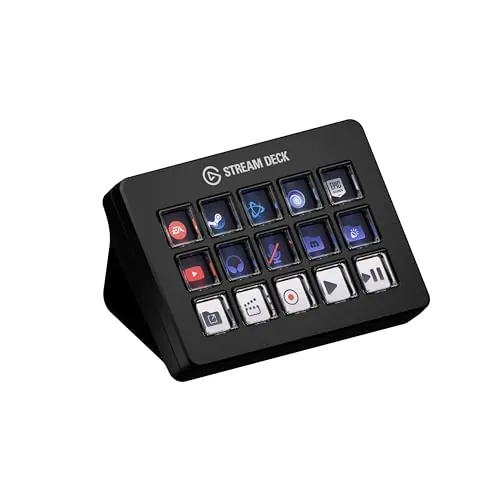
Black 15-key Elgato Stream Deck Scissor Keys model, SKU 10GBL9901.
Model 10GBL9901
Amazon ASIN B0DVZCB7JD
Elgato
Elgato Stream Deck+ White
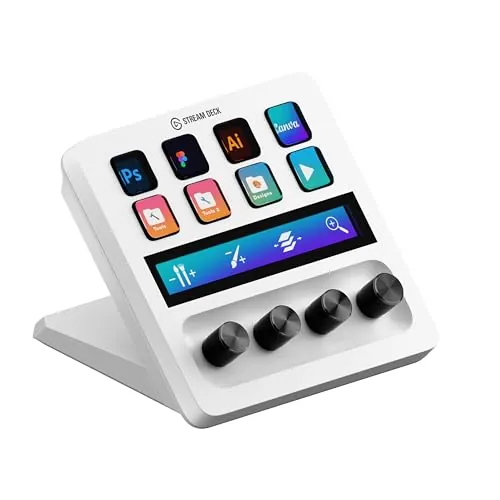
White Elgato Stream Deck+ model 10GBD9911, with eight keys, four encoders and an LCD touch panel.
Model 10GBD9911
Amazon ASIN B0BXHL5DMD
Differences that matter
What matters most to you?
Choose a priority to see what it changes.
Sources for Direct key positions
Sources for Dial and touch interaction
Sources for Computer setup check
Sources for Stand and desk planning
Match the control layout to the actions you will assign
The black Stream Deck Scissor Keys (SKU 10GBL9901) has 15 programmable LCD scissor keys. It suits a plan built around separate, labeled commands such as opening an app, selecting a scene or triggering a configured shortcut. Its maker describes the switches as having a scissor-key feel; this guide does not rank their feel or speed.
The white Stream Deck+ (SKU 10GBD9911) has eight LCD keys, four push encoders and a narrow touch panel. Elgato describes turning the dials to adjust values, pressing an encoder to cycle its assigned actions, and tapping or swiping the panel for controls and pages. Choose this layout when you can name the recurring parameters or page changes you will use; the controls do not guarantee that every app exposes a matching plugin or action.
Check the host and software before choosing
Both exact product pages list Windows 11 or newer, macOS 13 or newer and Stream Deck software. Elgato's current software requirements article repeats Windows 11 (64-bit) and macOS 13 or later. If this is a work computer, check its OS and software-install permissions before ordering.
The port requirement differs on the exact pages: Scissor Keys lists a USB-C port, while Stream Deck+ White lists a USB-C 3.0 port. The White page separately labels the device interface USB 2.0; that is not a reason to override its stated host requirement. Check the computer's port documentation and do not assume an adapter, hub or older port is supported unless Elgato documents that setup for your case.
For the Stream Deck+ setup sequence, Elgato's Quick Start Guide says to install Stream Deck software, connect the deck to the computer, then drag actions onto keys or dials. Use the exact model's requirements first, then check the plugin or keyboard shortcut needed for your planned action.
Measure the desk and verify what arrives in the box
Elgato lists Scissor Keys at 118 × 84 × 30 mm, 286 g with its stand, and includes a detachable stand plus a 150 cm USB-C-to-USB-C cable. Stream Deck+ White is listed at 140 × 138 × 110 mm and 465 g; its box list names the deck, same-length cable and Quick Start Guide. The White page does not name a stand, so confirm the exact seller package if you need one.
Before checkout, measure the spot where the deck and cable will sit, then compare it with the body dimensions and the host-port location. For actions you expect to use on the White model, write down the value changes you would assign to the encoders; if that list is empty and your layout needs more key positions, the 15-key Scissor model may be the more direct fit.
Product details
Elgato Stream Deck Scissor Keys
A 15-key layout for assigning separate programmable actions. The exact product page identifies SKU 10GBL9901, a USB-C host port and an included detachable stand.
- Programmable controls
- 15 programmable LCD scissor keys Source
- Listed OS and host connection
- Windows 11 or newer or macOS 13 or newer; USB-C port; Stream Deck software Source
- Interface and included cable
- USB 2.0 interface; 150 cm USB-C to USB-C cable Source
- Box and footprint
- Detachable stand and cable listed in box; 118 × 84 × 30 mm; 286 g with stand and 160 g without Source
Elgato Stream Deck+ White
A mixed control surface for direct actions plus dial-based adjustment and touch/swipe navigation. Its product page lists the white SKU, USB-C 3.0 host requirement and a larger published body footprint.
- Programmable controls
- Eight customizable LCD keys, four 360° push encoders and a 108 × 14 mm LCD touch panel Source
- Listed OS and host connection
- Windows 11 or newer or macOS 13 or newer; USB-C 3.0 port; Stream Deck software Source
- Interface and included cable
- USB 2.0 interface; 150 cm USB-C to USB-C cable Source
- Box and footprint
- Box list names the deck, cable and Quick Start Guide; 140 × 138 × 110 mm; 465 g Source
Before you buy
Community discussions
A buyer asks about scissor keys on the Stream Deck+
Elgato Stream Deck+ White
A shopper wanted scissor keys on a Stream Deck+ and asked about the key mechanism.
What to check
Decide which you reach for more often: a particular type of key or the Plus’s dial controls. Confirm the key type on the exact model you order.
Common questions
Does Stream Deck+ White have more direct keys than Scissor Keys?
No. Elgato lists 15 programmable keys for Scissor Keys and eight for Stream Deck+ White. The White model adds four encoders and a touch panel, which serve different interactions from adding more keys.Stream Deck Scissor Keys (US exact product page, SKU 10GBL9901)Stream Deck+ White (US exact product page, SKU 10GBD9911)
Can I use either one with an older operating system?
The exact product pages list Windows 11 or newer and macOS 13 or newer for both. Elgato's current Stream Deck software requirements page also lists Windows 11 (64-bit) and macOS 13 or later; check again if you use an older software release or a managed computer.Stream Deck Scissor Keys (US exact product page, SKU 10GBL9901)Stream Deck+ White (US exact product page, SKU 10GBD9911)Elgato Stream Deck Software — System Requirements
What should I check before connecting the White model?
Elgato's exact Stream Deck+ White page lists a USB-C 3.0 port and Stream Deck software. It also lists a USB 2.0 device interface, so use the stated host-port requirement as written rather than inferring compatibility from the interface label. Its Quick Start Guide describes installing the app, connecting the unit, then assigning actions to keys or dials.Stream Deck+ White (US exact product page, SKU 10GBD9911)Elgato Stream Deck+ — Quick Start Guide
Does the Stream Deck+ White box include a stand?
The exact White product page's In The Box list names Stream Deck+, a USB-C to USB-C cable and the Quick Start Guide; it does not name a stand. Scissor Keys' page explicitly lists a detachable stand. Confirm the seller's current included-items list if a stand matters to your desk setup.Stream Deck+ White (US exact product page, SKU 10GBD9911)Stream Deck Scissor Keys (US exact product page, SKU 10GBL9901)
Sources and scope
This guide compares manufacturer-listed controls, setup requirements and box contents. It does not test typing feel, speed, comfort, app compatibility, productivity or reliability. Stream Deck action support depends on the selected plugin, shortcut and configuration. Confirm your computer meets the exact selected model's listed port and OS requirements, and verify the seller's color, SKU and included items before buying.
Related comparisons
Elgato Stream Deck Neo vs Stream Deck+ White: Touch Pages or Physical Dials?
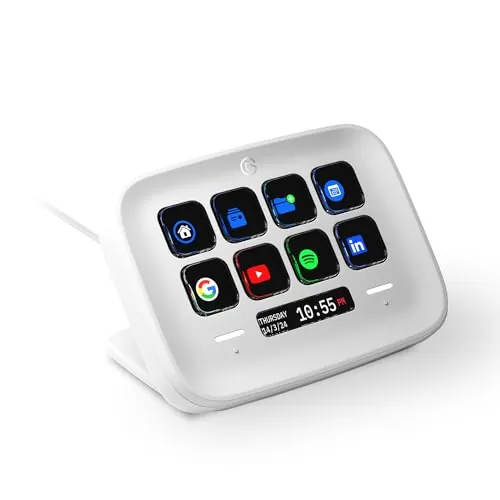
These white eight-key Stream Decks share the Stream Deck desktop app, but their hands-on controls differ. Stream Deck Neo pairs two page-navigation Touch Points with a customizable Info Bar and an attached 90 cm USB-C cable. Stream Deck+ White adds four turn-and-press dials and a touch strip that displays dial information and changes pages; Elgato notes that dial support depends on the available action or plug-in. Choose from a real task you will assign, then check the USB port and cable reach on your exact computer.
Read comparisonElgato Stream Deck Neo vs Scissor Keys: 8 Touch-Page Keys or 15 Dedicated Keys?
The Stream Deck Neo pairs eight customizable LCD keys with two page-switching Touch Points and a built-in three-position stand. Stream Deck Scissor Keys puts 15 customizable LCD keys on the pad and includes a detachable stand and longer USB-C cable. Count the actions you want visible, measure your cable route, and verify the Scissor Keys host-port requirement before buying.
Read comparison