Products compared
TP-Link
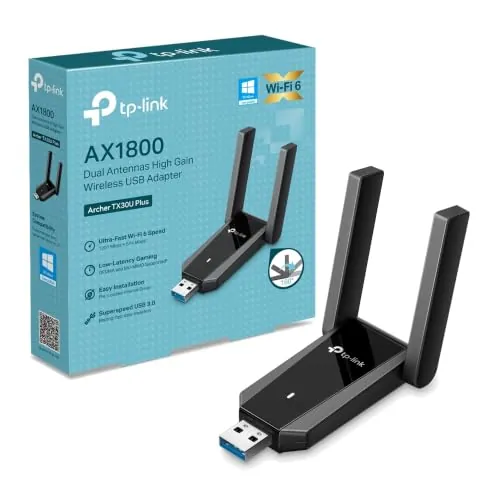
TP-Link Archer TX30U Plus
AX1800 dual-band Wi-Fi 6 USB adapter; TP-Link's US page lists Windows 10 and 11.
Model Archer TX30U Plus
Amazon ASIN B0FJT8JWBG
TP-Link
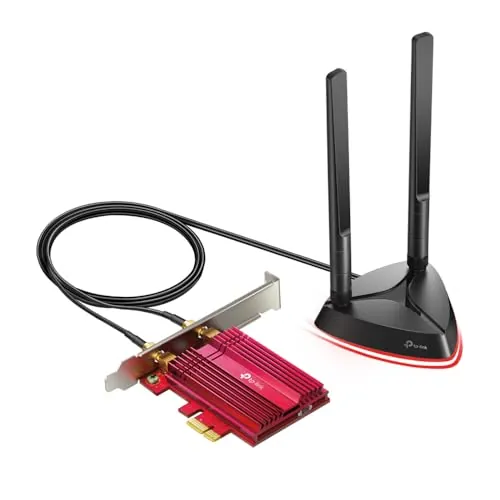
TP-Link Archer TX3000E
AX3000 dual-band Wi-Fi 6 PCIe adapter with a separate antenna base; the revision sold with this ASIN is not confirmed here.
Model Archer TX3000E
Amazon ASIN B07ZV2CJL2
Differences that matter
What matters most to you?
Choose a priority to see what it changes.
Sources for How it connects to the desktop
Sources for Windows and driver check
Sources for Antenna placement and listed box parts
Start with the connection your desktop can use
TX30U Plus is a USB 3.0 adapter, so it does not take a PCIe expansion slot. TP-Link lists two adjustable antennas attached to the adapter and says they fold for storage. If you want to avoid opening a desktop case, this is the more direct form factor, assuming the supported Windows and USB setup fits your computer.
TX3000E installs as a PCIe card. TP-Link lists x1, x4, x8, or x16 PCIe interfaces and includes a separate magnetic antenna base with a 1 m RF cable in its V2 package list. Before ordering, check the motherboard slot, case clearance, and whether you need the supplied low-profile bracket.
Treat TX3000E hardware revision as a required compatibility check
TP-Link's US TX3000E documentation identifies V1, V2, and current V4 versions, and its support selector lists multiple hardware-version branches. The product pages differ: V1 lists Windows 10 64-bit only and Bluetooth 5.0; V2 lists Windows 10/11 64-bit and Bluetooth 5.2; the current V4 page lists Windows 10/11 64-bit and Bluetooth 5.3. The maker sources reviewed do not tie this comparison's ASIN to one of those revisions.
If Windows 11 or a particular Bluetooth version is important, confirm the revision printed on the offered unit or ask the seller, then check TP-Link's support page for that exact version. Do not rely on the TX3000E name alone or treat the current V4 page as proof that this listing is V4.
Bluetooth is a separate motherboard connection on documented TX3000E versions
For TX3000E V2 and current V4, TP-Link specifies an F_USB 2.0 motherboard interface for Bluetooth and lists a Bluetooth header cable in the box. This internal header is for Bluetooth; Wi-Fi uses the PCIe card. Check your motherboard manual and the exact card revision if you need both wireless functions.
TP-Link's TX30U Plus US page reviewed documents Wi-Fi and does not specify Bluetooth. If Bluetooth is a must-have, verify the exact offer's official documentation rather than assuming either model's listing title answers the connection question.
Product details
TP-Link Archer TX30U Plus
TP-Link Archer TX3000E
- Card interface
- PCI Express x1, x4, x8, or x16; confirm case and slot fit Source
- Antenna hardware
- Two antennas and a separate magnetic base with 1 m RF cable; a low-profile bracket and Bluetooth header cable are listed in the package Source
- Revision-dependent support
- V1 lists Windows 10 64-bit only and Bluetooth 5.0; V2 lists Windows 10/11 64-bit and Bluetooth 5.2; the current US V4 page lists Windows 10/11 64-bit and Bluetooth 5.3. This ASIN is not mapped to one revision. Source
Before you buy
Community discussions
Checking an existing PC for a card slot
TP-Link Archer TX3000E
A shopper considering the Archer TX3000E wanted to know whether their desktop had an available slot and the internal connections it needed.
What to check
Check the available slots and connectors in your motherboard manual, then match them to the requirements on the exact adapter listing.
Leaving space beside an installed graphics card
TP-Link Archer TX3000E
A desktop owner considering the TX3000E had a graphics card in the way of one slot and asked whether there was still room for an adapter.
What to check
Look at the physical space next to the graphics card and the brackets at the back of the case. Compare that with the USB adapter’s space outside the case.
Common questions
Which adapter avoids installing a card inside the PC?
The TX30U Plus is the external USB 3.0 option. TX3000E is an internal PCIe card, so check for a compatible free slot and confirm the case has room before choosing it.Archer TX30U Plus | AX1800 Dual Antennas High Gain Wireless USB AdapterArcher TX3000E V2 | AX3000 Wi-Fi 6 Bluetooth 5.2 PCIe Adapter
Does the TX3000E support Windows 11?
TP-Link lists Windows 11/10 64-bit for TX3000E V2 and current V4, but Windows 10 64-bit only for V1. The exact revision sold with ASIN B07ZV2CJL2 is not established by the sources reviewed, so confirm the revision and matching driver before purchase.Archer TX3000E V1 | AX3000 Wi-Fi 6 Bluetooth 5.0 PCIe AdapterArcher TX3000E V2 | AX3000 Wi-Fi 6 Bluetooth 5.2 PCIe AdapterArcher TX3000E V4 | AX3000 Wi-Fi 6 Bluetooth 5.3 PCIe Adapter
Does TX3000E Bluetooth use the PCIe slot?
Wi-Fi uses the PCIe card. TP-Link's V2 and current V4 specifications list a separate F_USB 2.0 motherboard interface for Bluetooth and include a Bluetooth header cable. Check the exact hardware revision and your motherboard manual; the revision for this ASIN remains unknown.Archer TX3000E V2 | AX3000 Wi-Fi 6 Bluetooth 5.2 PCIe AdapterArcher TX3000E V4 | AX3000 Wi-Fi 6 Bluetooth 5.3 PCIe Adapter
Does TX30U Plus include an external antenna base?
The TX30U Plus page describes two adjustable antennas attached to the USB adapter and says they fold compactly. TP-Link's TX3000E V2 package list separately names a magnetic antenna base with a 1 m RF cable. Verify the box for the exact TX3000E revision being sold.Archer TX30U Plus | AX1800 Dual Antennas High Gain Wireless USB AdapterArcher TX3000E V2 | AX3000 Wi-Fi 6 Bluetooth 5.2 PCIe Adapter
Sources and scope
The TX3000E ASIN in this comparison is not tied by the manufacturer documentation reviewed to a specific hardware revision. TP-Link lists different operating-system and Bluetooth details by revision, so check the revision on the offered unit and its matching support page. No hands-on setup, wireless speed, coverage, latency, or security comparison is claimed.
- Archer TX30U Plus | AX1800 Dual Antennas High Gain Wireless USB Adapter
- Download for Archer TX30U Plus V1
- Archer TX3000E V1 | AX3000 Wi-Fi 6 Bluetooth 5.0 PCIe Adapter
- Archer TX3000E V2 | AX3000 Wi-Fi 6 Bluetooth 5.2 PCIe Adapter
- Archer TX3000E V4 | AX3000 Wi-Fi 6 Bluetooth 5.3 PCIe Adapter
- Download for Archer TX3000E: hardware versions and downloads