Products compared
TP-Link
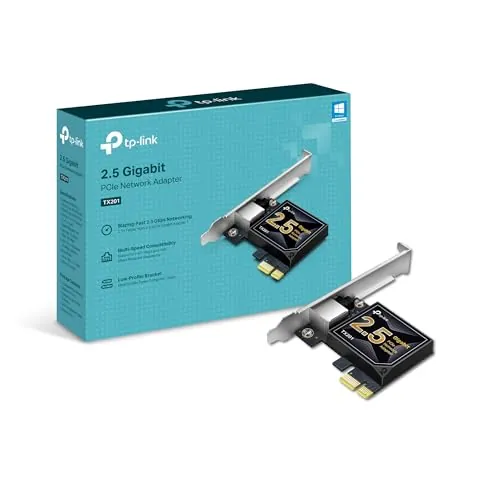
TP-Link 2.5 Gigabit PCIe Network Adapter
U.S. TX201 listing. TP-Link specifies a PCI Express 2.1 x1 interface, 2.5GBASE-T/1GBASE-T/100BASE-TX media, and standard plus low-profile brackets. Exact hardware revision and driver support must be checked against the shipped card and the current U.S. support selector.
Model TX201
Amazon ASIN B0BG685PKM
TP-Link
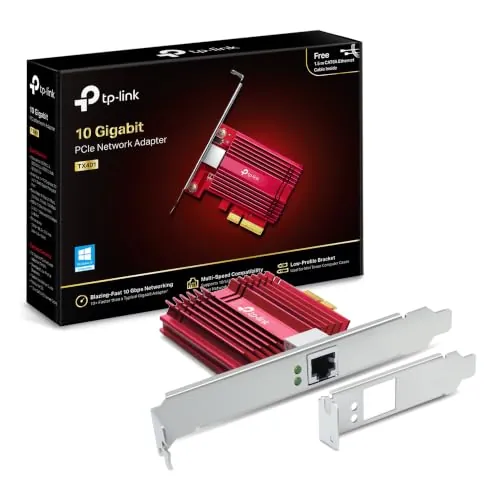
TP-Link 10 Gigabit PCI Express Network Adapter
U.S. TX401 listing. TP-Link specifies a PCI Express 3.0 x4 interface and network media from 10GBASE-T down through 100BASE-TX. Its linked guide specifies an x4, x8 or x16 slot; the current product page lists standard and low-profile brackets plus a 1.5 m Cat6A cable. Verify the seller's hardware revision and its OS driver separately.
Model TX401
Amazon ASIN B08D71PVXG
Differences that matter
What matters most to you?
Choose a priority to see what it changes.
Sources for Network link mode the rest of the path can use
Sources for What is included for the wired connection
Sources for Hardware revision and operating-system driver
Start with the slot you can actually use
TX201's listed interface is PCI Express 2.1 x1. TX401 is PCI Express 3.0 x4, and its linked guide names an x4, x8 or x16 slot. Before choosing on paper, check your motherboard manual for which slot is free, the case opening and the electrical lane configuration. TP-Link notes that M.2, SATA and PCIe devices can share lanes or change a slot's availability; a long connector by itself is not enough to settle this.
Both makers list a standard and low-profile bracket. That gives a case-height option, but it does not establish room around a neighboring GPU or guarantee that a slot remains enabled. If you cannot identify a usable TX401 slot from the board documentation, do not assume the longer-looking slot is suitable.
Map the whole Ethernet path to the speed you need
TP-Link lists 2.5GBASE-T, 1GBASE-T and 100BASE-TX for TX201. TX401 lists 10GBASE-T, 5GBASE-T, 2.5GBASE-T, 1GBASE-T and 100BASE-TX and describes negotiation with lower modes. These are supported link modes. TP-Link cautions that actual throughput is not guaranteed and can vary with the cable and computer; a slower switch/router port or endpoint can also limit the path.
For a home 2.5GbE upgrade, TX201 is the direct feature fit to investigate. TX401 fits a plan that specifically uses the higher link modes, provided the PC and every relevant network hop are suitable. That distinction does not claim measured downloads or file transfers will be faster with either card.
Check box contents and cable reach
TP-Link's U.S. TX201 package list names the adapter, standard and low-profile brackets, quick installation guide and resource CD. The TX401 package list names those corresponding items and a 1.5 m Cat6A cable. If you need the cable to reach a switch or router, measure the route rather than assuming 1.5 m reaches your equipment; the product page does not verify your installation layout.
Bracket height and cable supply are separate from PCIe slot fit. A supplied low-profile bracket changes the case opening option, not the slot interface or lane layout.
Match the card revision to the driver before checkout
TP-Link's U.S. support pages expose different hardware-version choices for each adapter: the TX201 selector lists V1.60 and V1, while the TX401 selector lists V2.60, V2 and V1. Driver entries and OS notes vary by the selected version; do not transfer one revision's driver list to another.
The current listing data does not say which hardware revision a seller will ship. Check the card/package version and your OS against the exact U.S. selector before purchase, especially if you depend on a particular Linux kernel or Windows release.
Product details
TP-Link 2.5 Gigabit PCIe Network Adapter
TP-Link 10 Gigabit PCI Express Network Adapter
- PCIe interface and network modes
- PCI Express 3.0 x4 interface; manufacturer lists 10GBASE-T, 5GBASE-T, 2.5GBASE-T, 1000BASE-T and 100BASE-TX link media. Source
- Slot and bracket fit
- The TX401 guide names an x4, x8 or x16 PCI-E slot. The product page lists standard and low-profile brackets; a low-profile bracket changes the case opening fit, not the motherboard slot or lane wiring. Source
- Included network cable
- TP-Link's U.S. TX401 page lists a 1.5 m Cat6A Ethernet cable in the package. Source
Before you buy
Community discussions
Checking how the TX201 bracket fits the back of a case
TP-Link 2.5 Gigabit PCIe Network Adapter
A TX201 owner with a PowerSpec desktop asked why the card and bracket were difficult to fit together in the available opening.
What to check
Compare the bracket included in the box with the slot opening and available height in your own case.
Checking space beside a thick graphics card
TP-Link 10 Gigabit PCI Express Network Adapter
A buyer considering the TX401 wanted to know whether there was enough room in their desktop with a large graphics card already installed.
What to check
Look at which slots remain accessible and compare the physical envelope with the dimensions listed for the TX401.
Common questions
Can I decide TX401 fits by looking only at whether the motherboard has a long PCIe slot?
No. TP-Link's TX401 guide names x4, x8 or x16 slots, and its support material warns that slot wiring and lane sharing vary by motherboard. Check the board manual for the exact slot and for M.2/SATA/PCIe sharing. Physical connector length alone does not establish the electrical configuration or availability.TX401 User Guide, Hardware Version 2TP-Link Wired Adapter Troubleshooting: PCIe Lane Sharing and Slot Switching
Will TX401 make my internet or file transfers run at 10Gbps?
The maker lists 10GBASE-T as a supported link mode, but actual throughput is not guaranteed. The connected port, cable path, other endpoint, service and computer can limit the result; these specifications are not a matched transfer test.TX401: 10 Gigabit PCI Express Network Adapter, U.S. Specifications
How do I know whether a driver applies to the card I am buying?
The U.S. support pages offer hardware-version selectors and version-specific downloads. Ask which revision is in the seller's package, then match that version and your OS to TP-Link's current download page. The listing data does not identify a shipped revision.Download for TX201, U.S. Hardware Versions and DriversDownload for TX401, U.S. Hardware Versions and Drivers
Sources and scope
This is a manufacturer-specification fit guide, not a throughput, latency, stability or reliability test. Published link modes are not measured throughput and do not guarantee internet or local-transfer speed. The listing data does not identify the hardware revision shipped by the selected offer; TP-Link's U.S. support pages expose version-specific manuals/drivers, so check the card or package revision and exact OS before purchase. A motherboard's slot appearance does not prove its lane wiring or availability, particularly when other PCIe, M.2 or SATA devices share lanes.
- TX201: 2.5 Gigabit PCIe Network Adapter, U.S. Specifications
- TX401: 10 Gigabit PCI Express Network Adapter, U.S. Specifications
- Download for TX201, U.S. Hardware Versions and Drivers
- Download for TX401, U.S. Hardware Versions and Drivers
- TX401 User Guide, Hardware Version 2
- TP-Link Wired Adapter Troubleshooting: PCIe Lane Sharing and Slot Switching