
Products compared
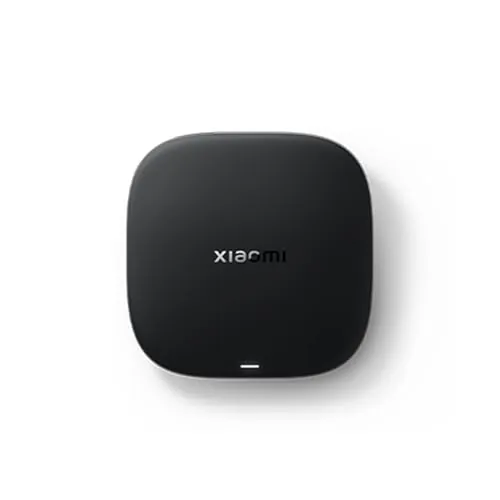
Xiaomi
Xiaomi TV Box S (3rd Gen)
Assigned U.S. marketplace ASIN for Xiaomi TV Box S 3rd Gen. Xiaomi’s global documentation confirms the 3rd-generation box, but does not certify this exact offer’s local plug, remote or package configuration.
Model TV Box S 3rd Gen
Amazon ASIN B0F3JWFL56
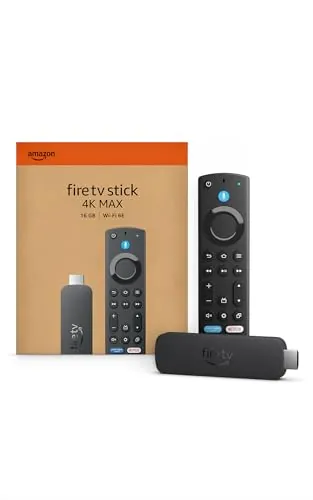
Amazon
Amazon Fire TV Stick 4K Max (2nd Generation)
Assigned U.S. listing data product identifies model K3R6AT; Amazon identifies Fire TV Stick 4K Max (2nd Generation) and publishes its HDMI, wall-power and Fire TV app setup.
Model K3R6AT
Amazon ASIN B0BP9SNVH9
Differences that matter
What matters most to you?
Choose a priority to see what it changes.
Sources for TV connection and physical placement
Sources for Platform and voice workflow
Sources for External connections and Wi-Fi
Plan the HDMI and power route first
Xiaomi’s global specifications describe a separate 97 × 97 × 17 mm box with one HDMI output, one USB 2.0 port and a power interface. That can suit a TV stand or shelf where the box can sit near the screen and its HDMI cable reaches; measure the actual spot and cable route. Xiaomi’s listed package includes a power adapter and HDMI cable, but verify the exact U.S. offer because the global page does not establish its local plug or package.
Fire TV Stick 4K Max 2nd Gen plugs into the TV’s HDMI port. Amazon’s setup guide lists an adapter, power cable, remote and batteries, and tells users to power from a wall outlet rather than the TV USB port. It mentions an optional HDMI extender for tight socket access. Count the HDMI port and reachable wall outlet before choosing either layout.
Choose the software path around services you actually watch
Xiaomi documents Google TV, phone/tablet casting through Google Cast-enabled apps, and Google Assistant on the remote. Its global product page warns that some apps, content, assistant languages and features vary by country or region. Treat Google TV branding as the platform, not as a promise that every service is enabled for every location.
Amazon documents Alexa voice interaction and compatible Amazon Appstore apps for the 2nd-generation 4K Max. It advises checking an app’s Works With information for compatibility. Before buying, list the exact streaming services and voice features you need and verify them for the country where the device will be used. No regional bypass or app availability guarantee is implied.
Use the port difference only for a confirmed accessory need
Xiaomi lists a USB 2.0 port and Wi-Fi 6 on the TV Box S 3rd Gen. The port gives you a physical connector to investigate, but the specification alone does not prove a particular drive, hub, keyboard or other accessory will work. Check the accessory manufacturer’s compatibility instructions before counting on it.
Amazon’s device-identification page says compatible USB devices are not available for Fire TV Stick 4K Max 2nd Gen. The stick’s USB cable is part of its power setup, not a promise of an external-device port. If a USB peripheral is essential, rule out this model unless Amazon documents that exact device path. Wi-Fi 6 versus Wi-Fi 6E describes supported standards; it does not establish real-world streaming speed in your home.
Product details
Xiaomi TV Box S (3rd Gen)
This is the separate-box installation: plan for an HDMI cable from the box to the TV, a power connection and a place for the 97 mm-square body. Xiaomi documents Google TV and Google Cast, but specifically warns that services and features can vary by region.
- Body size
- 97 × 97 × 17 mm, according to Xiaomi Global; dimensions are model specifications, not a guarantee of clearance in a specific cabinet. Source
- Ports
- One HDMI 2.1, one USB 2.0 and one power interface on the global model specification page. Source
- Platform and listed Wi-Fi bands
- Google TV; 2.4 GHz and 5 GHz Wi-Fi. Xiaomi cautions that platforms, content and some apps/features vary by country or region. Source
- Wi-Fi generation
- Xiaomi lists Wi-Fi 6 and notes it requires a Wi-Fi 6-capable router; this is not a measured speed result. Source
Amazon Fire TV Stick 4K Max (2nd Generation)
This is the HDMI-stick installation: check that the TV has an available HDMI port and that a nearby wall outlet can power the included adapter. Amazon’s compatibility table says compatible USB devices are unavailable for the 2nd-gen 4K Max, so do not buy it expecting a USB accessory connection.
- Generation and network
- Amazon identifies this Fire TV Stick 4K Max as the 2nd-generation device with Wi-Fi 6E support. Source
- Installation and in-box setup items
- Amazon’s 2nd-generation setup guide lists the remote, power cable, wall adapter, AAA batteries and an optional HDMI extender; it directs users to wall-power the stick rather than connect its USB cable directly to the TV. Source
- Platform and app compatibility
- Amazon lists Alexa voice interaction and compatible Amazon Appstore apps; check the specific app’s Works With information for Fire TV Stick 4K Max. Source
Before you buy
Community discussions
Testing Echo controls and resuming an app
Amazon Fire TV Stick 4K Max (2nd Generation)
A Fire TV Stick 4K Max Gen 2 owner who upgraded from the first generation reported difficulty with some Echo voice commands and said Netflix sometimes reloaded after a longer pause.
What to check
If you use hands-free controls, verify support for your exact voice device and test navigation in your main streaming app.
Planning a test for Plex live TV
Amazon Fire TV Stick 4K Max (2nd Generation)
A first-generation 4K Max owner reported buffering and dropped frames with antenna TV through Plex and asked whether moving to the second generation would help.
What to check
If Plex live TV matters, check the exact app and try playback with your home server. Test in the room and on the connection you will use.
Common questions
Do both devices need an HDMI port on the TV?
Yes. Xiaomi’s setup page says to attach the TV Box S 3rd Gen to the TV’s HDMI port. Amazon’s Fire TV setup guide also requires an available HDMI port; it mentions an optional extender when the stick does not fit easily at that port.Xiaomi TV Box S (3rd Gen) — Xiaomi GlobalHow to Set Up Fire TV Stick 4K Max (2nd Generation) — Amazon Customer Service
Can I power the Fire TV Stick from the TV’s USB port?
Amazon’s 2nd-generation setup instructions say to connect the stick’s USB cable to its adapter and plug the adapter into a wall outlet; they advise against connecting that cable directly to the TV.How to Set Up Fire TV Stick 4K Max (2nd Generation) — Amazon Customer Service
Will Xiaomi’s listed adapter and apps necessarily match a U.S. Amazon offer?
That is not confirmed by the global product page. It lists an adapter in the model’s package contents and separately warns that platforms, content and some apps or features vary by country or region. Check the exact offer’s adapter and the services available in your location.Xiaomi TV Box S (3rd Gen) Specs — Xiaomi GlobalXiaomi TV Box S (3rd Gen) — Xiaomi Global
Does the Fire TV Stick support USB peripherals?
Amazon’s compatibility table says compatible USB devices are not available for Fire TV Stick 4K Max 2nd Gen. It still uses a USB cable for power; that cable is not a peripheral port.Which Fire TV Device Do I Have? — Amazon Customer ServiceHow to Set Up Fire TV Stick 4K Max (2nd Generation) — Amazon Customer Service
Will a particular streaming app work on either one in my country?
Confirm the exact app and region before buying. Xiaomi explicitly says some apps, content and features may vary by country or region; Amazon directs buyers to the app’s Works With information to confirm Fire TV compatibility. This comparison does not guarantee that any particular service is available.Xiaomi TV Box S (3rd Gen) — Xiaomi GlobalWhich Fire TV Device Do I Have? — Amazon Customer Service
Sources and scope
The Xiaomi manufacturer evidence is global model documentation, not a U.S.-specific confirmation of the exact Amazon offer’s power plug, remote bundle or app listing data. Confirm current box contents and local app availability before buying. Amazon’s support material identifies Fire TV Stick 4K Max 2nd Generation; the assigned U.S. listing data lists model K3R6AT for ASIN B0BP9SNVH9. This guide does not compare measured network speed, responsiveness, picture quality, reliability, or service subscriptions.
- Xiaomi TV Box S (3rd Gen) Specs — Xiaomi Global
- Xiaomi TV Box S (3rd Gen) — Xiaomi Global
- Which Fire TV Device Do I Have? — Amazon Customer Service
- How to Set Up Fire TV Stick 4K Max (2nd Generation) — Amazon Customer Service
- Safety and Compliance Information for Fire TV Stick 4K Max — Amazon Customer Service
Related comparisons
Fire TV Stick 4K Plus vs 4K Max: App Compatibility, Storage and Remote
This comparison covers the U.S. Fire TV Stick 4K Plus (2025) and Fire TV Stick 4K Max (2nd Gen, 2023). Amazon lists both with Fire OS 8 based on Android 11, so Max is not an OS-generation upgrade. That does not guarantee support for a particular app: check the app's Works With information for the exact device. Max adds 16 GB total storage with external-storage support, a Wi-Fi 6E/6 GHz option for compatible networks, an enhanced remote and Ambient Experience. Both devices list 2 GB memory and the same core 4K HDR and audio formats. Decide whether a specific Max feature fits your setup.
Read comparison
Fire TV Stick 4K Select vs 4K Max: Check Apps, HDR, and Remote Fit
The 2025 Fire TV Stick 4K Select (CL32P4) runs Vega OS, while the 2nd-generation Fire TV Stick 4K Max (K3R6AT) runs Fire OS 8. Amazon uses separate Fire OS and Vega OS app release tracks, so check each must-have app's current Works With listing for the exact stick. Then compare HDR needs, available Wi-Fi, storage, and remote compatibility. The similarly named 2025 4K Plus is a different device.
Read comparison