
Products compared
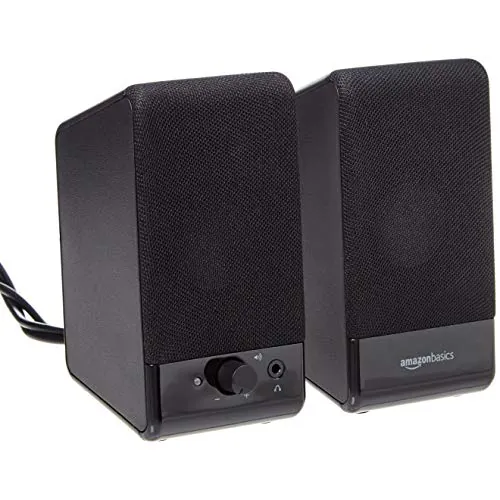
Amazon Basics
Amazon Basics USB-Powered Computer Speakers — Black
Black U.S. listing; compact computer-speaker pair with 3.5 mm audio input and USB power
Model U213
Amazon ASIN B07D7TV5J3
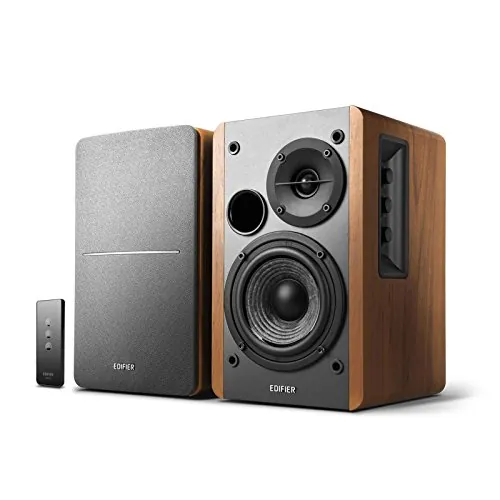
Edifier
Edifier R1280T Powered Bookshelf Speakers — Brown
Brown U.S. marketplace variant; two-speaker set with one active and one passive unit, analog RCA inputs
Model R1280T
Amazon ASIN B016P9HJIA
Differences that matter
Sources for Audio input versus power connection
Sources for How many sources stay connected
Sources for Desk controls and private listening
Sources for Space, separation and desk setup
Start with the signal path, not the connector label
For the Amazon Basics U213, the reviewed exact-model listing describes a 3.5 mm audio jack for the signal and a USB cable for power. Plan on using both connections. USB alone is not documented as carrying audio, so if your laptop or dock has no analog headphone output, check that source's specifications before choosing this pair.
The Edifier R1280T uses stereo RCA for audio and mains power for the active speaker. Its passive partner connects to the active unit by speaker cable. Edifier's manual lists a 3.5 mm-to-dual-RCA cable in the box contents, which can connect a source with a 3.5 mm analog output; it is still an analog cable path, not USB audio.
Decide whether two inputs are worth the larger setup
If you only connect one computer, U213's single 3.5 mm audio path and USB power routine may cover the needed desk connections. The R1280T is more useful when two analog stereo source pairs should remain plugged in. Edifier says both sources play when connected simultaneously; the manual's routine is to lower volume or switch off the source you are not selecting. Do not expect an automatic source switch based on the documents reviewed.
R1280T also exposes side-panel master-volume, bass and treble controls and lists a remote. If those controls matter, make sure you can reach the side panel and keep the remote where it belongs. The U213 listing documents a single front knob combining volume with on/standby and a headphone jack.
Sketch the placement before checkout
Amazon Basics lists U213 dimensions of 2.76 × 3.55 × 5.3 inches. Confirm which direction those dimensions take on your listing and measure where the pair and cables will sit; the listing's compact-size description does not prove fit on a particular desk.
Edifier describes R1280T for bookshelves or desktops. Its manual recommends at least 1.5 meters between its speakers and shows the passive speaker connected to the active one. Measure the two placements, the connecting cable route and a nearby mains outlet before buying. This is a setup check, not a claim about sound or listening results.
A quick pre-buy checklist
Choose U213 if a 3.5 mm analog output and USB power are both available and you want the documented single-knob/headphone-jack routine. Choose R1280T if your sources use RCA (or you can use the manual-listed 3.5 mm-to-RCA cable), the bookshelf/desktop footprint works, and two analog inputs are useful enough to justify mains power, speaker separation and a manual source-selection routine.
Before ordering, confirm exact color and model at the listing: U213 Black is ASIN B07D7TV5J3 and R1280T Brown is ASIN B016P9HJIA in this comparison. The current Edifier page lists R1280T color variants, while the precise package contents and condition at the Amazon offer were not checked here.
Product details
Amazon Basics USB-Powered Computer Speakers — Black
- Audio and power connections
- The exact U213 listing describes a 3.5 mm audio connection and USB power. Treat USB as power in this setup, not as a digital USB-audio input. Source
- Desk controls and headphone use
- The listing describes a front volume/on-standby knob and a headphone jack. Source
- Listed dimensions
- Amazon Basics lists 2.76 × 3.55 × 5.3 inches; verify the measurement orientation and clearance for your actual desktop placement. Source
Edifier R1280T Powered Bookshelf Speakers — Brown
- Audio inputs
- Two stereo RCA input pairs. The manual says both sources play if connected at the same time; reduce volume or power off the source you are not selecting. Source
- Power and speaker connection
- The active speaker has a power cord and connects to the passive speaker with the supplied speaker cable; this is a mains-powered analog-input setup. Source
- Controls and manual-listed accessories
- Side controls adjust master volume, bass and treble; the manual lists a remote and a 3.5 mm-to-dual-RCA audio cable among box contents. Source
Before you buy
Community discussions
Leaving a computer and console connected
Edifier R1280T Powered Bookshelf Speakers — Brown
An R1280T owner connected two sources to its two RCA inputs so they could use a PC or console without moving cables.
What to check
Check whether the cables you own connect both sources, and what you will use to mute a second source when it stays plugged in.
Common questions
Does the Amazon Basics U213 use USB for audio?
The exact U213 product listing describes USB power and a separate 3.5 mm audio connection. It does not document USB audio input, so check your host's analog output or an appropriate, verified adapter if it lacks one.Amazon Basics USB-Powered Computer Speakers with Volume Control — exact U213 Black listing
Can I connect a laptop and another source to R1280T at the same time?
Edifier documents two stereo RCA input pairs. Its R1280T manual says both connected sources play simultaneously; to use one, reduce volume or power off the other source. This is not an automatic source selector described in the manual.Support for R1280T — EdifierR1280T User Manual IB-200-R1280T-07
Does the R1280T have Bluetooth or USB audio?
Edifier's R1280T support page says it is not Bluetooth. Its official manual describes RCA stereo audio inputs and mains power; no USB audio input is documented in the sources reviewed.Support for R1280T — EdifierR1280T User Manual IB-200-R1280T-07
Which speaker system has the headphone jack?
The U213 listing documents a headphone jack. The Edifier R1280T product page and manual reviewed here do not document a headphone output; verify with Edifier if that output is a deciding requirement.Amazon Basics USB-Powered Computer Speakers with Volume Control — exact U213 Black listingSupport for R1280T — EdifierR1280T User Manual IB-200-R1280T-07
Sources and scope
Check the exact package for color, included leads and accessories. U213 takes analog audio over a 3.5 mm connection and draws power by USB. R1280T uses the paired-speaker cable and analog inputs documented in its manual.
Related comparisons
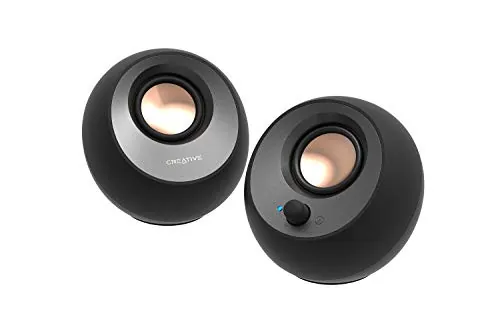
Creative Pebble V3 vs Edifier R1280T: USB Desk Speakers or Wired Bookshelf Pair?
The Creative Pebble V3 (MF1700) is the compact computer-first option: USB audio, Bluetooth 5.0 or 3.5 mm AUX, with USB power. The Edifier R1280T is a larger two-speaker wired setup with dual RCA inputs, an AC power cord, remote and side tone controls; it has no Bluetooth. Before choosing, map each source to the cable you will actually use, confirm a nearby outlet for the R1280T, and reserve space for its two cabinets. The R1280T manual says two connected sources both play, so it does not automatically switch between them. No matched listening test establishes a sound-quality winner.
Read comparison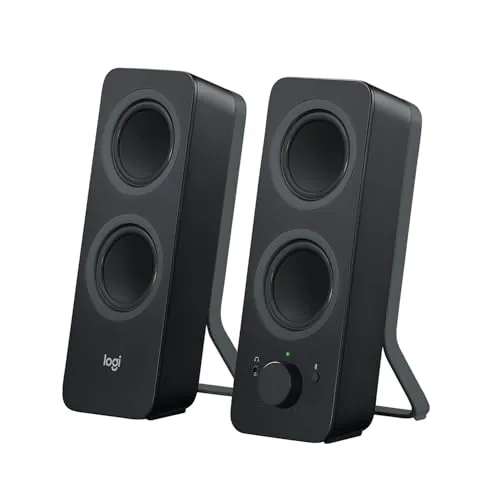
Logitech Z207 vs Edifier R1280T: Bluetooth, Inputs and Desk Setup
Logitech Z207 model 980-001294 accepts Bluetooth and one 3.5 mm analog input, with power and volume at the right speaker. Edifier R1280T has no Bluetooth, but offers two RCA inputs, a remote for volume and mute, and side-panel tone controls. A 3.5 mm source can still connect to the R1280T using its documented 3.5 mm-to-RCA cable; its two connected sources play together rather than auto-selecting.
Read comparison