
Products compared
Anker
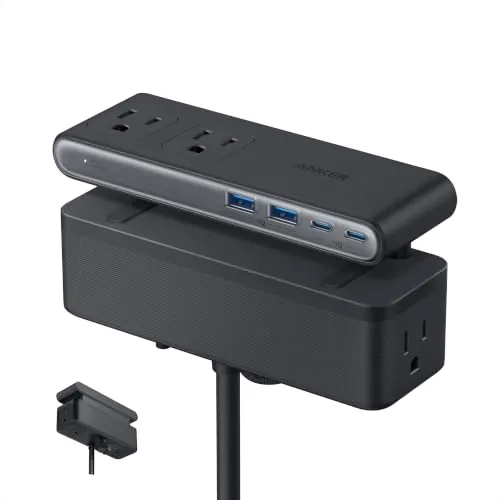
Anker Nano Power Strip (10-in-1, 70W, Clamp)
Anker identifies A9196 as a desk-clamp power strip with six AC outlets and four USB ports. Its clamp is intended for a bounded range of desk-edge thickness and shapes; measure the actual edge before choosing it.
Model A9196
Amazon ASIN B0FFGZH2S2
Belkin
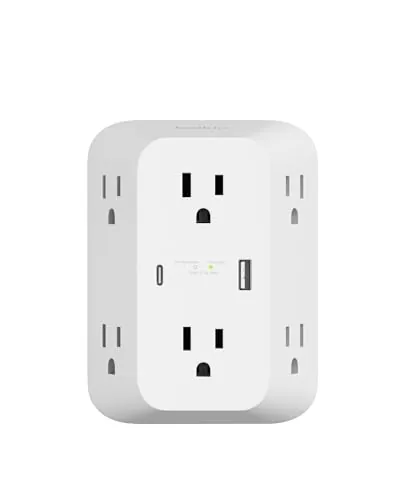
Belkin 6-Outlet Wall Surge Protector with USB-C and USB-A
Belkin's U.S. product page identifies SKU SRA008p6tt as a direct-to-wall unit with six AC outlets, one USB-C port and one USB-A port. Its USB ports have a 22.5W maximum total output; the checked page does not provide a port-by-port allocation table.
Model SRA008p6tt
Amazon ASIN B0CCYKVVRH
Differences that matter
What matters most to you?
Choose a priority to see what it changes.
Sources for Manufacturer-listed surge figures
Start with the location, not a feature score
The main difference is how the outlets reach the space. Anker's A9196 clamps to a qualifying desk edge and has a 5 ft attached cord. Belkin's SRA008p6tt plugs directly into a wall receptacle. Both list six AC outlets, so the deciding check is whether you want power attached to the desk or located at the wall.
For A9196, measure the edge at the intended clamp point. Anker specifies 0.6–1.8 inches (15–45 mm) and excludes glass, edges over 45° and desks without a suitable clamping edge. For Belkin, check the actual receptacle and surrounding plug clearance. The manufacturer describes its format as compact and direct-to-wall, but this guide does not verify fit at your wall.
Match the USB ports to your devices and simultaneous-use pattern
A9196 lists two USB-C and two USB-A ports with a 70W total USB ceiling. Anker's exact product guide publishes allocations for simultaneous use: with both USB-C ports, examples include 45W+25W, 25W+45W, 35W+35W or 65W+5W; the two USB-A ports share 12W total. The exact page also notes that USB-C2 output is reduced in some multi-port arrangements and says laptops requiring more than 45W should use an AC outlet when multiple USB ports are in use. The port total is not a promise about a particular laptop, cable or charging time.
SRA008p6tt has one USB-C and one USB-A port and Belkin lists 22.5W maximum total output across them. The reviewed page does not state how the total is divided between the two ports. If your decision depends on a per-port minimum, treat that as an unanswered question and confirm it with Belkin or use another source that provides the exact allocation. Do not derive a charge-rate winner by comparing Anker's detailed table with Belkin's total alone.
Treat joule figures as specifications, not a protection contest
Anker lists 1,500 joules and Belkin lists 1,680 joules. The numbers describe manufacturer-published ratings; this comparison did not test either strip, compare protection under the same conditions or assess lifespan. The joule figures alone do not establish which is safer or better for a device.
If surge protection is a purchase requirement, read the exact model's current documentation and use conditions, then make the choice independently of the desk-versus-wall and USB-layout recommendation here.
Do a short pre-buy check
Measure the proposed position, confirm the selected model number, then map each AC plug and USB cable to the unit. For Anker, include the 5 ft cord route, desk-edge measurements and the USB allocation for the number of ports you will use at once. For Belkin, confirm that the wall location works and whether the 22.5W combined USB maximum is sufficient for the intended devices; the per-port split is not shown on the product page reviewed.
Before purchase, verify the exact model selected in the retailer listing and check that its package matches the model discussed here. No current offer price is included.
Product details
Anker Nano Power Strip (10-in-1, 70W, Clamp)
- Mounting and edge range
- Desk clamp for 0.6–1.8 in (15–45 mm) edges; not recommended for glass, edges over 45°, or edges outside the stated thickness range. Source
- Outlet and USB layout
- 6 AC outlets, 2 USB-C and 2 USB-A; 5 ft (152 cm) attached extension cord. Source
- USB output boundary
- 70W total USB maximum; simultaneous C1+C2 allocations are listed as 45W+25W, 25W+45W, 35W+35W or 65W+5W. USB-A ports share 12W total; use conditions affect output. Source
- Published surge rating
- 1,500J, as stated by Anker; this rating is not a comparative protection test. Source
- Listed size
- Overall 6.02 × 2.06 × 3.97 in; 0.75 in above desk and 2.61 in below desk in Anker's listed dimensions. Source
Belkin 6-Outlet Wall Surge Protector with USB-C and USB-A
- Placement
- Plugs directly into a wall outlet; Belkin describes it as a compact wall-mounted format. Source
- Outlet and USB layout
- 6 AC outlets, 1 USB-C and 1 USB-A port. Source
- USB output boundary
- 22.5W maximum total across USB-C and USB-A; Belkin's page does not specify how that total is allocated between ports. Source
- Published AC and surge ratings
- 6 AC outlets rated 1,875W; 1,680J surge rating, as listed by Belkin. Ratings alone are not a comparative protection test. Source
- Indicator and box
- Belkin lists an LED indicator and identifies the six-outlet wall charger with USB-A and USB-C as the box contents. Source
Before you buy
Community discussions
Can a clamp keep outlets within reach at your desk?
Anker Nano Power Strip (10-in-1, 70W, Clamp)
Someone looking to organize the cables under their desk got a suggestion for the clamp-on Anker Nano power strip.
What to check
Check the thickness and shape of your desk edge and where the cable would run before choosing a clamp mount.
Common questions
Will the Anker clamp fit any desk?
No universal desk fit is established. Anker gives a 0.6–1.8 inch (15–45 mm) edge range and excludes glass, edges over 45° and desks without a suitable clampable edge. Measure your own mounting edge and check its shape before ordering.Anker Nano Power Strip (10-in-1, 70W, Clamp) — U.S. product page
Does Anker provide 70W to each USB-C port at once?
No. Anker's exact product guide describes 70W as the total USB maximum and lists shared allocations when both USB-C ports are in use. It also documents shared USB-A output and reduced output under some multi-port combinations. Check the specific combination and your device's requirements.Anker Nano Power Strip (10-in-1, 70W, Clamp) — Anker support product guideAnker Nano Power Strip (10-in-1, 70W, Clamp) — U.S. product page
How much USB output does the Belkin provide?
Belkin lists 22.5W maximum total across the USB-C and USB-A ports. The checked exact-model page does not show a port-by-port allocation, so it does not support a specific wattage promise for either individual port.6-Outlet Wall Surge Protector with USB-C and USB-A — Belkin U.S. product page, SKU SRA008p6tt
Does Belkin's higher joule number mean it protects better?
That conclusion is not supported here. Anker lists 1,500J and Belkin lists 1,680J, but no matched surge test was performed. Treat these as the manufacturers' published ratings, not a comparative protection result.Anker Nano Power Strip (10-in-1, 70W, Clamp) — U.S. product page6-Outlet Wall Surge Protector with USB-C and USB-A — Belkin U.S. product page, SKU SRA008p6tt
Sources and scope
This is a manufacturer-specification and setup-fit comparison, not hands-on installation, USB charging, electrical or surge-protection testing. Published USB maxima do not guarantee the output a particular device will negotiate. Belkin lists combined USB output but not an allocation table on the checked exact-model page. Surge joule figures are listed ratings only and do not establish which unit protects better. Check the exact model, host-device power needs and placement at the retailer before purchase.
Related comparisons
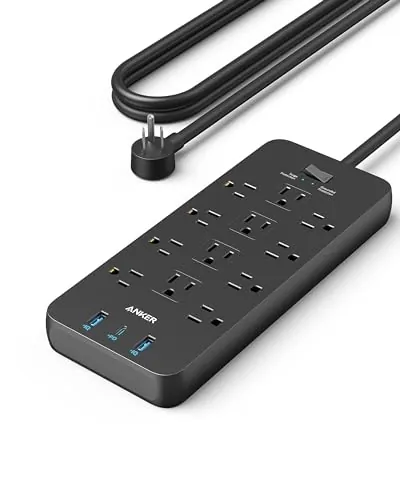
Anker 351 A9192 vs Nano Clamp A9196: Outlets, USB Sharing, and Desk Fit
Anker 351 A9192 is a flat, wall-mountable strip with twelve AC outlets, one USB-C and two USB-A ports. Nano A9196 puts six AC outlets across a desk clamp and adds two USB-C plus two USB-A ports, with up to 70 W available from one USB-C port under the stated conditions. Compare how many AC adapters you need, where plugs must sit, and what the USB ports deliver when used together. Measure the desk edge and the 2.61-inch body below it before relying on the clamp.
Read comparison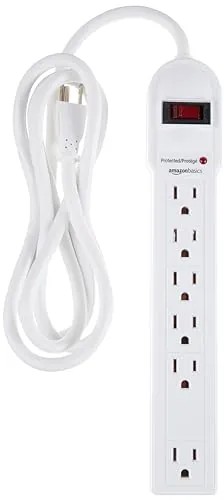
Amazon Basics 1702 MW-1702W vs Belkin SRA008p6tt: Cord Reach or Wall USB?
Amazon Basics’ MW-1702W has a 6-foot cord and six AC outlets, with wall-mounting guidance in its manual. Belkin’s SRA008p6tt fits at the wall receptacle and lists six AC outlets plus USB-A and USB-C. Measure the outlet area and check any USB charging requirement before choosing.
Read comparison