
Products compared
Anker
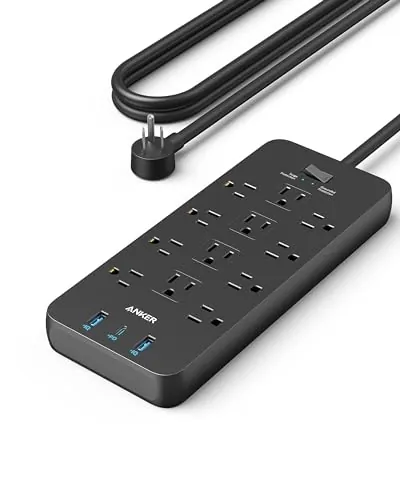
Anker 351 Power Strip, A9192, Black, 5 ft
Flat 12-AC-outlet strip with three USB ports and a 5 ft cord. Anker lists wall mounting; the exact Black 5 ft ASIN listing names two mounting screws and a welcome guide in the package.
Model A9192
Amazon ASIN B09SG2Q23M
Anker
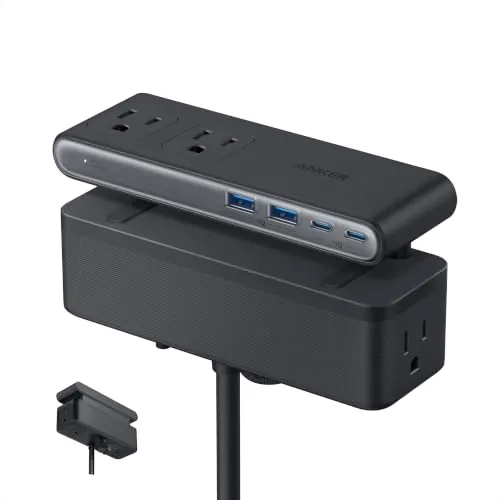
Anker Nano Power Strip (10-in-1, 70W, Clamp), A9196, Black
Clamp-mounted 10-port strip: six AC outlets split between two above-desk and four below-desk, plus two USB-C and two USB-A ports. Its mount is integrated and adjusted with a knob; verify desk geometry and the lower-body/plug clearance.
Model A9196
Amazon ASIN B0FFGZH2S2
Differences that matter
What matters most to you?
Choose a priority to see what it changes.
Sources for AC socket count and placement
Sources for USB output when devices share ports
Sources for Mounting hardware and installation path
Quick answer: many fixed plugs or a clamp at the desk edge?
A9192 is the simpler comparison if you need up to twelve AC sockets or want Anker’s wall-mountable flat strip. A9196 makes sense when six AC sockets are enough, your desk edge meets the clamp limits, and two top outlets with four USB ports placed nearby solve a real access problem.
Compare the actual USB configuration you will run. A9192’s 20 W USB-C mode requires both USB-A ports to be unused. A9196 can reach 70 W from a single USB-C port, but its manual details lower per-port allocations when other ports are active. Neither is presented as a tested charging winner.
Count adapters and decide where each plug should live
A9192 provides twelve AC outlets across a flat body. The exact U.S. listing identifies the Black 5 ft version and includes two mounting screws and a welcome guide. Anker’s page describes wall mounting, which suits an installation planned around that strip’s flat shape.
A9196 has six AC outlets divided into two above-desk and four below-desk. This is useful only if the top positions match the plugs you reach often and the lower positions fit the adapters that can stay connected. A large adapter may occupy adjacent space; do not assume every outlet can be used simultaneously with bulky bricks.
Check USB sharing against your device list
For A9192, Anker lists 20 W maximum from USB-C only while both USB-A ports are unused. The support spec gives up to 2.4 A per USB-A port and describes 15 W shared when USB-A and USB-C are used together. Match this to the phone or accessory mix rather than treating “20 W USB-C” as a constant while all ports are occupied.
For A9196, Anker’s guide enumerates the combinations. A single USB-C port can be up to 70 W. Both USB-C ports can divide output as 45 + 25, 25 + 45, 35 + 35, or 65 + 5 W depending on the documented device pairing; a two-laptop example is 35 + 35 W. With all four USB ports active, the guide lists C1 45 W, C2 12 W, and 12 W shared across the USB-A pair. These are rated distributions, not measured charge times.
Measure clamp fit before you move furniture
A9196’s guide sets the desk-edge thickness range at 0.6–1.8 inches and shows a maximum 45° slope. Anker excludes curved or non-clampable edges and says glass is not recommended. Measure the actual edge rather than estimating from the desk top.
Also inspect the space underneath. The A9196 lower section measures 6.02 × 2.05 × 2.61 inches. Four AC outlets sit below the desk, so the desk apron, drawers, plugs, and cable bends all need clearance. The specified body size is not the total space required after connecting your equipment.
Check what arrives and how you plan to mount it
For the exact A9192 Black 5 ft ASIN, Amazon’s listing names two mounting screws and a welcome guide. A9196 uses an integrated clamp adjusted with its knob; the exact listing names the power strip and welcome guide. Confirm the currently selected listing and seller before relying on package details.
The guides and product pages are not instructions to alter mains wiring or modify either device. If the intended placement requires electrical work, consult the applicable product documentation and a qualified professional.
Before you buy
1. Count AC adapters and mark which need quick desk access. 2. Write down the USB devices that will charge at the same time and compare that combination with the manufacturer’s allocation table. 3. If considering A9196, measure the edge thickness, slope, shape, and available underside space, then add clearance for plugs. 4. If choosing A9192 for wall mounting, check the exact listing’s included screws and mounting instructions for the intended surface. 5. Keep the shared U.S. AC rating in view: both models list 125 V / 15 A / 1,875 W.
Product details
Anker 351 Power Strip, A9192, Black, 5 ft
- Socket and USB layout
- 12 AC outlets, one USB-C and two USB-A ports. Source
- USB-C condition
- USB-C is rated up to 20 W, and Anker says this output is available only when both USB-A ports are unused; Anker support lists 15 W shared when USB-A and USB-C are used together. Source
- U.S. AC rating and cord
- Anker support lists 125 V, 60 Hz, 15 A / 1,875 W AC output and a 5 ft cord. Source
Anker Nano Power Strip (10-in-1, 70W, Clamp), A9196, Black
- Ports and zones
- Six AC outlets (two above the desk and four below), two USB-C and two USB-A; 5 ft cord. Source
- Clamp fit and clearance
- Manufacturer lists 0.6–1.8 in edge thickness and maximum 45° edge slope; curved edges, glass surfaces, and desks without a clampable edge are excluded or not recommended. Below-desk unit dimensions are 6.02 × 2.05 × 2.61 in, before allowing for plugs and cables. Source
- USB output limits
- One USB-C port can provide up to 70 W alone. With both USB-C ports used, the guide lists different allocations (including 35 W + 35 W for two-laptop combinations); with all four USB ports active, it lists C1 up to 45 W, C2 up to 12 W and 12 W shared across both USB-A ports. Source
- U.S. AC rating
- Anker lists U.S. AC input 125 V, 60 Hz, 15 A and AC output 1,875 W. Source
Before you buy
Community discussions
A9192 owner needs a placement that leaves sockets accessible
Anker 351 Power Strip, A9192, Black, 5 ft
The poster names the Anker 351 A9192 and says straps holding it to a PC stand obscure some outlets. The case highlights how an existing placement can affect access; it does not establish clamp fit or a preferred mounting method.
What to check
Compare the strip’s outlet orientation with the surface, cord route and plug positions in your own setup; check whether adapters or restraints would leave the sockets you need accessible.
Common questions
Does the A9196 give 70 W to both USB-C ports at once?
No. The 70 W figure is a maximum total allocation, not 70 W per USB-C port. Its manual lists combinations including 45 W + 25 W, 25 W + 45 W, 35 W + 35 W, and 65 W + 5 W for the two-C-port case, depending on the device combination.Anker Nano Power Strip (10-in-1, 70W, Clamp) A9196 — Anker U.S. product pageAnker Nano Power Strip A9196 User Guide — Anker (U.S. PDF)
What does the A9196 do when all four USB ports are used?
The guide’s four-port case allocates up to 45 W to C1, 12 W to C2, and 12 W shared by A1 and A2 (69 W total in that arrangement). The USB-C port labels run C1/C2 before A1/A2 from right to left in the manual.Anker Nano Power Strip A9196 User Guide — Anker (U.S. PDF)
Will A9196 clamp to my desk?
Check that the edge is 0.6–1.8 inches thick, has a slope no greater than 45°, and offers a clampable, non-curved edge. Anker says glass is not recommended. Also check the below-desk body and plug clearance; thickness alone cannot confirm fit.Anker Nano Power Strip (10-in-1, 70W, Clamp) A9196 — Anker U.S. product pageAnker Nano Power Strip A9196 — Anker support specifications and guide linksAnker Nano Power Strip A9196 User Guide — Anker (U.S. PDF)
Can A9192 provide 20 W USB-C while I use both USB-A ports?
Anker says the 20 W USB-C output is available only when both USB-A ports are unused. Its support page lists USB-A and USB-C use together as a 15 W shared mode.Anker 351 Power Strip A9192 — Anker U.S. product pageAnker 351 Power Strip A9192 — Anker support specifications
Are the two models rated for different AC loads because one has more outlets?
No difference is documented in the U.S. ratings used here: Anker lists each at 125 V, 60 Hz, 15 A / 1,875 W AC output. Socket count is not an increase to that rating.Anker 351 Power Strip A9192 — Anker support specificationsAnker Nano Power Strip A9196 User Guide — Anker (U.S. PDF)
What mounting parts come with each exact listing?
The exact B09SG2Q23M listing names two mounting screws and a welcome guide. A9196’s guide describes its built-in clamp and knob, while the exact B0FFGZH2S2 listing names the strip and welcome guide. Recheck the seller’s current package details because listings and offers can change.Anker Nano Power Strip A9196 User Guide — Anker (U.S. PDF)
Sources and scope
This is a U.S.-model feature and setup comparison of Anker 351 A9192 Black, 5 ft (product 347 / ASIN B09SG2Q23M) and Anker Nano Power Strip (10-in-1, 70W, Clamp) A9196 Black (product 357 / ASIN B0FFGZH2S2). Ratings cited here are the manufacturers’ listed ratings, not comparative electrical or charging tests. USB figures are port-allocation limits, not measured charging speed or a promise that every device accepts a given profile. The current Anker support guide supports A9196’s USB allocations; Anker’s current marketing page summarizes some dual-port cases but not the full table. Package notes use the exact U.S. listing to establish what it names; seller changes remain possible. No safety, surge-survival, thermal, reliability, or universal compatibility winner is claimed, and no electrical modification is described.
- Anker 351 Power Strip A9192 — Anker U.S. product page
- Anker 351 Power Strip A9192 — Anker support specifications
- Anker Nano Power Strip (10-in-1, 70W, Clamp) A9196 — Anker U.S. product page
- Anker Nano Power Strip A9196 — Anker support specifications and guide links
- Anker Nano Power Strip A9196 User Guide — Anker (U.S. PDF)
Related comparisons
Kasa HS300 vs Anker 351 A9192: Smart Outlets or 12 AC Positions?
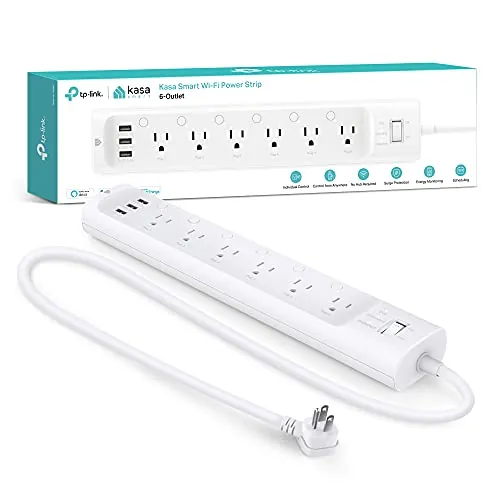
These strips share a 15 A / 1,875 W maximum AC load, so Anker's twelve sockets do not raise the combined limit. Kasa HS300 adds six independently controlled outlets, schedules and energy-use viewing over secured 2.4 GHz Wi-Fi. Anker A9192 provides twelve AC outlets plus USB-C and USB-A charging; its 20 W USB-C output depends on whether the USB-A ports are in use.
Read comparison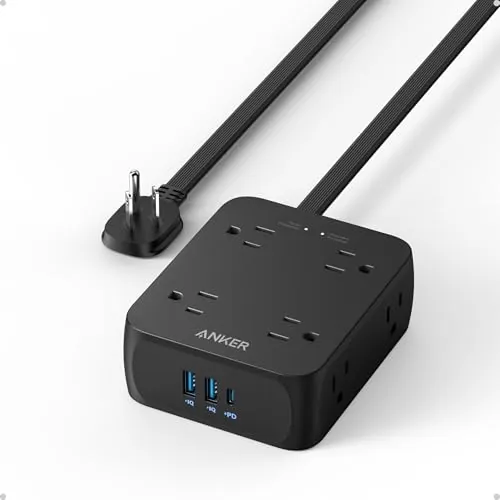
Anker 341 A9183 vs Anker 351 A9192: Outlet Count, USB Sharing and Placement
The Anker 341 A9183 lists 8 AC outlets; the Anker 351 A9192 lists 12. Both list one USB-C port, two USB-A ports, a 5-foot cord and the same 125 V / 15 A / 1,875 W AC ceiling. USB behavior differs: A9183 lists 15 W shared across USB ports when multiple are used, while A9192's 20 W USB-C maximum is available only when both USB-A ports are unused. Choose by outlet count and actual setup, not the product series number.
Read comparison