
Products compared
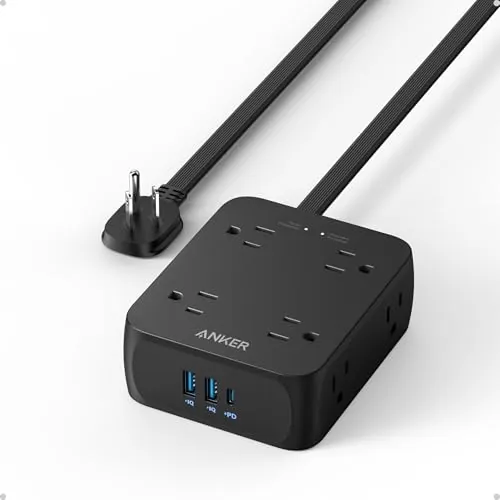
Anker
Anker 341 USB Power Strip
Anker’s U.S. page lists 8 AC outlets, one USB-C port and two USB-A ports for the 341 A9183. It also describes a 5 ft option, a 45-degree flat plug and two wall-mounting slots. The page currently defaults to white, so check the color and cord length on the exact listing.
Model A9183
Amazon ASIN B0DXPRK65X
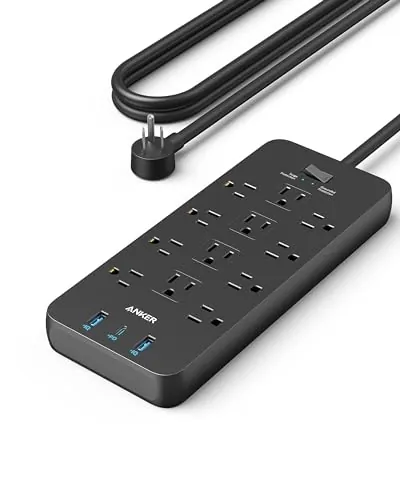
Anker
Anker 351 Power Strip
Anker’s U.S. page lists 12 AC outlets and the same USB port count as the 341 for model A9192. Anker Support lists a 5 ft cord and says 20 W USB-C output is available only when neither USB-A port is in use.
Model A9192
Amazon ASIN B09SG2Q23M
Differences that matter
What matters most to you?
Choose a priority to see what it changes.
Sources for AC outlet capacity and published AC ceiling
Sources for USB port mix and simultaneous output
Sources for Cord route, body footprint and mounting
Decide whether eight outlets are enough
Both models provide one USB-C and two USB-A ports, but the AC outlet count differs: the 341 A9183 lists eight, while the 351 A9192 lists twelve. If you have nine to twelve AC plugs to place, A9192 is the count match. If eight or fewer cover your setup, outlet count does not decide between them; use the footprint, plug angle and USB sharing rules next.
Both product pages list the same AC output ceiling, 125 V / 15 A / 1,875 W. A higher receptacle count is not a higher load rating. Check the label and the exact unit's instructions for how to use the strip; this comparison does not calculate a safe load or recommend which appliances to plug in.
Plan the USB devices you will use at the same time
The 351's USB-C port is listed up to 20 W, but Anker says that 20 W mode is available only when both USB-A ports are unused. Its support page describes 15 W shared when USB-A and USB-C operate together. For the 341, Anker's detailed U.S. page lists 15 W shared across the three USB ports when multiple ports are active. If phone charging and two USB accessories will overlap, compare the shared-use ceiling—not the standalone USB-C maximum.
These are manufacturer output ratings. They do not establish a particular phone's charging time or that each connected device will receive its maximum simultaneously.
Measure cord reach, body space and mounting before buying
Both offers compared here are 5 ft versions. Anker’s A9183 page also offers a 10 ft option, so check the selected length. The A9183 body is listed at 4.5 × 3.6 × 1.6 inches and its page describes a 45-degree flat plug and two mounting slots underneath. The A9192 body is listed at 9.65 × 4.17 × 1.02 inches; its page describes extra spacing for larger plugs and promotes wall mounting.
Before ordering, measure the wall-to-device cable distance and the space available for the strip. Lay out bulky adapters against the manufacturer images to see which outlets they may cover. Neither page gives a directly comparable adapter-clearance measurement, and the A9192 U.S. page does not confirm whether every seller’s package includes screws. Check the A9183 listing’s selected color and cord length; Anker’s U.S. page defaults to white and shows both 5 ft and 10 ft options.
Product details
Anker 341 USB Power Strip
- AC and USB ports
- 8 AC outlets, 1 USB-C and 2 USB-A. Manufacturer lists 125 V / 15 A / 1,875 W AC output. USB-C is listed up to 20 W alone; when USB ports are used together, the combined USB output is listed at 15 W shared. Source
- Cord and plug
- Anker’s U.S. page offers 5 ft and 10 ft A9183 cord options; this comparison uses the 5 ft version. The page also describes a 45-degree flat plug. Source
- Body and mounting
- The listed body is 4.5 × 3.6 × 1.6 inches. Anker describes two bottom wall-mounting slots, but the page text does not confirm whether every retailer package includes screws. Source
Anker 351 Power Strip
- AC and USB ports
- 12 AC outlets, 1 USB-C and 2 USB-A. Manufacturer lists 125 V / 15 A / 1,875 W AC output. The USB-C maximum is 20 W only while both USB-A ports are unused; when USB-C and USB-A ports operate together, Anker lists 15 W shared. Source
- Cord and body
- Anker Support lists a 5 ft cord; Anker's U.S. product page lists 9.65 × 4.17 × 1.02 inches. Source
- Placement and mounting
- Anker’s U.S. page describes extra room for larger plugs and promotes wall mounting. It does not give a directly comparable adapter-clearance measurement or confirm screw contents for every retailer package. Source
Before you buy
Community discussions
A9192 owner describes blocked outlet positions in a tower-stand setup
Anker 351 Power Strip
The poster names the Anker 351 A9192 and says straps holding it to a perforated PC stand cross the front and cover some outlets. This is a placement example, not a report comparing the 341 or a mounting result.
What to check
Compare the strip’s outlet orientation with the surface, cord route and plug positions in your own setup; check whether adapters or restraints would leave the sockets you need accessible.
Common questions
Is the Anker 351 a higher-capacity electrical strip because it has 12 outlets?
It has more receptacles, not a higher published AC output ceiling: both U.S. product pages list 125 V, 15 A and 1,875 W. Outlet count does not establish what load is appropriate for a particular setup; follow the product label and device instructions.Anker 341 USB Power Strip (A9183) — U.S. manufacturer pageAnker 351 Power Strip (A9192) — U.S. manufacturer page
Can I get 20 W USB-C from the 351 while using its USB-A ports?
Anker says the A9192's 20 W USB-C charging is available only when both USB-A ports are unused. When USB-C and USB-A are used together, the A9192 support description lists 15 W shared. A9183's U.S. page also lists 15 W shared across multiple USB ports.Anker 341 USB Power Strip (A9183) — U.S. manufacturer pageAnker 351 Power Strip (A9192) — U.S. manufacturer pageAnker 351 Power Strip — U.S. Support product description and user-guide listing
Do both models have a five-foot cord?
Both offers compared here are 5 ft variants. Anker’s A9183 U.S. page also offers a 10 ft option, so check the selected listing length. Anker Support lists a 5 ft cord for A9192.Anker 341 USB Power Strip (A9183) — U.S. manufacturer pageAnker 351 Power Strip — U.S. Support product description and user-guide listing
Which one has better spacing for bulky plugs?
The manufacturer describes extra room for larger plugs on the 351, and says the 341's outlets are spaced for larger plugs too. The reviewed pages do not provide a comparable clearance measurement, so compare your adapter shapes with the actual product layout instead of assuming a spacing winner.Anker 341 USB Power Strip (A9183) — U.S. manufacturer pageAnker 351 Power Strip (A9192) — U.S. manufacturer page
Does the Anker 351 include mounting screws?
The Anker U.S. product page promotes easy wall mounting but does not list included screws in the text reviewed. Check the exact retailer listing or in-box documentation. The A9183 page describes two slots, but also does not confirm included screws for this marketplace ASIN.Anker 341 USB Power Strip (A9183) — U.S. manufacturer pageAnker 351 Power Strip (A9192) — U.S. manufacturer page
Sources and scope
For load and installation requirements use the label and instructions on the exact strip. Confirm the color, cord length and mounting hardware on the seller’s package.
Related comparisons
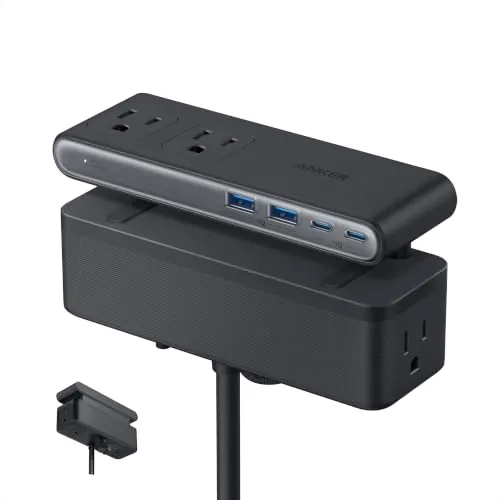
Anker 351 A9192 vs Nano Clamp A9196: Outlets, USB Sharing, and Desk Fit
Anker 351 A9192 is a flat, wall-mountable strip with twelve AC outlets, one USB-C and two USB-A ports. Nano A9196 puts six AC outlets across a desk clamp and adds two USB-C plus two USB-A ports, with up to 70 W available from one USB-C port under the stated conditions. Compare how many AC adapters you need, where plugs must sit, and what the USB ports deliver when used together. Measure the desk edge and the 2.61-inch body below it before relying on the clamp.
Read comparison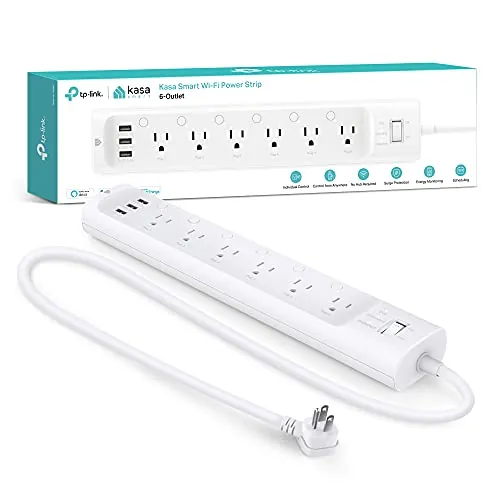
Kasa HS300 vs Anker 351 A9192: Smart Outlets or 12 AC Positions?
These strips share a 15 A / 1,875 W maximum AC load, so Anker's twelve sockets do not raise the combined limit. Kasa HS300 adds six independently controlled outlets, schedules and energy-use viewing over secured 2.4 GHz Wi-Fi. Anker A9192 provides twelve AC outlets plus USB-C and USB-A charging; its 20 W USB-C output depends on whether the USB-A ports are in use.
Read comparison