
Products compared
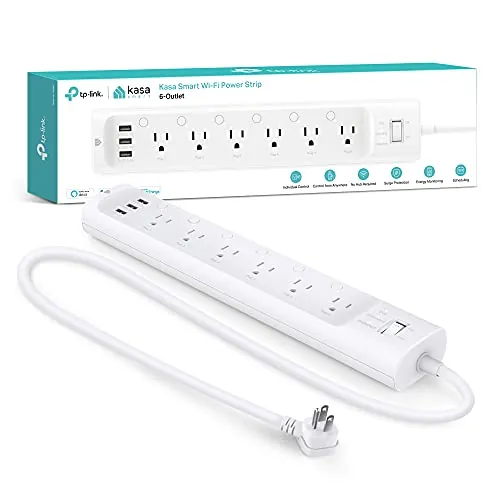
Kasa Smart
Kasa Smart Wi-Fi Power Strip, 6-Outlets
U.S. White model; six AC outlets, three USB ports, Kasa app control
Model HS300
Amazon ASIN B07G95FFN3
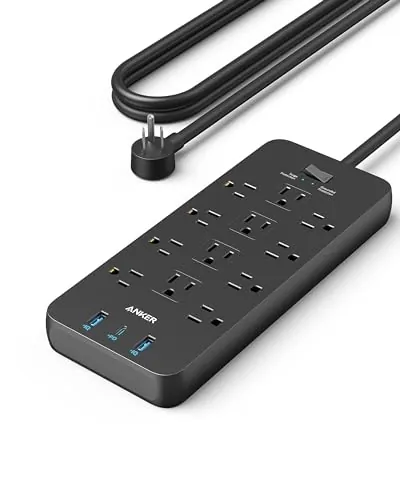
Anker
Anker 351 Power Strip
U.S. Black model with 5 ft cord; twelve AC outlets, one USB-C and two USB-A ports
Model A9192
Amazon ASIN B09SG2Q23M
Differences that matter
What matters most to you?
Choose a priority to see what it changes.
Sources for AC socket count and common load cap
Start with what you want to control
Kasa HS300's six AC outlets can be managed individually in the Kasa app, with schedules and connected-device energy-use viewing. The current product page lists a secured 2.4 GHz home Wi-Fi connection. That is useful when selected devices need different routines; it also means initial app and network setup is part of the decision.
Anker's A9192 supplies twelve AC outlets and USB charging ports. Its official product and support pages document the connector layout and output limits, but do not establish the HS300-style per-outlet schedule and energy-view workflow. If that smart routine is required, HS300 has the relevant feature documented. If you only need connection positions, compare the plugs and cords you actually use.
Count outlets, but keep one shared AC limit in view
A9192 offers twelve AC positions; HS300 offers six. Both manufacturers list a maximum total AC load of 15 A / 1,875 W. Treat that as the strip-wide limit, not a per-socket allowance. Before buying, make a list of devices likely to run at the same time and check their labels and the strip's exact instructions.
The enclosures differ in their published dimensions, but dimensions alone do not show whether neighboring power bricks will overlap or block another socket. Measure the real placement area, cord route and adapters you plan to connect. No fit result is inferred here.
Match the USB ports to the devices you charge
Anker A9192 has one USB-C and two USB-A ports. Anker lists USB-C up to 20 W when used alone, and its A9192 support specification says USB-A and USB-C share 15 W when used together. If you plan to charge through several ports at once, use the combined-use figure rather than assuming each port can deliver its standalone maximum simultaneously.
Kasa’s current HS300 U.S. specification lists three USB ports at 5 V / 2.4 A per port and 5 V / 4 A total. The available instructions cover HS300 V1, while the retailer listing does not identify the unit’s hardware revision. Check the actual label and included guide before relying on revision-specific details.
Make a quick pre-buy list
Write down three things before ordering: how many AC plugs must connect, which devices need independent schedules or energy viewing, and which USB connectors and simultaneous-use output you need. Then compare that list with six individually controlled AC outlets on HS300 or twelve AC outlets plus USB-C/USB-A on A9192.
Check the total AC rating separately from port count: both list 15 A / 1,875 W. If USB limits, app setup, or HS300 revision details would change your choice, verify those on the exact unit's current documentation. These steps turn an outlet-count choice into a check of the functions and limits your own setup uses.
Product details
Kasa Smart Wi-Fi Power Strip, 6-Outlets
The HS300 is the documented choice here for individually scheduling or checking the energy use of AC-connected devices. It requires Kasa setup on secured 2.4 GHz Wi-Fi; its USB ports are a separate, always-on charging function.
- AC outlets and app control
- Six independently controlled AC outlets; schedule outlets and view connected-device energy use in Kasa. Source
- Wi-Fi requirement
- Secured home Wi-Fi at 2.4 GHz is listed for setup and connection. Source
- Total AC rating
- 15 A / 1,875 W maximum load in total across the strip. Source
- USB ports
- Three USB ports; the current U.S. product specifications list 5 V / 2.4 A each and 5 V / 4 A total. Confirm the exact unit revision if its USB power limit is important. Source
Anker 351 Power Strip
A9192 gives more AC socket positions and a USB-C connector alongside two USB-A ports. The USB-C maximum is conditional: the manufacturer's support specification says the USB-A and USB-C outputs share 15 W when both connector types are in use.
- AC outlets
- Twelve AC outlets; the product page specifies a total output limit of 125 V × 15 A / 1,875 W. Source
- USB-C output
- USB-C is listed up to 20 W when used alone; Anker's A9192 support specification says USB-A and USB-C used together share 15 W. Source
- USB-A output
- Two USB-A ports; Anker lists up to 2.4 A per port and 15 W shared when USB-A and USB-C ports are used together. Source
- Enclosure dimensions
- 9.65 × 4.17 × 1.02 inches as listed by Anker; check the physical orientation and adapter clearance for your placement. Source
Before you buy
Community discussions
An HS300 shopper has two different outlet-control needs
Kasa Smart Wi-Fi Power Strip, 6-Outlets
A shopper looking at the Kasa HS300 wants to schedule all outlets and asks whether turning off one outlet could control the rest.
What to check
List the devices you want to control together and independently, then check which controls each strip actually supports.
Common questions
Does the Anker's twelve-outlet count let me connect a larger AC load?
No. Anker lists a 15 A / 1,875 W total AC output for A9192, and Kasa lists the same maximum total for HS300. The socket count changes the number of connection positions, not the shared AC rating.Anker 351 Power Strip A9192 — U.S. product pageKasa Smart Wi-Fi Power Strip, 6-Outlets — HS300 U.S. product specifications
Can Anker's USB-C deliver 20 W while I also use USB-A?
Anker lists USB-C at up to 20 W when used alone. Its A9192 support specification says that when USB-A and USB-C ports are used together, they share 15 W. Treat the connector combination as part of the limit.Anker 351 Power Strip A9192 — U.S. product pageAnker 351 Power Strip A9192 — support specifications
Does HS300 need Wi-Fi for its smart outlet functions?
Kasa lists a secured 2.4 GHz home Wi-Fi connection and Kasa app for its smart outlet controls and schedules. If app-based control is not part of your routine, compare the physical socket and USB layouts separately.Kasa Smart Wi-Fi Power Strip, 6-Outlets — HS300 U.S. product specificationsTP-Link Kasa Smart Wi-Fi Power Strip HS300 U.S. V1 User Guide, REV1.0.1
Are the published HS300 USB limits guaranteed for every HS300 listing?
The current U.S. Kasa page lists 5 V / 2.4 A per port and 5 V / 4 A total. The available manual is labeled HS300 V1, but the compared listing does not state the unit’s hardware revision. Check the label and included manual.Kasa Smart Wi-Fi Power Strip, 6-Outlets — HS300 U.S. product specificationsTP-Link Kasa Smart Wi-Fi Power Strip HS300 U.S. V1 User Guide, REV1.0.1
Sources and scope
This compares listed features and rated capacities; it is not an electrical or surge test. The compared HS300 listing does not identify its hardware revision. Kasa’s current U.S. page lists USB output ratings, while the available instructions are specifically for HS300 V1; check the actual unit label and included guide.
Related comparisons
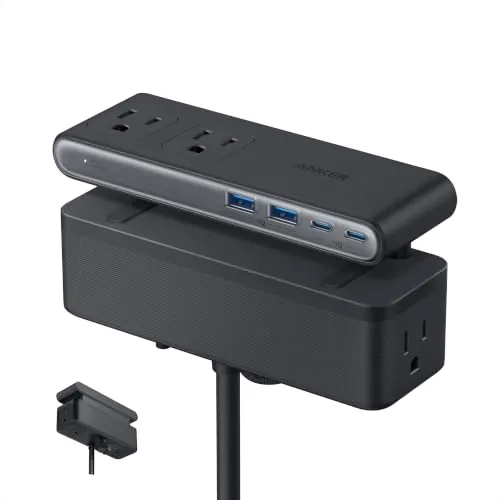
Anker 351 A9192 vs Nano Clamp A9196: Outlets, USB Sharing, and Desk Fit
Anker 351 A9192 is a flat, wall-mountable strip with twelve AC outlets, one USB-C and two USB-A ports. Nano A9196 puts six AC outlets across a desk clamp and adds two USB-C plus two USB-A ports, with up to 70 W available from one USB-C port under the stated conditions. Compare how many AC adapters you need, where plugs must sit, and what the USB ports deliver when used together. Measure the desk edge and the 2.61-inch body below it before relying on the clamp.
Read comparison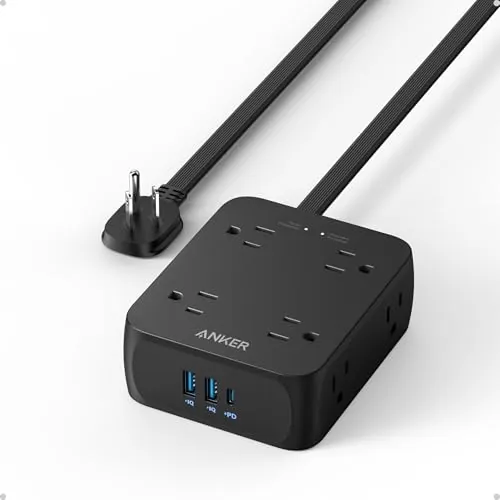
Anker 341 A9183 vs Anker 351 A9192: Outlet Count, USB Sharing and Placement
The Anker 341 A9183 lists 8 AC outlets; the Anker 351 A9192 lists 12. Both list one USB-C port, two USB-A ports, a 5-foot cord and the same 125 V / 15 A / 1,875 W AC ceiling. USB behavior differs: A9183 lists 15 W shared across USB ports when multiple are used, while A9192's 20 W USB-C maximum is available only when both USB-A ports are unused. Choose by outlet count and actual setup, not the product series number.
Read comparison