
Products compared
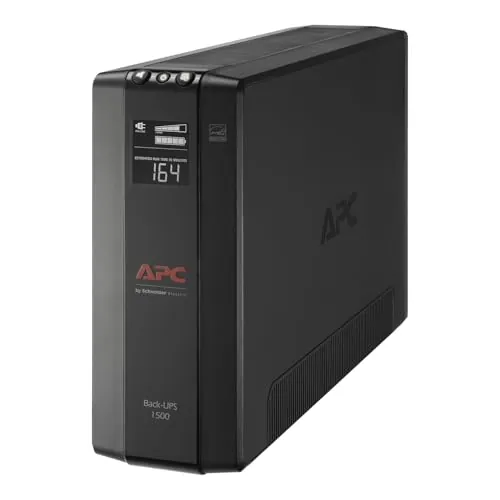
APC
APC Back-UPS Pro BX1500M
120 V tower UPS; manufacturer lists 10 NEMA 5-15R outlets, with five battery-backup and five surge-only.
Model BX1500M
Amazon ASIN B06VY6FXMM
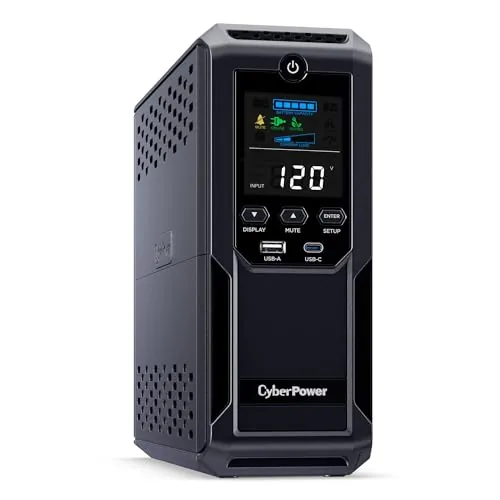
CyberPower
CyberPower CP1500AVRLCD3 Intelligent LCD UPS
120 V mini-tower UPS; manufacturer lists 12 NEMA 5-15R outlets, with six battery-and-surge and six surge-only, plus two USB charging ports.
Model CP1500AVRLCD3
Amazon ASIN B0BCMLLSHL
Differences that matter
What matters most to you?
Choose a priority to see what it changes.
Sources for AC outlets that provide battery backup
Sources for Exact replacement battery cartridge
Sources for On-battery output label
Start with the devices that must stay on battery
The useful first question is not which UPS has the bigger outlet total. It is how many of your actual devices need power from the battery during an outage. BX1500M allocates five outlets to battery backup and five to surge-only. CP1500AVRLCD3 allocates six to battery-and-surge and six to surge-only.
Write down the computer, display, network equipment or storage device you intend to keep backed up, then mark the separate peripherals that can use surge-only outlets. If your essential list needs six backed outlets, only the CyberPower model has that sixth position in this pair. Both are listed at 1500 VA / 900 W, so that extra socket is not extra load capacity.
Keep the replacement cartridge with the model name
The BX1500M manual identifies APCRBC124 as its replacement battery cartridge. CyberPower's RB1290X2E compatibility listing includes CP1500AVRLCD3. These are not interchangeable identifiers: save the complete UPS model with its corresponding cartridge number in your maintenance notes.
This confirms the manufacturer's listed part for each model; it does not compare replacement cost, availability or future battery life. Check the replacement listing again when you actually need a cartridge.
Check the equipment maker's waveform requirement
On battery, Schneider Electric describes BX1500M output as a stepped approximation to a sine wave. CyberPower describes CP1500AVRLCD3 output as simulated sine wave. Keep those manufacturer-specific labels intact: this comparison does not prove that the phrases mean identical waveforms, nor that a particular power supply or device will accept either one.
If an equipment maker lists a UPS waveform requirement, verify it for the exact model before buying. If no requirement is published, ask the device maker rather than reading compatibility into an outlet count or VA/W number.
A quick load-planning worksheet
Before choosing, make a small table with one line per device: whether it needs battery backup, representative watts you can verify, and VA if your equipment or measurement reports it separately. Add the battery-backed devices first; compare watts with the 900 W limit and VA with the 1500 VA limit rather than assuming watts and VA are interchangeable. Leave unknown figures marked unknown.
BX1500M's manual explains its load-capacity bar in five 20% segments. CyberPower describes the CP1500AVRLCD3 LCD as showing detailed battery and power conditions; the reviewed exact-model page does not state an increment for its load indication. Use product displays as status references, not as a substitute for deciding what must be backed up. For duration, compare the exact manufacturers' runtime information at a similar load; no runtime estimate is made here.
USB charging is a separate convenience
If you want charging ports directly at the UPS, CyberPower lists one USB-A and one USB-C charge port for the CP1500AVRLCD3. APC's BX1500M product specifications list no USB power supply. The USB ports add a charging option; they do not increase the unit's AC outlet count, 900 W output rating or runtime.
Choose around those ports only if their placement helps your desk setup. The reviewed specifications establish port presence, not the charging time for a particular phone or tablet.
Product details
APC Back-UPS Pro BX1500M
CyberPower CP1500AVRLCD3 Intelligent LCD UPS
Before you buy
Community discussions
Checking the battery replacement path before buying a UPS
APC Back-UPS Pro BX1500M
Someone shopping for a home-network UPS asks about replaceable batteries. A commenter describes moving on from a BX1500M while weighing battery replacement options.
What to check
Check each manufacturer’s supported replacement pack, service instructions, and pack availability for the exact model.
Common questions
How many outlets stay on battery during an outage?
The BX1500M lists five battery-backup outlets plus five surge-only outlets. The CP1500AVRLCD3 lists six battery-and-surge outlets plus six surge-only outlets. Count the devices that need backup before comparing total receptacles.APC Back-UPS Pro BX1500M product page and specificationsCyberPower CP1500AVRLCD3 Intelligent LCD UPS product specifications and downloads
Which replacement battery part matches each UPS?
APC's manual names APCRBC124 for the BX1500M. CyberPower lists RB1290X2E for the CP1500AVRLCD3. Check the full model on the UPS and replacement listing before buying a cartridge.Back-UPS Pro BX850/1000/1350/1500M/M-LM60 User ManualCyberPower RB1290X2E replacement battery cartridge product page
Do the shared 1500 VA / 900 W ratings tell me how long my computer will run?
No. The rating is a load-capacity specification, not a backup-time estimate for your particular setup. Check the exact manufacturer's runtime information at a comparable load; this comparison does not supply a number of minutes.APC Back-UPS Pro BX1500M product page and specificationsCyberPower CP1500AVRLCD3 Intelligent LCD UPS product specifications and downloads
Are the on-battery waveforms described the same way?
No. Schneider Electric calls the BX1500M waveform a stepped approximation to a sine wave; CyberPower calls the CP1500AVRLCD3 waveform simulated sine wave. Check the connected equipment manufacturer's guidance; the labels alone do not establish compatibility.APC Back-UPS Pro BX1500M product page and specificationsCyberPower CP1500AVRLCD3 Intelligent LCD UPS product specifications and downloads
Sources and scope
Manufacturer specifications are compared; no UPS, runtime, waveform compatibility, surge protection, electrical safety or equipment compatibility testing was performed. Outlet totals and 1500 VA / 900 W labels do not predict backup time. Confirm the exact model on the retail offer, your equipment maker's waveform requirements, and load-specific runtime from each manufacturer before purchase.
Related comparisons
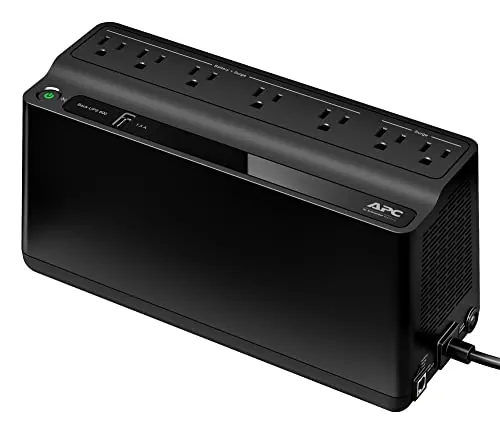
APC BE600M1 vs BX1500M: Load, Outlets and Battery Replacement
The BE600M1 is rated 600 VA/330 W; the BX1500M is rated 1,500 VA/900 W. Both have five battery-backup outlets, but the BE600M1 adds two surge-only outlets and the BX1500M adds five. Both use a stepped-approximation-to-sine waveform while on battery and have user-replaceable batteries, with different replacement cartridges. Start with your equipment nameplates and outlet plan; the ratings do not predict runtime.
Read comparison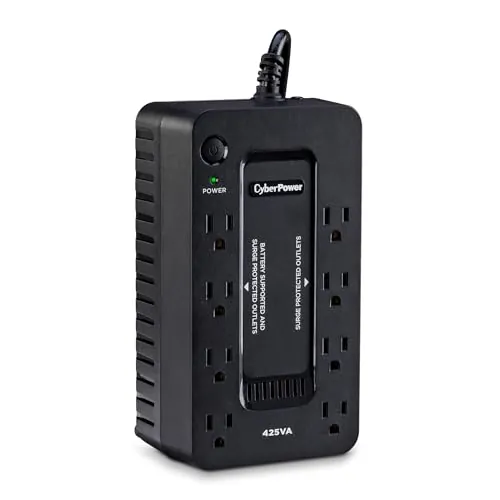
CyberPower ST425 vs CP1500AVRLCD3: Load Limits, Outlet Groups and USB Status
For this exact US pair, CyberPower ST425 is rated 425 VA / 260 W with four battery-backed outlets and four surge-only outlets; its manual recommends keeping load below 80% of its rating and excludes ST425 from USB-to-PC status communication. CP1500AVRLCD3 is rated 1500 VA / 900 W, splits 12 outlets six-and-six, and lists a multifunction LCD plus HID-compliant USB status communication. The higher rating is not a runtime estimate or a fit guarantee: compare your equipment load and required battery-backed outlet count against the exact ratings.
Read comparison