
Products compared
Logitech
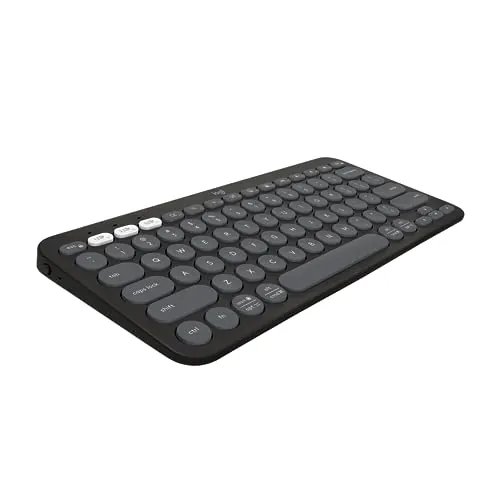
Logitech Pebble Keys 2 K380s Bluetooth Keyboard, Tonal Graphite
Exact assigned U.S. retailer offer: Pebble Keys 2 K380s in Tonal Graphite, part 920-011775. Logitech documents Bluetooth Low Energy pairing with up to three devices and Easy-Switch selection. Its U.S. support page says the K380s requires two AAA alkaline batteries. A Logi Bolt receiver is an optional, separately purchased USB-A connection route; do not assume it comes in this single-keyboard package.
Model 920-011775
Amazon ASIN B0BT4DP7SC
Apple
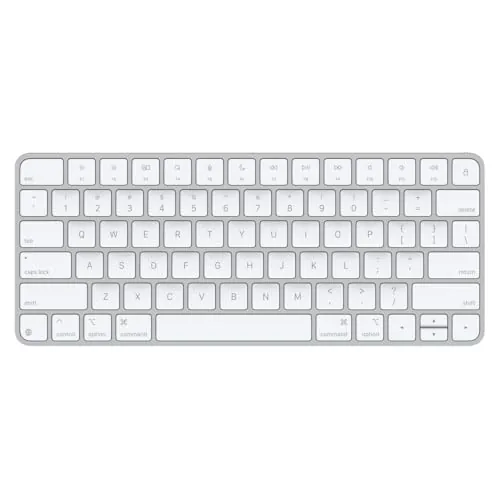
Apple Magic Keyboard (USB-C), US English, standard model without Touch ID
The white, U.S.-English standard USB-C Magic Keyboard in this comparison is MXCL3LL/A, without Touch ID or a numeric keypad. Apple lists Bluetooth, an internal rechargeable battery, and an included USB-C cable for pairing and charging from a Mac. If multi-device switching matters, check Apple's current instructions for this exact model.
Model MXCL3LL/A
Amazon ASIN B0DL6LV7Q6
Differences that matter
What matters most to you?
Choose a priority to see what it changes.
Sources for Host pairing and switching
Sources for Connection setup and ports
Sources for Power routine
Decide how many hosts you need to select
For a setup where one keyboard moves between a computer, tablet and phone, Logitech gives a concrete operation: pair up to three devices, then select one with an Easy-Switch button. Logitech’s U.S. product page names the assigned Tonal Graphite K380s and lists Windows, macOS, iPadOS, iOS and Android compatibility.
Apple’s standard USB-C Magic Keyboard documentation describes automatic pairing with Mac. It does not give a saved-device count or switching steps, so this guide does not label the Apple model single-host or incompatible with switching. If a particular multi-host routine matters, confirm it for MXCL3LL/A before buying.
Separate wireless pairing from the cable and receiver options
Both decisions involve more than a connector label. K380s pairs over Bluetooth Low Energy; Logitech also describes a Logi Bolt USB-A receiver route, but says that receiver must be purchased separately. This single-keyboard comparison does not assume a receiver is in the package.
Apple describes Bluetooth and an included USB-C cable connected to a Mac for pairing and charging. The documented cable use is not evidence that the keyboard supports continuous wired-only operation. Check the ports on the host you intend to use and any adapter you would need.
Pick the power routine you prefer
Logitech specifies two AAA alkaline batteries in a replaceable compartment and lists up to 36 months as expected life. Apple describes a built-in rechargeable battery and USB-C charging. These are different maintenance routines, not a matched runtime comparison; choose the one that is easier for you to maintain.
Before buying the Apple model, verify its exact part
This comparison identifies Apple’s product as the standard white Magic Keyboard with USB-C, US English, no Touch ID and no numeric keypad, part MXCL3LL/A. The current listing data marks the selected ASIN unavailable, and the current Apple U.S. parts list checked here does not return that part. Verify the exact code and seller availability before purchasing. This draft includes no Apple purchase link.
Product details
Logitech Pebble Keys 2 K380s Bluetooth Keyboard, Tonal Graphite
- Host switching
- Bluetooth Low Energy; pair up to three devices and select one with Easy-Switch. Source
- Power
- Requires two AAA alkaline batteries; Logitech states up to 36 months expected battery life. This is not a comparative runtime result. Source
- Optional receiver
- Logitech lists Logi Bolt as a separately purchased USB-A receiver connection method; do not assume it is included with this single keyboard. Source
Apple Magic Keyboard (USB-C), US English, standard model without Touch ID
Before you buy
Community discussions
Checking the same keyboard on several devices
Logitech Pebble Keys 2 K380s Bluetooth Keyboard, Tonal Graphite
A K380s owner said some keys did not work on their iPad even though they worked on a PC and an iPhone.
What to check
Check input and shortcuts across the specific Apple devices you use. A successful pairing is the first step, so try your usual typing on each.
Common questions
Can the K380s switch among multiple paired devices?
Yes. Logitech says the K380s can pair with up to three devices. Hold the Easy-Switch button to pair another device, then short-press it to toggle between the paired devices.Getting Started — Pebble Keys 2 K380s (U.S. Logitech Support)
Does Apple document a matching saved-device switch count?
The cited Apple page describes automatic pairing with Mac and cable-assisted pairing/charging, but does not give a saved-host count or switch steps. Check with Apple if switching among saved hosts is essential; the page does not establish that the keyboard cannot do it.Magic Keyboard (USB-C) — Tech Specs
Is Apple’s USB-C cable a continuous wired keyboard connection?
Apple documents connecting the included USB-C cable to a Mac for pairing and charging, while the standard keyboard is also Bluetooth. The reviewed source does not describe continuous wired-only operation.Magic Keyboard (USB-C) — Tech Specs
What batteries do these models use?
Logitech specifies two AAA alkaline cells for K380s. Apple describes an internal rechargeable battery charged over USB-C. No matched battery-runtime comparison is made.Getting Started — Pebble Keys 2 K380s (U.S. Logitech Support)Magic Keyboard (USB-C) — Tech Specs
Sources and scope
Logitech documents Easy-Switch and sells the optional Bolt receiver separately. Apple’s USB-C specifications cover pairing and charging with a Mac. Check Apple’s current support documents for saved-device switching or wired-only operation if either matters to you. Look for MXCL3LL/A on the listing to match the US English keyboard in this comparison.
Related comparisons
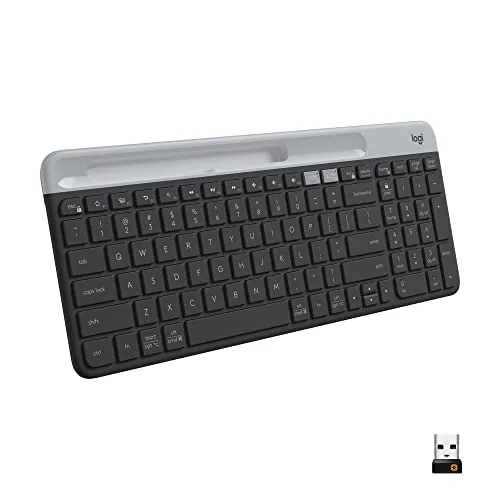
Logitech Pebble Keys 2 K380s vs K585: Layout, Device Switching and Receiver
The English-US Tonal Graphite Pebble Keys 2 K380s (920-011775) is the more compact layout, omits a dedicated number pad and can keep up to three devices paired for Easy-Switch. The Graphite K585 (920-011479) adds a number pad and phone cradle, switches between two paired devices and includes a Unifying USB receiver. Both can connect over Bluetooth Low Energy. Before buying, count your regular hosts and check whether the receiver type and keyboard width fit your actual desk or bag.
Read comparison
Logitech Pebble Keys 2 K380s vs Wave Keys: Compact Carry or Number Pad?
Both Logitech keyboards pair with up to three devices over Bluetooth and can use Logi Bolt. The Pebble Keys 2 K380s is the much smaller, low-profile round-key option; Wave Keys adds a wave-shaped layout, cushioned palm rest, a documented 10-key number pad and an included Bolt receiver. Check the desk or bag footprint and whether you will use Bluetooth or the receiver before choosing.
Read comparison