
Products compared
Logitech
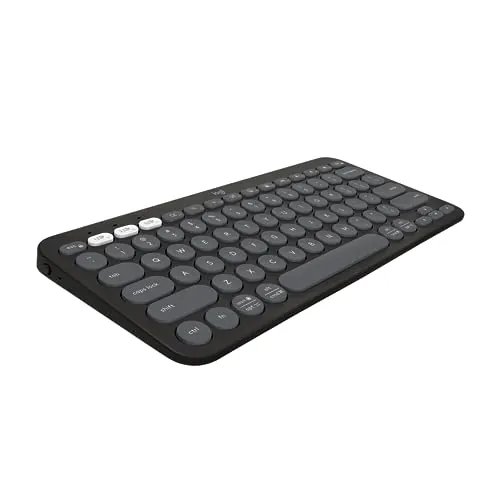
Logitech Pebble Keys 2 K380s (Tonal Graphite)
US standalone compact Bluetooth keyboard with round, low-profile keys; not the Pebble 2 Combo.
Model K380s / 920-011775
Amazon ASIN B0BT4DP7SC

Logitech
Logitech Wave Keys (Graphite)
US Graphite wave-shaped wireless keyboard with integrated cushioned palm rest and 10-key number pad.
Model Wave Keys / 920-011898
Amazon ASIN B0BTNY72VD
Differences that matter
What matters most to you?
Choose a priority to see what it changes.
Sources for Shape, pad and physical footprint
Sources for Bluetooth, three-device switching and receiver
Sources for OS setup and customization
Pick the layout that fits your desk and hands-on routine
K380s is Logitech's slim, compact option with round, low-profile keys. Wave Keys has a wave-shaped key field and a cushioned palm rest. Logitech describes that pad as a support feature; it does not prove that one keyboard will feel more comfortable for every person.
For number work, the exact Wave Keys 920-011898 sheet documents a ten-key number pad. K380s is listed as compact and has a much shorter body dimension set, but its exact spec page does not expressly state numpad status. If a number pad is essential, verify the actual K380s key map or choose the documented Wave layout.
Bluetooth makes the receiver difference optional
Both support Bluetooth and Easy-Switch for up to three paired devices. If Bluetooth is already available on your laptop, tablet or phone, the receiver in Wave Keys' box may not affect your choice.
If you need a Logi Bolt connection, Wave Keys includes the receiver. K380s standalone lists it as a separate purchase. K380s receiver pairing uses a USB-A port and Logitech's Options+ or Web Connect path. Its support page has a likely 'M380s' typo in that subsection, so verify the exact receiver compatibility before ordering.
Measure your actual workspace before buying
Logitech lists the K380s body at 279.5 × 124.2 × 16.4 mm and the Wave Keys body at 375.97 × 218.91 × 30.53 mm. Compare those body measurements with your desk strip, keyboard tray or bag sleeve. Leave space for the mouse and the way you place your hands; the dimensions alone do not say how a desk will feel.
Keep package and keyboard sizes separate. The Wave Keys sheet also lists retail packaging measurements, which are larger and should not be used as the keyboard footprint.
Product details
Logitech Pebble Keys 2 K380s (Tonal Graphite)
Pick K380s when a compact board and round, low-profile keys suit a bag or a crowded desk. It can switch across three paired devices. Bluetooth avoids buying a receiver; if you require Bolt, plan to buy it separately and verify the supported receiver/setup for this exact model.
- Listed body dimensions
- 279.5 × 124.2 × 16.4 mm, per Logitech's K380s specification table. Source
- Layout and switching
- Compact slim board with round low-profile keys; Easy-Switch pairs up to three devices. Source
- Connection kit
- Bluetooth is built in. Logitech describes Bolt as an optional receiver bought separately; its support article has a model-name typo in the optional receiver subsection. Source
Logitech Wave Keys (Graphite)
Pick Wave Keys if you want the wave-shaped key field, integrated cushioned palm rest and documented number pad in one desk keyboard. Its included Logi Bolt receiver saves the separate receiver purchase, but the larger body needs more desk or bag room than the K380s. The palm rest is a design feature, not proof it will feel better for every hand.
- Listed body dimensions
- 375.97 × 218.91 × 30.53 mm, per Logitech's exact-part product-data sheet. Source
- Layout and palm rest
- Wave-shaped compact layout, integrated cushioned palm rest, and a documented 10-key number pad. Source
- Connection kit
- Bluetooth or Logi Bolt; the exact 920-011898 sheet lists a Bolt receiver and two AAA batteries in the box. Easy-Switch connects up to three devices. Source
Before you buy
Community discussions
One returning K380 owner prefers the older key feel
Logitech Pebble Keys 2 K380s (Tonal Graphite)
A person who had used the original K380 says their new K380s feels rougher and its Backspace key feels clunkier to them. This is an individual tactile impression, not a general quality assessment.
What to check
If key texture or Backspace feel matters, try those keys yourself if possible. This owner’s comparison can help you decide what to check, but it does not establish how the keyboard will feel to everyone.
Checking the same keyboard on several devices
Logitech Pebble Keys 2 K380s (Tonal Graphite)
A K380s owner said some keys did not work on their iPad even though they worked on a PC and an iPhone.
What to check
Check the keys you use most on the phone, tablet or computer you will pair. Try switching away and back.
Common questions
Does Wave Keys have a number pad?
Yes. Logitech's exact-part 920-011898 product-data sheet calls out a 10-key number pad and labels the layout compact. The source does not establish that the K380s spec sheet includes a separate pad, so check its exact key map if that is a must-have.Wave Keys wireless ergonomic keyboard — exact 920-011898 product sheetSpecification — Pebble Keys 2 K380s
Do both keyboards switch between multiple computers or devices?
Both Logitech sources document Easy-Switch support for up to three paired devices. Check the connection method and OS layout for each host; the switch count does not establish that every device can use optional software customization.Pebble Keys 2 K380s Bluetooth Keyboard — Tonal Graphite, 920-011775Wave Keys wireless ergonomic keyboard — exact 920-011898 product sheet
Is a Logi Bolt receiver included with each one?
The Wave Keys 920-011898 sheet lists a receiver in the box. Logitech says the receiver is included only with Pebble 2 Combo, not the standalone K380s. K380s support text has an 'M380s' typo in its optional receiver section, so check the exact compatible receiver offer before buying it.Wave Keys wireless ergonomic keyboard — exact 920-011898 product sheetGetting Started — Pebble Keys 2 K380s
Sources and scope
This is a feature-fit comparison of the US Tonal Graphite K380s (920-011775) and Graphite Wave Keys (920-011898), not either model's Mac-specific or bundled variant. Logitech's K380s setup page contains a likely 'M380s' typo in its optional Bolt instructions, but its page title, product page, compatibility text and separately sold receiver link identify the K380s context; confirm the receiver listing matches K380s before purchase. Logitech documents Wave Keys with a 10-key pad; the K380s specifications call it compact but do not expressly state numpad status, so inspect the exact key layout if a dedicated pad is essential. Dimensions are manufacturer-listed body dimensions, not the space needed for your hands or mouse. No comfort, typing-speed, sound, durability or reliability winner is claimed.
- Pebble Keys 2 K380s Bluetooth Keyboard — Tonal Graphite, 920-011775
- Getting Started — Pebble Keys 2 K380s
- Specification — Pebble Keys 2 K380s
- Wave Keys Ergonomic Wireless Keyboard — Graphite, 920-011898
- Wave Keys wireless ergonomic keyboard — exact 920-011898 product sheet
- Getting Started — Wave Keys
Related comparisons

Logitech MX Keys S vs Wave Keys: Choose by Lighting, Layout and Power
These two Logitech keyboards share Bluetooth, an included Logi Bolt receiver and Easy-Switch workflows, so connection alone does not settle the choice. MX Keys S (920-011558) has a low-profile layout, adaptive backlighting and a USB-C charging port you can use while typing. Wave Keys (920-011898) has a wave-shaped layout with an attached cushioned palm rest, uses two included AAA batteries, and its Logitech consumer FAQ says its keys are not backlit. Check your lighting, desk layout, host operating systems and power preference before choosing; neither model is a universal comfort winner.
Read comparison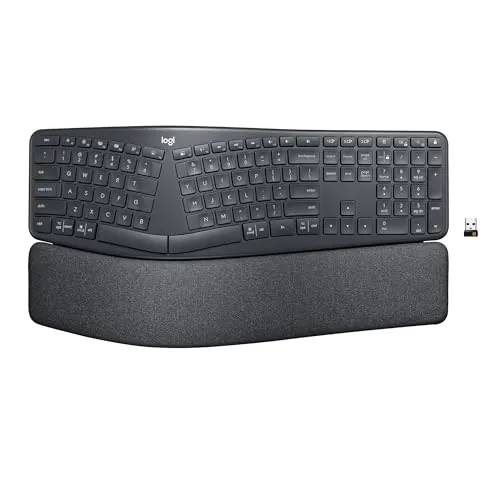
Logitech ERGO K860 vs Wave Keys: Layout, Receiver, and Desk Fit
The Graphite Logitech ERGO K860 (920-009166) and Wave Keys (920-011898) both include an integrated palm-rest area, Bluetooth, three-device switching, and two AAA batteries. The K860 has a curved split keyframe, adjustable palm lift, and a Unifying receiver path; Wave Keys has a compact wave-shaped layout and an included Logi Bolt receiver. The receiver families do not pair with one another, so match the keyboard to the receiver already used by your computer or use Bluetooth where supported. This is a layout and setup comparison, not a medical or measured comfort result.
Read comparison