
Products compared
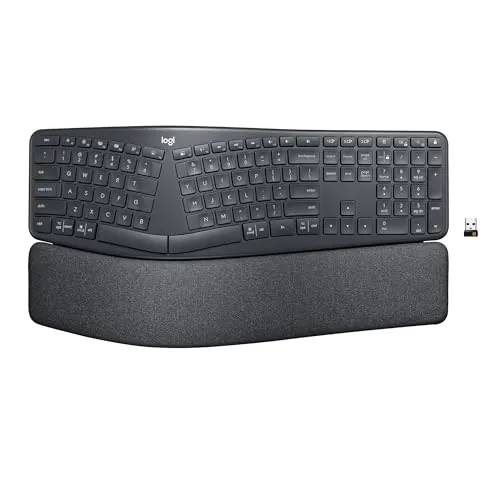
Logitech
Logitech ERGO K860 Split Ergonomic Keyboard, Graphite
Logitech ERGO K860, Graphite, part 920-009166. Full-size curved split keyframe, integrated three-layer palm rest, three palm-lift settings, Bluetooth and Logitech Unifying receiver connection.
Model 920-009166
Amazon ASIN B07ZWK2TQT

Logitech
Logitech Wave Keys Ergonomic Wireless Keyboard, Graphite
Logitech Wave Keys, Graphite, part 920-011898. Compact wave-shaped layout, integrated cushioned palm rest, Bluetooth or Logi Bolt receiver connection, and Easy-Switch for up to three devices.
Model 920-011898
Amazon ASIN B0BTNY72VD
Differences that matter
What matters most to you?
Choose a priority to see what it changes.
Start with the key layout and desk space
ERGO K860 is Logitech's full-size split option: its curved keyframe separates the typing areas and includes a numeric keypad and broad integrated wrist rest. Wave Keys is described as a compact wave-shaped keyboard with its own cushioned palm rest. These are different physical arrangements, so think about whether you want a central split or a continuous wave-shaped key field before considering the wireless connection.
Logitech lists Wave Keys at 218.9 mm high, 375.9 mm wide and 30.5 mm deep. Exact K860 dimensions are not listed in this comparison. If your tray has tight boundaries, compare the Wave Keys measurements with it and confirm dimensions for the exact K860 listing; do not estimate from photos or the “full-size” label.
Compare the built-in palm-rest and lift hardware
K860 pairs its curved split frame with a three-layer pillowed wrist rest and palm-lift legs selectable at 0°, -4°, or -7°. Logitech describes Wave Keys as a compact wave layout with a cushioned palm rest made with three memory-foam layers. Both add hardware at the front edge of the keyboard, so include that area when planning the desk surface.
These design descriptions do not predict comfort for every hand, typing style, or medical condition. Choose by the frame and adjustment features you want to try, and test the shape in person where possible if feel is the deciding factor.
Match the keyboard to your receiver and host
K860's setup guide documents Bluetooth and a Unifying USB receiver. Wave Keys' Logitech page documents Bluetooth and the included Logi Bolt receiver. Logitech says Unifying and Bolt devices do not pair with each other's receiver, so a receiver already plugged into your computer only helps if it belongs to the matching family.
Both support multi-device switching, but their published workflows phrase it differently: K860's setup page says up to three computers, while Wave Keys describes switching among a laptop, tablet, or phone. If Bluetooth is available and you do not need the USB receiver, connect that way; check host operating-system support and available ports before ordering.
Pre-buy check: confirm SKU, receiver, and batteries
Confirm the listing is ERGO K860 Graphite model 920-009166 or Wave Keys Graphite model 920-011898, matching the keyboard you intend to buy. If you rely on a receiver, check whether the one you already own is Unifying or Logi Bolt. The two types are not interchangeable; confirm you have the included/matching receiver or a supported Bluetooth host.
Both keyboards use two AAA batteries. Logitech lists up to 24 months for K860 depending on use and conditions, and up to 36 months for Wave Keys. These are maker estimates rather than a matched battery test. For a tight tray, verify the exact K860 dimensions with the current selected listing; this guide records the Wave Keys component measurements exactly as displayed in Logitech Support.
Product details
Logitech ERGO K860 Split Ergonomic Keyboard, Graphite
- Layout and palm hardware
- Full-size curved split keyframe; integrated three-layer pillowed wrist rest; palm lift at 0°, -4°, or -7° Source
- Connection and switching
- Bluetooth or Unifying USB receiver; Easy-Switch can pair up to three computers Source
- Power
- Two AAA batteries; Logitech lists up to 24 months depending on use and operating conditions Source
Logitech Wave Keys Ergonomic Wireless Keyboard, Graphite
- Layout and palm hardware
- Compact wave-shaped layout with integrated cushioned palm rest containing three memory-foam layers Source
- Connection and switching
- Bluetooth or included Logi Bolt receiver; Easy-Switch changes among compatible laptop, tablet, or phone devices Source
- Power and listed footprint
- Two included AAA batteries; Logitech lists up to 36 months. Support specifications list height 218.9 mm, width 375.9 mm, and depth 30.5 mm. Source
Before you buy
Community discussions
Comparing desk space and split-layout adjustment
Logitech ERGO K860 Split Ergonomic Keyboard, Graphite
A shopper narrowed the choice to Wave Keys and ERGO K860 for work. They expect Wave Keys to be more compact and ask whether the K860’s size could affect desk space or mouse reach. The post asks for experience; it does not establish a fit or comfort result.
What to check
Measure the usable desk or keyboard tray, then leave room for your mouse in the position you use. Compare the exact keyboard dimensions and layout before deciding whether the K860 footprint fits.
Checking where your usual B and G keystrokes land
Logitech ERGO K860 Split Ergonomic Keyboard, Graphite
A new K860 owner says they usually type B, and sometimes G, with the right hand and finds that habit conflicts with the split down the middle. They are considering Wave Keys as an alternative. This is a single typing-habit question, not a general adjustment outcome.
What to check
If you use a nonstandard hand assignment for B or G, try that typing pattern on the K860 layout and compare it with Wave Keys before buying. The post does not establish how long a switch would take.
Common questions
Can the K860 Unifying receiver connect to Wave Keys?
No. Logitech says Logi Bolt devices cannot pair with a Unifying USB receiver, and Unifying devices cannot pair with Logi Bolt receivers. Use the receiver family made for that keyboard or Bluetooth if the computer supports it.What is the difference between Bolt and Unifying receivers? — Logitech SupportGetting Started — ERGO K860 — Logitech SupportWave Keys Ergonomic Wireless Keyboard, Graphite — Logitech U.S.
Which keyboard fits a smaller desk better?
Logitech describes Wave Keys as compact and ERGO K860 as full-size. The Wave Keys support page lists component dimensions as height 218.9 mm, width 375.9 mm, and depth 30.5 mm; K860 dimensions were not confirmed in the fetched text. Check the exact K860 listing and measure your available space before deciding based on a specific clearance.Wave Keys Ergonomic Wireless Keyboard, Graphite — Logitech U.S.Specification — Wave Keys — Logitech SupportERGO K860 Split Ergonomic Keyboard, Graphite — Logitech U.S.
Do both use rechargeable batteries?
The cited Logitech documentation lists two AAA batteries for each keyboard. Wave Keys' U.S. product page says the two AAA batteries are included; the K860 setup guide lists two AAA batteries and up to 24 months of use depending on conditions.Getting Started — ERGO K860 — Logitech SupportWave Keys Ergonomic Wireless Keyboard, Graphite — Logitech U.S.
Does the K860's shape guarantee better wrist comfort than Wave Keys?
No comparative comfort result is established here. Logitech describes different designs: K860's curved split frame and adjustable palm lift, and Wave Keys' compact wave shape with cushioned palm rest. Those details help you choose hardware to try; they do not show which will feel better or prevent pain for a particular person.ERGO K860 Split Ergonomic Keyboard, Graphite — Logitech U.S.Wave Keys Ergonomic Wireless Keyboard, Graphite — Logitech U.S.Getting Started — ERGO K860 — Logitech Support
Sources and scope
This guide compares Logitech ERGO K860 Graphite, part 920-009166, with Wave Keys Graphite, part 920-011898. It covers layout, setup, receiver and battery details; it is not a typing, comfort, productivity or wireless-reliability test and makes no health claim. Logitech describes K860 as full-size and Wave Keys as compact, but exact K860 width and depth are not listed in this comparison. Check the selected offer or measure the keyboard if desk clearance is tight.
Related comparisons

Logitech MX Keys S vs Wave Keys: Choose by Lighting, Layout and Power
These two Logitech keyboards share Bluetooth, an included Logi Bolt receiver and Easy-Switch workflows, so connection alone does not settle the choice. MX Keys S (920-011558) has a low-profile layout, adaptive backlighting and a USB-C charging port you can use while typing. Wave Keys (920-011898) has a wave-shaped layout with an attached cushioned palm rest, uses two included AAA batteries, and its Logitech consumer FAQ says its keys are not backlit. Check your lighting, desk layout, host operating systems and power preference before choosing; neither model is a universal comfort winner.
Read comparison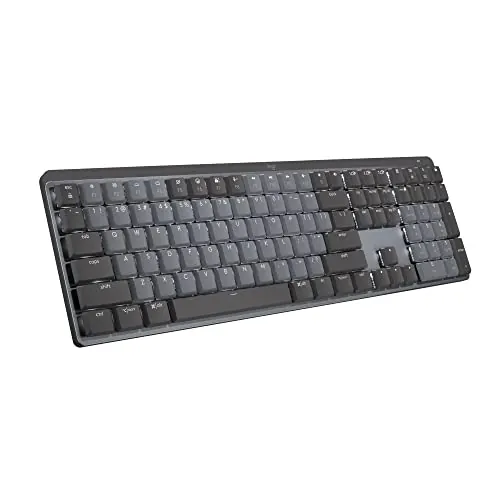
Logitech Wave Keys vs MX Mechanical: Layout, Receiver, and Charging
The Graphite Logitech Wave Keys (920-011898) uses a compact wave-shaped plunger layout with a cushioned palm rest and two replaceable AAA batteries. The Graphite MX Mechanical Tactile Quiet (920-010547) is a wider, full-size low-profile mechanical keyboard with a numpad, a rechargeable battery, white smart backlighting, and a USB-C charging cable. Logitech lists a Logi Bolt USB receiver and Bluetooth for both. Pick by the layout and maintenance routine you actually want; the manufacturer battery estimates use different test conditions and do not prove one lasts longer in comparable use.
Read comparison