
Products compared

Logitech
Logitech Wave Keys Ergonomic Wireless Keyboard — Graphite
U.S. Graphite Wave Keys, part 920-011898. Logitech describes it as a compact wireless wave-shaped keyboard with an integrated cushioned palm rest.
Model 920-011898
Amazon ASIN B0BTNY72VD
Logitech
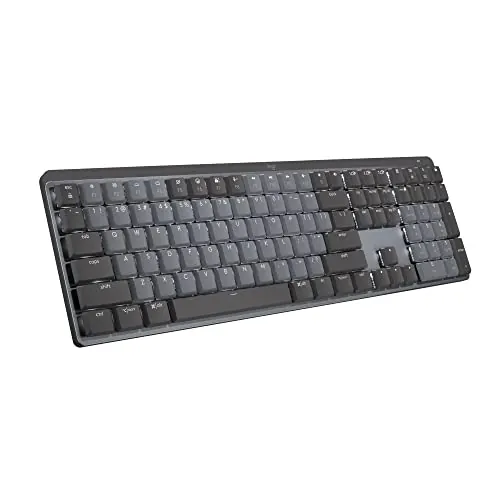
Logitech MX Mechanical Wireless Illuminated Keyboard, Tactile Quiet — Graphite
U.S. Graphite full-size MX Mechanical, part 920-010547 with Tactile Quiet switches. Logitech distinguishes the full-size model from MX Mechanical Mini.
Model 920-010547
Amazon ASIN B09LK1P1RD
Differences that matter
What matters most to you?
Choose a priority to see what it changes.
Sources for Receiver and host connection
Sources for Device switching and cable behavior
Before you choose: check your desk and connection
Measure the keyboard space if width is limited. Logitech lists Wave Keys at 375.9 mm wide and full-size MX Mechanical at 433.85 mm. Wave Keys is the compact, wave-shaped layout with an attached cushioned palm rest; MX Mechanical adds a numpad and low-profile mechanical switches. These dimensions and feature descriptions do not predict individual comfort or typing speed.
Both support Bluetooth and list a Logi Bolt USB receiver in the box. The receiver uses a USB-A host port. If your computer or dock has no available USB-A port, plan to pair by Bluetooth; the MX Mechanical USB-C cable charges the keyboard but is not a wired data connection.
For switching between computers, pair up to three devices and select a channel with Easy-Switch. Logitech’s MX Mechanical setup guide specifies a three-second press to put a selected channel into pairing mode. For power, Wave Keys avoids routine USB charging through replaceable AAA cells; MX Mechanical is rechargeable and has backlighting that will not turn on in bright surroundings or at low battery.
Product details
Logitech Wave Keys Ergonomic Wireless Keyboard — Graphite
- Layout and key mechanism
- Compact wave-shaped layout; Logitech Support classifies the keyboard as plunger type. Source
- Included wireless receiver
- Logi Bolt USB receiver listed in the support specification box contents; Bluetooth Low Energy is also supported. Source
- Power
- Two user-replaceable AAA batteries; Logitech lists up to 36 months as its battery-life estimate. Source
Logitech MX Mechanical Wireless Illuminated Keyboard, Tactile Quiet — Graphite
- Layout and key mechanism
- Full-size keyboard with integrated numpad and low-profile mechanical switches; Tactile Quiet is one of the available switch styles. Source
- Included wireless receiver
- Logi Bolt USB receiver listed in the support specification box contents; Bluetooth Low Energy is also supported. Source
- Power and lighting
- Rechargeable battery, USB-C charging, and white backlighting; Logitech rates up to 15 days with backlight or up to 10 months without it. Source
Before you buy
Community discussions
Trying the sound and feel of Tactile Quiet keys
Logitech MX Mechanical Wireless Illuminated Keyboard, Tactile Quiet — Graphite
A commenter who uses a Tactile Quiet MX Mechanical with a number pad found it more audible than their previous MX Keys and preferred its tactile feel.
What to check
Compare finger position and sound while typing your normal text, particularly if you are used to a lower or quieter keyboard.
Common questions
Do both keyboards include a Logi Bolt receiver?
Yes. Logitech support specifications list a Logi Bolt USB receiver in the box for both Wave Keys and MX Mechanical. Both also support Bluetooth Low Energy. The receiver uses a USB-A port, so check the host or use Bluetooth if that port is unavailable.Specification — Wave KeysSpecification — MX Mechanical
Can I use the MX Mechanical over USB-C as a wired keyboard?
Logitech says the USB-C cable is for charging only. You can continue typing while it charges, but the documentation does not describe a wired USB data mode.Getting Started — MX Mechanical
Which battery lasts longer?
The published figures cannot settle that comparison: Logitech estimates up to 36 months for Wave Keys’ two AAA cells and up to 15 days with backlighting or 10 months without it for MX Mechanical, under product-specific conditions. They are not matched runtime tests.Specification — Wave KeysSpecification — MX Mechanical
Sources and scope
This is a manufacturer-documentation comparison, not a typing, comfort, noise, durability, or battery-runtime test. The Wave Keys and MX Mechanical battery figures are vendor estimates from different products and are not directly comparable. Both are wireless; MX Mechanical USB-C is documented as charging-only. Confirm the exact Graphite variant and host connection before buying.
Related comparisons

Logitech MX Keys S vs Wave Keys: Choose by Lighting, Layout and Power
These two Logitech keyboards share Bluetooth, an included Logi Bolt receiver and Easy-Switch workflows, so connection alone does not settle the choice. MX Keys S (920-011558) has a low-profile layout, adaptive backlighting and a USB-C charging port you can use while typing. Wave Keys (920-011898) has a wave-shaped layout with an attached cushioned palm rest, uses two included AAA batteries, and its Logitech consumer FAQ says its keys are not backlit. Check your lighting, desk layout, host operating systems and power preference before choosing; neither model is a universal comfort winner.
Read comparisonLogitech MX Keys S vs MX Mechanical: Scissor or Tactile Quiet?
The Graphite MX Keys S uses scissor keys; the assigned full-size MX Mechanical is the Tactile Quiet low-profile mechanical version. Logitech lists 1.8 mm total travel for MX Keys S and 3.2 mm for MX Mechanical. Both support lighting, Bluetooth LE or a Logi Bolt receiver, and switching among up to three devices. Choose by a typing style you already know you want; these specifications do not establish typing speed, comfort or sound superiority.
Read comparison