
Products compared

Logitech
Logitech MX Keys S Wireless Keyboard, Graphite
U.S. Graphite MX Keys S; scissor-key keyboard, distinct from the MX Keys Mini.
Model 920-011558
Amazon ASIN B0BKW3LB2B
Logitech
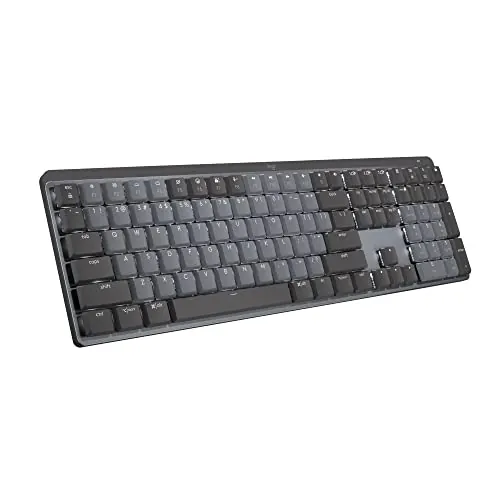
Logitech MX Mechanical Full-Size Tactile Quiet Keyboard, Graphite
U.S. Graphite full-size MX Mechanical with Tactile Quiet low-profile mechanical switches and integrated numpad; not MX Mechanical Mini or Clicky/Linear switch versions.
Model 920-010547
Amazon ASIN B09LK1P1RD
Differences that matter
What matters most to you?
Choose a priority to see what it changes.
Sources for Key mechanism and total travel
Sources for Keyboard layout and desk footprint
Sources for Smart backlight and recharge planning
Sources for Host connection and device switching
Start with scissor versus mechanical keys
MX Keys S uses scissor keys with 1.8 mm total travel, and Logitech describes its keys as spherically dished for fingertips. The assigned MX Mechanical is a full-size Graphite model with Tactile Quiet low-profile mechanical switches and 3.2 mm total travel. Those are meaningful setup differences if you already know which key mechanism you prefer; a specification does not establish that one will feel more comfortable or help you type faster.
Keep the MX Mechanical's switch identity exact: Logitech also sells Clicky and Linear switch versions, and a separate Mini layout. This comparison concerns the 920-010547 Tactile Quiet full-size model. If you cannot decide from mechanism names, try the exact switch style before making a feel-based purchase.
Check layout before measuring desk space
The full-size MX Mechanical is explicitly listed with an integrated numpad; Logitech presents MX Mechanical Mini as its space-saving alternative. MX Keys S is the standard-size model, with MX Keys Mini offered separately. Official specifications list about 430 mm width for MX Keys S and 433.85 mm for MX Mechanical, so this assigned pair does not offer a meaningful width difference for a buyer seeking a compact keyboard.
If you use a numpad every day, the full-size MX Mechanical's documented layout is easy to verify. If you want fewer keys or a narrower board, compare the Mini products separately and confirm their exact layout and color; those Mini versions are outside this article's assigned pair.
Plan lighting around your room and recharge routine
Both keyboards have smart backlighting that responds when your hands approach. Logitech says MX Keys S adjusts brightness to ambient light and lets you adjust duration and brightness in Logi Options+. The MX Mechanical also auto-adjusts and offers lighting effects through Options+. Choose based on the controls you plan to use, rather than assuming one lighting system is superior.
Battery figures need their conditions attached. MX Keys S's specification gives 6.1 days at Level 4 in 100–200 lux and 10.1 days at Level 2 below 100 lux, plus five months with backlighting off. Logitech lists the MX Mechanical at up to 15 days with lighting and up to 10 months without. The backlit conditions are not identical, so they are planning estimates, not a direct endurance ranking.
Map the keyboard to your computers and tablets
Logitech lists Bluetooth Low Energy and Logi Bolt receiver connections for both models, along with switching among up to three devices. The product pages list Windows, macOS, Chrome OS/ChromeOS, Linux and iPadOS. This shared workflow is not a reason to choose one over the other if your hosts are on those listed systems.
Before checkout, list each host device, its operating system and whether you plan to use Bluetooth or the receiver. MX Keys S's support specification lists Bluetooth host requirements for current Windows/macOS, Chrome OS, Linux, iPadOS, iOS and Android, while noting basic functions without software for systems other than Windows and macOS. If you rely on customizable lighting or Smart Actions, check the current software support for the host where you will configure them.
Product details
Logitech MX Keys S Wireless Keyboard, Graphite
The MX Keys S is the standard-size Graphite model in this pair, not the compact MX Keys Mini. Its specifications describe a scissor mechanism and 1.8 mm total travel.
- Key mechanism and travel
- Scissor keys; 1.8 mm total travel; fingertip-shaped, spherically dished keys Source
- Backlight behavior
- Keys illuminate when hands approach and auto-adjust to the environment; brightness and duration can be controlled in Logi Options+ Source
- Wireless and host support
- Bluetooth Low Energy or Logi Bolt USB receiver; switch among up to three devices. Logitech lists Windows, macOS, Chrome OS, Linux and iPadOS; its support page specifies additional Bluetooth host requirements. Source
- Published backlight battery estimates
- 6.1 days at Level 4 in 100–200 lux; 10.1 days at Level 2 below 100 lux; five months with backlight off. Manufacturer estimates, not a matched test against MX Mechanical. Source
Logitech MX Mechanical Full-Size Tactile Quiet Keyboard, Graphite
This assigned MX Mechanical is the full-size Graphite Tactile Quiet model, not the Mini or the Clicky/Linear switch versions. Logitech lists a 3.2 mm total travel and an integrated numpad for the full-size option.
- Key mechanism and travel
- Low-profile mechanical Tactile Quiet switch; 3.2 mm total travel Source
- Backlight behavior
- White backlight illuminates when hands approach and auto-adjusts; Logi Options+ provides lighting effects Source
- Wireless and host support
- Bluetooth Low Energy or Logi Bolt USB receiver; switch among up to three devices. Logitech lists Windows, macOS, ChromeOS, Linux and iPadOS. Source
- Published battery estimates
- Up to 15 days with backlighting and up to 10 months without; manufacturer estimates, not a matched test against MX Keys S Source
- Physical dimensions and included receiver
- 433.85 mm wide; Logitech lists a Logi Bolt receiver and 1 m USB-C-to-A charging cable in the box Source
Before you buy
Community discussions
Activating the backlight while charging
Logitech MX Keys S Wireless Keyboard, Graphite
An MX Keys S owner said they could trigger the backlight by moving a hand near the keyboard on battery, but needed a keypress when they kept the cable connected.
What to check
Check how each board lights up when you approach the keys and when its cable is connected. Compare the settings you actually plan to use.
Common questions
Is the assigned MX Mechanical the Clicky or Linear version?
No. The assigned Graphite part number 920-010547 is the full-size Tactile Quiet MX Mechanical configuration. Logitech lists Tactile Quiet, Clicky and Linear as separate switch types; check the exact part number and switch label when selecting a listing.Logitech MX Mechanical Graphite (920-010547)
Which keyboard has a numpad?
Logitech explicitly describes the full-size MX Mechanical as having an integrated numpad. The compact MX Mechanical Mini is a different model. MX Keys S is also the standard-size model, not MX Keys Mini; verify the exact regional key layout shown in your chosen seller listing.Logitech MX Mechanical Graphite (920-010547)Logitech MX Keys S Graphite (920-011558)
Are MX Keys S and MX Mechanical's battery estimates a direct comparison?
No. The official MX Keys S estimates specify two room-lighting levels and brightness settings, while the MX Mechanical page gives an up-to-15-day estimate with its backlight. Treat these as model-specific manufacturer estimates, not a matched test or guaranteed runtime.Logitech Support: MX Keys S SpecificationsLogitech Support: MX Mechanical Specifications
Can either keyboard switch between a computer and tablet?
Logitech lists switching among up to three devices for both. The current product pages list Windows, macOS, ChromeOS/Chrome OS, Linux and iPadOS. MX Keys S's support page also documents Bluetooth LE host requirements for iOS, iPadOS and Android, and says basic functions work without software on systems other than Windows and macOS. Check the exact connection and software needs for your hosts before buying.Logitech MX Keys S Graphite (920-011558)Logitech Support: MX Keys S SpecificationsLogitech MX Mechanical Graphite (920-010547)
Does Tactile Quiet prove that MX Mechanical is quieter than MX Keys S?
No measured noise comparison is provided here. Tactile Quiet is Logitech's name for this MX Mechanical switch option; it does not establish that this keyboard is quieter than MX Keys S in use or at a particular desk.Logitech MX Mechanical Graphite (920-010547)
Sources and scope
This is an official-source, feature-fit comparison, not a hands-on typing or acoustic test. Switch preference is personal; the source set does not establish comparative speed, comfort, sound, durability in use or typing accuracy. Battery estimates have different stated conditions and do not establish a head-to-head winner. Host compatibility is not exhaustively tested on every OS/device combination, and exact regional key legends should be confirmed in the selected listing.
Related comparisons

Logitech MX Keys S vs Wave Keys: Choose by Lighting, Layout and Power
These two Logitech keyboards share Bluetooth, an included Logi Bolt receiver and Easy-Switch workflows, so connection alone does not settle the choice. MX Keys S (920-011558) has a low-profile layout, adaptive backlighting and a USB-C charging port you can use while typing. Wave Keys (920-011898) has a wave-shaped layout with an attached cushioned palm rest, uses two included AAA batteries, and its Logitech consumer FAQ says its keys are not backlit. Check your lighting, desk layout, host operating systems and power preference before choosing; neither model is a universal comfort winner.
Read comparison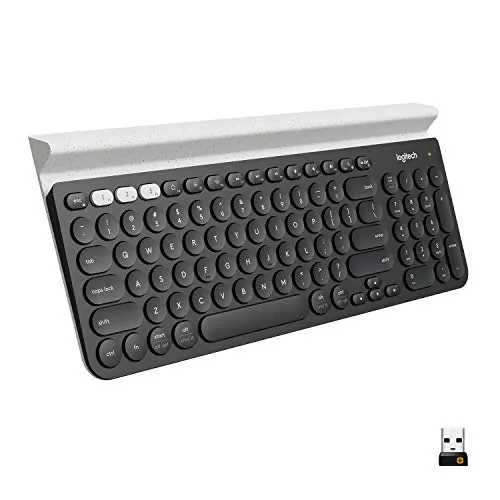
Logitech MX Keys S vs K780: Desk Footprint, Receiver and Phone Cradle
This U.S. comparison covers the Graphite Logitech MX Keys S (920-011558) and Speckled White Logitech K780 (920-008025). MX Keys S is 430.20 mm wide and 131.63 mm deep, uses Bluetooth or a Logi Bolt USB receiver, and its rechargeable battery can charge over USB-C while you continue typing. K780 is 380 mm wide and 153 mm deep, uses Bluetooth or Logitech's Unifying receiver, and its built-in cradle holds phones through a 12-inch iPad class; Logitech lists a maximum device thickness of 11.3 mm. K780 uses two replaceable AAA cells and has no backlight. The practical choice is whether your desk and phone/tablet routine benefit more from an integrated cradle or from illumination and rechargeable upkeep—not a typing-quality verdict.
Read comparison