
Products compared

Logitech
Logitech MX Keys S Wireless Illuminated Keyboard — Graphite
Graphite U.S. MX Keys S, part number 920-011558. Its published footprint is 430.20 mm long across the desk and 131.63 mm deep. Logitech documents Bluetooth LE and an included Logi Bolt USB receiver, three-device Easy-Switch, smart backlighting and USB-C charging while typing. The sources used here do not establish an integrated phone/tablet cradle; plan a separate support if needed.
Model 920-011558
Amazon ASIN B0BKW3LB2B
Logitech
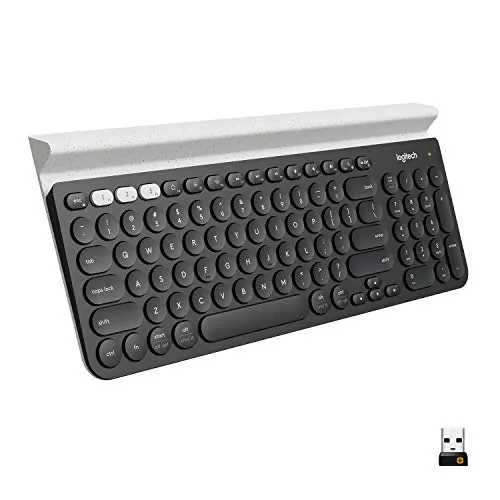
Logitech K780 Multi-Device Wireless Keyboard — Speckled White
Speckled White U.S. K780, part number 920-008025. The keyboard is 380 mm wide and 153 mm deep and has a built-in rubber phone/tablet cradle. Logitech documents Bluetooth or its Unifying USB receiver and switching among up to three devices. It has no backlight and uses two replaceable AAA batteries.
Model 920-008025
Amazon ASIN B01LZTBKBG
Differences that matter
What matters most to you?
Choose a priority to see what it changes.
Sources for Keyboard layout and desk footprint
Sources for Receiver type and switching among devices
Sources for Phone or tablet placement while typing
Measure your desk in width and depth
MX Keys S spans 430.20 mm across the desk and is 131.63 mm deep. K780 spans 380 mm but is 153 mm deep. Put those two measurements against your available workspace: K780 takes less width, while MX Keys S takes less front-to-back depth. Include your normal mouse area and any device support when checking the layout.
This comparison does not turn those dimensions into a comfort or typing-quality winner. It gives you an orientation-specific space check so you can see whether your desk is constrained more by width or depth.
Check the receiver and device-switch routine
Both keyboards can pair with multiple devices, but Logitech documents different USB receiver families: Logi Bolt for MX Keys S, Unifying for K780. MX Keys S support instructions describe Bluetooth LE or its included Logi Bolt receiver and pairing up to three computers. The K780 U.S. page describes Bluetooth or a Unifying receiver and switching among up to three devices.
Before choosing, list every computer and whether you intend to use Bluetooth or USB on it. If you rely on a receiver, check the exact package and the available port. Treat the receiver names as different documented connection methods; this comparison does not assume they are interchangeable.
Decide how the phone or tablet will sit
K780's integrated rubber cradle is the clear documented option when you want a phone or tablet held at the keyboard. Logitech describes the supported size through a 12-inch iPad class and specifies 11.3 mm as the maximum device thickness. Check your device with its case and in the orientation you expect to use; the stated class is not a fit guarantee for every combination.
The MX Keys S sources used here do not confirm an integrated cradle. If you want a raised device alongside it, plan a separate support and measure how that support will sit next to the wider MX Keys S. This is a deliberate evidence boundary, not a claim that no third-party stand can be used.
Pick the power and lighting upkeep you prefer
MX Keys S has smart backlighting and a rechargeable battery. Logitech says to connect USB-C and keep typing while charging; its setup instructions also describe the ambient-light response and the conditions that turn backlighting off. That makes it a fit for buyers who value illuminated keys and can keep a cable available when needed.
K780 has no backlight and takes two replaceable AAA cells. Logitech support explains the low-battery indication and replacement steps. If you prefer to swap cells rather than charge a keyboard, this is the documented routine. Runtime claims are not compared because usage conditions differ and no matched test was performed.
A short setup checklist before buying
1. Measure usable desk width and depth. 2. If you plan to rest a phone or tablet on the keyboard, check its dimensions and thickness with the case; K780's stated limit is 11.3 mm. 3. Identify each host's Bluetooth capability and open USB ports; if using USB, note Logi Bolt for MX Keys S versus Unifying for K780 and verify the receiver is in the package. 4. Choose between MX Keys S backlighting/rechargeable USB-C and K780's unlit, replaceable-AAA routine. 5. If selecting MX Keys S, include the footprint of a separate phone stand if you need one.
These checks address layout, connection and upkeep. They do not predict typing feel, comfort or battery runtime in your own environment.
Product details
Logitech MX Keys S Wireless Illuminated Keyboard — Graphite
- Footprint
- Logitech lists a keyboard body 430.20 mm long across the desk by 131.63 mm deep, and 20.5 mm high. Measure the available desk area using the same orientation. Source
- Wireless receiver and device switching
- Logitech documents Bluetooth LE or the included Logi Bolt USB receiver; Easy-Switch can pair up to three computers and switch channels. Receiver use requires a compatible computer USB port; Bluetooth is the other documented route. Source
- Power and illumination
- Rechargeable battery; connect USB-C and continue typing during charging. Smart backlighting responds to ambient light and hands approaching; it is disabled in bright conditions and when battery is low. Source
Logitech K780 Multi-Device Wireless Keyboard — Speckled White
- Footprint and integrated cradle
- Logitech lists 380 mm width and 153 mm depth. The integrated cradle supports phones through the 12-inch iPad class; its specification lists maximum device thickness of 11.3 mm. Check your device including its case and intended orientation. Source
- Wireless receiver and device switching
- The U.S. product page documents Bluetooth or Logitech's Unifying USB receiver and switching among up to three devices. Confirm your exact box includes the receiver if you plan to use USB rather than Bluetooth. Source
- Power and backlighting
- K780 has no backlight and uses two replaceable AAA batteries; Logitech support explains the low-battery indicator and replacement steps. No directly comparable runtime claim is used. Source
Before you buy
Community discussions
Adding the keyboard to a receiver already in use
Logitech MX Keys S Wireless Illuminated Keyboard — Graphite
An MX Keys S owner said they paired the keyboard with the Bolt receiver already used by their Lift mouse.
What to check
Check which receiver family your current devices use. Confirm the pairing steps and whether the selected keyboard includes the receiver you need.
Trying both keyboards at a quiet desk
Logitech MX Keys S Wireless Illuminated Keyboard — Graphite
Someone who had used a K780 for years tried an MX Keys S and noticed a different sound when first touching its keys, even though both keystrokes seemed quiet to them.
What to check
If you type near other people, try normal light typing on each keyboard in a similar room. A demo of hard keypresses may give a different impression.
Common questions
Will a tablet fit in the Logitech K780 cradle?
Logitech says the integrated K780 cradle holds devices up to the 12-inch iPad class, and its specification lists a maximum thickness of 11.3 mm. Measure your tablet including its case and check its orientation; the published limit does not verify every model or case combination.Logitech K780 Multi-Device Wireless Keyboard, U.S. part number 920-008025K780 Multi-Device Keyboard technical specifications — Logitech Support
Do MX Keys S and K780 use the same USB receiver?
Logitech documents Logi Bolt for MX Keys S and a Unifying receiver for K780. The sources do not establish receiver interchangeability; check the exact receiver and computer port you plan to use. Both also support Bluetooth pairing.Getting Started — Logitech MX Keys SLogitech K780 Multi-Device Wireless Keyboard, U.S. part number 920-008025
Can MX Keys S keep working while it charges?
Yes. Logitech's MX Keys S setup instructions say to connect USB-C and that you can continue typing while it charges. Its backlighting may turn off in a bright room or when the battery is low.Getting Started — Logitech MX Keys S
What batteries does K780 use, and does it have backlighting?
Logitech's K780 specifications list two replaceable AAA cells and no backlight. Its support page explains replacing both cells when the low-battery indicator appears.K780 Multi-Device Keyboard technical specifications — Logitech SupportK780 Keyboard Battery Life and Replacement — Logitech Support
Sources and scope
Based on Logitech product and support documentation for MX Keys S and K780. No typing speed, comfort, key feel, durability or real-world battery-life test was performed. K780 cradle fit depends on the device's dimensions, thickness, orientation and case; measure the device and confirm its placement yourself. Verify the exact retailer box and receiver contents, computer ports, Bluetooth support and current compatibility information. Battery-runtime figures are not compared because Logitech states the MX Keys S figure varies with backlight settings and they are not a controlled pair test.
- Logitech MX Keys S Keyboard, Graphite, U.S. part number 920-011558
- Getting Started — Logitech MX Keys S
- Specification — Logitech MX Keys S
- Logitech K780 Multi-Device Wireless Keyboard, U.S. part number 920-008025
- K780 Multi-Device Keyboard technical specifications — Logitech Support
- K780 Keyboard Battery Life and Replacement — Logitech Support
Related comparisons

Logitech MX Keys S vs Wave Keys: Choose by Lighting, Layout and Power
These two Logitech keyboards share Bluetooth, an included Logi Bolt receiver and Easy-Switch workflows, so connection alone does not settle the choice. MX Keys S (920-011558) has a low-profile layout, adaptive backlighting and a USB-C charging port you can use while typing. Wave Keys (920-011898) has a wave-shaped layout with an attached cushioned palm rest, uses two included AAA batteries, and its Logitech consumer FAQ says its keys are not backlit. Check your lighting, desk layout, host operating systems and power preference before choosing; neither model is a universal comfort winner.
Read comparison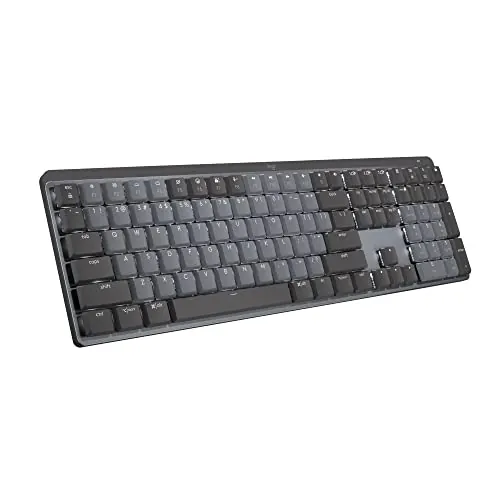
Logitech MX Keys S vs MX Mechanical: Scissor or Tactile Quiet?
The Graphite MX Keys S uses scissor keys; the assigned full-size MX Mechanical is the Tactile Quiet low-profile mechanical version. Logitech lists 1.8 mm total travel for MX Keys S and 3.2 mm for MX Mechanical. Both support lighting, Bluetooth LE or a Logi Bolt receiver, and switching among up to three devices. Choose by a typing style you already know you want; these specifications do not establish typing speed, comfort or sound superiority.
Read comparison