
Products compared
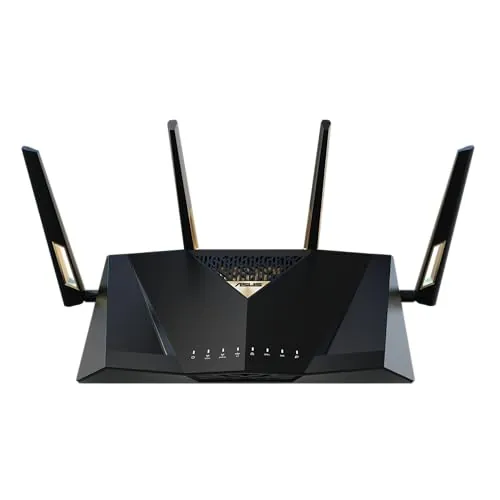
ASUS
ASUS RT-BE88U Dual-Band WiFi 7 Router
Black U.S. listing; dual-band Wi-Fi 7 router with configurable WAN/LAN ports and AiMesh support.
Model RT-BE88U
Amazon ASIN B0D55SWRSM

TP-Link
TP-Link Archer BE230 BE3600 Dual-Band Wi-Fi 7 Router
Black U.S. listing; BE3600-class dual-band Wi-Fi 7 router. TP-Link lists multiple U.S. hardware revisions, so confirm the unit's printed version for revision-dependent support details.
Model Archer BE230
Amazon ASIN B0DC99N2T8
Differences that matter
What matters most to you?
Choose a priority to see what it changes.
Sources for Published dual-band radio configuration
Sources for Wired port roles and expansion
Sources for Mesh ecosystem and version checks
Compare the clients, not the headline Wi-Fi totals
Both product pages describe dual-band Wi-Fi 7 on 2.4GHz and 5GHz; neither page lists a 6GHz radio for these exact models. ASUS lists up to 1,376Mbps at 2.4GHz and 5,764Mbps at 5GHz with 4×4 transmit/receive per band. TP-Link lists 688Mbps and 2,882Mbps respectively, plus 2×2 MU-MIMO and four total streams. These are maximum PHY specifications, not matched tests or forecasts of internet speed, range, or wall penetration.
Before choosing by radio numbers, check the devices that will connect most often. A laptop or phone needs to support the band, Wi-Fi mode, channel configuration, and spatial streams relevant to the listed router feature. A router's higher stream count does not give a 2×2 client four receive streams. If your client inventory cannot use the extra radio capability, weigh the wired layout or mesh fit instead.
Map WAN, LAN, and multi-gig endpoints before ordering
RT-BE88U gives a larger port-role menu: ASUS lists one 10G WAN/LAN RJ45, one 10G SFP+ port, one 2.5G WAN/LAN, three 2.5G LAN ports, and four gigabit LAN ports. Archer BE230 has a simpler published map: one 2.5G WAN, one 2.5G LAN, three gigabit LAN, and a USB 3.0 port. For a home with several 2.5G endpoints, an SFP+ uplink, or a switch and storage server, write down which port each device will use before you choose.
Do not count the ASUS SFP+ port as a ready-to-connect fiber socket without checking the endpoint and module. The user guide describes an SFP+ link up to 10Gbit/s, while the product page describes its port as WAN/LAN; the sources do not identify a universal transceiver or cable that will work with every switch or ISP handoff. Confirm the module, medium, port role, and other end of the link.
For Archer BE230, TP-Link lists multiple U.S. hardware versions. The Amazon listing identity does not specify which revision will arrive, so treat the model-level port summary as the comparison and use the unit label plus matching U.S. support page for firmware-specific instructions.
Choose a mesh family by the gear you already own
RT-BE88U is documented as an AiMesh router and node. ASUS support says AiMesh uses supported ASUS devices and does not form an AiMesh system with another brand's router. Archer BE230 is documented as EasyMesh-compatible. TP-Link says EasyMesh-certified devices from different manufacturers can work in theory, but setup behavior may vary; its support guidance recommends TP-Link EasyMesh devices for full compatibility and notes that some features depend on firmware.
That does not prove this exact pair will join one shared mesh. If you already own an ASUS AiMesh system, stay with a currently supported AiMesh unit unless ASUS confirms a different path. If you want to expand an Archer BE230 network, check TP-Link's current EasyMesh list and the BE230 hardware revision/firmware. For mixed-brand gear, require both sides' compatibility documentation for the exact combination before purchase; otherwise plan to use one router as a separate wired access point only if its manual documents that mode and your network layout supports it.
Product details
ASUS RT-BE88U Dual-Band WiFi 7 Router
- Bands and listed maximum Wi-Fi 7 rates
- Dual-band 2.4GHz and 5GHz; ASUS lists up to 1,376Mbps on 2.4GHz and 5,764Mbps on 5GHz, with 4×4 transmit/receive per band. Source
- Wired network ports
- One 10Gbps WAN/LAN RJ45, one 10Gbps SFP+ port, one 2.5Gbps WAN/LAN, three 2.5Gbps LAN, and four 1Gbps LAN ports; ASUS lists AiMesh router and node roles. Source
TP-Link Archer BE230 BE3600 Dual-Band Wi-Fi 7 Router
- Bands and listed maximum Wi-Fi 7 rates
- Dual-band 2.4GHz and 5GHz; TP-Link lists up to 688Mbps on 2.4GHz and 2,882Mbps on 5GHz, with 2×2 MU-MIMO and four streams total. Source
- Wired ports and mesh label
- One 2.5Gbps WAN, one 2.5Gbps LAN, three 1Gbps LAN, one USB 3.0, and EasyMesh compatibility are listed on the U.S. model page. Source
Before you buy
Community discussions
Adding an Archer BE230 when you already own Deco nodes
TP-Link Archer BE230 BE3600 Dual-Band Wi-Fi 7 Router
A fiber subscriber in Canada had three Deco M4 units and an Archer BE230. They asked how to use the units across three floors for streaming and work calls. The thread does not establish a compatible shared mesh configuration.
What to check
If you already own mesh hardware, list its exact model numbers. Confirm whether keeping those units means a separate access-point network or using a supported mesh with the new router.
Common questions
Do the ASUS RT-BE88U's higher listed rates mean faster Wi-Fi throughout my home?
The ASUS page lists higher per-band maximum PHY rates and 4×4 radio configurations, while TP-Link lists lower per-band rates and 2×2 MU-MIMO. Those specifications do not establish real-world speed or coverage. Check your clients' bands and stream support and use the rates as compatibility context, not a result prediction.RT-BE88U Tech Specs, ASUS USAArcher BE230 BE3600 Dual-Band Wi-Fi 7 Router, TP-Link U.S.
Which router has more wired ports for a multi-gig home network?
ASUS lists a 10G WAN/LAN RJ45, a 10G SFP+ port, a 2.5G WAN/LAN, three 2.5G LAN, and four 1G LAN ports. TP-Link lists one 2.5G WAN, one 2.5G LAN, and three 1G LAN ports. Map your actual devices to the port roles; verify the SFP+ module and connection medium separately.RT-BE88U Tech Specs, ASUS USAArcher BE230 BE3600 Dual-Band Wi-Fi 7 Router, TP-Link U.S.
Can I add the TP-Link Archer BE230 to an ASUS AiMesh network?
Do not assume that pairing works. ASUS says AiMesh requires supported ASUS devices and that ASUS routers do not form an AiMesh system with routers from other brands. TP-Link lists the Archer BE230 as EasyMesh-compatible, but that does not by itself establish this exact cross-brand pairing. Check both vendors' current compatibility information before buying for an existing mesh.Can I build an AiMesh system with another brand of router?, ASUS Official SupportArcher BE230 BE3600 Dual-Band Wi-Fi 7 Router, TP-Link U.S.General questions about EasyMesh, TP-Link U.S. Support
Does every Archer BE230 listing have the same hardware revision?
TP-Link's U.S. download page lists multiple revisions, including V1 and V2.60, and notes that model/revision availability varies by region. Check the printed hardware-version label and the matching U.S. support entry for revision-dependent firmware or setup steps.Download for Archer BE230: Hardware Versions and U.S. Support, TP-Link
Sources and scope
No the product listing or independent matched testing establishes throughput, latency, range, roaming, stability, or a real-world performance winner. Listed per-band PHY rates are specifications and depend on client capability and network conditions. The selected TP-Link ASIN is listed as Archer BE230, but the specific unit's hardware revision is not established; TP-Link lists multiple U.S. revisions, so revision-dependent firmware/setup must be checked against the product label. ASUS SFP+ support does not establish that a particular transceiver, cable type, or network-endpoint combination is included or compatible. The reviewed sources do not confirm this ASUS RT-BE88U and TP-Link Archer BE230 as a supported mixed-brand mesh pair.
- RT-BE88U Tech Specs, ASUS USA
- RT-BE88U Dual-Band WiFi 7 Router, ASUS USA
- RT-BE88U User Guide, ASUS
- Can I build an AiMesh system with another brand of router?, ASUS Official Support
- Archer BE230 BE3600 Dual-Band Wi-Fi 7 Router, TP-Link U.S.
- Download for Archer BE230: Hardware Versions and U.S. Support, TP-Link
- General questions about EasyMesh, TP-Link U.S. Support
- TP-Link EasyMesh Devices: Routers, Extenders, and More
Related comparisons

TP-Link Archer BE400 vs BE230: Match Wi-Fi Tier to Your Wired Setup
The assigned US listings are Archer BE400 ASIN B0DVBP5L6Y (one unit) and Archer BE230 ASIN B0DC99N2T8 (one unit). TP-Link's US pages show the same port count on both: one 2.5Gbps WAN, one 2.5Gbps LAN, and three 1Gbps LAN ports, plus USB 3.0. The main published distinction is wireless class: BE400 is BE6500 dual-band Wi-Fi 7 with six external antennas; BE230 is BE3600 dual-band Wi-Fi 7 with four. Before choosing, draw the modem-to-router connection and list each wired endpoint by link rate. The BE400 Amazon page's captured model fields identify BE400, but a separate box field names BE230; confirm the shipped item with the seller. Neither Amazon listing establishes the unit's hardware revision.
Read comparisonASUS RT-BE88U vs TP-Link Archer BE400: Plan Your Wired Network First
The RT-BE88U is the fit to investigate for a 10G WAN, SFP+ link or several multi-gig wired devices. The Archer BE400 covers a simpler 2.5G WAN, one 2.5G LAN device and three gigabit clients. Both are dual-band Wi-Fi 7 routers, so neither adds a 6GHz band.
Read comparison