
Products compared
ASUS
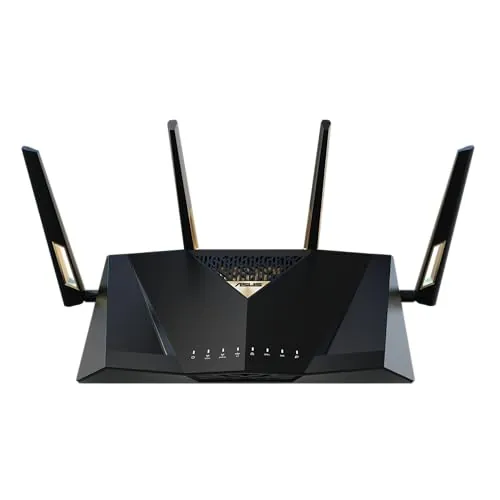
ASUS RT-BE88U WiFi 7 Router
U.S. single-router listing for RT-BE88U; the listing identifies one unit and the exact model number.
Model RT-BE88U
Amazon ASIN B0D55SWRSM

TP-Link
TP-Link Archer BE400 BE6500 Dual-Band Wi-Fi 7 Router
U.S. single-router ASIN. Amazon's model-name and model-number fields identify Archer BE400; its separate in-box text says Archer BE230, so confirm the exact model on the listing and received packaging.
Model Archer BE400
Amazon ASIN B0DVBP5L6Y
Differences that matter
What matters most to you?
Choose a priority to see what it changes.
Sources for WAN handoff and internet plan
Sources for Direct-wired client inventory
Sources for Wireless bands and Wi-Fi 7 clients
Sources for Adding mesh nodes later
Start with the ports on your modem and devices
The useful difference appears when you draw the wired path. The BE400 has a clearly listed 2.5Gbps WAN port, one 2.5Gbps LAN port and three 1Gbps LAN ports. That is a straightforward fit for an internet handoff at 2.5Gbps or below, one faster wired client, and a few gigabit devices.
The RT-BE88U adds a listed 10Gbps WAN/LAN option, a 10Gbps SFP+ interface, and a larger set of multi-gig and gigabit ports. ASUS's U.S. technical specification says one of its four 2.5G ports is WAN/LAN and three are LAN; the product feature page describes all four as LAN. If the choice depends on exactly four 2.5G LAN clients, resolve that difference with the manual or port configuration before purchase. Neither router turns a slower modem, switch, cable or client into a faster link.
Wi-Fi 7 does not mean these routers have the same bands
Both exact-model pages list Wi-Fi 7 with 2.4GHz and 5GHz radios. Neither lists 6GHz. If you want a 6GHz-capable network, compare a tri-band router instead of deciding between these two labels.
For the devices that stay on Wi-Fi, check their supported bands and Wi-Fi features. A Wi-Fi 7 client may use features such as multi-link operation when both sides and the selected configuration support them; the logo alone does not promise a particular speed, latency or coverage in your home.
Match a future mesh node to the router's ecosystem
ASUS lists AiMesh for the RT-BE88U; TP-Link lists EasyMesh for the BE400. Those labels help narrow the compatibility check, but they do not prove that any particular existing node will join. If you plan to reuse a node, look up its exact model and firmware in the vendor's compatibility material before treating it as part of the buying decision.
A pre-buy port-map check
Write down the modem or ONT handoff rate, the router WAN port you expect to use, every direct-wired device and its Ethernet rate, and any switch uplink. Add an SFP+ device only after confirming the exact module or cable, peer port and configuration with the relevant vendors.
If this inventory fits the BE400's one 2.5G WAN, one 2.5G LAN and three 1G LAN ports, the RT-BE88U's extra ports may not change your setup. If you have a 10G WAN, an SFP+ link or several multi-gig endpoints, map those exact connections against the RT-BE88U specification and resolve its 2.5G port-role discrepancy first. This is a compatibility planning check, not a speed test.
Product details
ASUS RT-BE88U WiFi 7 Router
- Wireless bands
- Dual-band Wi-Fi 7: 2.4 GHz and 5 GHz; no listed 6 GHz band. Source
- Ports in ASUS U.S. technical specifications
- 1× 10Gbps WAN/LAN, 1× 10Gbps SFP+, 1× 2.5Gbps WAN/LAN, 3× 2.5Gbps LAN and 4× 1Gbps LAN. ASUS's feature page separately describes four 2.5G LAN ports; verify the exact port role and configuration before designing a four-device 2.5G LAN layout. Source
- Mesh ecosystem
- ASUS lists AiMesh support; confirm the exact node model and mode before expanding an existing mesh. Source
TP-Link Archer BE400 BE6500 Dual-Band Wi-Fi 7 Router
Before you buy
Community discussions
Planning the wired endpoints before buying
ASUS RT-BE88U WiFi 7 Router
In one two-floor RT-BE88U setup, the owner used wired backhaul and plugged their PC and TV into separate units.
What to check
Set aside the ports needed for the incoming internet and any backhaul. Then count the wired clients you plan to connect.
Common questions
Is the ASUS RT-BE88U automatically faster than the Archer BE400?
This comparison does not establish a direct speed winner. ASUS lists more and faster wired interfaces; real results still depend on the WAN service, peer ports, cabling, configuration, Wi-Fi clients and environment.ASUS RT-BE88U U.S. technical specificationsTP-Link Archer BE400 U.S. product and specification page
Does the Archer BE400 have a 10Gbps port or a 6GHz band?
TP-Link lists one 2.5Gbps WAN, one 2.5Gbps LAN and three gigabit LAN ports. Its official wireless specification lists 2.4GHz and 5GHz only. If your plan requires a 10G port or 6GHz, the BE400 is not a match for that requirement.TP-Link Archer BE400 U.S. product and specification page
Can I connect a 10G SFP+ switch or NAS to the ASUS?
The RT-BE88U specification lists a 10Gbps SFP+ port. That establishes the interface, not compatibility with every module, DAC, peer device or port role. Verify the exact parts and configuration first.ASUS RT-BE88U U.S. technical specificationsASUS RT-BE88U U.S. product page
Is B0DVBP5L6Y definitely an Archer BE230 bundle?
The U.S. Amazon page's model-name and model-number fields identify Archer BE400, but its separate built-in-media/box field says Archer BE230. Treat that as a listing inconsistency, not proof of a BE230 bundle; verify the exact item and packaging with the seller.Amazon U.S. listing for TP-Link Archer BE400, ASIN B0DVBP5L6Y
Sources and scope
No paired lab test, range test, throughput test or latency test was conducted for this guide, and it does not rank measured Wi-Fi performance. ASUS's U.S. marketing page and technical-spec page describe the four 2.5G ports differently; exact port role should be checked in the current manual or configuration interface. The BE400 ASIN page has a separate in-box label inconsistency; no claim is made that a BE230 is included. The listed port ratings, Wi-Fi class rates and coverage figures are not real-world speed or coverage guarantees. No price or dated offer comparison is included.
Related comparisons

Deco X55 3-Pack vs Archer BE400: Three-Node Mesh or Wi-Fi 7 Router?
The selected US offers are TP-Link Deco X55 3-pack ASIN B09PRB1MZM and one Archer BE400 ASIN B0DVBP5L6Y. X55 is a three-unit Wi-Fi 6 Deco mesh kit with three Gigabit ports on each node. BE400 is a single Wi-Fi 7 router; TP-Link’s US specifications list one 2.5Gbps WAN, one 2.5Gbps LAN and three 1Gbps LAN ports, with EasyMesh support. TP-Link says Deco Mesh and Archer EasyMesh cannot form one unified mesh. Before choosing, map the rooms, modem, Ethernet jacks and wired clients; for BE400, also confirm the exact hardware version and clarify an Amazon box-contents field that says Archer BE230 even though the listing model is BE400.
Read comparison
TP-Link Archer BE400 vs BE230: Match Wi-Fi Tier to Your Wired Setup
The assigned US listings are Archer BE400 ASIN B0DVBP5L6Y (one unit) and Archer BE230 ASIN B0DC99N2T8 (one unit). TP-Link's US pages show the same port count on both: one 2.5Gbps WAN, one 2.5Gbps LAN, and three 1Gbps LAN ports, plus USB 3.0. The main published distinction is wireless class: BE400 is BE6500 dual-band Wi-Fi 7 with six external antennas; BE230 is BE3600 dual-band Wi-Fi 7 with four. Before choosing, draw the modem-to-router connection and list each wired endpoint by link rate. The BE400 Amazon page's captured model fields identify BE400, but a separate box field names BE230; confirm the shipped item with the seller. Neither Amazon listing establishes the unit's hardware revision.
Read comparison