
Products compared
ASUS
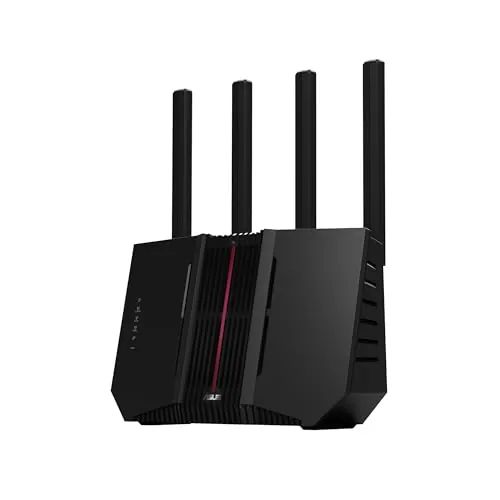
ASUS RT-BE9700 WiFi 7 Tri-band Router
U.S. RT-BE9700 tri-band Wi-Fi 7 router. ASUS lists 2.4/5/6 GHz and five Ethernet interfaces, including two configurable WAN/LAN ports and three dedicated 2.5 Gbps LAN ports.
Model RT-BE9700
Amazon ASIN B0GJX8NKVR

TP-Link
TP-Link Archer BE230 BE3600 Dual-Band Wi-Fi 7 Router
U.S. Archer BE230 dual-band Wi-Fi 7 router. TP-Link lists 2.4/5 GHz, one dedicated 2.5 Gbps WAN port, one 2.5 Gbps LAN port, and three 1 Gbps LAN ports. Its support page lists multiple hardware revisions.
Model Archer BE230
Amazon ASIN B0DC99N2T8
Differences that matter
What matters most to you?
Choose a priority to see what it changes.
Sources for Wi-Fi bands and client fit
Sources for Wired ports after assigning WAN
Sources for Retail hardware revision and support lookup
Check the radio bands your devices can use
Both are Wi-Fi 7 products, but the U.S. model specifications do not show the same band set. ASUS lists 2.4, 5, and 6 GHz for the RT-BE9700. TP-Link lists the Archer BE230 as dual-band 2.4/5 GHz, with no 6 GHz band on its product page. A 6 GHz radio is useful to your decision only if the client device you care about supports 6 GHz; verify that on the adapter or device specifications before paying for the difference.
Do not translate band count or Wi-Fi generation into a range or speed winner. Both manufacturers describe actual results as dependent on conditions, and this guide does not test either router in a home.
Count the wired ports only after you choose a WAN port
Start with the modem or ONT. The RT-BE9700 has one 10 Gbps WAN/LAN port, one 2.5 Gbps WAN/LAN port, and three 2.5 Gbps LAN ports. If 10G is the WAN connection, the configurable 2.5G port and three dedicated 2.5G ports can serve LAN: four multi-gig LAN connections. If the 2.5G port is WAN instead, the 10G port can serve LAN alongside the three dedicated 2.5G ports. The configurable ports cannot be WAN and LAN simultaneously.
The Archer BE230 uses a dedicated 2.5 Gbps WAN port. Its LAN side is one 2.5 Gbps LAN plus three 1 Gbps LAN ports. That layout covers one wired 2.5G endpoint and up to three gigabit endpoints directly, based on the listed sockets. If you plan two multi-gig wired devices, compare the added switch and cabling with choosing the ASUS layout. The switch's sockets still connect through its uplink to the router, so count that link as part of the path.
A port rating is only one part of a working link. Check the endpoint's Ethernet adapter, any switch, the cable path, modem/ONT and Internet service. Port labels describe interfaces rather than measured Internet or local-transfer speed.
Use this five-minute pre-buy worksheet
1. Write the model and port rate of your modem or ONT, then circle the router port that will connect to it. 2. List each wired device and its adapter rate. 3. Mark which Wi-Fi clients actually support 6 GHz. 4. Compare the resulting LAN count with the ports left on each router. 5. If a switch is needed, add its purchase cost, power and shelf space, and verify the router-facing uplink and endpoint ports support your intended link.
Also check the BE230 version if a feature depends on a particular hardware revision. TP-Link lists several U.S. revisions and says availability varies by region. If the seller listing does not name one, ask which version ships and match the unit label to the corresponding regional support entry.
Product details
ASUS RT-BE9700 WiFi 7 Tri-band Router
TP-Link Archer BE230 BE3600 Dual-Band Wi-Fi 7 Router
- Operating bands
- Dual-band Wi-Fi 7 on 2.4 GHz and 5 GHz; no 6 GHz band is listed on the U.S. product page Source
- Ethernet port layout
- 1 × 2.5 Gbps WAN, 1 × 2.5 Gbps LAN, and 3 × 1 Gbps LAN Source
- Hardware revision check
- U.S. support lists V1, V1.20, V1.26, V1.60, V2, V2.20, and V2.60; the exact revision in this retail offer is unknown Source
Before you buy
Community discussions
A household maps Wi-Fi 7 clients, a 1 Gb NAS and a 1 Gb internet connection
ASUS RT-BE9700 WiFi 7 Tri-band Router
The OP is comparing routers for a two-story 1,400 sq ft townhome with three Wi-Fi 7 computers or laptops, a Synology NAS with a 1 Gb port, and 1 Gb internet. They are considering an ASUS RT-BE92U BE9700 among other models. These are the buyer’s stated requirements, not proof that the BE92U and RT-BE9700 listings are identical.
What to check
List each wired endpoint and its port speed, reserve the WAN connection, and confirm which client devices actually support 6 GHz before comparing the exact RT-BE9700 and Archer BE230 layouts. The OP’s NAS and internet are both listed as 1 Gb; do not infer a speed or coverage advantage.
A router buyer wants one more 2.5 Gbps wired port
ASUS RT-BE9700 WiFi 7 Tri-band Router
The OP wants an additional 2.5 Gbps port and has narrowed the choice to ASUS RT-BE92U BE9700 or Netgear RS280S. The post supplies a port-count requirement, not evidence about the exact RT-BE9700 listing or its performance.
What to check
After counting the WAN port, compare the number of remaining 2.5 Gbps LAN endpoints in the exact RT-BE9700 and Archer BE230 layouts. Confirm that the chosen router has enough direct ports for the planned devices.
Checking which Archer BE230 revision ships
TP-Link Archer BE230 BE3600 Dual-Band Wi-Fi 7 Router
A shopper found several Archer BE230 hardware revision labels and asked whether it mattered which one the seller shipped.
What to check
Confirm the region and hardware revision on the exact listing. Use the manufacturer’s port and band specifications for that version.
Common questions
Does the TP-Link Archer BE230 have 6 GHz Wi-Fi?
TP-Link's U.S. Archer BE230 page describes a dual-band 2.4/5 GHz router and does not list 6 GHz. ASUS lists 2.4/5/6 GHz for the RT-BE9700. If 6 GHz matters, verify that the exact client you plan to use supports it too.Archer BE230 BE3600 Dual-Band Wi-Fi 7 Router — TP-Link U.S.ASUS RT-BE9700 Tech Specs — ASUS USA
How many multi-gig LAN connections remain on the RT-BE9700 after WAN?
It depends on which configurable WAN/LAN port is used for Internet. Assigning WAN to the 10G port leaves four 2.5G LAN ports. Assigning WAN to the 2.5G port leaves the 10G port plus three dedicated 2.5G LAN ports for LAN. A configurable port can serve one role at a time.ASUS RT-BE9700 Tech Specs — ASUS USA
Can a switch give the BE230 another multi-gig wired connection?
A compatible switch can add physical ports, but it connects back through the BE230's single 2.5G LAN port. Check the switch's own port rates and the client adapters, and account for traffic sharing that router-facing link. If you want multiple direct multi-gig ports from the router, the RT-BE9700's published port layout offers more options.Archer BE230 BE3600 Dual-Band Wi-Fi 7 Router — TP-Link U.S.ASUS RT-BE9700 Tech Specs — ASUS USA
Which Archer BE230 hardware revision will the retail listing ship?
TP-Link's U.S. support page lists several BE230 hardware versions and says availability varies by region. Check the version on the unit and its matching regional support page before relying on a version-specific feature.Download for Archer BE230 — TP-Link U.S. Support
Sources and scope
This is a model-specification and setup-fit comparison for the U.S. RT-BE9700 and Archer BE230, not a wireless throughput, latency, range, reliability, or wall-penetration test. Ethernet port ratings describe interfaces, not guaranteed Internet or file-transfer results; every connected device and link in the path must support the intended rate. The BE230's U.S. support page lists several hardware revisions, and the revision in the selected listing is not identified here. Check the unit label and matching regional support materials before relying on firmware-specific behavior.
Related comparisons

TP-Link Archer BE400 vs BE230: Match Wi-Fi Tier to Your Wired Setup
The assigned US listings are Archer BE400 ASIN B0DVBP5L6Y (one unit) and Archer BE230 ASIN B0DC99N2T8 (one unit). TP-Link's US pages show the same port count on both: one 2.5Gbps WAN, one 2.5Gbps LAN, and three 1Gbps LAN ports, plus USB 3.0. The main published distinction is wireless class: BE400 is BE6500 dual-band Wi-Fi 7 with six external antennas; BE230 is BE3600 dual-band Wi-Fi 7 with four. Before choosing, draw the modem-to-router connection and list each wired endpoint by link rate. The BE400 Amazon page's captured model fields identify BE400, but a separate box field names BE230; confirm the shipped item with the seller. Neither Amazon listing establishes the unit's hardware revision.
Read comparison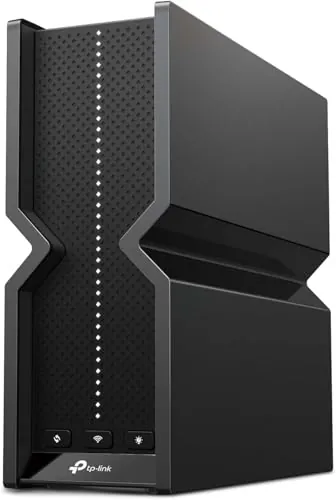
TP-Link Archer BE230 vs BE550: Plan Your 6 GHz and Wired Devices
The Archer BE230 is a dual-band Wi-Fi 7 router with one 2.5 Gbps WAN, one 2.5 Gbps LAN and three 1 Gbps LAN ports. The Archer BE550 adds a 6 GHz band and four 2.5 Gbps LAN ports behind a separate 2.5 Gbps WAN. Choose with a port-by-port device list, then check which household devices can use 6 GHz.
Read comparison