
Products compared

TP-Link
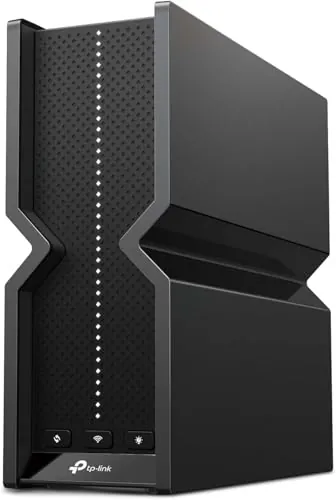
TP-Link Dual-Band BE3600 Wi-Fi 7 Router, Archer BE230
US-market black router listing; dual-band Wi-Fi 7. Confirm the model on the retailer listing because other Archer BE-series names and revisions are not interchangeable.
Model Archer BE230
Amazon ASIN B0DC99N2T8
TP-Link
TP-Link Tri-Band BE9300 WiFi 7 Router (Archer BE550)
US-market black Archer BE550 router listing; tri-band Wi-Fi 7 with 6 GHz. Verify that a retailer offer is the Archer BE550 rather than another BE9300-branded variant.
Model Archer BE550
Amazon ASIN B0CJSNSVMR
Differences that matter
What matters most to you?
Choose a priority to see what it changes.
Sources for Internet-facing WAN port
Sources for Wired LAN capacity after WAN
Sources for What to verify before paying
Start with the devices, not the BE class number
BE3600 and BE9300 are product-class labels, not a promise that a speed test or download will reach those combined rates. For this choice, two practical questions matter more: which devices can connect on 6 GHz, and how many wired clients need a 2.5G LAN connection?
BE230 covers 2.4 and 5 GHz. BE550 adds a 6 GHz radio. If the phones and laptops you use most do not support 6 GHz, the extra band does not create a new connection for them; you may still prefer BE550 for its wired LAN ports.
Map WAN and LAN before counting ports
Both models list a 2.5 Gbps WAN port for the modem or Ethernet service handoff. Do not count that WAN socket as a spare LAN port. BE230 then gives you one 2.5G LAN and three 1G LAN ports; BE550 gives you four 2.5G LAN ports.
Make a short list such as modem → WAN, NAS → 2.5G LAN, desktop → 2.5G LAN, printer → 1G LAN. If the BE230's single multi-gig LAN is already assigned to a NAS, connect other gigabit devices to its 1G ports or plan for a separate switch if your network design requires more multi-gig ports.
Use a 6 GHz checklist for the BE550
Look up each intended device by its exact model and check for Wi-Fi 6E/6 GHz support, adapter and driver support where applicable, and regional availability. If you cannot verify that capability, treat that device as a 2.4/5 GHz client when deciding whether 6 GHz is worth paying for.
Six GHz can be useful for a compatible device near the router, but it has shorter range and does not pass through obstacles as well as lower bands. Place the router where that client is actually used and keep normal 2.4/5 GHz coverage needs in the plan.
A simple pre-purchase worksheet
1. Record the speed of the modem/ONT Ethernet output and the ISP tier. 2. List wired devices and mark which have 2.5G-capable adapters. 3. Look up 6 GHz support for the household's important phones and computers. 4. Check where the router will sit relative to those devices. 5. Match the result to BE230's one 2.5G LAN or BE550's four 2.5G LAN ports and 6 GHz band.
If you need more direct multi-gig LAN sockets than BE550 provides, compare the cost and management of a separate switch or another router class. If your issue is a dead zone rather than port count, assess placement and mesh hardware separately; EasyMesh compatibility does not mean extra nodes are included with either router.
Product details
TP-Link Dual-Band BE3600 Wi-Fi 7 Router, Archer BE230
TP-Link Tri-Band BE9300 WiFi 7 Router (Archer BE550)
Before you buy
Community discussions
Counting Ethernet connections for a second access point
TP-Link Dual-Band BE3600 Wi-Fi 7 Router, Archer BE230
A shopper in South Africa considered buying two Archer BE230 routers and using a wired link between them. They also wanted traffic prioritization for their PC and asked how the setup would compare with an ASUS option.
What to check
When comparing LAN layouts, reserve a port for wired backhaul and count the remaining multi-gig devices. Check which clients can use 6 GHz separately.
Common questions
Does the Archer BE230 have a 6 GHz band?
No. TP-Link lists the Archer BE230 as a dual-band router using 2.4 GHz and 5 GHz. The BE550 is the model in this pair with a 6 GHz band.Archer BE230 | BE3600 Dual-Band Wi-Fi 7 RouterArcher BE550 | BE9300 Tri-Band Wi-Fi 7 Router
How many 2.5G LAN ports does each router have?
TP-Link lists one 2.5 Gbps LAN port on BE230, alongside a separate 2.5 Gbps WAN and three 1 Gbps LAN ports. BE550 has one 2.5 Gbps WAN and four 2.5 Gbps LAN ports.Archer BE230 | BE3600 Dual-Band Wi-Fi 7 RouterArcher BE550 | BE9300 Tri-Band Wi-Fi 7 Router
Will my Wi-Fi 7 phone or laptop use the BE550's 6 GHz band?
Check the exact device specification rather than its Wi-Fi generation label alone. TP-Link's support guidance says 6 GHz depends on client hardware and may also be restricted by regional rules. Confirm that the model supports Wi-Fi 6E/6 GHz or the relevant Wi-Fi 7 band, with current adapter or operating-system support.Can’t Find or Connect to 6GHz Wi-Fi?Wi-Fi and your home layout
Will either router make my internet service run at 2.5 Gbps?
Not by itself. The modem or ONT handoff, ISP service tier, Ethernet cable, router WAN port and client device all constrain the connection. The listed 2.5 Gbps port rate is a hardware capability, not a promised internet result.Archer BE230 | BE3600 Dual-Band Wi-Fi 7 RouterArcher BE550 | BE9300 Tri-Band Wi-Fi 7 Router
Sources and scope
Port counts and band support are model specifications, not a promise of internet speed or whole-home coverage. Actual results depend on the modem or ONT, service plan, client hardware, placement, walls, interference, firmware and local 6 GHz rules. No matched performance test of these two exact Amazon offers was performed for this guide.
Related comparisons

TP-Link Archer BE400 vs BE230: Match Wi-Fi Tier to Your Wired Setup
The assigned US listings are Archer BE400 ASIN B0DVBP5L6Y (one unit) and Archer BE230 ASIN B0DC99N2T8 (one unit). TP-Link's US pages show the same port count on both: one 2.5Gbps WAN, one 2.5Gbps LAN, and three 1Gbps LAN ports, plus USB 3.0. The main published distinction is wireless class: BE400 is BE6500 dual-band Wi-Fi 7 with six external antennas; BE230 is BE3600 dual-band Wi-Fi 7 with four. Before choosing, draw the modem-to-router connection and list each wired endpoint by link rate. The BE400 Amazon page's captured model fields identify BE400, but a separate box field names BE230; confirm the shipped item with the seller. Neither Amazon listing establishes the unit's hardware revision.
Read comparisonTP-Link Archer BE400 vs BE550: Will You Use 6 GHz and Four 2.5G LAN Ports?
The assigned US listings are one Archer BE400 (ASIN B0DVBP5L6Y) and one Archer BE550 (ASIN B0CJSNSVMR). TP-Link's US pages describe BE400 as dual-band Wi-Fi 7 on 2.4/5GHz with one 2.5Gbps WAN, one 2.5Gbps LAN and three 1Gbps LAN ports. BE550 is tri-band Wi-Fi 7 with 2.4/5/6GHz, one 2.5Gbps WAN and four 2.5Gbps LAN ports. Choose BE550 if you have clients whose exact specifications support 6GHz or need multiple multi-gig wired endpoints. BE400 can fit a 2.4/5GHz household with at most one 2.5G LAN device. Before ordering BE550, verify the hardware revision and confirm your client supports 6GHz; Wi-Fi 7 alone is not enough. The BE400 listing still has a captured BE400-vs-BE230 box-field mismatch that must be confirmed with its seller.
Read comparison