
Products compared
ASUS
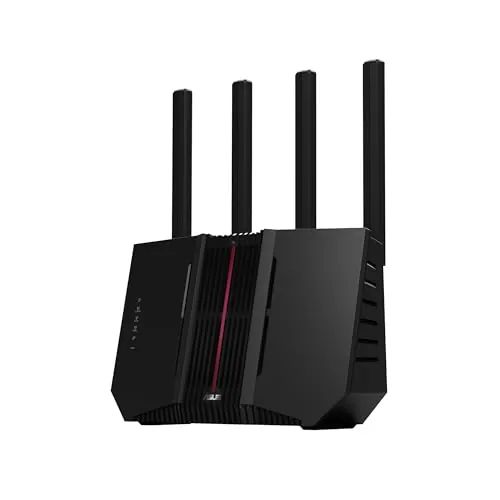
ASUS RT-BE9700 Tri-Band Wi-Fi 7 Router
selected U.S. listing for the ASUS RT-BE9700. The official U.S. specification identifies 2.4, 5 and 6 GHz bands and the listed WAN/LAN port roles.
Model RT-BE9700
Amazon ASIN B0GJX8NKVR

TP-Link
TP-Link Archer BE400 BE6500 Dual-Band Wi-Fi 7 Router
selected U.S. listing for the Archer BE400. TP-Link’s U.S. overview lists 2.4 and 5 GHz Wi-Fi and a dedicated 2.5 Gbps WAN alongside four LAN ports with one 2.5 Gbps and three 1 Gbps links. Verify the hardware revision for the exact retail offer.
Model Archer BE400
Amazon ASIN B0DVBP5L6Y
Differences that matter
What matters most to you?
Choose a priority to see what it changes.
Sources for Wireless bands and 6 GHz client requirement
Sources for WAN/LAN assignment and wired endpoint count
Sources for Exact Archer BE400 hardware revision
Sources for A useful pre-buy network map
First decide whether 6 GHz will reach a device you own
ASUS lists 2.4, 5 and 6 GHz operation for RT-BE9700. TP-Link calls Archer BE400 a dual-band router and its U.S. overview lists 5 GHz and 2.4 GHz. That makes 6 GHz the cleanest wireless distinction, but only when a client can use it.
Before purchase, check the official network specifications for your laptop, phone or desktop adapter. ASUS states that a device must support Wi-Fi 6E or 6 GHz to connect on 6 GHz; devices supporting Wi-Fi 5 or Wi-Fi 6 alone use 2.4 and 5 GHz. Do not assume every product branded Wi-Fi 7 has a 6 GHz radio: check the exact device model.
Map the wired ports before comparing router labels
Write the modem or ONT connection at the top of a small port map, then list each wired PC, NAS, console, switch or access point and the link speed that endpoint needs. RT-BE9700 lists three 2.5 Gbps LAN ports plus one 10 Gbps WAN/LAN and one 2.5 Gbps WAN/LAN port. The two role-flexible ports should be assigned according to your actual WAN and LAN layout.
TP-Link's U.S. Archer BE400 page lists a dedicated 2.5 Gbps WAN, one 2.5 Gbps LAN and three 1 Gbps LAN ports. If a multi-gig device must plug directly into the router, this fixed port mix may be the deciding constraint. If you use an external switch, confirm its uplink and port speeds separately; this guide does not assume a switch is included or predict the speed of an installed network.
Check the Archer BE400 hardware revision on the exact offer
The product listing data identifies the selected listing as Archer BE400 but does not expose the hardware-version suffix. TP-Link's U.S. download page displays Archer BE400 V1.60, says hardware availability varies by region, and links a U.S. V1.6 data sheet. The data-sheet page reached through that link is titled Archer BE400 1.0, so the material reviewed here cannot bind the Amazon ASIN to that physical revision.
If a firmware, mesh or port detail is essential to your setup, check the hardware version shown on the exact offer or unit and open the matching U.S. support guide. Use the model-level band and port summary as a shortlist, not as proof that every regional or hardware revision has identical details.
Turn your network plan into a conditional choice
Choose RT-BE9700 when a known 6 GHz-capable client or several direct multi-gig LAN connections make its documented band and port layout useful. Choose Archer BE400 when dual-band wireless is sufficient and its dedicated 2.5 Gbps WAN plus one 2.5 Gbps and three 1 Gbps LAN ports match your written map.
If the plan fits both, these specifications do not decide which will cover a particular home or deliver a given speed. Compare current offers and the exact hardware revision, then use a controlled test of your own environment only if performance is the deciding question.
Product details
ASUS RT-BE9700 Tri-Band Wi-Fi 7 Router
Before you buy
Community discussions
A BE400 used behind a cable router
TP-Link Archer BE400 BE6500 Dual-Band Wi-Fi 7 Router
One Archer BE400 owner says brief wired and Wi-Fi interruptions began after about 15 days while the BE400 sat behind a cable router. The user tried several settings without resolving them; the post does not identify a cause or establish a general reliability pattern.
What to check
If your planned setup keeps a cable router upstream, map which device will handle routing and check your intended wired and Wi-Fi connections in that layout. This report does not show that double NAT caused the interruptions.
Common questions
Can a Wi-Fi 6 device use the RT-BE9700's 6 GHz band?
Only if that exact device supports 6 GHz. ASUS says 6 GHz-capable clients can connect to that band, while devices supporting Wi-Fi 5 or Wi-Fi 6 alone use 2.4 GHz and 5 GHz. Check the device's official specifications before counting the RT-BE9700's third band as a benefit.ASUS RT-BE9700 Tech Specs — U.S.ASUS FAQ: What Is the Difference Between WiFi 6 and WiFi 6E? — U.S.
How many wired multi-gig LAN devices can I plan for?
ASUS lists three 2.5 Gbps LAN ports on the RT-BE9700, plus a separate 10 Gbps and 2.5 Gbps port each labeled WAN/LAN. TP-Link lists one 2.5 Gbps LAN port on Archer BE400; the other three LAN ports are 1 Gbps in its U.S. product overview. Count your wired devices and their port needs before ordering.ASUS RT-BE9700 Tech Specs — U.S.Archer BE400 — BE6500 Dual-Band Wi-Fi 7 Router — U.S.
Does the Archer BE400 listing identify its hardware version?
The listing information used for this comparison gives the model Archer BE400 but not a hardware-version suffix. TP-Link's U.S. support page shows V1.60 and notes that availability varies by region. Check the exact retail offer or unit label and match it to the correct U.S. documentation if revision-specific details matter.TP-Link U.S. Download for Archer BE400
Does the RT-BE9700 guarantee better range or speed?
No such result is established here. This comparison uses manufacturer-published bands and port roles; it does not include a controlled range, throughput or latency test for these exact routers in comparable conditions.ASUS RT-BE9700 Tech Specs — U.S.Archer BE400 — BE6500 Dual-Band Wi-Fi 7 Router — U.S.
Sources and scope
Check the Archer BE400 hardware revision on the carton. TP-Link’s U.S. download page and the linked datasheet show different revision numbers. Use the setup and port information for the hardware you receive.
Related comparisons

Deco X55 3-Pack vs Archer BE400: Three-Node Mesh or Wi-Fi 7 Router?
The selected US offers are TP-Link Deco X55 3-pack ASIN B09PRB1MZM and one Archer BE400 ASIN B0DVBP5L6Y. X55 is a three-unit Wi-Fi 6 Deco mesh kit with three Gigabit ports on each node. BE400 is a single Wi-Fi 7 router; TP-Link’s US specifications list one 2.5Gbps WAN, one 2.5Gbps LAN and three 1Gbps LAN ports, with EasyMesh support. TP-Link says Deco Mesh and Archer EasyMesh cannot form one unified mesh. Before choosing, map the rooms, modem, Ethernet jacks and wired clients; for BE400, also confirm the exact hardware version and clarify an Amazon box-contents field that says Archer BE230 even though the listing model is BE400.
Read comparison
TP-Link Archer BE400 vs BE230: Match Wi-Fi Tier to Your Wired Setup
The assigned US listings are Archer BE400 ASIN B0DVBP5L6Y (one unit) and Archer BE230 ASIN B0DC99N2T8 (one unit). TP-Link's US pages show the same port count on both: one 2.5Gbps WAN, one 2.5Gbps LAN, and three 1Gbps LAN ports, plus USB 3.0. The main published distinction is wireless class: BE400 is BE6500 dual-band Wi-Fi 7 with six external antennas; BE230 is BE3600 dual-band Wi-Fi 7 with four. Before choosing, draw the modem-to-router connection and list each wired endpoint by link rate. The BE400 Amazon page's captured model fields identify BE400, but a separate box field names BE230; confirm the shipped item with the seller. Neither Amazon listing establishes the unit's hardware revision.
Read comparison