
Products compared
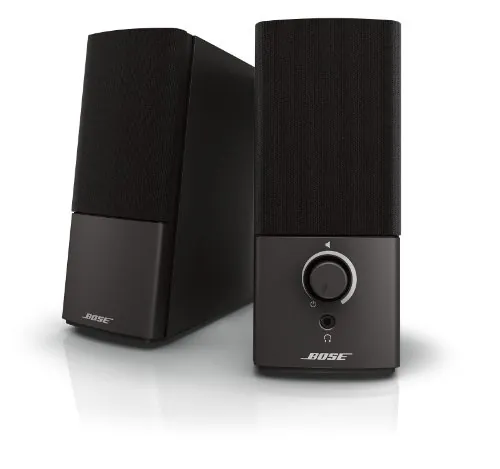
Bose
Bose Companion 2 Series III Multimedia Speaker System
Black US Companion 2 Series III system. Bose's quick-start guide connects a computer output to the right speaker and shows another audio device connecting there; support documents automatic speaker mute when headphones are plugged in.
Model C2III
Amazon ASIN B098825YYZ
Edifier
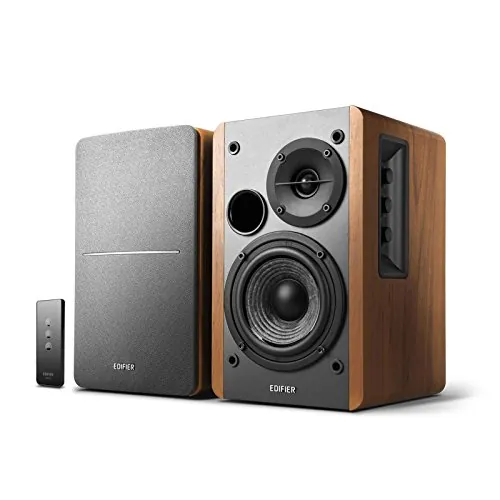
Edifier R1280T Powered Bookshelf Speakers
Brown R1280T pair. Edifier lists two pairs of RCA inputs, a remote and controls on the active speaker; its manual explains how to dedicate playback to one of two simultaneously connected sources.
Model R1280T
Amazon ASIN B016P9HJIA
Differences that matter
What matters most to you?
Choose a priority to see what it changes.
Sources for Source connections for a computer plus another device
Sources for What happens when both sources are connected
Sources for Published dimension labels for desk planning
Start with the source jacks you actually have
For a computer plus a second wired device, the models document different connection plans. Bose's Series III quick-start guide runs the supplied mini-plug audio cable from the computer's headphone, speaker, or line output to the right speaker; it says another audio device can also connect there. The Edifier R1280T lists two pairs of RCA inputs, and its manual shows a supplied 3.5 mm-to-RCA cable for a PC sound-card connection plus a dual-RCA cable.
Before ordering, inventory the output on each device and compare it with the exact cables included for the selected model. This is a connector and wiring choice, not a claim about sound quality or device compatibility beyond the documented analog connections.
Plan for source behavior and control access
The Edifier's manual says both connected sources play if both are active. To dedicate output to one, reduce or turn off the source you are not using. It does not describe an input selector on the speakers. Bose documents connecting an additional device to the right speaker, but the opened Bose material does not explain how two simultaneously active sources are selected; check the exact behavior you need before relying on the speakers as a switch.
The control routines are distinct: Bose lists volume control within reach, and Bose support documents automatic speaker muting when headphones or another 1/8-inch stereo plug is connected to the headphone jack. Edifier documents a remote and right-panel knobs; its manual names master volume, bass, and treble. The opened R1280T materials do not establish a headphone output, so confirm it on the exact unit if that matters.
Check the desktop layout from labeled dimensions
Bose's Series III quick-start guide labels its listed size H × W × D as 7.5 × 3.1 × 5.9 inches. The R1280T manual labels dimensions W × H × D as 146 × 234 × 196 mm. Do not compare the first number in each list without matching the axes; the manuals also do not describe your paired-speaker arrangement on a particular desk.
Use paper templates for each cabinet, leave room for the intended speaker separation and cable bends, and check that the front controls or remote fit the way you plan to sit. Treat this as a pre-buy measurement step, not a conclusion that one pair fits better.
Product details
Bose Companion 2 Series III Multimedia Speaker System
A fit to consider when the documented computer-plus-another-device setup and headphone-triggered mute match your routine. The Bose materials do not explain source selection when two devices are connected and active at once.
- Documented connection path
- Bose's Series III quick-start guide connects the included mini-plug cable from a computer's headphone, speaker, or line output to the right speaker; it says another audio device can connect to the right-speaker jack. Source
- Headphone routine
- Bose support says the speakers automatically mute when headphones or another cable with a 1/8-inch stereo plug is connected to the headphone jack. Source
Edifier R1280T Powered Bookshelf Speakers
A fit to consider when you want to wire two RCA sources and are comfortable controlling which one is active at its source device. The opened R1280T page and manual do not establish a headphone output.
- Inputs and source behavior
- Edifier lists two pairs of RCA input ports. The R1280T manual says both sources play if connected and active at the same time; lower the volume or power off the unselected device to dedicate output to one. Source
- Controls and box contents
- The exact model page lists a remote and right-panel knobs; the manual identifies master-volume, bass and treble dials, and lists a remote, speaker connection cable and two audio cables in the box. Source
Before you buy
Community discussions
Leaving a computer and console connected
Edifier R1280T Powered Bookshelf Speakers
An R1280T owner connected two sources to its two RCA inputs so they could use a PC or console without moving cables.
What to check
Plan both connections at your desk, including where you will adjust volume when both devices stay connected.
Matching separate left and right outputs to the speaker
Edifier R1280T Powered Bookshelf Speakers
An R1280T owner with a Scarlett 2i2 interface asked how to connect its two quarter-inch outputs to the speaker’s left and right inputs.
What to check
Check the output on your interface and the input on the speaker. Plan the cable for both stereo channels and decide where you will control volume.
Common questions
Does the Edifier R1280T have a switch to select one of its two connected sources?
The R1280T manual says both signals play if two sources are connected simultaneously. It instructs users to lower the volume or turn off the unselected source to dedicate output; it does not describe a dedicated speaker-side selector.R1280T User Manual (IB-200-R1280T-06)
Will the Bose Companion 2 Series III mute when headphones are connected?
Bose support says the speakers automatically mute when headphones or another cable with a 1/8-inch stereo plug is connected to the system's headphone jack.No audio from product | Companion 2 Series III multimedia speaker system
Does the Edifier R1280T have a headphone jack?
The exact R1280T page and manual opened for this guide do not establish a headphone output. Check the exact unit's panel or ask Edifier if that feature is required; documentation silence does not establish that it is absent.R1280T Powered Bookshelf Speakers — Edifier USR1280T User Manual (IB-200-R1280T-06)
Sources and scope
This guide compares documented connections, source behavior, controls, and manufacturer-labeled dimensions only. No listening or measured audio test was performed. Bose documents an additional-device connection but not how to choose between two simultaneously active sources. Edifier's R1280T manual says two connected sources both play and recommends reducing or turning off the unselected source; it does not describe a speaker-side selector. The opened Edifier materials do not establish a headphone output. Dimension labels and system/cabinet measurement basis differ, so measure the actual pair and cable route on your desk.
Related comparisons
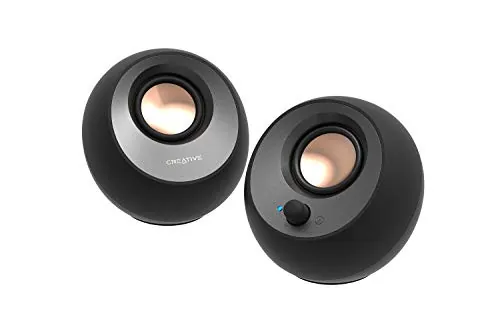
Creative Pebble V3 vs Edifier R1280T: USB Desk Speakers or Wired Bookshelf Pair?
The Creative Pebble V3 (MF1700) is the compact computer-first option: USB audio, Bluetooth 5.0 or 3.5 mm AUX, with USB power. The Edifier R1280T is a larger two-speaker wired setup with dual RCA inputs, an AC power cord, remote and side tone controls; it has no Bluetooth. Before choosing, map each source to the cable you will actually use, confirm a nearby outlet for the R1280T, and reserve space for its two cabinets. The R1280T manual says two connected sources both play, so it does not automatically switch between them. No matched listening test establishes a sound-quality winner.
Read comparison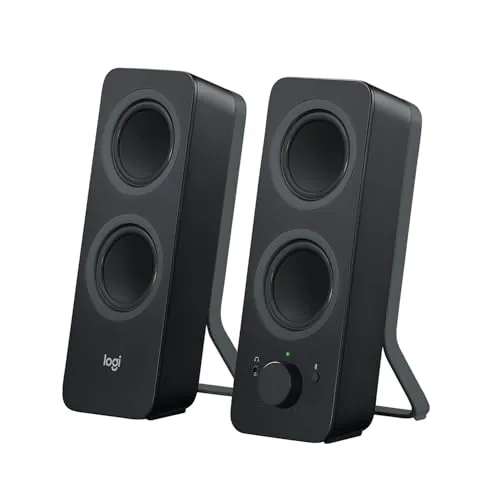
Logitech Z207 vs Edifier R1280T: Bluetooth, Inputs and Desk Setup
Logitech Z207 model 980-001294 accepts Bluetooth and one 3.5 mm analog input, with power and volume at the right speaker. Edifier R1280T has no Bluetooth, but offers two RCA inputs, a remote for volume and mute, and side-panel tone controls. A 3.5 mm source can still connect to the R1280T using its documented 3.5 mm-to-RCA cable; its two connected sources play together rather than auto-selecting.
Read comparison